Zend IDE, optimize the launch and remove Git Staging by default
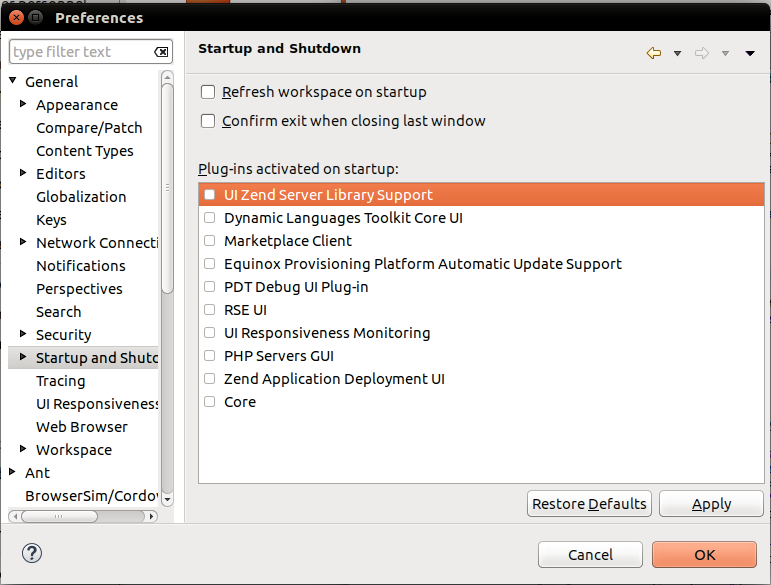
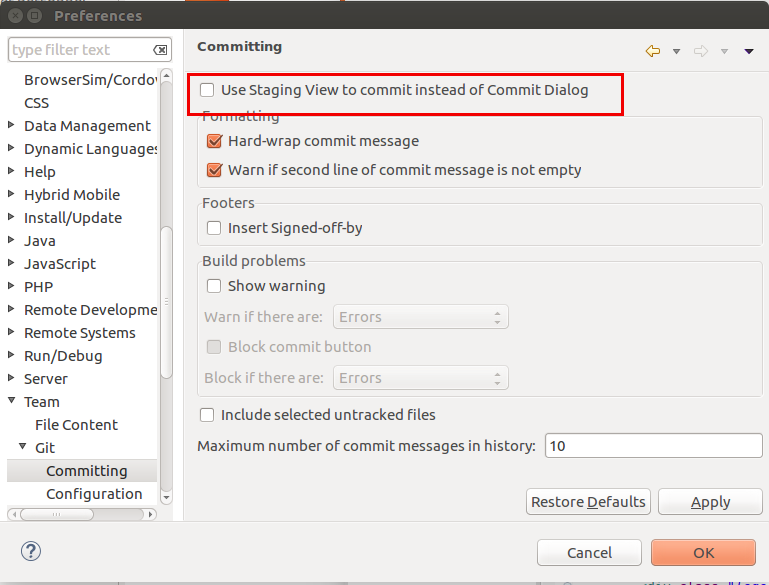
To make Zend IDE launch faster, simply deactivate all the modules that initialize at launch. Window -> Preferences -> General -> Startup and Shutdown And uncheck everything To prevent Zend IDE from using Git Staging, just remove it from the default launch. ...
TBWritten byThomas Bourdin1 min read
To make Zend IDE launch faster, simply deactivate all the modules that initialize at launch. Window -> Preferences -> General -> Startup and Shutdown And uncheck everything
To prevent Zend IDE from using Git Staging, just remove it from the default launch. Window -> Preferences -> Team -> Git -> Committing And uncheck the first box "Use Staging View to commit instead of Commit Dialog"
Version context
This procedure describes the software and the environment available at the time of its publication. The packages, interfaces, and repositories mentioned may have changed or disappeared; first check the system version and its support level.
cat /etc/os-release
uname -r
Work on a backup or a snapshot, note every modified file, and prepare for rollback. For a current workstation or server, prefer signed packages from officially supported repositories.