





You are developing a web application's help center. A user asks a question, your search engine returns a list of help articles… and the right answer is in twelfth place. It exists and was retrieved, but it remains far below the first results your interface displays.
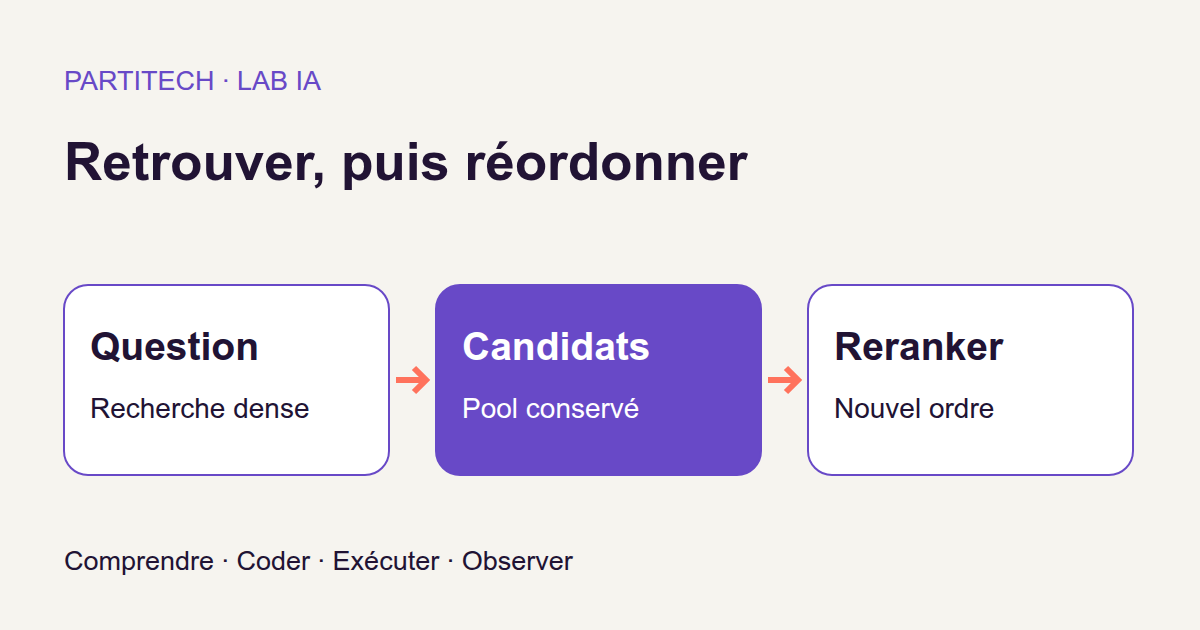
Do you need to replace the whole search engine? Not necessarily. First, separate two problems: retrieving useful documents, then putting them in the right order.
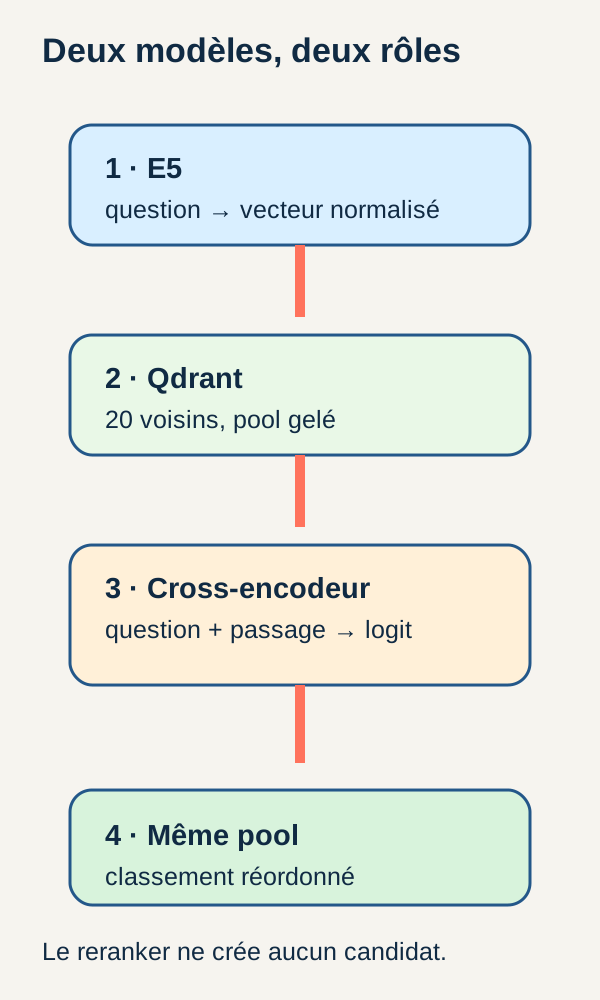
That is exactly what we will explore. A first model, E5, selects documents. A second model, called a reranker, reads each candidate alongside the question to propose a new ranking. We will measure what it improves, what it cannot fix, and how much time this second reading adds.
The help center scenario is an illustration. The results presented later come from the tutorial's fictional corpus and r3 workflow; small calculation examples are identified separately.
The executable tutorial is available here: Download the complete tutorial project.
Objective and expected outcome
What we will build
The corpus, meaning the collection of documents we search, contains 200 fictional documents. It comes with 80 questions: 20 development questions and 60 test questions.
The development questions let you become familiar with the workflow and study its behavior. The test questions are used for the reported evaluation. This split does not mean we will train a model: here, we use already trained models to perform computations, a process called inference.
For each question, E5 dense retrieval builds a pool of 20 candidates. There is nothing mysterious about the word pool: it is the list of 20 documents selected for the next stage. Dense here means retrieval based on learned numerical vectors, which we will explain.
The bge-reranker-v2-m3 reranker then receives these candidates. It does not search all 200 documents again: it only reorders the 20 documents already selected.
What you will be able to interpret by the end
Three files make the experiment observable. outputs/candidates.json preserves the initial selection; outputs/reranked.json contains the new ranking and question–document pair scores; outputs/evaluation.json collects the measurements.
You will be able to answer three concrete questions: were the useful documents available in the selection? Does the new ranking make them more visible among the first five results? How much additional time does this improvement require?
We are building a retrieval and ranking mechanism, not a chatbot that writes an answer. It could become a component of another application, but text generation is not part of this experiment.
What you need to follow along
You should be able to read a Python function, work with lists and dictionaries, open JSON, and run terminal commands. Concepts specific to retrieval and models are introduced along the way.
Running the project requires Linux x86_64, Docker Compose, an NVIDIA driver, and NVIDIA Container Toolkit. The tutorial was verified with an RTX 3090. Allow 8 GiB of free VRAM, 12 GiB of available RAM, and 25 GiB of disk space for the project and Docker. VRAM is the graphics card's memory; it is distinct from your machine's RAM.
These resources are conservative allowances, not experimentally established minimum requirements. The tutorial does not offer a CPU mode: we will keep the validated GPU workflow.
Why two models?
E5: representing each text separately
An embedding is a list of numbers computed from a text. Think of it as the coordinates of a point: texts the model has learned to associate may be close together in this space.
Here, each embedding has 384 coordinates, or dimensions. These are not 384 categories we defined manually. A single coordinate does not, by itself, mean “invoice” or “password.”
E5 is used as a bi-encoder: it transforms the question on one side and each document on the other. The query: prefix indicates a question; passage: indicates text to retrieve. These prefixes assign a role to the text; they do not translate it.
This separation lets us prepare the vectors for the 200 documents once, as long as the corpus remains unchanged. When a new question arrives, we only need to encode that question and find its neighbors.
Qdrant is not the AI model. E5 produces the vectors; Qdrant stores them in a collection and searches for vectors close to the question's vector. Here, the comparison uses cosine similarity, a measure of how closely vector directions align.
The result is an initial plausible list. But proximity in this space does not guarantee that a passage answers the request precisely.
The cross-encoder: reading a question and passage together
The second model works differently. A cross-encoder receives a complete pair: the question and a candidate's text. It can therefore compute interactions between the two texts during processing, instead of only comparing two independently produced representations.
Consider an invented example to understand the difference, without treating it as an output from the corpus:
Question : « Comment récupérer l’accès à mon compte ? »

Paire A : cette question + une fiche sur le changement d’adresse de courriel
Paire B : cette question + une fiche sur la réinitialisation du mot de passe
Both help articles discuss an account. However, they do not describe the same action. The cross-encoder's role is to provide a new signal for distinguishing these candidates; its ranking must then be checked against the annotations, not assumed to be correct.
This joint reading must be repeated for every pair. For our question, 20 candidates therefore mean 20 pairs to evaluate. The code processes them in batches of 4: that means five batches for a full pool, not just four selected documents.
Why not submit all 200 documents directly? That would require computing 200 pairs per question instead of 20. The first stage is precisely what limits the second stage's work. This is the principle behind the retrieve-then-rerank workflow described by Sentence Transformers.
A score for sorting, not a probability of truth
The reranker returns a logit, meaning a raw numerical score. In this workflow, a higher score ranks ahead of a lower one.
For example, fictional scores of 4,2, 1,4, and -0,6 are enough to order three candidates. They do not mean “420%,” “140%,” or “negative relevance.” The number is used for ranking, not directly to express a reliability percentage.
The official BGE model card shows that a sigmoid function can map these scores to values between 0 and 1. Our code does not do this. And changing the scale would not be enough to demonstrate that a score is a properly calibrated probability for your business documents.
So do not try to add the E5 cosine similarity and BGE logit. They have neither the same meaning nor the same scale. In this tutorial, E5 selects the candidates; the BGE score determines their new order.
The limitation to keep in mind
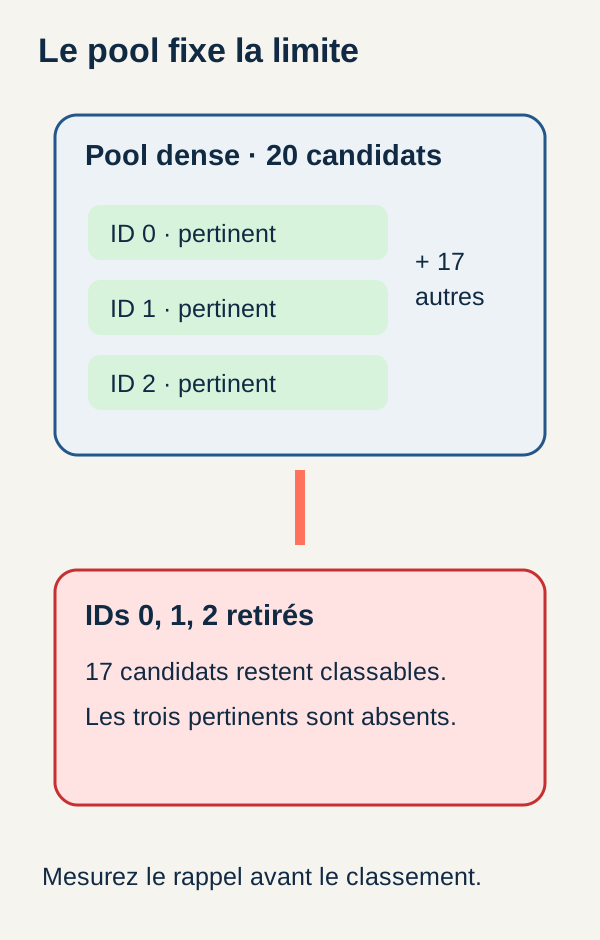
Let us return to our correct help article in twelfth place. If it is among the 20 candidates, the reranker can move it up. If it is missing from that selection, the reranker cannot retrieve it.
We therefore save the list before reranking: this is the frozen pool. Here, frozen means retained as a comparison reference, not made technically impossible to modify. We compare two orderings of the same set, not two searches whose results have changed in between.
Workflow architecture
Processing happens in distinct stages, each with a verifiable role:
preparechecks the 200 documents and 80 questions.indexencodes documents into 384 dimensions and stores them in a dedicated Qdrant collection.retrieveencodes each question and freezes its 20 neighbors inoutputs/candidates.json.rerankcomputes a logit for each question–document pair, in batches of 4, then writesoutputs/reranked.json.evaluatecomputes metrics on evaluable test questions;exercisedeliberately removes the relevant documents forREF-000to test the reranker's limitation.
For a web developer, the intermediate JSON files play a role similar to API responses saved during a test: they help you understand what one stage passed to the next, rather than looking only at the final page.
Qdrant is temporary in this project. The cleanup command docker compose down removes the index. Downloaded models and outputs remain available: you can reread the JSON files without keeping Qdrant running, or rebuild the index to rerun the subsequent stages.
This difference in persistence is a tutorial design choice, not a general property of all Qdrant or Docker deployments.
Read the core code before the results
The snippets below show the core mechanism. They use objects initialized elsewhere in the project, such as self.model, self.tokenizer, or store. They do not form a standalone script on their own: use the files in the ZIP to run the complete workflow.
1. Turning text into an E5 vector
Before reading the function, let us clarify three terms you will encounter.
The tokenizer splits text into units recognized by the model, called tokens, then replaces them with numerical identifiers. A token can be a word, part of a word, or a symbol: 512 tokens therefore does not mean 512 characters, or necessarily 512 words.
To compute several texts at once, we group them into a batch. Because their lengths differ, shorter texts receive padding, a technical filler. The attention mask identifies which positions correspond to actual text and which correspond to padding.
Finally, pooling combines the representations at different positions into one vector per text. Here, it is an average that ignores padding. Be careful with these similar terms: pooling produces a vector; the candidate pool is a list of documents.
def encode(self, texts, kind):
    if kind not in ("query", "passage") or not texts:
        raise ValueError("Préfixe query/passage et liste non vide requis")

    vectors = []

    for offset in range(0, len(texts), 16):
        batch = self.tokenizer(
            [kind + ": " + text for text in texts[offset:offset + 16]],
            padding=True,
            truncation=False,
            return_tensors="pt",
        )

        if batch["input_ids"].shape[1] > 512:
            raise ValueError("Texte dépassant 512 tokens : découpez le document")

        batch = batch.to("cuda")

        with torch.inference_mode():
            hidden = self.model(**batch).last_hidden_state
            mask = batch["attention_mask"].unsqueeze(-1).bool()
            pooled = hidden.masked_fill(~mask, 0).sum(1) / mask.sum(1)
            normalized = torch.nn.functional.normalize(pooled, p=2, dim=1)

        if not torch.isfinite(normalized).all():
            raise ValueError("Embedding non fini")

        vectors.extend(normalized.cpu().tolist())

    return vectors
What happens in this function?
kind must be query or passage, and the list of texts must not be empty. The loop then takes at most 16 texts at a time, adds the appropriate prefix, and tokenizes them.
padding=True aligns lengths within the batch. By contrast, truncation=False prevents an input from being silently shortened. The batch width, batch["input_ids"].shape[1], corresponds to its longest sequence after tokenization and padding. If it exceeds 512 tokens, the function stops before the model computation. Prefixes and special tokens added by the tokenizer are part of this input.
batch.to("cuda") moves the computation data to the GPU. The model then produces last_hidden_state: a numerical representation for every position in every text. torch.inference_mode() avoids preparing gradient computation, which provides the information needed to adjust parameters during training. This mode does not, by itself, replace setting the model to evaluation mode during initialization.
The three lines involving mask, pooled, and normalized are the heart of the conversion: they zero out padding positions, add up the useful representations, divide by their count, and normalize the resulting vector.
To understand the average, imagine just two coordinates and two useful positions: [2, 4] and [4, 4]. Their average is [3, 4]. A padding position should neither add a value nor increase the divisor from 2 to 3. This is a miniature calculation, not a representation actually produced by E5.
L2 normalization then scales the vector's length to 1. For [3, 4], that length is √(3² + 4²) = 5, so the vector becomes [0,6 ; 0,8]. We thus compare directions rather than arbitrary lengths. The same principle applies to the 384 coordinates in our workflow.
Finally, torch.isfinite rejects infinite values and NaN, which indicates an undefined numerical result. .cpu().tolist() brings the vectors back into CPU-side memory as Python lists usable by the rest of the program.
The official multilingual E5 model card illustrates the prefixes, masked average, and normalization. It provides conceptual background: to reproduce this experiment, keep the ZIP's locked files and settings, particularly its explicit rejection of inputs that are too long.
2. Saving candidates before reranking them
At this point, the document vectors are indexed. For each question, we compute its vector and ask Qdrant for 20 neighbors.
store.search(encoder.encode([data["queries"][0]["query"]], "query")[0], 20)

rows = []

for query in data["queries"]:
    start = time.perf_counter()
    candidates = store.search(encoder.encode([query["query"]], "query")[0], 20)
    rows.append(
        {
            **query,
            "candidates": candidates,
            "seconds": {"dense": time.perf_counter() - start},
        }
    )

save("candidates", {"rows": rows})
The first line performs a warm-up search. It takes place before the timed loop. Its result is not added to rows: the first question will then be processed again as part of the normal measurements.
Inside the loop, the timer starts before question encoding. The seconds.dense duration therefore includes both encoding and the Qdrant search call. It does not measure only the time spent comparing vectors in the database.
The expression {**query, ...} retains the question's information and adds the candidates and elapsed time. At the end, save writes the reference file.
This is the contract between the two models: the reranker will reread this saved list. Running another search with a different pool during the comparison would prevent us from isolating the effect of reranking.
3. Computing a score for each pair
The reranker does not receive the E5 embeddings to improve them. It takes each candidate's text and pairs it with the question. Identifiers are used to locate documents and track their new positions.
def score(self, query, candidates, documents):
    if not candidates:
        return {"ranked": [], "pairs": [], "truncated": False}

    if not isinstance(query, str) or not query.strip():
        raise ValueError("Question non vide requise")

    rank_scores(candidates, [0.] * len(candidates))
    pairs = [[query, documents[identifier]["text"]] for identifier, _ in candidates]
    scores = []
    truncated = False

    for offset in range(0, len(pairs), 4):
        part = pairs[offset:offset + 4]
        lengths = [len(self.tokenizer(a, b)["input_ids"]) for a, b in part]
        truncated |= any(length > 512 for length in lengths)

        batch = self.tokenizer(
            part,
            padding=True,
            truncation=True,
            max_length=512,
            return_tensors="pt",
        ).to("cuda")

        with torch.inference_mode():
            scores.extend(self.model(**batch).logits.view(-1).float().cpu().tolist())

    return {
        "ranked": rank_scores(candidates, scores),
        "truncated": truncated,
        "pairs": [
            {
                "query": query,
                "document_id": identifier,
                "text": documents[identifier]["text"],
                "score": score,
            }
            for (identifier, _), score in zip(candidates, scores)
        ],
    }
The first behavior is an explicit return for an empty pool. The function then returns an empty ranked list, no pairs, and truncated: False. This happens before the question is checked: with an empty pool, this snippet therefore does not require a nonempty question. With a nonempty pool, an invalid question does trigger an error.
rank_scores(candidates, [0.] * len(candidates)) performs an initial validation pass on candidates, including their identifiers. The zeros are temporary: they are neither E5 cosine similarities nor BGE predictions. The complete helper function is included in the ZIP; it also handles the final sort and rejects non-finite scoring results.
The pairs list comprehension builds one pair per candidate. The loop then processes them in batches of 4. A first tokenization checks lengths; a second prepares the batch sent to CUDA, with a 512-token limit.
The model produces logits. view(-1) presents them as a list of scores, .float() converts them to floating-point numbers, and .cpu().tolist() makes them usable in Python. The final sort is descending by score, using the identifier as a stable tie-breaker.
The return value contains two complementary views: ranked, the reordered list, and pairs, the details of the question–document associations with their text and scores. In this snippet, pairs follows the input candidate order; read ranked to see the new ranking.
Two different policies for text that is too long
This detail deserves a pause, because the two stages do not behave in the same way.
E5 rejects inputs longer than 512 tokens. The program asks you to split the document explicitly, rather than silently changing the material being searched.
The reranker allows an overly long pair to be truncated, but reports it with truncated: True. Its limit applies to the combined input: question, passage, and special tokens. Two texts that E5 accepts separately can therefore form a pair that is too long for the second model; their tokenizers may also split the same words differently.
According to the Transformers truncation documentation, truncation=True applies the longest_first strategy: tokens are removed from the longer sequence in the pair until the limit is met. This setting therefore does not guarantee that only the passage will be shortened. Here, 512 is the limit chosen by the tutorial code, not a claim about every possible BGE capability.
The truncated boolean accumulates the observation across batches: it becomes true as soon as at least one pair exceeds the limit. It gives neither the number of affected pairs nor the exact positions removed.
Another important nuance: the text field retains the original document, not a reconstruction of the text after truncation. The outputs let you locate the source pair and its score; they do not prove that the model consumed every word of the saved text. When truncation is reported, examine the actual tokenization before explaining a result through a sentence at the end of the document.
Preparing and running the tutorial
Starting in the right directory
Download and extract the ZIP, then open a terminal at the root of the extracted project. All commands below start from this directory. Running them requires the complete code, not just the article's snippets.
GPU_DEVICE=1 would select the second card; index 0 is used by default. Check the GPU selection in the project configuration before running computations.
The preflight is a preliminary environment check. It actually initializes CUDA inside a container and verifies that Docker can use the card. A successful nvidia-smi result on the host is not enough: the card may be accessible to Linux but not to the container.
NVIDIA Container Toolkit exposes the GPU to containers; its official guide supplements the prerequisites. The project's preflight installs nothing and does not change your system configuration.
Building the environment and acquiring models
Run these five commands in order. They must all finish without errors before you continue.
./scripts/preflight.sh
sh scripts/setup.sh
docker compose build
docker compose --profile acquisition run --rm --no-deps fetch
docker compose run --rm --no-deps app -m unittest discover -s tests -v
setup.sh prepares the project's local environment; build builds the image. The fetch service, enabled by the acquisition profile, explicitly acquires the models. It checks file sizes and SHA-256 hashes before renaming them atomically.
A SHA-256 hash is a fingerprint computed from a file's bytes. Here, comparing it with the expected value verifies that the acquired model matches the intended asset. Atomic renaming places the file under its final name after validation, rather than presenting a partial download as a completed model. This is a file integrity check, not a measure of model quality.
The final command runs the project's public test suite. The validated workflow's expected result is 17 passing public tests. Understand any failure before continuing: apparently credible search results do not compensate for a failed check.
Building the index, retrieving, reranking, and evaluating
Next, start Qdrant and run the following stages:
docker compose up -d qdrant
docker compose run --rm --no-deps app -m src.cli prepare
docker compose run --rm --no-deps app -m src.cli index
docker compose run --rm --no-deps app -m src.cli retrieve
docker compose run --rm --no-deps app -m src.cli rerank
docker compose run --rm --no-deps app -m src.cli negatives
docker compose run --rm --no-deps app -m src.cli evaluate
After prepare, check the reported population: 200 documents and 80 questions, including 20 development questions and 60 test questions.
After index, the output should include documents: 200, dimension: 384, device: "cuda", and points_count: 200. We want as many indexed points as documents, with the expected dimension.
After retrieve, open outputs/candidates.json. For one question, identify its 20 candidates and their initial order. This will be your comparison baseline.
After rerank, open outputs/reranked.json. Find the same question, compare the identifiers in ranked with those in the pool, then read the pairs, logits, and truncation flag. The documents should not change simply because their order changes.
After negatives, the checks should confirm behavior for an empty pool, reported truncation, and an empty collection. A negative test checks a deliberately triggered boundary or special case, not just the path where everything goes well.
After evaluate, outputs/evaluation.json contains the reference metrics. We will now see how to interpret them.
Acquisition and inference are separate. Once the models have been acquired, inference stays local and off external networks. This does not prevent the application from communicating with Qdrant inside the Docker project.
Defining measurements before inspecting them
What is a “relevant” document?
To evaluate a search, you must know what it should have retrieved. Relevance annotations provide this reference: for each question, they identify the documents considered useful in the experiment.
The model's score does not create this ground truth. Otherwise, we would be asking the engine to grade itself. Here, the annotations belong to a fictional educational corpus; they do not replace independent business validation on real documents.
Why 80, 60, and 48 refer to different things
The 80 questions comprise 20 development questions and 60 test questions. Of those 60 test questions, 48 have at least one relevant document in the annotations; the other 12 are outside the corpus.
Relevance metrics cover the 48 evaluable questions. The latencies reported later cover the 60 test questions, including the 12 out-of-corpus questions.
Why separate the latter? For a question with no relevant document, recall would have a zero denominator and the ideal nDCG ranking would have no gain. Arbitrarily assigning it a zero would mix two problems: ranking an available answer poorly, and searching a corpus that contains no expected answer.
These 12 questions are still observed: they receive candidates. Obtaining a list, even a ranked one, therefore does not prove that a help article answers the question. The workflow does not demonstrate an ability to decide automatically that “no answer is available.”
On small screens, scroll the table horizontally.
| Metric | What it observes |
|---|---|
| Recall@20 | Proportion of relevant documents present in the dense pool of 20. It bounds what the reranker can do. |
| MRR@5 | Rank of the first relevant document within the first five positions. |
| nDCG@5 | Position of all relevant documents within the first five positions, with discounting by rank. |
| Dense latency | Question encoding and Qdrant search. |
| Reranker latency | Additional cost of scoring the 20 pairs, excluding model loading. |
Recall@20: are the useful documents available?
Recall measures coverage. For a question with at least one relevant document:
Recall@20 = number of relevant documents among the 20 candidates / total number of expected relevant documents.
With three relevant documents, retrieving two gives 2 / 3 ≈ 0,667. Retrieving all of them gives 1, even if they rank 12th, 16th, and 20th. Recall@20 therefore does not tell you whether the interface's first results are good; it tells you what the reranker has available.
If the reranker only permutes these same 20 candidates, recall stays unchanged. It can improve their presence in the top 5, but cannot add a document to the pool of 20.
MRR@5: where does the first useful answer appear?
For a question, we find the rank of the first relevant document among the top five. Its reciprocal rank, written here as RR@5, is the inverse of that position: rank 1 → 1; rank 2 → 1 / 2 = 0,5; rank 5 → 1 / 5 = 0,2.
If there is no relevant document in the top five, RR@5 is 0, even if a useful document appears at rank 6.
MRR, or Mean Reciprocal Rank, is the average of these values across evaluable questions. It is not the inverse of the average rank. For example, two questions whose first relevant documents rank 1st and 5th give (1 + 0,2) / 2 = 0,6, not 1 / 3.
This metric answers “how quickly do we encounter a first useful answer?” well. It does not describe the positions of other relevant documents.
nDCG@5: are several useful answers well placed?
The name sounds more intimidating than the idea. nDCG means normalized Discounted Cumulative Gain: relevance gains are added together, giving less weight to lower positions, then compared with the best possible ranking.
To understand the calculation with binary annotations, a relevant document at rank r contributes 1 / log2(r + 1); an irrelevant document contributes 0. log2 denotes the base-2 logarithm. Here, we consider only the first five positions.
With one relevant document, placed at rank 2, its contribution is 1 / log2(3) ≈ 0,631. The ideal ranking would put it at rank 1, for a gain of 1: nDCG@5 is therefore also approximately 0,631.
With several relevant documents, adding their contributions is not enough: we must also divide by the ideal ranking's gain. This normalization lets us interpret 1 as the best possible result for the given annotations and cutoff.
An example you can work out by hand
The following table is an educational example, not an output from the r3 reproductions. Imagine a question with three relevant documents, all present in a pool of 20. We change only their positions.
On small screens, scroll the table horizontally.
| Positions of the three relevant documents | Recall@20 | RR@5 for this question | nDCG@5 |
|---|---|---|---|
| Ranks 2, 4, and 8 | 1,0000 | 0,5000 | ≈ 0,4982 |
| Ranks 1, 8, and 9 | 1,0000 | 1,0000 | ≈ 0,4693 |
| Ranks 1, 2, and 3 | 1,0000 | 1,0000 | 1,0000 |
For the first row, only ranks 2 and 4 contribute to the top-5 gain:
DCG@5 = 1 / log2(3) + 1 / log2(5) ≈ 1,0616.
With three relevant documents, the ideal ranking would place them at ranks 1, 2, and 3:
IDCG@5 = 1 + 1 / log2(3) + 1 / log2(4) ≈ 2,1309.
The normalized result is therefore 1,0616 / 2,1309 ≈ 0,4982.
Now compare the first two rows. Reciprocal rank improves because a useful answer comes first, but nDCG decreases because only one useful answer remains in the top five results. Two metrics can move in opposite directions without the calculation being inconsistent. They observe different aspects of the ranking.
Pool recall stays at 1 in all three cases. It establishes which documents are available; by itself, it does not summarize the quality of their ordering.
Latency: what time are we measuring?
Latency is the elapsed time needed to perform an operation. In this tutorial, dense latency includes question encoding and Qdrant retrieval. Reranker latency is an additional cost for processing the 20 pairs; it excludes model loading.
The r3 measurements are taken after warm-up. They describe neither the full first startup nor model downloads, nor the total delay of a future web page including networking, authentication, and rendering.
Observed R3 results
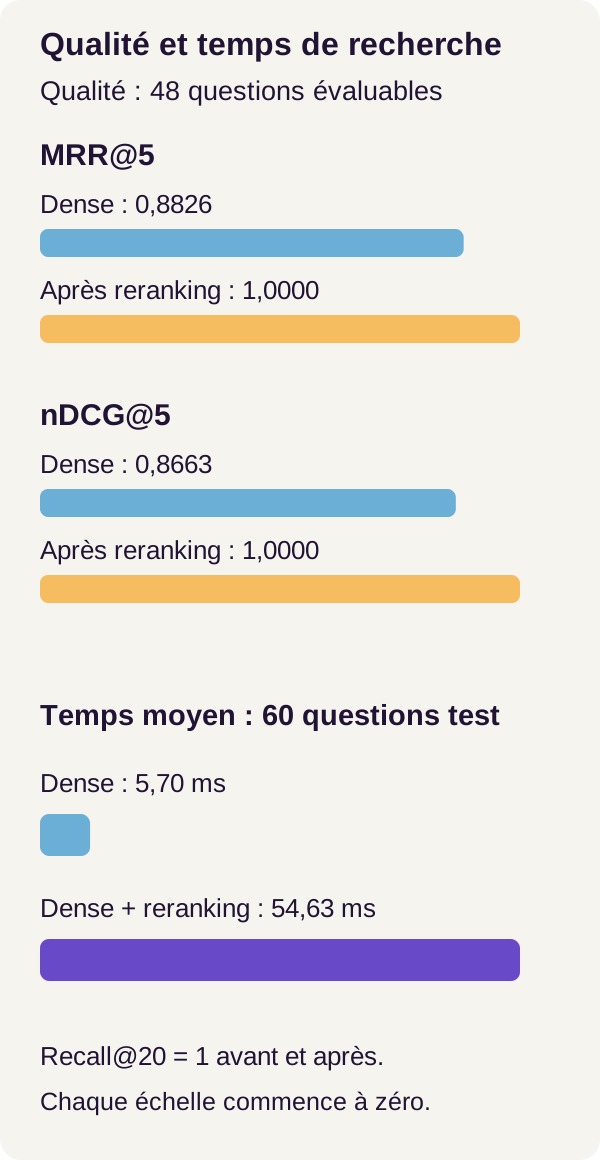
Two reproductions of the r3 workflow yielded identical quality metrics. The latencies below come from the second reproduction, averaged across the 60 test questions, after warm-up and excluding model loading.
Ranking quality
On small screens, scroll the table horizontally.
| Route | MRR@5 | nDCG@5 | Recall@20 | Population |
|---|---|---|---|---|
| Dense candidates | 0,8826 | 0,8663 | 1,0000 | 48 evaluable |
| After reranking | 1,0000 | 1,0000 | 1,0000 | 48 evaluable |
The first number to read is recall@20: 1,0000 in both rows. All relevant documents for the 48 evaluable questions were already present in the dense pools. The reranker therefore does not improve coverage: coverage was already complete at this retrieval depth.
The improvement concerns positions. MRR@5 rises from 0,8826 to 1,0000, and nDCG@5 from 0,8663 to 1,0000. The reported result is optimal for these metrics on this evaluated dataset; it does not demonstrate that the model will be perfect on other questions.
Nor should you read MRR@5 = 0,8826 as “88.26% of documents are correct.” It is an average of reciprocal ranks. nDCG also measures a ranking, not a probability of truth.
The additional time
On small screens, scroll the table horizontally.
| Average time | Milliseconds |
|---|---|
| Dense | 5,70 ms |
| Additional reranking | 48,92 ms |
| Total | 54,63 ms |
Here, reranking adds an average of 48.92 ms to a dense search of 5.70 ms. The reported total reaches 54.63 ms, approximately 54,63 / 5,70 ≈ 9,6 times the dense-only path's duration.
Published durations retain two decimal places. Their visible sum is 54.62 ms, compared with the reported total of 54.63 ms; this 0.01 ms difference is compatible with independent rounding. Unrounded values would be needed to confirm its origin: do not interpret it as an additional, separately measured cost.
The right reasoning is therefore neither “49 ms must be negligible” nor “almost ten times slower must be unusable.” The question is: does the ranking change justify this additional time in the intended application?
These results describe a fictional corpus, one workstation, and a specific configuration. They are not a promise of business benefit, a load test, or an estimate of your future service's performance.
What we have learned
Retrieval and reranking are different operations
E5 and Qdrant build a candidate list. The cross-encoder adds a more expensive comparison between the question and each candidate. It can change the order, but cannot retrieve a document left outside the pool.
Before blaming the reranker for a poor answer, inspect the input list. A missing help article and a poorly ranked one require different diagnoses.
A model score and an evaluation metric are not the same thing
The E5 cosine similarity and BGE logit produce rankings. Recall, MRR, and nDCG compare those rankings with known annotations. A high logit does not replace evaluation, and a good MRR does not mean every result is useful.
A first result is not proof of an answer
Out-of-corpus questions also receive candidates. The best item in a list can therefore simply be the closest match to a request that no document answers. Knowing when to reject an answerless search is a separate problem, which perfect scores on the 48 evaluable questions do not solve.
Quality has a measured cost here
In this experiment, the top five improve and total time increases. Pool size, model, text length, and hardware are part of the trade-off to investigate. Nothing justifies automatically transferring the 54.63 ms figure to another context.
Exercise: predict, modify, run, observe, explain
Predict before running
For REF-000, the relevant documents have identifiers 0, 1, and 2. They are present in the reference pool.
We will remove them before reranking. Write down your prediction: will any relevant document remain to rank? Can a model put an identifier first if that identifier is no longer passed to it? What recall will the modified pool have for this question?
Modify and run
Do not edit the code for this exercise. The supplied command applies exactly this modification to the first question's frozen pool:
docker compose run --rm --no-deps app -m src.cli exercise
Observe the outputs
In outputs/exercise.json, check removed_relevant: [0, 1, 2]. The pool should retain 17 candidates, and none of the three removed identifiers should reappear in ranked.
Do not confuse the 17 candidates with the 17 public tests: the first number comes from 20 - 3, while the second describes the project's test suite.
Explain what happened
The cross-encoder may prefer document 3 among the remaining candidates, but it cannot rank an absent document. For this question, none of the three expected relevant documents remains in the modified pool, so its recall is zero, regardless of how well the other 17 documents are sorted.
This does not turn REF-000 into an out-of-corpus question: its answers still exist in the corpus and annotations. We deliberately caused a retrieval failure, rather than removing the existence of an expected answer.
Increasing the pool or improving retrieval are avenues to explore separately. They require new measurements of coverage, top-5 ranking, and latency; they are not improvements already demonstrated by this exercise.
Your own experiment, separate from the exercise
The previous exercise tested a specific limitation. To explore the quality–latency trade-off, first preserve the reference outputs, then work in a copy of the project. Results from this variant are not part of the r3 reproductions presented here.
One interesting variable is the number of neighbors requested from Qdrant. For example, you can compare a smaller pool with the reference pool of 20, without simultaneously changing the documents, questions, and reranker. The visible code uses 20 in both the warm-up search and the measured loop: ensure the variant stays consistent, including any checks in the complete program.
Before running, write two separate hypotheses: what you expect regarding the presence of relevant documents, and what you expect regarding processing time. A smaller pool removes pairs to evaluate, but may also exclude a useful document. A larger pool provides more candidates; it does not guarantee a better final ranking.
Rerun retrieve, rerank, and evaluate with the commands already presented. If your change affects a file copied into the Docker image, rebuild the image according to the project's setup: changing a file on the host does not guarantee the container executes the new version.
Compare the candidate count, pool recall, MRR@5, nDCG@5, and dense, reranker, and total times. Also note any truncation. If you change retrieval depth, state that depth in your report: recall measured on a pool of 10 is not the reference recall@20 simply because you rename it.
Do not replace old results with new ones without preserving their configuration. The comparison must make the changes visible. And use development questions to explore settings, rather than choosing a configuration solely because it maximizes test-set performance.
Limitations for production use
Controlled data, not business validation
The corpus and questions are fictional. The 48 evaluable questions and their annotations replace neither representative user queries nor error analysis on real documents. A perfect result on this dataset does not validate general-purpose search.
Requests with no answer in the corpus must be handled separately. A threshold on the BGE score would be a new rule to evaluate, not an abstention capability already validated by this workflow.
Resource observations with limitations
The tutorial was tested on a workstation with an RTX 3090. It offers neither a CPU mode nor a production engine. Hardware allowances remain conservative, with no study of the minimum required.
VRAM was sampled approximately once per second: a brief peak can fall between readings. Docker caches were available, and disk-space changes cannot be attributed solely to the tutorial. Average latency on this machine alone says nothing about delays under concurrency or the slowest queries.
An architecture to complete for your application
Choose pool size and latency budget using representative queries. Monitor long pairs and truncation, preserve corpus, model, and metric versions, then measure retrieval before attributing a change to the reranker.
In a document application with access permissions, the authorized scope must also be respected before sending text for reranking. Qdrant filters provide a technical building block for restricting candidates; their presence alone does not constitute a complete authorization policy.
Container security, locked acquisition, and deployment limitations are documented in the archive. Read them before adapting the project; they do not turn the tutorial into a production-ready service.
Troubleshooting and cleanup
Preflight fails on CUDA. Check the NVIDIA driver, NVIDIA Container Toolkit, and the card selected by GPU_DEVICE, then rerun preflight. It installs nothing. Detecting a card on the host is not enough if it is not exposed to the container.
Qdrant is unavailable. Rerun docker compose up -d qdrant before index. If the failure persists, inspect this project's Docker logs rather than continuing with an incomplete search.
E5 rejects a document longer than 512 tokens. This is expected behavior: split the document explicitly. If splitting changes indexed units, identifiers, or annotations, you have a new experiment to rebuild, not an unchanged reproduction of the r3 corpus.
The reranker reports truncation. Reread the affected pair and its tokenized length. The flag reports shortening but does not, by itself, retain the removed tokens. Having the full text in pairs does not mean the model read all of it.
Timings vary significantly. Do not run two benchmarks simultaneously on the same GPU. Also check that you are comparing the same pool and timing scope.
Once you have saved your observations, finish by running this from the project root:
docker compose down
This command removes the project's services and its temporary Qdrant index. Models and outputs remain available. To rerun a search after cleanup, restart Qdrant and rebuild the index before retrieval.
Summary
Dense retrieval answers “which documents should we consider?” A reranker answers “in what order should we present these documents?” The second can improve the top results, but cannot repair the absence of a passage from the pool.
In the r3 workflow, all relevant documents were already available among the 20 candidates: recall stays at 1.0000, while MRR@5 and nDCG@5 reach 1.0000 after reranking. This improvement comes with a reported average total time of 54.63 ms on the tested workstation.
The most useful result is not just this table. It is the method for understanding it: freeze candidates, read lists before averages, separate out-of-corpus questions, and measure the additional cost. You can reuse this approach on your own data without confusing better ordering with better document coverage.
Further reading
The official BGE reranker model card presents pair scoring and logits. The multilingual E5 model card shows prefixes, masked pooling, and embedding normalization.
To place these components in an architecture, see the Sentence Transformers Retrieve & Re-Rank workflow. Its cross-encoder evaluation documentation also highlights an important distinction between evaluating only retrieved candidates and artificially reintroducing all relevant documents. Our comparison uses the saved dense pool, with no documents added by the reranker.
The Transformers documentation on padding and truncation helps explain how long pairs are handled. Qdrant filters offer a way to restrict retrieval to a document scope.
These references explain the mechanisms; they do not replace the ZIP's code, models, and versions for reproducing the reported results. This article's educational examples illustrate calculations, while the “Observed R3 results” tables reproduce measurements from the tutorial's two reproductions.