





Imagine the help centre of a web application. You have written an article titled “Reset the account password”. Yet a user will not necessarily type those words into the search bar. They may instead ask: “How can I regain access to my account?”
The right information exists. The challenge is to find it despite the change in wording, then place it high enough for the user to see it. Showing an article that also mentions an account but explains how to change an email address does not answer their request.
That is the problem we will explore. Our running question, “How can I regain access to my account?”, should lead to article ID 0, REF-100, about resetting a password. It should not lead to article ID 1, REF-101, about changing an email address. Both belong to the Compte family, but they address different intents.
We will build three rankings, observe where they disagree, and understand their calculations. There is one useful surprise: combining two methods is not automatically better than using just one.
Download the complete tutorial project — public r3 archive containing the code, data, tests, and reader guide.
The commands, code extracts, and results shown follow the r3 walkthrough. Small examples marked as educational are there to clarify calculations; they are not new model measurements.
What you will build
You will build a small search engine that returns three lists of articles for the same question.
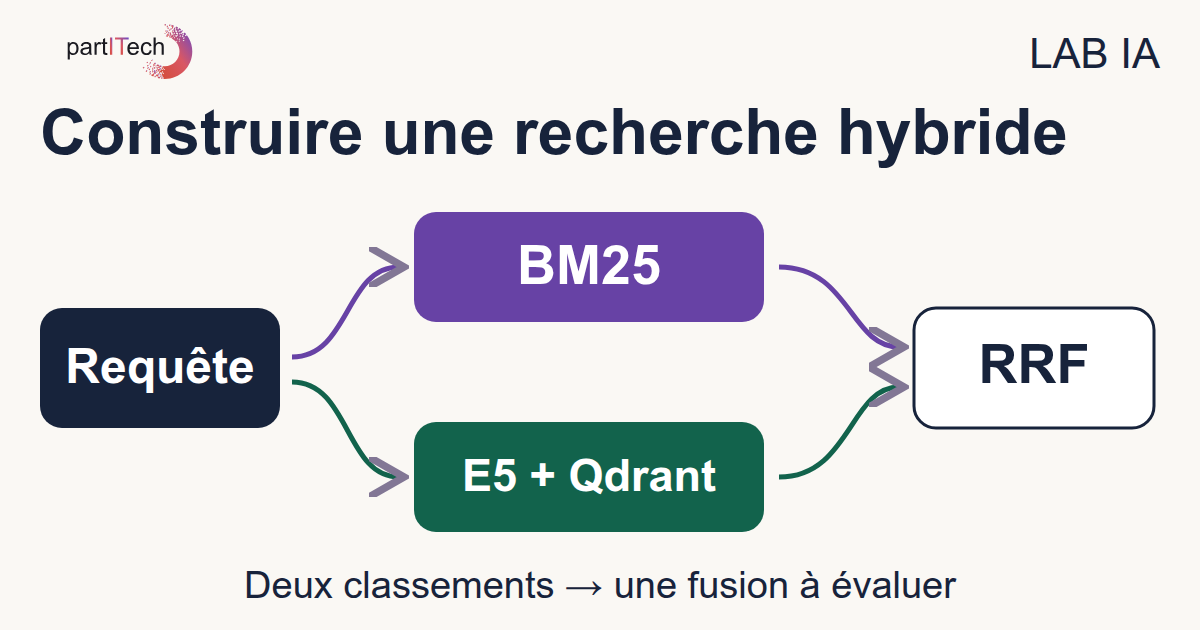
BM25 ranks articles using the terms they share with the question. E5 and Qdrant rank them using numerical representations of their texts. RRF then combines the positions obtained in both lists.
For a web developer, the output therefore looks more like a catalogue search than a conversation: an ordered list of identifiers, references, and source texts. The tutorial produces JSON files that you can open and compare. It does not yet provide a web search interface.
This is not a chatbot. No model writes an answer for the user. We are looking for the right article; we are not asking an AI to reword a procedure or invent an answer when the catalogue does not contain one.
What you will learn
The walkthrough has three stages:
- Prepare a readable experiment: load a JSON corpus, keep stable identifiers, and define the expected articles for each question.
- Build the two searches: calculate BM25, produce E5 embeddings on the GPU, then store and query them with Qdrant.
- Compare instead of assuming: merge ranks with RRF, measure relevance and latency, then explain the results article by article.
A corpus is simply the complete set of documents being studied. A relevance annotation indicates which article is considered a good answer to a question. Both ideas matter as much as the choice of model.
Prerequisites
Knowledge
You can use Python lists and dictionaries, write functions, read JSON, and work in a terminal. You know the basics of Docker: image, container, and volume. No prior knowledge of BM25, embeddings, or Qdrant is assumed.
You do not need to know how to train a model. In this tutorial, we will use an already trained model to calculate text representations. Indexing articles does not mean training E5 again.
Hardware
The intended setup is Linux x86_64 with a CUDA-compatible NVIDIA GPU, 5 GiB of free video memory, 12 GiB of available RAM, and 20 GiB of free disk space, both for the project storage and Docker storage.
Video memory, or VRAM, belongs to the GPU; it is not the same as the computer's main RAM. CUDA is the environment used here to run model calculations on the NVIDIA GPU.
These figures are comfortable margins checked by the preflight, not minimum requirements established by finding the smallest possible configuration. The r3 walkthrough was reproduced on an RTX 3090. The ZIP does not provide a CPU path, so do not treat a GPU-free run as a validated variation of this exercise.
Software
Docker Engine with the Compose plugin, the NVIDIA driver, and NVIDIA Container Toolkit are required. Internet access is used only to build and retrieve images and acquire the model. Once those resources are available, calculation and search use local services.
The path of a query
Let us separate two moments that are easy to confuse: preparing documents and answering a search.
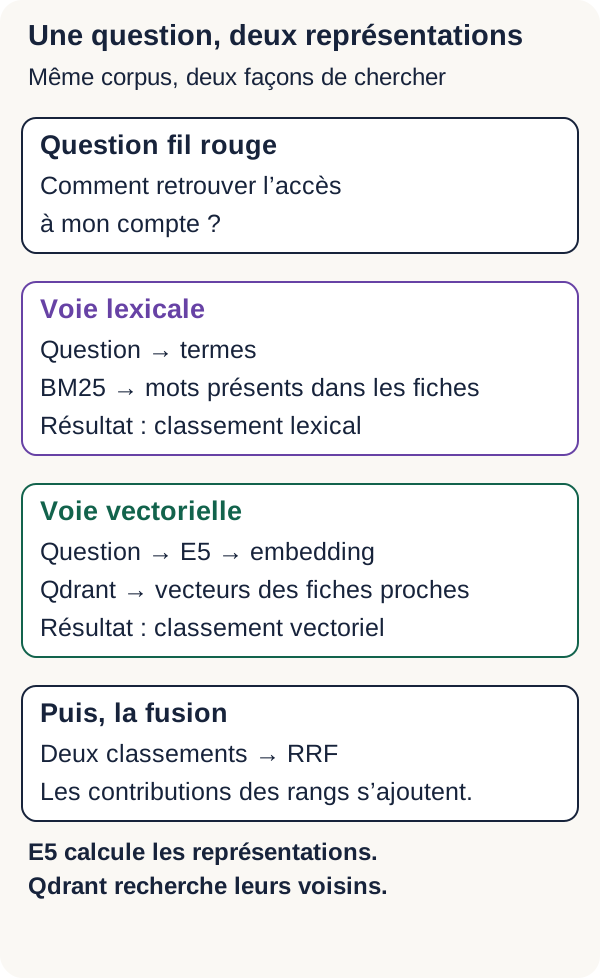
Before the first search, BM25 prepares term counters. E5, meanwhile, turns every article into a list of numbers called a vector or embedding, which Qdrant stores. When a question arrives, BM25 gives it lexical scores and E5 calculates the question vector. Qdrant can then look for the closest article vectors.
Fiches → BM25 : préparation des fréquences
Fiches → E5 passage: → vecteurs → Qdrant : indexation
Question → BM25 → classement lexical
Question → E5 query: → vecteur → Qdrant → classement dense
Classement lexical + classement dense → RRF → classement hybride
RRF comes last: it receives two rankings that have already been calculated and builds a third one. It plays no part in preparing the model or in E5 reading the articles.
Important: a score only makes sense alongside its calculation method. BM25 adds term contributions. The dense route measures cosine similarity, which we will explain later. RRF adds rank-based contributions. Comparing their numbers directly would be like comparing marks obtained with three different grading scales.
We will therefore keep all three outputs. The useful question will not be “which engine produces the biggest number?”, but “where is the expected article in each list?”
Preparing the workstation and containers
Check that Docker can see your GPU
Download and extract the ZIP, then open a terminal at its root, where README.md is located. Every command that follows starts from this directory. Do not run them from another Docker project.
The preflight is a preliminary check, similar to checking requirements before launching an application. Linux must first see the card through nvidia-smi, then Docker must make that same card accessible to the container. These are separate conditions: a card visible on the host may still be inaccessible from Docker.
The script checks the selected GPU, RAM, project disk space, and Docker storage. It also initializes CUDA in a diagnostic container. The expected result is PREFLIGHT=PASS.
./scripts/preflight.sh
NVIDIA Container Toolkit lets the container access the GPU and the required elements of the host driver. It does not replace that driver, and the preflight does not install it for you. If diagnostics report a GPU visible on the host but not in Docker, correct the indicated configuration before continuing. The official NVIDIA Container Toolkit documentation describes that installation.
Then run the project setup:
sh scripts/setup.sh
It writes LOCAL_UID, LOCAL_GID, and GPU_DEVICE to .env, then creates the working directories. The first two settings use your local identity for files; the third selects the card to expose. Check this choice if your machine has multiple GPUs.
Finally, build the image:
docker compose build
The build must finish without an error. The r3 image starts from Python 3.12.13 slim-bookworm Linux amd64, pinned by digest. That digest identifies the exact image rather than a name that may point to a different version later.
The dependency lock installs PyTorch 2.10.0+cu129, Transformers 4.57.6, and Safetensors 0.7.0, together with their URLs and SHA-256 hashes. PyTorch performs the model's numerical calculations; Transformers notably provides the model and tokenizer loading classes. The CUDA components used by this stack come from PyTorch binary packages; the driver remains on the host.
The distribution references are the official Python image and PyTorch CUDA 12.9 wheels. To reproduce the experiment, keep the versions in the ZIP instead of replacing them with the latest available ones.
A map of volumes and services
Before running the code, identify where its inputs and outputs are located:
| Item | Role in the tutorial |
|---|---|
app |
Python, PyTorch, and the GPU: prepares, encodes, searches, and writes results. |
qdrant |
Temporary vector index and neighbour search. |
models/ |
Local model in models/e5, acquired once then read offline. |
outputs/ |
JSON generated at every stage, mounted on the host for inspection. |
The app service is the main program. Qdrant is a separate service queried over the Docker network. The models/ and outputs/ folders remain visible on your computer through volume mounts.
The following extract comes from the app service. It is not a standalone Compose file: the common anchor, reused by <<: *common, is defined in the complete file. Keep the ZIP's compose.yaml for the other services and limits.
  app:
    <<: *common
    environment:
      MODEL_DIR: /models/e5
      QDRANT_URL: http://qdrant:6333
      HF_HUB_OFFLINE: "1"
      TRANSFORMERS_OFFLINE: "1"
    volumes:
      - ./models:/models:ro
      - ./outputs:/app/outputs
    networks: [isolated]
    deploy:
      resources:
        reservations:
          devices:
            - driver: nvidia
              device_ids: ["${GPU_DEVICE:-0}"]
              capabilities: [gpu]
MODEL_DIR is the model path as seen from inside the container. The ./models:/models:ro mount connects your local models/ folder to /models; :ro means “read-only”. The outputs/ mount, meanwhile, lets you retrieve files written by the program.
QDRANT_URL uses the qdrant service name on the Docker network. The HF_HUB_OFFLINE and TRANSFORMERS_OFFLINE variables ask the relevant libraries to work offline. Finally, device_ids exposes only the selected GPU; the Docker documentation on GPUs in Compose explains this reservation.
The built image is called tutorial-hybride:r3.
You will often see docker compose run --rm --no-deps app later on. This command runs the program in a one-off container for the app service, removes that container when it ends, and does not start its dependencies automatically. That is why we will start Qdrant explicitly before steps that need it. Outputs mounted on the host do not disappear with this one-off container.
Going further — Why the containers are hardened
The complete compose.yaml limits what containers can change or consume. read_only makes their root filesystem read-only, cap_drop: [ALL] removes extra Linux capabilities, and no-new-privileges prevents acquiring new privileges. An internal network plus limits on memory, CPU, processes, and tmpfs complete these restrictions. A tmpfs is temporary in-memory storage.
In this walkthrough, app reads models and writes only outputs. Qdrant keeps its collection in temporary storage. The fetch service is the exception for networking and model writes: it must contact their repository and populate models/.
These choices reduce what services can do. They are not a universal security guarantee, nor are they settings you need to modify to learn BM25, E5, or RRF.
Acquiring E5 reproducibly
The model used is intfloat/multilingual-e5-small, at fixed revision 614241f622f53c4eeff9890bdc4f31cfecc418b3.
A model's weights are the numerical parameters it acquired during training. We will download them and then use them as they are. Pinning the revision is like keeping an exact commit of a dependency: we know which architecture, files, and weights were used in the experiment. This makes runs comparable without promising that every hardware setup will produce strictly identical measurements.
The nine required files are described in configs/models.lock.json, with their size and SHA-256 hash. A hash is a summary calculated from a file's bytes; comparing it with the expected value detects a different or incomplete file.
scripts/fetch_model.py downloads to a partial file, verifies size and hash, then atomically renames it to the final file in models/e5. In other words, the final name is used only after the check succeeds.
docker compose --profile acquisition run --rm --no-deps fetch
A complete local file is checked again and reused. During acquisition, a missing or incorrect file is downloaded again and must pass the checks. If verification fails, acquisition stops.
At the end, the nine verified files are in models/e5. Acquiring them for the first time requires roughly 493 MB. Internet access is no longer needed to encode texts and search articles afterwards.
Acquisition and inference remain separate. Here, inference means using the model to calculate a vector, not training it. If a file is missing at that point, the encoder fails: it does not quietly download another model. The protocol and its limits are described in docs/MODEL_ACQUISITION.md. Do not change the pinned revision just to make an error disappear.
Before indexing, run the tests and educational checkpoints:
docker compose run --rm --no-deps app -m unittest discover -s tests -v
docker compose run --rm --no-deps app scripts/checkpoint.py
Completed r3 reproductions finish the 18 tests with no failures or skipped tests, then confirm the 7 checkpoints. They cover calculations, simulated acquisition, E5 inference on CUDA, and the educational stages.
The important point is the real E5 calculation on CUDA: showing that a card is available in Docker would not prove that the model works on it. Address a failure before continuing; a plausible-looking list of results is no substitute for a passing test.
Loading the articles
The corpus contains 16 fictional articles. We also have four development queries, whose expected articles have IDs 0, 1, 14, and 15. They help explore how the system works, especially with our running question.
Evaluation uses another set: 12 questions, each with one relevant article, and two out-of-corpus questions, for which no article is annotated as relevant.
An annotation here is binary: an article is relevant to a question or it is not. These are educational choices, not the result of a user survey. The annotations are used to assess rankings; they are not used to train E5 in this tutorial.
Start Qdrant, then prepare the data:
docker compose up -d qdrant
docker compose run --rm --no-deps app -m src.cli prepare
Open outputs/prepared.json. It must report 16 documents and show the first article, ID 0, REF-100. At this stage, Qdrant is running but contains no vector yet: preparing data and indexing it are separate operations.
Data: one article, one identifier, one annotation
Here is the first article as it appears in data/corpus.json:
{
  "id": 0,
  "reference": "REF-100",
  "family": "Compte",
  "text": "REF-100 — Réinitialiser le mot de passe du compte. Cliquez sur Mot de passe oublié puis suivez le lien envoyé par courriel."
}
id identifies the article in the code and in the index. reference is its readable reference. family gives its broad topic. text contains the content to search.
In data/development.json, “How can I regain access to my account?” has the annotation relevant: [0]. This means: for this question, we expect article 0. Article ID 1 is annotated separately for “Change my email address”.
The distinction between family and relevant is essential. Two articles in the Compte family may be very close in vocabulary while answering two different problems. The engine must not merely find the right topic: we will check whether it finds the right procedure.
These IDs remain stable in rankings, the index, and annotations, even if an interface displays only a title or an excerpt. The corpus contains no customer data.
BM25: frequency, rarity, and length
Let us start with a method you can follow without a neural network.
BM25 is a lexical ranking rule: it gives an article points according to the terms it shares with the question. Rather than only asking “does this text contain this word?”, it distinguishes more or less useful words and accounts for repetition.
Three ideas drive the calculation: a present term provides a signal; a term that is rare in the corpus provides a more distinctive signal; repeating a term or writing a very long text should not mechanically win every ranking.
This route provides an initial search without a neural model, especially useful when a reference or error code is discriminating. Its score is not a probability: it orders articles from the same corpus for the same query.
First, decide what counts as a term
The program normalizes Unicode characters using NFKC, converts text to lowercase, and extracts sequences recognized by \w+. NFKC harmonizes certain character representations; it does not mean “remove accents”.
So courriel, becomes courriel, and REF-100 becomes two tokens, ref and 100. Accents remain. Nor does the code automatically reduce compte and comptes to the same term.
A token is a unit produced by this splitting rule. Here it is neither a sentence nor necessarily a word as you see it on screen. This rule has a practical consequence: BM25 does not treat reference REF-100 as an indivisible identifier. Validating an exact reference would be a different operation.
Counting in one article is not counting in the corpus
To read the formula, keep these correspondences in mind:
f(t,d): how many times termtappears in articled;|d|: how many tokens that article contains.N: total number of articles;df(t): number of articles containing the term, regardless of how many times it is repeated in each one.avgdl: average article length, measured with the same token splitting rule.
For example, if a word appears five times in a single article, its frequency in that article is 5, but that article contributes only 1 to df(t).
Rarity is calculated by IDF, short for inverse document frequency:
IDF(t) = log(1 + (N - df(t) + 0,5) / (df(t) + 0,5))
log means the natural logarithm here, calculated by math.log. You do not need to memorize the formula to understand its effect: the more widely a term is shared among articles, the less it can distinguish between them.
Take the three fictional articles in a small example, separate from the tutorial corpus. If rare appears in one article, df(rare)=1 and IDF≈0,981. If courant appears in all three, df(courant)=3 and IDF≈0,134. All else being equal, the first therefore carries more weight.
Why repetition does not pay forever
The full contribution of a term is:
IDF(t) × f(t,d) × (k1 + 1) / (f(t,d) + k1 × (1 - b + b × |d| / avgdl))
The k1=1,2 setting controls saturation: repeating a term increases its contribution, but by less and less. The b=0,75 setting controls the length correction. With b=0, that correction is ignored; with b=1, it is fully applied.
To make saturation tangible, take an educational calculation where the article is exactly average length. The factor multiplying IDF is 1 for one occurrence, 1.375 for two occurrences, and about 1.964 for ten occurrences. Ten repetitions therefore do not give ten times as many points.
The terms in the question are deduplicated. Repeating the same word ten times in the question does not multiply its contribution by ten.
The Apache Lucene BM25 documentation describes the role of k1, b, and the IDF variant used here. It is a reference for the concepts; the tutorial's Python code remains the implementation to observe.
Reading the implementation
"""BM25 : fréquence des mots, rareté et correction de longueur."""
import math
import re
import unicodedata
from collections import Counter


def validate_query(query):
    if not isinstance(query, str) or not query.strip() or len(query) > 2048:
        raise ValueError(
            "Requête attendue : texte non vide de 2048 caractères maximum"
        )
    return query


def tokens(text):
    return re.findall(r"\w+", unicodedata.normalize("NFKC", text).lower())


class BM25:
    def __init__(self, documents, k1=1.2, b=0.75):
        self.documents = documents
        self.k1 = k1
        self.b = b
        self.terms = [Counter(tokens(doc["text"])) for doc in documents]
        self.lengths = [sum(terms.values()) for terms in self.terms]
        self.average_length = sum(self.lengths) / max(1, len(documents))
        self.document_frequency = Counter(
            term for terms in self.terms for term in terms
        )

    def search(self, query, limit=10):
        validate_query(query)
        if limit <= 0:
            raise ValueError("limit doit être positif")
        result = []
        for doc, frequencies, length in zip(
            self.documents, self.terms, self.lengths
        ):
            score = 0.0
            for term in set(tokens(query)):
                frequency = frequencies[term]
                if not frequency:
                    continue
                count = self.document_frequency[term]
                rarity = math.log(
                    1 + (len(self.documents) - count + 0.5) / (count + 0.5)
                )
                length_factor = (
                    1 - self.b + self.b * length / self.average_length
                )
                score += (
                    rarity * frequency * (self.k1 + 1)
                    / (frequency + self.k1 * length_factor)
                )
            if score > 0:
                result.append((doc["id"], score))
        return sorted(result, key=lambda row: (-row[1], row[0]))[:limit]
In __init__, Counter counts each article's terms. lengths and average_length prepare the lengths. document_frequency then counts how many articles contain each term: iterating over a Counter's keys avoids counting the same term multiple times within one article.
In search, validation requires a non-empty string of at most 2,048 characters and a positive limit. The program visits every article, then every distinct term in the question. An absent term contributes nothing. For the others, rarity calculates IDF and length_factor the length correction before adding the contribution to the score.
Finally, zero-score articles are omitted. Sorting uses -row[1] to put the highest scores first, then row[0] to break ties by ascending ID. The result is a list of (identifiant, score) pairs.
You can now connect the code with the three opening ideas: count, weight rarity, correct repetition and length. No model was trained to perform these operations.
Run the lexical search:
docker compose run --rm --no-deps app -m src.cli lexical
For the running question, the first five IDs in the verified r3 BM25 ranking are [15, 1, 8, 9, 0]. The expected article, ID 0, therefore arrives at rank 5.
BM25 finds terms from the question, but the question does not contain every word in the reset procedure. Keep that observation before trying the other route. The point is not to change parameters until the desired answer is forced, but to understand what this first signal can — and cannot — distinguish.
From words to embeddings
BM25 answers one specific question: “Which terms can be found in this article?” We will now add another way of comparing texts.
An embedding is a list of numbers produced from a text by a model. You can picture it as the coordinates of a point. Texts the model has learned to bring closer together can have nearby points, even when they do not share exactly the same words.
The model chosen here produces 384 coordinates per text. That is what “a 384-dimensional vector”, or “384D”, means. We do not manually choose a compte axis, a mot_de_passe axis, and a facture axis. The coordinates come from representations learned by the model.
Do not confuse this vector with an article ID. The ID lets the program retrieve the same document. The embedding compares it with others. Nor is it a SHA-256 hash: a hash checks bytes, whereas an embedding measures proximity in a learned space.
This route is called dense search because it uses this kind of numerical representation. It provides a signal different from shared terms. “Regain access” can therefore be close to an article about “forgotten password”.
But close does not necessarily mean relevant. Two articles about account management can resemble each other without offering the same procedure. That is why we will compare results with our annotations rather than trusting the impression of understanding alone.
E5: from text to vector
E5 is the encoder here: it turns texts into vectors. It does not write an answer, and we do not teach it new parameters using the 16 articles. We use the weights it has already acquired to perform inference.
Let us go through the steps in order. The names may sound technical; each one corresponds to a quite concrete transformation of the data.
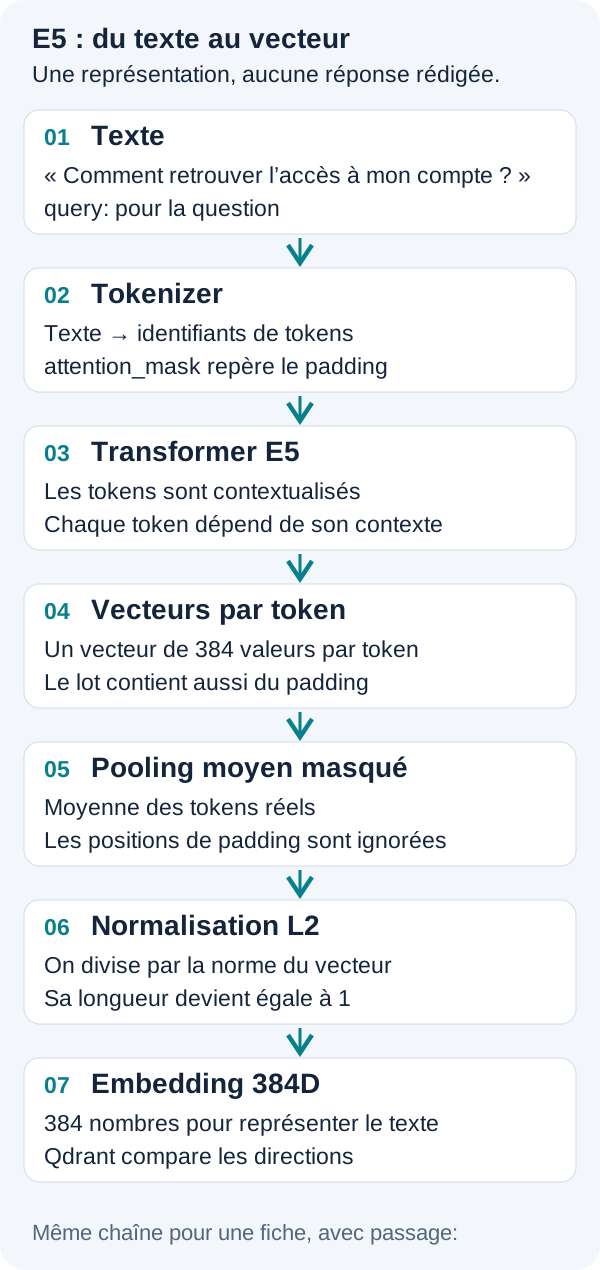
1. State the role of the text
A question starts with query: . An article starts with passage: . These prefixes stay in English, even when the content is in French.
For our running example, E5 therefore receives the question as query: Comment retrouver l'accès à mon compte ?. The article is prefixed with passage: before encoding.
The prefix does not translate the text. It indicates its role: an expressed need on one side, content to retrieve on the other. The official multilingual E5 model card at the revision used presents this convention and its encoding example.
2. Turn texts into tokens and prepare a batch
The tokenizer splits text into units recognized by the model, then replaces them with numerical identifiers, input_ids. A token may represent a word, part of a word, or a symbol. Its splitting is therefore not BM25's splitting.
The program handles texts in batches of up to 16. To calculate sequences of different lengths together, it extends them to a shared width. This is padding.
The model also receives an attention_mask. For example, [1, 1, 0] means the first two positions are valid and the third is padding. This lets it distinguish text from positions added for batch calculation.
3. Obtain a representation for every position
The Transformer, the model architecture, calculates a vector for every text position while taking its context into account. The intermediate result is called last_hidden_state in the code.
We do not yet have one vector per article, but one vector per position. The word hidden in “hidden state” simply means an internal model representation, not secret information.
This is not a dictionary that replaces a word with its synonym. Relationships between phrasings come from the model's earlier training. That can bring some texts closer, but it still does not guarantee they answer the same need.
4. Go from several vectors to one: masked averaging
We now need one representation for the whole text. Pooling is the operation that gathers position representations into a single vector. Here, we calculate a coordinate-by-coordinate average while excluding padding.
Take an educational example with two coordinates, much smaller than real E5 vectors:
Première position valide : [2, 4]
Deuxième position valide : [4, 4]
Position de remplissage  : ignorée
Masque                   : [1, 1, 0]

Somme des positions valides : [2 + 4, 4 + 4] = [6, 8]
Nombre de positions valides : 2
Moyenne                    : [6 / 2, 8 / 2] = [3, 4]
At this stage, the mask does two things: it sets the contribution of padding positions to zero and counts valid positions for the division. We therefore obtain the average for the text, not for an artificially extended text.
With E5, the same principle applies to all 384 coordinates. No individual coordinate should be interpreted as a business label such as “talks about billing”.
5. Normalize the vector to compare its direction
L2 normalization brings the vector's mathematical length, called its norm, to 1. This length is not the number of coordinates: a vector remains 384D after normalization.
In our two-coordinate example, [3, 4] has a norm of 5 because 3² + 4² = 25. Dividing the coordinates by 5 gives [0.6, 0.8].
Why do this? We want to compare vector direction rather than magnitude. The dot product multiplies corresponding coordinates of two vectors, then adds those products. When both vectors have a norm of 1, that result is their cosine similarity.
A high value indicates proximity in the learned space. It is not the probability that the article answers the question. Similarity must be checked against the content and the annotation, especially when several procedures discuss the same theme.
Read the code, then find each step
"""E5 sur un seul GPU CUDA ; les poids sont acquis séparément."""
import os
import torch
from transformers import AutoModel, AutoTokenizer


class Encoder:
    def __init__(self):
        if not torch.cuda.is_available():
            raise RuntimeError(
                "GPU CUDA requis ; vérifier GPU_DEVICE et NVIDIA Container Toolkit"
            )
        torch.manual_seed(42)
        torch.set_num_threads(4)
        directory = os.environ.get("MODEL_DIR", "/models/e5")
        self.tokenizer = AutoTokenizer.from_pretrained(
            directory, local_files_only=True
        )
        self.model = (
            AutoModel.from_pretrained(directory, local_files_only=True)
            .to("cuda")
            .eval()
        )

    def encode(self, texts, kind):
        if kind not in ("query", "passage") or not texts:
            raise ValueError("Préfixe query/passage et liste non vide requis")
        vectors = []
        for offset in range(0, len(texts), 16):
            batch = self.tokenizer(
                [kind + ": " + text for text in texts[offset:offset + 16]],
                padding=True,
                truncation=False,
                return_tensors="pt",
            )
            if batch["input_ids"].shape[1] > 512:
                raise ValueError("Texte dépassant 512 tokens : découpez le document")
            batch = batch.to("cuda")
            with torch.inference_mode():
                hidden = self.model(**batch).last_hidden_state
                mask = batch["attention_mask"].unsqueeze(-1).bool()
                pooled = hidden.masked_fill(~mask, 0).sum(1) / mask.sum(1)
                normalized = torch.nn.functional.normalize(pooled, p=2, dim=1)
            if not torch.isfinite(normalized).all():
                raise ValueError("Embedding non fini")
            vectors.extend(normalized.cpu().tolist())
        return vectors
The constructor checks CUDA, sets the seed to 42, limits CPU threads to 4, and loads the tokenizer and model from MODEL_DIR. local_files_only=True prevents an implicit download. The model is placed on the GPU with .to("cuda").
The .eval() and torch.inference_mode() calls have complementary roles. The first sets the model's behaviour for evaluation. The second disables gradient-tracking mechanisms needed for training. The PyTorch documentation for inference_mode explains that one does not replace the other. Here, we encode texts; we do not update any weights.
In encode, the list built with kind + ": " + text adds the prefix. The tokenizer prepares identifiers and the mask, then batch.to("cuda") sends this data to the GPU.
The central passage exactly matches the calculation explained above: hidden holds position representations; unsqueeze(-1) adds an axis to the mask so it applies to coordinates; masked_fill cancels padding's contribution; .sum(1) adds positions; division calculates the average; normalize fixes the vector norm.
Finally, torch.isfinite rejects invalid values such as infinity or NaN before sending them to Qdrant. normalized.cpu().tolist() brings results back as ordinary Python lists.
An explicit limit instead of silently cutting text
The tokenizer uses truncation=False. If the tokenized batch exceeds 512 positions, the program rejects the text before the Transformer calculation and asks you to split the document. The check applies to the tokenized sequence, including the prefix and tokens added by the tokenizer.
This prevents part of an article from silently disappearing before encoding. Do not confuse this limit with the 2,048 characters used for lexical validation: they are two checks expressed in two different units.
The encoder is expected to return a list of finite vectors of length 384, never generated text. Articles are encoded as passages before indexing; the question is encoded as a query when searching. The multilingual E5 model card completes this overview.
Storing and searching vectors with Qdrant
E5 has just calculated numbers. We now need to store them and retrieve those that resemble a question vector. That is Qdrant’s role in this tutorial.
To picture the storage, imagine a record with three elements: the article identifier, its vector, and its JSON content. Qdrant calls this record a point and the set of these points a collection. The table analogy can help you find your bearings, but search here is based on vector proximity.
The content associated with a vector is called the payload. It retains the article’s ID, reference, and text so they can be displayed after the search. The payload does not calculate the embedding: E5 has already produced it in Python.
What indexing must guarantee
The following extract comes from the VectorStore class. It includes only the index and search methods, not the full class or its HTTP communication methods.
Indexing requires one vector of dimension 384 per article. It creates a collection configured with distance: Cosine, then adds the articles and their vectors. If the collection already exists, it refuses to continue: this prevents the walkthrough from confusing a new indexing operation with state left by a previous one.
    def index(self, documents, vectors):
        if len(documents) != len(vectors) or any(
            len(vector) != 384 for vector in vectors
        ):
            raise ValueError("Un vecteur de dimension 384 par document est requis")
        self.ready()
        path = "/collections/" + self.collection
        exists = self.request(path + "/exists")["result"]["exists"]
        if exists:
            raise ValueError(
                "Collection existante : arrêter le projet avant une nouvelle indexation"
            )
        self.request(
            path,
            {"vectors": {"size": 384, "distance": "Cosine"}},
            "PUT",
        )
        if documents:
            points = [
                {"id": doc["id"], "vector": vector, "payload": doc}
                for doc, vector in zip(documents, vectors)
            ]
            self.request(path + "/points?wait=true", {"points": points}, "PUT")
        return self.request(path)["result"]

    def search(self, vector, limit=10):
        body = {
            "query": vector,
            "limit": limit,
            "with_payload": True,
            "params": {"exact": True},
        }
        result = self.request(
            "/collections/" + self.collection + "/points/query", body
        )["result"]["points"]
        return sorted(
            [(row["id"], row["score"]) for row in result],
            key=lambda row: (-row[1], row[0]),
        )
In index, the first check verifies both the number of vectors and their dimension. self.ready() comes before the service calls. The request to /exists checks for a collection, and creation states the expected dimension and proximity measure.
Each item in points then associates an id, vector, and payload. The wait=true parameter asks to wait for the write operation to be applied. After indexing, the collection must contain 16 points.
Run this step:
docker compose run --rm --no-deps app -m src.cli index
Open outputs/index.json. It states the number of points, the dimension, and the CUDA device. The collection should be created only once per project start. To rebuild it, stop the project, restart Qdrant, and index again.
“Exact search” does not mean “a correct answer is guaranteed”
In search, query contains the question vector. limit sets the maximum number of requested neighbours. with_payload: True asks to include their data; this extract then reduces the results to (id, score) pairs for ranking.
The exact: True setting requests an exhaustive neighbour search rather than an approximate one. The Qdrant Search documentation explains the distinction.
The word exact therefore concerns the calculation of neighbours using the selected vectors and measure. It does not mean that Qdrant verifies whether the retrieved procedure is correct. An exactly calculated neighbour can still be an irrelevant article for our user.
Now run the dense route:
docker compose run --rm --no-deps app -m src.cli dense
Read the neighbours and their cosine scores in outputs/dense.json. For the running example, the r3 top 5 is [0, 1, 8, 2, 14]: the expected article, ID 0, comes first, compared with fifth place in BM25.
Its measured cosine score is 0.8599599. This does not mean “an 85.99599% chance that the answer is correct.” The useful result is that the article annotated as relevant is at the top, and that you can reread its text.
A pause: how should we combine these two lists?
Here are the first five articles from each route for the same question. Top 5 simply means “the first five positions in the ranking.”
| Rank | BM25 | E5 / Qdrant |
|---|---|---|
| 1 | ID 15 · REF-115 Removing a team member removes their access to the project but retains their shared documents |
ID 0 · REF-100 Reset the account password |
| 2 | ID 1 · REF-101 Change the account email address from the profile |
ID 1 · REF-101 Change the account email address from the profile |
| 3 | ID 8 · REF-108 Enable two-factor authentication |
ID 8 · REF-108 Enable two-factor authentication |
| 4 | ID 9 · REF-109 Close all active sessions from Security |
ID 2 · REF-102 Download a PDF invoice from Billing, then Payment History |
| 5 | ID 0 · REF-100 Reset the account password |
ID 14 · REF-114 Invite a member to a team |
E5 puts password reset first. BM25 instead puts an article about removing a team member first, which also mentions access. The two searches use the same corpus, but they do not value the same signals.
We might be tempted to add their scores together. The problem is their scale: a BM25 sum and a cosine score are not two marks calculated on the same scale. Adding them directly would introduce an arbitrary weight between the methods.
The two lists do, however, share an easy-to-read piece of information: rank. First, second, third… We will use that position to combine them.
RRF: merging without converting scores
RRF, or Reciprocal Rank Fusion, is a rank-based merge. Imagine two rankings proposed by two evaluators: we award points to articles according to their position in each one, then add those points together.
RRF reads neither the text nor the embeddings. It does not convert a BM25 score into a cosine score, and it does not learn to recognise the expected procedure. It applies an arithmetic rule.
One contribution per observed rank
For an article at rank rang in a list, the contribution is:
1 / (k + rang)
Ranks start at 1. The constant k softens the gaps between positions. With a large k, the first ranks make fairly similar contributions. With a small k, the very first places carry more weight.
For an article d, we add the contributions from the rankings in which it appears:
RRF(d) = Σ 1 / (k + rang_i(d))
The symbol Σ simply means “add them up.” An article absent from a list receives 0 for that list. We do not invent a rank for it at the end.
Reworking the calculation for our two account articles
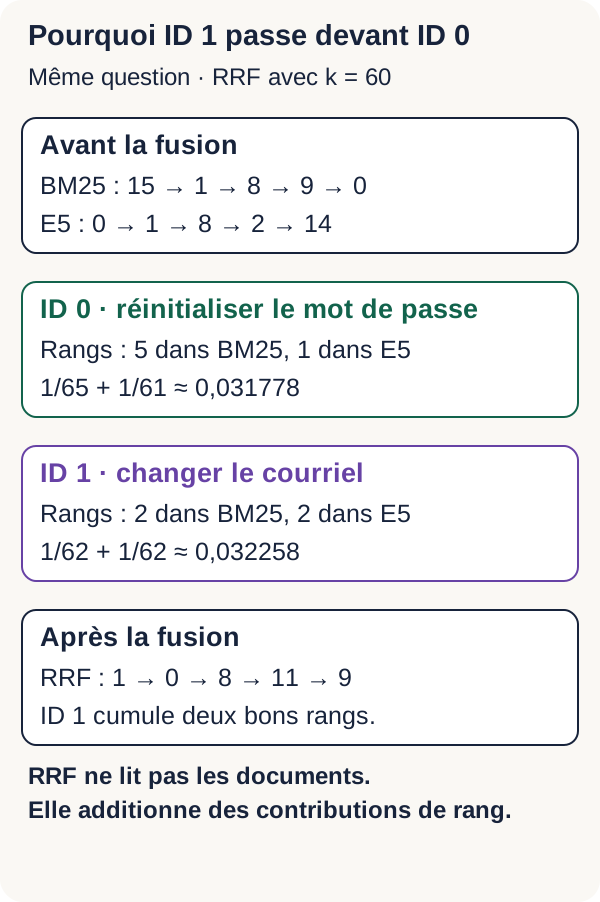
The walkthrough uses k=60. For ID 0, the positions are 5 in BM25 and 1 in dense search:
RRF(ID 0) = 1/65 + 1/61 ≈ 0,031778
For ID 1, the position is 2 in both lists:
RRF(ID 1) = 1/62 + 1/62 ≈ 0,032258
ID 1 therefore moves ahead of ID 0. Agreement on two second places brings slightly more than one first place combined with a fifth place. The calculation is correct, but it does not know our annotation: “change the email address” remains a different intent from “regain access to my account.”
An RRF score is a sum of contributions, not a probability. The Elasticsearch documentation on RRF also illustrates this formula. It is a reference for the mechanism here; we do not install Elasticsearch and keep the ZIP’s Python implementation.
Reading the merge in the code
"""Reciprocal Rank Fusion (RRF), rangs commençant à 1."""
import math


def reciprocal_rank_fusion(rankings, k=60):
    if not isinstance(k, (int, float)) or not math.isfinite(k) or k < 0:
        raise ValueError("k doit être fini et positif ou nul")
    scores = {}
    for ranking in rankings:
        seen = set()
        for rank, (document_id, original_score) in enumerate(ranking, start=1):
            if document_id in seen or not math.isfinite(original_score):
                raise ValueError("Classement avec doublon ou score non fini")
            seen.add(document_id)
            contribution = 1.0 / (k + rank)
            scores[document_id] = scores.get(document_id, 0.0) + contribution
    return sorted(scores.items(), key=lambda row: (-row[1], row[0]))
The outer loop iterates over the rankings. enumerate(..., start=1) provides the ranks, then contribution calculates the points. The scores dictionary accumulates contributions for the same ID across lists.
By contrast, seen prevents the same ID from being counted twice within a single list. Non-finite scores are rejected. The function also checks that k is finite and non-negative, which allows the experiment with k=0 later.
Note the limited role of original_score: it rejects a non-finite value, but does not enter the formula. If only score values change, without changing the order or candidates in either list, the merge remains identical. The final sort orders contributions from highest to lowest, using ascending ID as a tiebreaker.
Run the comparison:
docker compose run --rm --no-deps app -m src.cli compare
Open outputs/compare.json before drawing a conclusion. A merge can stagnate or regress if its candidates are poor, if one route was already very good, or if k does not match the trade-off you are looking for.
| Route | First five IDs | Rank of expected article ID 0 |
|---|---|---|
| BM25 | 15, 1, 8, 9, 0 | 5 |
| E5 + Qdrant | 0, 1, 8, 2, 14 | 1 |
| RRF | 1, 0, 8, 11, 9 | 2 |
The merge raises ID 0, “Reset the account password,” from lexical rank 5 to hybrid rank 2. It nevertheless pushes it back compared with dense rank 1. ID 1, “Change the email address,” comes first because of its two second places.
One detail deserves a pause: ID 11 appears in RRF’s first five even though it does not appear in the two top 5 lists shown above. RRF does not create identifiers. According to its code, an ID can appear in the merge only if it was present in at least one received list. The five displayed rows are therefore not enough to reconstruct all of its inputs. To reproduce the full ranking, inspect the lists actually passed through the walkthrough and the comparison outputs rather than merging only the table’s five items.
The lesson is not “hybrid works badly.” It is more precise: this merge improves one route and degrades the other for this question. We must now check what happens across the evaluation set.
Negative cases
Before measuring relevance, let us verify the errors the system must handle. A negative case is a test in which we deliberately present an empty or invalid situation and check the expected behaviour.
An empty collection must produce an empty list. Text exceeding 512 tokens must be rejected after tokenization, before the Transformer calculates representations. Qdrant must also reject a vector whose dimension is not 384.
This last check resembles an API contract: we have declared a structure, and an incompatible input must not be silently accepted. These tests verify correct technical behaviour; they do not yet measure article relevance.
docker compose run --rm --no-deps app -m src.cli negatives
The three indicators in outputs/negatives.json must be true before continuing. An expected error that is correctly rejected is a successful test here, not a failure of the tutorial.
Measuring the three routes
We have lists. How do we judge whether they are useful? A similarity score is not enough: we must compare the retrieved identifiers with the expected articles.
The evaluation rules are defined before reading the results. The 12 questions with a relevant article are included in the relevance averages. The two out-of-corpus questions are counted separately.
Why separate them? For a question with no relevant article, recall would have a zero denominator. Automatically assigning it a score of 0 would mix two problems: ranking an answer that exists badly, and knowing when to abstain when one does not. Here, we keep a dedicated counter for questions with no relevant answer and results that were nevertheless returned.
Recall@5: finding relevant articles
Recall@5, or recall at five results, answers this question: “Among all expected articles, how many did I retrieve in the first five?”
The formula is:
|top5 ∩ pertinents| / |pertinents|
The intersection ∩ retains identifiers present in both sets. The bars |…| count their elements.
In our set, every evaluable question has a single relevant article. If it is at rank 4, recall is 1; if it is absent from the first five, recall is 0. A high value therefore indicates that the useful article is generally visible in the top 5.
Note: Recall@5 does not distinguish ranks 1 and 5. Nor does it measure the proportion of good articles among the five displayed. A list containing one good article and four bad ones can have recall 1 if that good article was the only one expected.
MRR@10: placing the first answer
MRR@10, or Mean Reciprocal Rank, looks at the position of the first relevant article among the first ten results.
For one question, we take the inverse of that rank: 1 at rank 1, 1/4 = 0,25 at rank 4, and 0 if no relevant article is in the first ten. The set’s MRR is then the average of these values, calculated question by question.
A high value means that the user quickly finds a first useful article. This metric does not reward other relevant articles that come after the first when there are several.
nDCG@10: ordering useful answers
nDCG@10, or normalized Discounted Cumulative Gain, asks a slightly broader question: “Are my useful articles placed as well as they could be?”
With our binary relevance, every relevant article provides a gain that decreases with its rank. At rank r, this gain is 1 / log2(r + 1). We add the gains in the first ten positions, then divide by the gain of the best possible ranking. log2 is the base-2 logarithm; the key point is that it makes the gain decrease as rank increases.
With one relevant article, the ideal ranking puts it at rank 1 and has a value of 1. At rank 2, its gain is 1 / log2(2 + 1) ≈ 0,63093. An article absent from the top 10 contributes nothing.
A high value means that useful articles are concentrated at the top. Unlike MRR, nDCG can value several well-placed relevant articles. This corpus has only one per evaluable question, but the code keeps the general definition.
Applying the three rules to our running question
Let us return to the ranks already observed: 5 for BM25, 1 for E5/Qdrant, and 2 for RRF. The following table is an application of the formulas to these ranks, not a new GPU run or the average for the evaluation set.
| Route, for the running question only | Rank of ID 0 | Recall@5 | Contribution to MRR@10 | nDCG@10 |
|---|---|---|---|---|
| BM25 | 5 | 1 | 0.2 | 0.386853 |
| E5 + Qdrant | 1 | 1 | 1 | 1 |
| RRF | 2 | 1 | 0.5 | 0.630930 |
All three routes have the same recall: each retrieves the correct article in the first five. Yet they do not offer the same reading experience. MRR and nDCG make that difference visible.
Checking what the functions actually count
"""Pertinence binaire ; les requêtes sans pertinent sont traitées séparément."""
import math


def ranking_metrics(ids, relevant):
    if len(ids) != len(set(ids)):
        raise ValueError("Identifiants dupliqués")
    relevant = set(relevant)
    if not relevant:
        return None
    hits = [
        rank
        for rank, identifier in enumerate(ids[:10], 1)
        if identifier in relevant
    ]
    ideal = sum(
        1 / math.log2(rank + 1)
        for rank in range(1, min(10, len(relevant)) + 1)
    )
    return {
        "recall_at_5": len(set(ids[:5]) & relevant) / len(relevant),
        "mrr_at_10": 1 / hits[0] if hits else 0.0,
        "ndcg_at_10": sum(1 / math.log2(rank + 1) for rank in hits) / ideal,
    }


def summarize(rows):
    result = {}
    for route in ("lexical", "dense", "hybrid"):
        scored = [
            ranking_metrics(
                [hit[0] for hit in row["routes"][route]], row["relevant"]
            )
            for row in rows
        ]
        valid = [score for score in scored if score is not None]
        if not valid:
            raise ValueError("Aucune requête évaluable")
        result[route] = {
            key: sum(score[key] for score in valid) / len(valid)
            for key in valid[0]
        }
        result[route]["evaluated_queries"] = len(valid)
        result[route]["no_relevant_queries"] = len(rows) - len(valid)
        result[route]["no_relevant_with_results"] = sum(
            bool(row["routes"][route])
            for row in rows
            if not row["relevant"]
        )
        result[route]["mean_search_ms"] = (
            1000 * sum(row["seconds"][route] for row in rows) / len(rows)
        )
    return result
ranking_metrics receives ranked IDs and relevant IDs. It rejects duplicates in the result list. If there is no relevant article, it returns None, rather than an artificial score.
hits contains relevant ranks among the first ten. ideal calculates the best possible gain by placing up to ten relevant articles first. The return dictionary then applies the three formulas: intersection in the first five, inverse of the first relevant rank, then normalized gain.
summarize repeats this calculation for each question and each of the lexical, dense, and hybrid routes. For relevance averages, it excludes only None returns. A numeric score of 0 is still included. This distinction prevents failed searches from disappearing.
The evaluated_queries, no_relevant_queries, and no_relevant_with_results fields show how many questions were evaluated, how many had no relevant article, and how many of those still received results.
By contrast, mean_search_ms uses all rows, therefore all 14 questions, including the two out-of-corpus ones. Do not give it the same denominator as the relevance metrics.
Run the evaluation:
docker compose run --rm --no-deps app -m src.cli evaluate
If an average surprises you, return to the lists question by question. The average summarises behaviours; it does not explain them by itself.
Understanding the timer before comparing durations
The latencies below are averages in milliseconds across the 14 questions, after a warm-up pass excluded from measurements. Warm-up is an initial use intended to avoid mixing calculation start-up with the measured searches. Model loading is also excluded.
Dense duration includes question encoding and the call to Qdrant. It is therefore not only time spent in the vector database. Hybrid duration adds the lexical, dense, and merge steps, run sequentially in this walkthrough.
The two time values on each row correspond to the two r3 reproductions on the same machine. They do not set a speed target for your computer and do not describe a web application under load.
r3 results
| Method | Recall@5 | MRR@10 | nDCG@10 | Mean latency (ms), 1 / 2 |
|---|---|---|---|---|
| BM25 | 0.833333 | 0.777778 | 0.791667 | 0.067 / 0.059 |
| E5 + Qdrant | 1.000000 | 0.825000 | 0.867053 | 6.613 / 5.749 |
| RRF | 0.916667 | 0.802778 | 0.847993 | 6.695 / 5.820 |
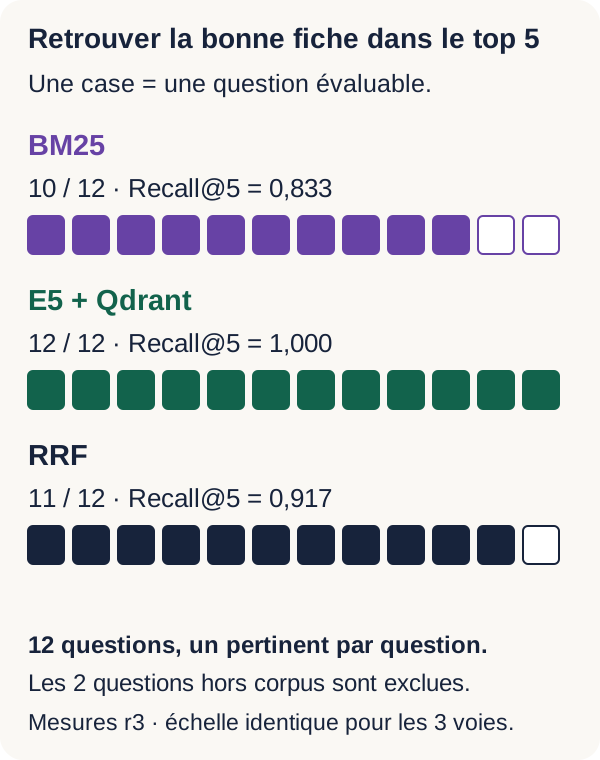
These measurements come from two r3 reproductions on the same RTX 3090 GPU and the same machine. The dense route performs better on this set’s three relevance metrics. RRF improves BM25 but remains below E5 alone.
Recall reads very concretely: BM25 retrieves the correct article in the first five for 10 questions out of 12; E5 for 12 out of 12; RRF for 11 out of 12. E5’s 1,000000 does not mean “the correct article is always first.” Its MRR of 0,825000 is a reminder that it does not consistently hold that rank.
How can the merge have a lower Recall@5 than E5 when it receives candidates from both routes? Adding candidates does not guarantee their place in the first five. An article in the dense list can be pushed lower after merging. Recall at a given depth depends as much on retained candidates as on their new order.
All three routes nevertheless return results for the two out-of-corpus questions. The tutorial therefore cannot decide that no article answers them. Having a “best available result” does not mean having a relevant answer.
Combining several methods does not guarantee an improvement: the hybrid architecture must be evaluated. This observation concerns this corpus, this model, and this configuration. It does not predict results on other documents, other GPUs, or unannotated questions.
What we have learned
BM25: using vocabulary
BM25 observes terms shared by the question and the articles. Frequency provides a signal, with saturation; IDF values rare terms; length correction avoids mechanically favouring long texts.
An exact reference can be discriminating, but the chosen lexical segmentation must also be understood. BM25 produces no embedding and does not directly measure proximity learned by a neural network.
E5: representing texts
E5 uses prior training to turn texts into vectors. The query: and passage: prefixes indicate their role. The tokenizer prepares inputs, the Transformer produces position representations, masked averaging gathers those representations, and normalization fixes the vector norm.
Different formulations can therefore become close. This proximity is a signal to check, not a guarantee that the texts answer the same need.
Qdrant: retrieving neighbours
In this tutorial, Qdrant receives vectors already calculated by E5. It stores them with identifiers and metadata, then finds neighbours for the question vector. Python coordinates these operations.
The vector database does not decide business relevance or write an answer. Its exact-search option concerns neighbours, not the truth of the retrieved content.
RRF: combining ranks
RRF neither reads documents nor calculates embeddings. It assigns a contribution to every observed rank, then adds the contributions for the same ID.
Two engines with incomparable scores can therefore contribute to the same merge. In return, RRF knows neither the difference in meaning between two articles nor why one engine placed one ahead of another.
Hybrid: a hypothesis to measure
On this small corpus, the merge improves BM25 but remains worse than E5 alone on all three metrics. Combining several methods does not guarantee an improvement.
To choose an architecture, test it against your documents, your queries, explicit annotations, and your latency constraints. The experiment teaches us a comparison method, not a universal rule about the best engine.
Exercise: changing the question and k
We will now act on two elements: the wording of the question and RRF’s k parameter. The aim is to separate their effects rather than change everything at once without knowing what mattered.
Predict. Before running the command, write down your hypothesis for “I forgot my password.” Which article should BM25 favour? Should E5 suggest the same first result? As k decreases, how important do the first positions become? Must a change in k necessarily change the final order?
Also do this small calculation by hand: merge the educational lists A=[0,1] and B=[1,2], first with k=60, then with k=0. These are simplified lists, distinct from the measured rankings in the running example.
Write down each ID’s contributions before sorting. ID 0 appears only in A, ID 2 only in B, and ID 1 in both lists. An absent item receives 0 for the relevant list; even with k=0, ranks start at 1, so the formula does not divide by zero.
Modify, then run. The r3 project’s exercise stage replaces the running question with the new wording. It then calculates the usual merge and a second merge with k=0. These changes are already implemented in src/cli.py: you do not need to modify the code for this exercise.
docker compose run --rm --no-deps app -m src.cli exercise
Observe. outputs/exercise.json contains the question, the three lists in routes, and the extra merge in hybrid_k0. Note the rank of ID 0 and the first five IDs in both merges.
First compare the results for this new question with outputs/compare.json to explore the effect of rewording. Then compare routes.hybrid and hybrid_k0 in the same exercise.json to isolate the effect of k for an identical question.
Explain. Compare your observations with the prediction and justify at least one position through rank contributions. If scores change but the order remains identical, that is also a valid result: a parameter can alter the gaps without reversing positions.
The solution to the manual calculation and the answer criteria are in lesson/SOLUTIONS.md. Observations that file explicitly calls r2 are historical. For your r3 run, use the outputs in your outputs/ directory.
Your own experiment: rewording a single article
This time, we will modify the document rather than the question. This experiment is offered to the reader; its results are not part of the r3 measurements published above.
Keep a copy of your reference outputs. In your own extracted ZIP, reword only the text of ID 0 in data/corpus.json. For example, you can introduce the word “access” into the description of the same procedure.
Keep the ID, reference, procedure, and annotations. Change neither the question nor k. We want to study a change in wording, not move the expected result or transform several elements at once.
Before making the change, predict separately the possible effect on BM25, E5, and RRF. Which shared term might BM25 now find? What do you expect of the representation produced by E5? How could a rank change in one route affect the merge? The three methods do not have to change order.
Watch out for the build: the corpus is copied into the Docker image. Changing the file on your computer is therefore not enough to change the one used by a previously built container.
Stop this project with the cleanup command given below, rebuild the image, then repeat the commands already presented: start and prepare Qdrant, run BM25, index, run dense search, and compare. The temporary collection will be recreated with your new documents.
Compare lexical.json, dense.json, and compare.json with their reference copies. Explain the differences without assuming an improvement. If you later expand the corpus or change the annotations, evaluate again: the reference figures no longer describe your new experiment.
From the tutorial to a real application
You now have an educational engine, not yet an application ready to receive business documents. For a web developer, the next step includes surrounding search with explicit contracts and services.
Documents and their lifecycle. You need to plan ingestion for your formats, their cleaning, and splitting them into passages, called chunking. Every passage must retain a link to its source. Addition, modification, deletion, and reindexing must remain consistent, with persistent storage, backups, and a tested restoration. The tutorial’s temporary collection does not provide these functions.
Permissions and search behaviour. Authentication, authorization, and isolation of users or organisations must apply to documents in both routes. Retrieving an article does not grant the right to view it. You must also define filters, pagination, and behaviour for an out-of-corpus question. Our two unanswered questions show that this last decision is not yet handled.
Operations and evaluation. An API, useful logs, error and latency tracking, monitoring, and load tests complete the service. For relevance, you need real documents, real queries, reviewed annotations, and error analysis. Every corpus, model, or setting change must be comparable with a baseline to detect regressions.
docs/PRODUCTION_GAPS.md details the project’s limitations. These additions depend on the need; they are not all necessary to understand the mechanism studied here.
If something goes wrong
The right reflex is to correct the step that fails rather than silently replace the model, remove a check, or continue with an incomplete index.
| Symptom | Likely cause | Check | Correction |
|---|---|---|---|
Preflight fails even though nvidia-smi works |
GPU not exposed to Docker | Read the preflight’s Docker GPU diagnostic | Correct the NVIDIA Container Toolkit configuration and rerun preflight. |
| The local model is missing | Incomplete acquisition | Read the error and check models/e5 |
Run the acquisition command again; already valid files are checked and reused. |
| Acquisition stops | Network, disk space, or integrity check | Read the fetch error and preflight disk diagnostic |
Correct the cause and run acquisition again, without removing SHA-256 checks. |
| Qdrant remains unavailable | Service not started | Check that the Qdrant start step completed | Resume starting this project’s service before indexing. |
| Text exceeds 512 tokens | Document too long for the walkthrough | Read the encoder’s explicit error | Split the document and rebuild your experiment; do not silently truncate the text. |
| Indexing rejects the collection | Collection already created in the active project | Read the Collection existante error |
Stop this project with the cleanup command, restart Qdrant, then index again. |
| Dense search fails on the dimension | Vector differs from 384D | Check the output and Qdrant contract | Re-encode with E5 R3; do not truncate the vector. |
| Metrics are surprising | Annotation, rank, or route misunderstood | Read the per-query lists before the average | Check the corpus and annotations, then rerun the evaluation. |
When you are finished, stop only this project’s services from the root of this extraction:
docker compose down
This command removes the project’s containers and network. Models and outputs mounted on the host remain available, but the temporary Qdrant collection disappears. To search again after a clean restart, you will therefore need to index it again.
The command does not purge your other Docker projects. Keep output files as long as you want to compare rankings or continue the analysis.
Going further
You can extend the walkthrough by replacing the fictional articles with your documents and annotating your questions. Another experiment is to add consistent document filters to both routes, or compare another embedding model on the same evaluation set.
A fourth path is to add a reranker after retrieval. Our engine can now find candidates. A reranker is an extra stage that re-examines the best candidates to reorder them with a specialised model. That is not what RRF does: RRF combines positions already calculated without rereading content.
Evaluate these extensions separately while retaining your comparison point. Reranking will be the subject of another tutorial; it is not needed to complete this one.
You now have a chain whose decisions can be examined: terms, vectors, neighbours, then rank contributions. The right question is no longer “does my engine use AI?”, but “does it retrieve the expected article, at which rank, and how can I explain it?”