





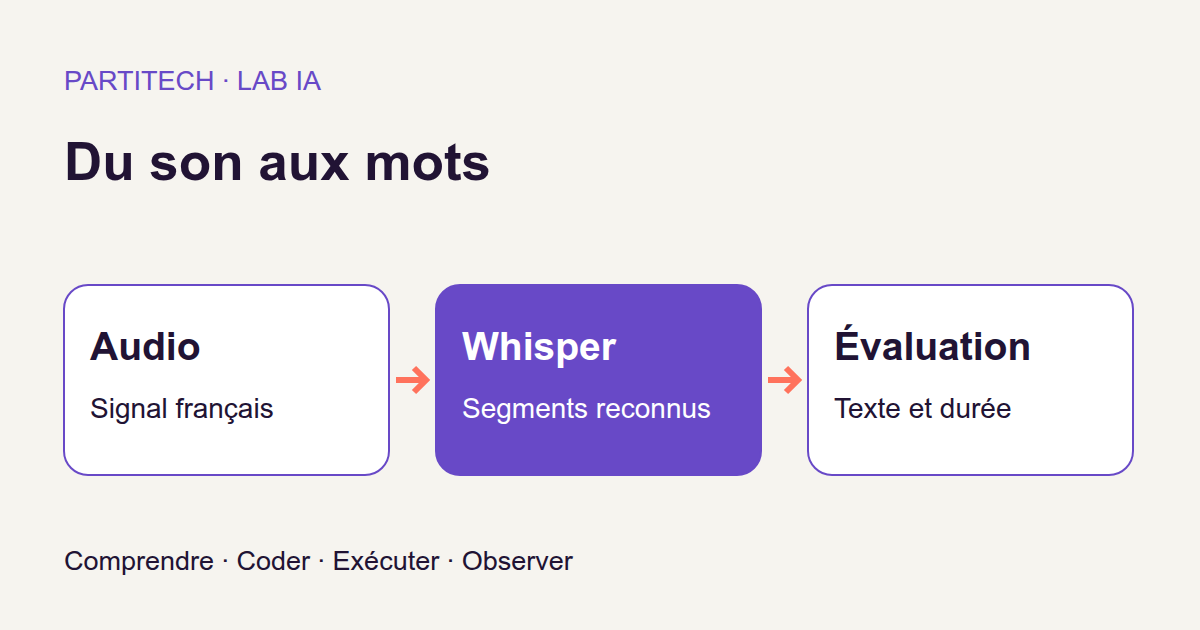
Imagine a fairly common web application feature: someone uploads an audio recording and wants its text, together with subtitles. You already know how to receive a file, run a process, and return a result. The new part is turning speech into words without sending the recording to an external service.
You could simply call a model and display its response. But how do you know whether the text matches what was said? What should happen when a subtitle extends beyond the end of the audio? And what exactly does “transcribing faster than real time” mean?
In this tutorial, we will build a local pipeline with Python and Docker, then answer these questions through code and observations. It transcribes 20 French clips from the FLEURS dataset using faster-whisper and a Whisper model converted for CTranslate2, on a CUDA GPU. By the end, you will have outputs/transcription.json, 20 SRT files, and an outputs/evaluation.json report.
The web application scenario is our starting point: the archive provides command-line processing, not an upload form or production API. We will use an already trained model; no training is required to follow this workflow.
The complete project is available in the Download the complete tutorial project archive. The results presented come from two r3 reproductions of this archive in fresh directories. Small examples added to explain calculations are labeled as educational: they do not replace those measurements.
What you will build
From an uploaded file to a verifiable result
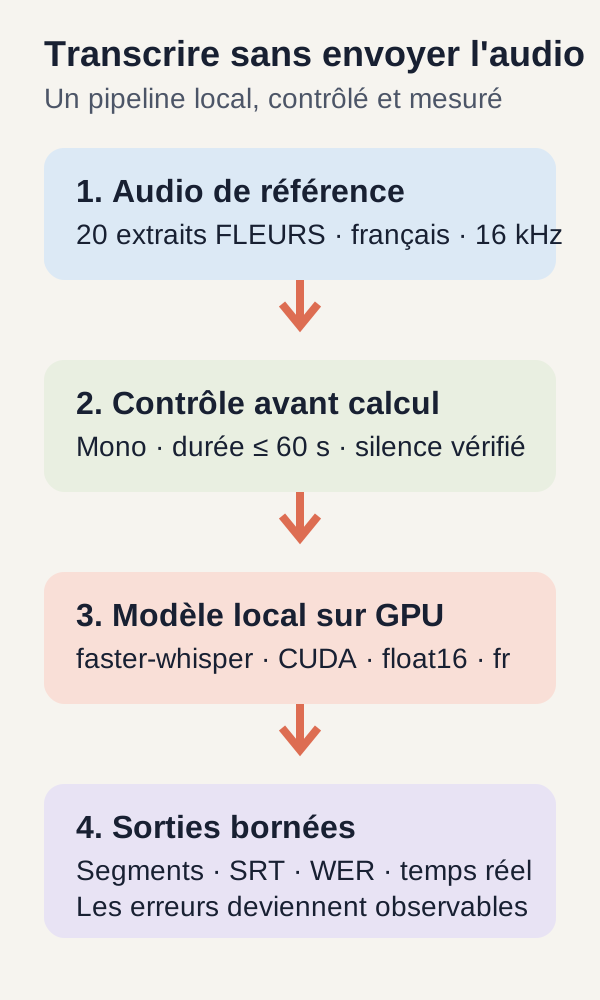
The program starts with a WAV file. It decodes it into a sequence of numerical values, prepares a mono signal at 16,000 samples per second, validates that signal, then calls the local model. The model returns pieces of text associated with start and end times: these are segments.
For a web developer, the structure is familiar: decode the input, validate its content, call a component, then serialize the response. The difference is that the recognition component can make mistakes even when every technical validation passes.
We will therefore retain two representations. The raw segments show what the transcription engine actually returned. A second list applies timing rules to produce SRT subtitles. Finally, the text is compared with a reference transcription, and computation time is expressed relative to audio duration.
Files to keep in view
| Output | What it lets you check |
|---|---|
outputs/prepared.json |
The 20 prepared clips and their durations. |
outputs/transcription.json |
Recognized text, raw and bounded segments, language, and measured durations. |
The 20 .srt files in outputs/ |
Subtitles you can open, review, and compare with the audio. |
outputs/evaluation.json |
Transcription errors, relative speed, and raw timestamp overruns. |
A subtitle file with better-bounded timestamps is not a more accurate transcription. Shortening a segment that extends past the end of the audio does not correct any words. This separation between recognition, presentation, and evaluation is the article's central theme.
Exact prerequisites
What you need to know
You should be able to read a Python function, work with lists and dictionaries, open JSON, and run Docker commands. No prior audio-processing knowledge is assumed: the necessary concepts will be explained when we use them.
The workstation intended for the experiment
The validated workflow targets Linux amd64, meaning the x86_64 architecture, with Docker Engine, the Docker Compose plugin, a working NVIDIA driver, nvidia-smi, and NVIDIA Container Toolkit. The latter lets Docker expose the selected GPU and required driver components to the container.
Inference runs exclusively on CUDA, the computing environment used here for the NVIDIA card, with the float16 numerical type. The project does not offer a CPU inference path. This does not mean the machine's processor never works: file preparation and the rest of the program still need it.
Only one card must be exposed to the container. On a multi-GPU machine, set GPU_DEVICE in the supplied .env file before the first run if card 0 is not the one you want. We do not distribute this transcription across multiple cards.
You need at least 20 GiB free on both the project disk and Docker storage, plus 12 GiB of available RAM. The container limits the application to 8 GiB of memory, 4 CPUs, 256 processes, and a 512 MiB /tmp. RAM is the machine's memory; VRAM, which we will observe in the results, belongs to the GPU.
These values are conditions checked by the script or container limits. They are not hardware minimums demonstrated for every CUDA card.
Check before downloading
After extracting the ZIP, move to the project root. The preflight is simply a preliminary check: it verifies Docker, Compose, the selected GPU, CUDA access from a container, RAM, and disk space. It installs nothing and does not reconfigure your machine.
./scripts/preflight.sh
On success, the last line reads PREFLIGHT=PASS. If the card is visible through nvidia-smi on Linux but missing in Docker, configure NVIDIA Container Toolkit using its official guide, then rerun the check.
Do not continue with a different GPU from the one you think you are using. A card visible on the host and a card actually accessible to the program inside the container require two separate checks.
Data before the model
A known reference, as in an automated test
To evaluate a transcription, you need to know what should have been written. That expected sentence is the reference. The model's text will be called the hypothesis: here, the word means not an opinion but the candidate transcription we compare with the reference.
The data/audio.json file describes exactly 20 files from the French FLEURS test split. A split is a subdivision of a dataset. Here, we use test files to observe an already trained model, not to teach it these sentences.
Each entry provides a stable identifier, a WAV filename, an audio sample count, and the reference sentence. Here is the first one:
{
  "id": 0,
  "file": "14682302550249108464.wav",
  "samples": 71040,
  "reference": "Le groupe Aerosmith a annulé les derniers concerts de sa tournée."
}
id lets you find the same clip in the outputs. file identifies its audio file. reference contains the expected text for evaluation. As for samples, it counts sound-signal values, not sentences or words.
Finding duration with a division
At 16,000 Hz, one second is represented by 16,000 values. The first file's duration is therefore:
71 040 / 16 000 = 4.44 seconds.
Watch out for a small terminology trap: in this entry, samples: 71040 counts audio samples. Later, samples: 20 in the preparation report counts the 20 corpus clips. The same English term refers to different units in these contexts.
The clips are the first selected entries from the FLEURS fr_fr test set. The FLEURS dataset card describes a corpus centered on read speech. Some sentences have several recordings, so distinct files in our selection may share the same reference.
This is enough to understand the pipeline, but not to represent every accent, meeting, background noise, proper name, or business-specific recording. Twenty files do not necessarily mean twenty independent, varied acoustic situations either.
Downloading the same model and data
The acquisition script downloads the Systran/faster-whisper-small model and FLEURS sources at pinned revisions. Model weights are numerical values learned during training. We load them for use, without changing them.
Every expected file is checked by size and SHA-256 fingerprint before use. The fingerprint acts as a content identity card: it verifies that we are working with the expected bytes. It says nothing about the accuracy of future transcriptions.
The public sources are FLEURS, under CC-BY-4.0, and Systran's faster-whisper-small, under MIT. Large files are not included in the archive: the first validated acquisition amounts to 835,707,397 bytes.
Installing, acquiring, and preparing the data
From the extracted archive's root, after choosing the GPU, run the following commands in order. They correspond to the start of the r3 workflow actually reproduced. Preflight is included again so this sequence can be followed from the beginning.
./scripts/preflight.sh
sh scripts/setup.sh
docker compose build
docker compose --profile acquisition run --rm --no-deps fetch
docker compose run --rm --no-deps app -m unittest discover -s tests -v
docker compose run --rm --no-deps app -m src.cli prepare
Understanding what each stage prepares
setup.sh creates directories and prepares permissions for the current user. docker compose build builds the pinned Python 3.12.13 image. The dependency lock installs, among others, faster-whisper 1.2.1, CTranslate2 4.8.2, and PyAV 18.1.0. These are the experiment's versions, not an invitation to replace them with the latest releases.
fetch explicitly acquires public resources. Among the project's services, it is the only one with the bridge network intended for acquisition. The application then runs on an internal Docker network, reads models/ read-only, and writes results to outputs/. Building the image and initially downloading resources may still require Internet access; audio processing itself is local.
In run commands, --rm removes the temporary container after execution; it does not delete files kept in mounted directories. --no-deps prevents other services from starting automatically. Arguments such as -m src.cli prepare are passed to the application's Python interpreter to run the requested stage.
Checking tests, then prepared data
The 18 public tests run before corpus inference. They cover audio validation, pinned acquisition, text normalization, Levenshtein distance, SRT bounds, and CUDA access, among other things. Their purpose is not merely to confirm that plausible text can be produced: they also verify the contracts we will rely on.
prepare decodes the 20 clips and writes outputs/prepared.json. This file should report samples: 20 and give each file's duration. For the first one, compare that duration with the 4.44-second calculation above.
Text output that looks correct does not, on its own, prove that the right model, GPU, or metric calculations were used. Technical checks and reviewing the result complement one another.
Useful concepts before reading the code
An audio signal is a sequence of numbers
After decoding, our audio is a numerical array. Mono means it contains only one channel. 16 kHz means it has 16,000 samples per second. Imagine a long series of regularly spaced measurements whose variations represent the sound signal.
This sampling rate is neither the number of spoken words, nor voice pitch, nor the model's numerical precision. When we discuss float16, the “16” concerns the representation of numbers used by the computing engine, not the recording's 16 kHz rate.
Before inference, the workflow rejects an empty signal, one that is still multichannel, one containing non-finite values, or one longer than 60 seconds. A non-finite value may be NaN, which represents an undefined numerical result, or an infinite value. The 60-second limit bounds this exercise; it is not a strategy for processing a long meeting.
Whisper, faster-whisper, CTranslate2: who does what?
Whisper is the model that learned to connect an audio signal with text. It produces text units called tokens, then segments associated with timestamps. A token can be part of a word: do not confuse it with the “word” counted by our evaluation metric.
faster-whisper is the Python library that drives this transcription. CTranslate2 is the engine that runs the model's computations. PyAV handles audio decoding. The Systran model card explains that these files are a conversion of Whisper small for CTranslate2: we are not building a new model from the 20 clips.
Inference simply means using an already trained model to obtain an output. Here, we transcribe French: we aim to write what is said, not summarize it or translate it into another language.
The experiment's settings, without unnecessary jargon
| r3 setting | What it means here |
|---|---|
language="fr" |
French is specified to the engine; we do not ask it to guess the language. |
device="cuda" |
The model runs on the NVIDIA GPU exposed to the container. |
compute_type="float16" |
The engine uses its half-precision computation mode. This is not an audio-format setting. |
beam_size=5 |
Decoding explores several candidate sequences instead of retaining only one path at each step. |
vad_filter=False |
Voice activity detection filtering is disabled. |
condition_on_previous_text=False |
Text from a previous audio window is not supplied as context to the next one. |
Think of beam search as exploring several sentence beginnings before selecting a continuation. beam_size=5 does not mean five final transcriptions will be returned or five GPUs used. Changing this parameter can affect cost and output; we keep its r3 value.
The condition_on_previous_text setting concerns windows processed within a transcription. It is not conversational memory linking the 20 files together. The documented faster-whisper 1.2.1 code details these parameters; the CTranslate2 documentation explains computation types.
A silence guard is not VAD
VAD, or voice activity detection, would identify portions of the signal containing speech. It is disabled in this workflow.
Instead, the code applies a much simpler rule: if the amplitude of the entire signal remains below a very low threshold, it returns an empty list before calling the model. This rule can detect almost perfect digital silence. It cannot distinguish speech, music, or noise once the threshold is exceeded. We will see exactly where it is applied.
Reading the core transcription code
Here is the program's core. We will read it as we would a validator and a business service: first the input contract, then component loading, and finally the call that produces the result.
"""Whisper local via CTranslate2, CUDA float16, paramètres historiques conservés."""
import numpy as np
import ctranslate2
from faster_whisper import WhisperModel


def validate_audio(audio):
    if (
        not isinstance(audio, np.ndarray)
        or audio.ndim != 1
        or not 0 < len(audio) <= 16000 * 60
    ):
        raise ValueError("Audio mono non vide, de60 secondes maximum à16kHz")
    if not np.isfinite(audio).all():
        raise ValueError("Audio non fini")


class Transcriber:
    def __init__(self):
        if ctranslate2.get_cuda_device_count() != 1:
            raise RuntimeError("Un unique GPU CUDA doit être exposé")
        self.model = WhisperModel(
            "/models/whisper",
            device="cuda",
            compute_type="float16",
            local_files_only=True,
            cpu_threads=4,
        )

    def transcribe(self, audio, guard_silence=True):
        validate_audio(audio)
        if guard_silence and float(np.max(np.abs(audio))) < 1e-5:
            return [], "fr"
        segments, info = self.model.transcribe(
            audio,
            language="fr",
            beam_size=5,
            vad_filter=False,
            condition_on_previous_text=False,
        )
        # The returned generator must be fully consumed before stopping the timer.
        rows = [
            {"start": s.start, "end": s.end, "text": s.text}
            for s in segments
        ]
        return rows, info.language
First contract: accepting a usable signal
validate_audio() requires a nonempty, one-dimensional NumPy array whose length does not exceed 16000 * 60, or 960,000 samples. At the intended 16 kHz rate, this corresponds to at most 60 seconds. np.isfinite(audio).all() then requires every value to be finite.
An array filled with zeros is not an empty array. It represents a duration of silence and passes these checks. By contrast, a Python list, a two-dimensional array, an array with no values, or a signal containing NaN is rejected.
There is an important nuance: this validator does not itself check the sampling rate. It receives only an array of numbers, without metadata telling it whether they represent 16,000 or 48,000 samples per second. Decoding and preparation must therefore have actually produced the expected 16 kHz mono signal.
Compare this with a monetary value received by an API: the number 100 does not reveal its currency. Similarly, an audio array's length is not enough to determine its duration without a sampling rate. The faster-whisper 1.2.1 decoder shows mono conversion and resampling; these operations precede the contract we are reading here.
Second contract: loading the intended model in the right place
The Transcriber.__init__() constructor checks that CTranslate2 sees exactly one CUDA GPU. This constraint concerns what is exposed to the container: the machine may physically have several cards.
It then loads the model from /models/whisper. The local_files_only=True setting prevents silently completing the model through a download during loading. If required files are missing, fix acquisition rather than expecting inference to retrieve them.
device="cuda" and compute_type="float16" preserve the chosen computation path. cpu_threads=4 sets the engine's CPU threads; it does not turn this execution into CPU inference.
Third contract: handling silence before recognition
In transcribe(), validation comes before any decision. The program then computes np.max(np.abs(audio)): the greatest absolute amplitude across the entire clip.
If this value is strictly below 1e-5, meaning 0.00001, and guard_silence is enabled, it immediately returns ([], "fr"). There is no call to self.model.transcribe() in this branch.
This is neither an average volume nor a speech detector. A single noise spike above the threshold is enough to prevent the guard from triggering. Conversely, speech whose samples all stayed below the threshold would be discarded. These are consequences of the rule written in the code, not additional r3 corpus measurements.
The pipeline can therefore correctly return an empty output for silence thanks to the controller, without the model recognizing anything. We will retain this distinction when interpreting the negative test.
Why convert segments into a list?
The segments result is a Python generator: its elements are produced as it is iterated over. Receiving this object does not mean all transcription work has finished.
Think of a database cursor: obtaining the cursor and reading all its rows are different operations. Here, the list comprehension fully consumes the generator and retains start, end, and text for every segment.
This is essential for timing. A timer around this call must not stop after merely creating the generator; consuming it fully lets us measure the clip's transcription through to completion. The official faster-whisper documentation highlights this behavior.
A warm-up pass runs on the first file before the 20 measurements. It prepares execution without contributing to the measured durations. Model loading is also excluded from the RTF we will calculate, though it remains part of the full time needed to run the workflow.
Running and reading the first transcription
docker compose run --rm --no-deps app -m src.cli transcribe
The command writes one object per clip to outputs/transcription.json and creates the 20 SRT files. Each object retains the joined text, raw segments, SRT segments, audio duration, inference time, and language.
In the r3 observations, the first file produces exactly its reference text, with a segment from 0.000 to 3.720 seconds for 4.440 seconds of audio. The segment need not occupy the file's entire duration: our policy prevents overruns but does not force it to end at the last sample.
Another interpretive nuance: since we supplied language="fr", seeing fr in the outputs is not independent validation of language detection. In the silence branch, our own code even returns this string directly.
Producing SRT without disguising raw segments
What does a subtitle look like?
An SRT file contains blocks made up of a number, an interval formatted as hh:mm:ss,mmm --> hh:mm:ss,mmm, and text. Here is the form corresponding to the first clip's text and timestamps reported above; it formats that example rather than providing a new inference result:
1
00:00:00,000 --> 00:00:03,720
Le groupe Aerosmith a annulé les derniers concerts de sa tournée.
The number identifies the subtitle. The two timestamps specify when to display it and when to remove it. The comma separates seconds from milliseconds: 03,720 means 3 seconds and 720 milliseconds.
Preserve the source, then apply an output policy
Model segments may overlap or exceed the audio duration. The project first retains raw_segments, then builds segments using an explicit rule: no start before the previous retained segment's end, start and end bounded by the actual duration, and removal of segments reduced to zero duration.
This does not correct recognition. It is an output transformation, comparable to preparing an object for display while keeping the original data to understand what changed.
"""Politique de sortie SRT : conserver le brut et borner à la durée audio."""
import math


def bounded_segments(rows, duration):
    if not math.isfinite(duration) or duration <= 0:
        raise ValueError("Durée positive requise")
    result = []
    previous = 0
    for row in rows:
        start, end = row["start"], row["end"]
        if (
            not all(math.isfinite(value) for value in (start, end))
            or not 0 <= start <= end
        ):
            raise ValueError("Segment invalide")
        start = min(duration, max(previous, start))
        end = min(duration, max(start, end))
        if end > start:
            result.append({"start": start, "end": end, "text": row["text"]})
            previous = end
    return result


def stamp(seconds):
    milliseconds = round(seconds * 1000)
    return f"{milliseconds // 3600000:02d}:{milliseconds // 60000 % 60:02d}:{milliseconds // 1000 % 60:02d},{milliseconds % 1000:03d}"


def to_srt(rows):
    return "\n\n".join(
        f'{i}\n{stamp(row["start"])} --> {stamp(row["end"])}\n{row["text"].strip()}'
        for i, row in enumerate(rows, 1)
    )
Reading both bounds line by line
bounded_segments() first rejects an audio duration that is non-finite or less than or equal to zero. For each segment, it then checks that timestamps are finite and that 0 <= start <= end. A negative start or an end preceding the start therefore triggers an error: the code does not silently repair every possible input.
previous stores the last retained segment's end. In max(previous, start), the start is pushed back if necessary to avoid overlap. Then min(duration, ...) prevents that start from going beyond the audio's end.
For the end, max(start, end) prevents it from preceding the new start, and min(duration, ...) applies the audio bound again. A segment is added only if end > start after these transformations.
The function follows the received order: it does not sort segments. It also creates a new list, leaving the raw entries available separately.
An example you can calculate by hand
The three segments below are fictional, created only to explain the function. Consider 4.44 seconds of audio:
| Segment | Raw interval, in seconds | After bounding | Explanation |
|---|---|---|---|
| A | 0.00 → 3.00 | 0.00 → 3.00 | It is already within the bounds. |
| B | 2.80 → 4.80 | 3.00 → 4.44 | The start moves after A; the end is limited to the audio duration. |
| C | 4.80 → 5.10 | Removed | Both bounds become 4.44; its duration becomes zero. |
Subtitle B is now within the permitted interval. Yet its first word may have been spoken before 3.00 seconds. Satisfying a timing constraint therefore does not prove that the text is properly synchronized.
C's text disappears from the SRT because this rule cannot assign it a positive interval. Its raw data remain available for analysis: this removal must not be mistaken for improved recognition.
Formatting timestamps is not enough to validate them
stamp() converts seconds into milliseconds with round(), then separates them into hours, minutes, seconds, and milliseconds. to_srt() numbers segments from 1, writes intervals, and removes excess whitespace at the text's ends with strip(). It does not correct words.
Bounding works in seconds before rounding to the nearest millisecond. Two very close timestamps can therefore look identical after rounding. For example, the educational bounds of 1.0001 and 1.0004 seconds both become 00:00:01,000. This precision example is not one of the observed r3 overruns; it shows why the function is not a complete subtitle validator.
The program guarantees neither word-level synchronization, comfortable reading time, nor a suitable character count per line. Open outputs/0.srt in a player or editor and compare it with the audio. A file a player can read and subtitles that are pleasant to follow remain two different goals.
Understanding metrics before the results
We will measure two different things: the difference between expected and obtained text, then the time needed to obtain that text. A program can be fast and make mistakes; it can also transcribe correctly while producing poorly timed subtitles. None of these dimensions replaces the others.
WER: counting word errors
WER, or word error rate, measures errors in words. To compute it, the project uses Levenshtein distance: the minimum number of insertions, deletions, and substitutions needed to transform the reference into the hypothesis.
A substitution replaces one word with another. A deletion removes an expected word. An insertion adds a word absent from the reference. The calculation seeks an alignment that minimizes the total: it does not simply compare the first word with the first, then the second with the second. Otherwise, one word inserted at the beginning could make the entire remainder appear incorrect.
The formula is:
WER = (substitutions + insertions + deletions) / number of reference words.
Consider this four-word educational reference, unrelated to the FLEURS measurements: the French sentence “le colis arrive demain” (“the parcel arrives tomorrow”).
| Hypothesis | Minimum difference | WER |
|---|---|---|
| “le colis arrive demain” | No error | 0 / 4 = 0% |
| “le colis arrive lundi” | One substitution | 1 / 4 = 25% |
| “le colis arrive” | One deletion | 1 / 4 = 25% |
| “le colis arrive bien demain” | One insertion | 1 / 4 = 25% |
The denominator stays four, even when the hypothesis has five words. We divide by the reference length, not the length of the produced response.
WER can even exceed 1, or 100%. With the educational reference “bonjour” and hypothesis “bonjour à toute la famille,” four insertions are needed for one reference word: WER is 4. This is not a percentage bug; the formula counts operations relative to the reference.
Exactly which words are compared?
Before counting, the project normalizes text with NFKC, lowercases it, and extracts Unicode sequences of word characters. NFKC normalizes Unicode representations; it is neither translation nor spell-checking. Punctuation no longer counts in this comparison.
For example, the educational texts “ÉTÉ !” and “été” yield the same unit, été. The accent remains, but uppercase letters and the exclamation mark no longer distinguish the texts. WER calculated this way therefore does not measure punctuation quality.
Likewise, “L’été, c’est fini !” splits into l, été, c, est, fini. Apostrophes separate units: this metric's “words” are defined by that rule, not just by visible spaces in the sentence.
Python's documentation on Unicode normalization and regular-expression character classes provides more detail on these operations. To reproduce the r3 figures, keep the archive's rule: changing normalization changes what the score measures.
Why “micro” WER rather than a sentence average?
Micro WER adds all errors and all reference words, then performs a single division. It does not give a two-word sentence the same weight as a twenty-word sentence.
Here is an educational calculation, separate from the 20 clips: a 2-word sentence has 1 error, and an 8-word sentence also has 1 error. Their respective WER values are 50% and 12.5%.
The simple average of the two rates is (50 % + 12,5 %) / 2 = 31,25 %. By contrast, micro WER is (1 + 1) / (2 + 8) = 20 %.
Both calculations describe the same errors but answer different questions. A sentence average gives every sentence equal weight; micro WER compares all errors with all expected words. It is this second calculation that we will read for r3.
RTF: relating computation time to audio duration
RTF, or real-time factor, is calculated as follows:
RTF = transcription time / audio duration.
In an educational example, transcribing 10 seconds of audio in 0.25 seconds gives 0,25 / 10 = 0,025. Transcription time is then 2.5% of the audio duration, meaning processing is 40 times faster than playback of that clip. An RTF below 1 means computation takes less time than the audio lasts.
Watch the unit: 0.025 is not a duration of 25 milliseconds. It is a dimensionless ratio. To recover transcription time, multiply it by the relevant audio duration.
Nor does this describe an application's full latency: file upload, queuing, model loading, and other operations are not all included in the inference duration used here. Transcribing a file faster than its duration does not establish that a live transcription service has been built or tested.
Mean and weighted RTF: two different calculations again
Mean RTF computes each clip's RTF, then averages those ratios. Weighted RTF divides total inference time by total audio duration: clips are then weighted by their audio duration.
For a second educational example, consider two clips: the first lasts 2 seconds and takes 0.2 seconds to transcribe; the second lasts 8 seconds and takes 0.4 seconds. Their RTF values are respectively 0.10 and 0.05.
The per-clip average is (0,10 + 0,05) / 2 = 0,075. The ratio of totals is (0,2 + 0,4) / (2 + 8) = 0,06. It is therefore normal for the values to differ. Neither corrects the other: they simply weight clips differently.
Producing checks and the report
docker compose run --rm --no-deps app -m src.cli negatives
docker compose run --rm --no-deps app -m src.cli evaluate
negatives checks invalid inputs and preserves the silence observation. A negative case is a test where rejection or special behavior is expected rather than an ordinary transcription.
evaluate writes outputs/evaluation.json with WER, RTF values, and raw timestamp overruns. Read these outputs alongside the texts and segments: the report provides reference points, not an automatic explanation of every error.
Observed results and their scope
What the two reproductions measured
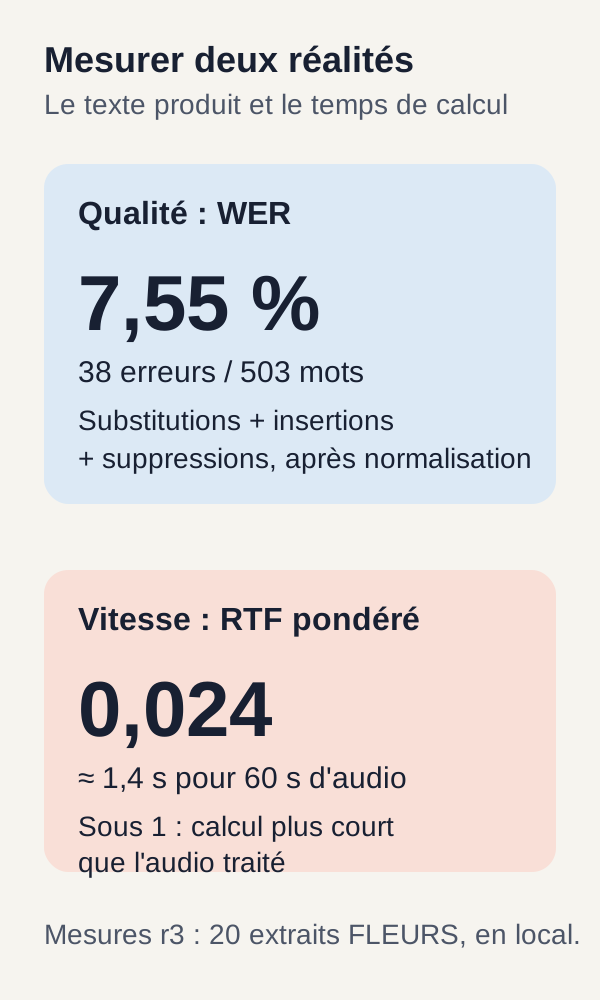
Both r3 reproductions obtained exactly 38 errors across 503 reference words, giving a micro WER of 0,07554671968190854, approximately 7.55%. This is the total number of edit operations computed after normalization, not 38 incorrect files or a grade assigned by the model.
| Indicator | Reproduction 1 | Reproduction 2 |
|---|---|---|
| Clips transcribed and evaluated | 20 | 20 |
| Reference words | 503 | 503 |
| Word errors | 38 | 38 |
| Rounded micro WER | 7.55% | 7.55% |
| Raw timestamp overruns, before bounding | 2 | 2 |
| Mean RTF per clip | 0.02587 | 0.02565 |
| RTF weighted by audio duration | 0.02396 | 0.02379 |
| Maximum VRAM observed through sampling | 1,056 MiB | 1,024 MiB |
These measurements were taken on an RTX 3090. VRAM was sampled about once per second: the table gives the maximum values observed at those instants, not a continuous measurement of the actual peak. They therefore cannot establish a guaranteed video-memory minimum for every run.
The model was acquired afresh in each reproduction directory. However, public Docker layers may have been reused. “Fresh directory” does not mean all the machine's caches had been cleared.
An overall score does not reveal the important error
A WER of 7.55% does not mean 92.45% of recordings are entirely correct. Nor does it establish that every name or number is reliable. It is an overall ratio of word errors across the evaluated population.
An error in a name, number, or negation may matter much more to a business than another error, even though the calculation assigns it the same cost. To use transcription in an application, review the elements that determine an action rather than only the average rate.
The corpus contains few clips, several repeated sentences, and no representative test of your own acoustic conditions. These figures describe this corpus and protocol; they are not a guarantee for your files.
Silence reveals the controller's role
The silence check provides a particularly instructive observation: without the guard, the model produced a sentence; with the guard, the segment list is empty.
This does not mean the model improved between the two tests. The guard simply prevented the model call. A plausible sentence produced from silence is exactly the kind of result you may miss if you check only whether outputs “look right.”
The two raw timestamp overruns illustrate another limitation: SRT processing constrains timestamps but proves neither better recognition nor better speech alignment.
What we have learned
We can now follow an audio file through to three distinct results: recognized text, formatted subtitles, and measurements for examining them.
This pipeline's reliability begins with ordinary development contracts: bounded input, verified model files, an explicitly selected GPU, and a record of raw outputs. The model performs recognition; the controller can reject input or short-circuit silence; SRT code applies timing constraints. These are different responsibilities.
WER depends on the reference and normalization. RTF depends on the measured time and audio duration. Understanding their denominators prevents a useful result from becoming an overly broad conclusion.
The r3 reproductions demonstrate this workflow on 20 FLEURS clips. They demonstrate neither universal transcription quality nor a service ready to receive production data.
Exercise: predict, modify, run, observe, explain
Predict before looking at the result
Return to the first clip: “Le groupe Aerosmith a annulé les derniers concerts de sa tournée.” After the project's normalization, its reference contains 11 words, and the original hypothesis is exact.
Predict what happens if we add the word intrus to this hypothesis. What type of error appears? Does the WER denominator become twelve because the response is longer? Are we modifying the model?
Write your answer before running the exercise. We expect an insertion, but the program must recompute the alignment: do not arbitrarily add 1 to a measurement without rerunning its comparison.
Running the intended modification
docker compose run --rm --no-deps app -m src.cli exercise
The command performs the project's planned exercise. It observes how modifying the hypothesis affects the metric, rather than teaching the model a new sentence.
Observe, then explain
The r3 output reports original_errors: 0, modified_errors: 1, and reference_words: 11.
The reference has not changed, so the denominator remains eleven. For this single modified sentence, the calculation is 1 / 11, approximately 9.09%. This educational calculation does not replace the reference corpus's overall WER of 7.55%.
The experiment checks the metric's meaning. It does not measure spontaneous model degradation: we deliberately added a word to the evaluated text without changing the model's weights.
Your own experiment, without preannounced results
You can now prepare a separate experiment using audio you have the rights to use and a reviewed reference transcription. Do not overwrite data/audio.json or the r3 evidence files. Copy the project into a new folder and keep reference results separately.
First document the duration, language, acoustic conditions, reference text, and parameters used. A message recorded in a quiet room and a conversation captured from a distance present different problems, even if both are in French.
The commands shown follow a pinned manifest and acquisition process. On their own, they are not an import procedure for arbitrary personal files. In your experimental copy, inspect how the complete project acquires, decodes, and associates a file with its reference, then explicitly adapt that path and the relevant checks. Do not silently replace acquired files while retaining their original fingerprints.
Then repeat the same sequence: prepare, transcribe, check, and evaluate. Manually compare the audio, reference, raw JSON, and SRT. Syntactically correct output should not replace listening.
Do not announce a score before measuring it. If you change the model, beam_size, VAD, segmentation, or corpus, you have created a new experiment. To study one parameter's effect, keep other conditions identical; to change the corpus, establish a new comparison baseline. The r3 figures do not automatically describe your variant.
For long recordings, you will need to define splitting, possible overlap, a concatenation strategy, and a dedicated evaluation. For example, timestamps for a segment transcribed within one chunk must be mapped back onto the full recording's timeline. This extension still needs to be built and measured: simply raising the 60-second limit does not validate it.
Targeted troubleshooting
nvidia-smi absent (nvidia-smi missing). Install or repair the NVIDIA driver, then rerun preflight. The check script does not perform this installation for you.
The GPU is visible on Linux but not in Docker. Install or configure NVIDIA Container Toolkit. The diagnostic container must see exactly one card, the one selected by GPU_DEVICE.
fetch fails. Check the connection and read the acquisition error. Do not disable size or SHA-256 checks to continue: a partial download or a file differing from the expected one is not the experiment's pinned model.
GPU CUDA requis (CUDA GPU required), or CUDA tests fail. Check GPU_DEVICE, the driver, Docker configuration, and complete execution of fetch. Retain the workflow's settings rather than silently switching to another engine or the CPU.
An audio input is rejected. Distinguish the decoded file from the array expected by validate_audio(). Empty, non-mono, non-finite input, or input exceeding 60 seconds in the expected format, is rejected before the model. The Image modifiée message encountered in the OCR tutorial does not concern this audio pipeline.
The SRT appears poorly timed. Compare raw_segments and segments, then listen to the passage. Bounding can shorten an interval or remove a segment; it cannot correct misrecognized text or invent the right pronunciation timestamps.
Moving from a tutorial to a service
Audio processing still to add
A service must explicitly handle long durations, accepted formats, channels, noise, accents, and the languages its use case requires. It must also choose and evaluate a VAD policy rather than treating our amplitude threshold alone as general speech detection.
Two further needs must be distinguished. Diarization seeks to assign speech turns to distinct speakers: who speaks when, without necessarily knowing their names. Alignment positions the text, potentially word by word, on the audio timeline. Good transcription does not automatically solve either problem.
For subtitles, line-length and reading-comfort rules also remain to be defined. This tutorial's code focuses on an explicit timing policy, not finished subtitling for every screen and audience.
A web application's usual responsibilities still apply
Controlled ingestion, an authenticated API, access permissions, quotas, a job queue, and execution time limits must be designed around transcription. A low local RTF is not enough to decide that every process can remain attached to a synchronous HTTP request.
You also need useful logs and monitoring, context-appropriate encryption, a retention policy, and deletion or restoration procedures. Keeping files on your machine avoids sending them to the scenario's external service, but does not itself manage rights to audio and transcriptions.
Measuring business quality and real load
Business quality requires a representative, reviewed corpus spanning the audio conditions important to your application, plus human-review rules. Numbers and names particularly deserve checks specific to the intended use.
The local average RTF provides neither throughput under load nor p95 or p99 latency. These percentiles describe durations below which respectively 95% or 99% of requests fall in a measured set. To determine them, measure many requests under the service's concurrency and queuing conditions.
These production mechanisms are neither implemented nor validated by this archive. The tutorial teaches and reproduces the local pipeline; adding them would require another development and evaluation stage.
Cleaning up exactly what was started
When you have finished reviewing outputs, stop the project's services from the archive root:
docker compose down
This command is also the last stage of the r3 reproductions. It stops this directory's Compose resources; it does not remove acquired models, the built image, or outputs retained on disk.
Keep outputs/ so you can reread and compare results. Delete experiment folders only after checking their contents; no global cleanup of your other Docker projects is needed.
References for further reading
To understand the resources used, consult the FLEURS dataset card and Systran/faster-whisper-small model card. They describe the corpus and model; the revisions and files to acquire for this experiment remain those pinned in the archive.
For the mechanisms, the official faster-whisper documentation presents the API and generator behavior. The version 1.2.1 transcription code details the parameters, while that version's decoder shows audio preparation. These references explain mechanisms; they do not extend the tutorial's measured results to other settings.
For the environment and calculations, the CTranslate2 numerical-type documentation, NVIDIA Container Toolkit guide, and Python 3.12 Unicode documentation supplement the explanations. Retain the ZIP's versions and commands to reproduce r3, even when general documentation shows other possibilities.