





Imagine a store's back office: a user uploads an image, and you want to suggest a category before they save the product page. For your application, the question seems simple: “Is this a pullover, a shoe or a bag?” For the model, it means learning to recognize patterns in pixels.
An initial network may produce interesting results while being too costly for the environment where you want to run it. So you build a smaller network. But how should you train it: only with the dataset's correct answers, or also with the larger network's predictions?
That is this tutorial's question. Here, distillation means training a small model, called the student, using the probabilities of a teacher model in addition to known labels. We will follow this transfer, understand its calculation and check whether it actually improves the student.
The outcome is not predetermined: a smaller student is not necessarily better after distillation. In the experiment presented, it actually performs worse than the same type of student trained only on labels. This negative result is precisely an opportunity to learn how to compare two methods properly.
Download the complete tutorial project
What we are building
We build a local experiment in Python and Docker around Fashion-MNIST, a dataset of clothing, footwear and accessory images. The back office described above provides a concrete motivation; the project does not supply that interface or validate classification of real photographs from your catalog.
We train and compare three models:
| Model | What it learns from the data | Why keep it in the comparison |
|---|---|---|
| CNN teacher | Associate each image with its label | Measure the quality of the model supplying probabilities |
| Label-trained student | Recover the label with a smaller architecture | Establish what the small network can do without distillation |
| Distilled student | Recover the label and bring its probabilities closer to the teacher's | Test the value of the teacher's additional signal |
Both students have the same architecture and parameter count, but different learning objectives. That does not mean their learned weights will be identical.
The program compares accuracy, macro-F1, parameter count, weight size and warm timing. All 10,000 official test images are retained. Identical duplicates are excluded from the train/validation pool before stratified selection; we will return to the role of this preparation.
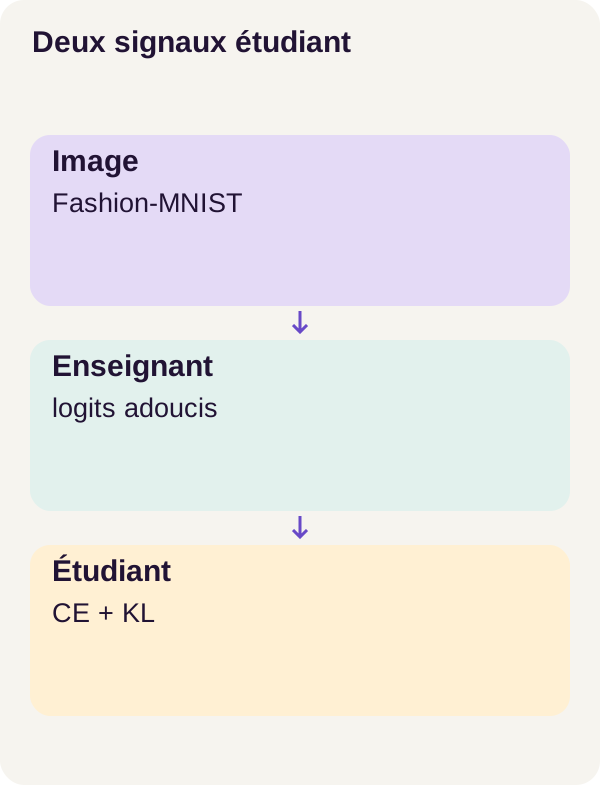
Distillation is therefore neither ZIP compression of weights nor copying the large network into the small one. The small architecture already exists; we are looking for a way to train it better. Once trained, the student can produce its own predictions without consulting the teacher.
The small numerical examples below explain the formulas. They are not captured model outputs. The r1 experimental results are grouped in the “Actual results and lessons learned” section.
Concepts explained
From an image to ten scores
A Fashion-MNIST image is 28 × 28 pixels, in grayscale. We can represent it as an array of 784 intensities. These 784 values are input data, not model parameters.
A CNN, short for convolutional neural network, applies small filters to different image regions. Each filter combines neighboring pixels, then produces an activation map: a new array showing where it responds. Subsequent layers combine these maps to build other representations.
The principle resembles an image-processing filter, with one essential difference: filter values are learned, rather than chosen by hand. Parameters are these adjustable numbers, along with the network's other weights and biases. A convolution reuses its filters at several positions; it does not necessarily assign a separate parameter to every pixel.
At the end, the network produces ten logits, one per class. A logit is a raw score: it can be negative, and the ten scores do not have to sum to 1.
Softmax turns this list into a probability distribution: every value is positive and they sum to 1. The highest-scoring class gives the classification prediction. Such a distribution describes the model's preference; it does not prove that its confidence matches its actual success rate.
The official Fashion-MNIST repository describes the images and ten classes, including pullover, shirt and bag.
Why pass on more than the correct answer?
A label is an image's expected class. For example, it says “pullover.” That information is essential, but it does not describe possible similarities with other classes.
The teacher supplies a more detailed distribution. It may assign a high probability to pullover, a secondary probability to shirt and a low probability to bag. The distillation hypothesis is that this distribution supplies a useful signal to the small network: some confusions are more plausible than others.
But the teacher can also be wrong. Its probabilities do not become truth simply because its network is larger. We therefore retain the labels, then measure the result on test images.
Temperature: make secondary classes more visible
Temperature T acts before softmax: we divide logits by T. For a class i, the formula is:
p_i(T) = exp(z_i / T) / sum_j exp(z_j / T).
z_i denotes the class logit; exp is the exponential function. The denominator makes the probabilities sum to 1.
Take a fictional three-class example, not the project's ten actual outputs. The logits are [3, 1, 0], associated in that order with pullover, shirt and bag.
| Fictional class | Original logit | Probability at T=1 | Probability at T=3 |
|---|---|---|---|
| Pullover | 3 | 84.38% | 53.15% |
| Shirt | 1 | 11.42% | 27.29% |
| Bag | 0 | 4.20% | 19.55% |
Percentages are rounded. At T=3, probabilities are less concentrated on the first choice: the distribution is softened. Pullover remains first. With fixed logits, division by a positive temperature does not change their order; it changes the distribution used for learning.
Increasing temperature therefore does not mechanically make a prediction more accurate. It changes the signal passed to the student.
Two learning instructions, two loss terms
The loss is a number training seeks to reduce. In this project, it combines two questions.
Cross-entropy, or CE, asks: “What probability does the student assign to the true class?” With a single label, for one image it equals the negative logarithm of that probability. A probability of 0.8 gives approximately 0.2231 loss; a probability of 0.2 gives approximately 1.6094. Assigning less probability to the correct answer therefore costs more.
KL divergence asks: “How far does the student's distribution deviate from the teacher's?” It considers all classes, not just the first choice. Here, the direction is KL(teacher || student): the teacher supplies the target distribution. This divergence is generally not symmetric.
Training combines these two terms. Backpropagation, called backward, then computes their gradients: how a small parameter change would change the loss. The optimizer uses these gradients to update weights. In contrast, inference uses an already trained network to predict without learning from the submitted image.
Docker and GPU prerequisites
To follow the code, you should know how to read Python functions, manipulate arrays and use a terminal. The commands assume Docker basics: an image describes the software environment, a container runs that environment and Compose organizes services.
The r1 walkthrough requires Linux x86_64, Docker Compose, NVIDIA Container Toolkit and a 24 GiB RTX 3090. The README recommends 16 GiB of RAM and 16 GiB of disk space, excluding Docker layers. These are the resources specified for this walkthrough; no CPU profile is validated.
RAM belongs to the host machine; video memory belongs to the GPU. NVIDIA Container Toolkit exposes GPU resources to Docker. A card recognized by Linux is not enough: check_environment.py must also check CUDA inside the container.
The acquire service downloads public archives. The gpu service performs local computations. locks/models.lock.json locks the archives and locks/environment.lock.json the environment. These files play a role similar to a dependency lockfile: they fix expected assets so that the experiment does not silently change.
The documentation references at the end of the article explain the mechanisms. The versions to use for reproducing r1 remain those of the project, not those of another tutorial or a randomly updated installation.
Data and the central function
Separate learning images from evaluation images
The official Fashion-MNIST dataset provides 60,000 training images and 10,000 test images. The first set is the starting pool from which to prepare training and validation; it must not be confused with the final size selected by this tutorial's configuration.
Train updates weights. Validation observes training choices. Test compares models once those choices are fixed. Here, all 10,000 official test images are retained.
Before train/validation selection, the project excludes identical duplicates from the relevant pool. Selection is then stratified: it accounts for classes to control their representation. These operations address distinct problems. Balancing classes is not enough to prevent an image from appearing several times.
Final train/validation counts and the number of removed duplicates are not quantified in the results reproduced in this article. Read them from the prepare logs: do not infer them from Fashion-MNIST's official count alone.
A large network and a small network, but the same output
The teacher has 93,962 parameters. It contains three convolutional blocks with widths 32, 64, 128. The student has 5,130 parameters, with two blocks of widths 16, 32. These widths denote the number of representation channels in the blocks, not the input image's dimensions.
Despite this internal difference, each must produce ten scores corresponding to the same ten classes in the same order. Without that alignment, comparing distributions would mean comparing one's “pullover” column with the other's “bag” column.
For a batch of B images, the usual representation is B × 1 × 28 × 28: images, grayscale channel, height, width. Logits have shape B × 10 and labels shape B, with one class identifier per image. A tensor is simply the multidimensional numerical array carrying these values in PyTorch.
The loss code
Here is the continuous excerpt from src/vision_distill/losses.py. Despite their names, the student and teacher arguments here are already computed logit tensors, not network objects. F denotes the functions in torch.nn.functional.
def distillation_loss(student, teacher, labels, alpha=0.5, temperature=3.0):
    if temperature <= 0 or not 0 <= alpha <= 1:
        raise ValueError("T>0 and 0<=alpha<=1 required")
    ce = F.cross_entropy(student, labels)
    target = F.softmax(teacher.detach() / temperature, dim=-1)
    logp = F.log_softmax(student / temperature, dim=-1)
    kl = (target * (torch.log(target.clamp_min(1e-30)) - logp)).sum(-1).mean()
    return (1 - alpha) * ce + alpha * temperature**2 * kl
What just happened? The function computed a scalar cost from predictions and labels. It does not load models, compute their predictions or update their weights. Calls to backward() and the optimizer belong to the training loop, outside this excerpt.
Read the computation line by line
The first check concerns settings. Temperature must be strictly positive and alpha between 0 and 1. This explicit check alone does not fully validate tensor shapes, devices or numerical values.
ce computes error against the label. It receives the student's logits directly, without division by temperature. Do not apply an extra softmax before this call: the CrossEntropyLoss documentation specifies that the expected input contains unnormalized scores.
target builds the teacher's softened answer. dim=-1 denotes the last dimension, hence the classes. Softmax is applied separately to each image in the batch.
teacher.detach() cuts the gradient path toward the teacher's logits. The loss can use their values, but it does not propagate back through this branch to train the teacher. This is the documented role of detach().
We must distinguish cutting this gradient path from the network's execution mode: detach() does not put the teacher in evaluation mode. The official PyTorch distillation tutorial separately shows teacher.eval(), computing the teacher's outputs without gradients, and optimizing the student's parameters. The loss excerpt presented here does not show that full loop.
logp computes logarithms of the student's softened probabilities. The same temperature is used on both sides. The computation uses log_softmax directly rather than manually chaining softmax and logarithm.
kl compares the two distributions. With q denoting teacher probabilities and p student probabilities, one image contributes:
KL(q || p) = sum_over_classes q × (log(q) − log(p)).
The clamp_min(1e-30) guard bounds values passed to the target's logarithm. It neither replaces all probabilities with that minimum nor renormalizes the distribution: the multiplying factor remains target.
.sum(-1).mean() sets the denominator. We first add contributions from the ten classes for each image, then average across images in the batch. This is not a mean over every cell in the array. The KLDivLoss documentation distinguishes this behavior, corresponding here to batchmean, from the mean reduction. With ten classes, averaging all cells would divide the term by ten again.
A small KL calculation
To check the formula's direction, take fictional distributions that are already softened: q = [0.50 ; 0.25 ; 0.25] for the teacher and p = [0.25 ; 0.25 ; 0.50] for the student.
The first class contributes 0.50 × log(2). The second contributes zero. The third contributes 0.25 × log(0.5), a negative quantity. Their sum is approximately 0.1733.
An individual contribution can therefore be negative even though total divergence is nonnegative in exact arithmetic. When distributions are identical, KL is zero. That does not mean CE is zero: teacher and student can agree without assigning all probability to the expected label.
Alpha and T² have different roles
The last line builds:
loss = (1 − alpha) × CE + alpha × T² × KL.
alpha=0 gives a label-based objective; alpha=1 gives an objective based on the teacher's distribution. In this excerpt, however, both terms are computed before summation: setting alpha=0 does not automatically eliminate computation of the teacher branch.
With the defaults alpha=0.5 and temperature=3.0, the formula becomes 0.5 × CE + 4.5 × KL. The coefficients are equal for CE and T² × KL, not for CE and raw KL. Nor does this guarantee equal-sized gradients.
Why T²? Dividing logits by temperature also changes the distillation term's gradients. This factor is the conventional scale compensation used to keep the signal comparable; it does not guarantee exact invariance as temperature changes. The foundational paper by Hinton, Vinyals and Dean and the PyTorch tutorial cited above present this approach. The exercise will isolate what happens when we remove this factor without changing T.
Install and prepare the images
Extract the ZIP and open a terminal in its root directory. All the following commands run from that same folder. The initial commands follow the order in README.md and lesson/tutorial.json.
sh scripts/setup.sh
docker compose config --quiet
docker compose build acquire gpu
docker compose run --rm acquire python scripts/acquire.py --config configs/minimum.yaml
docker compose run --rm gpu python scripts/check_environment.py --config configs/minimum.yaml
docker compose run --rm gpu python -m pytest -q
setup.sh prepares the project. config --quiet checks the Compose configuration, then build builds images for both services. Acquisition retrieves archives according to the locks; the next check verifies CUDA inside the container. Finally, pytest runs the project's suite.
At this stage, you want a consistent installation and passing checks, not yet good classification accuracy. Fix failed acquisition or CUDA access before proceeding.
Next, create the splits, inspect the networks, train the teacher and check the loss before training the students:
docker compose run --rm gpu python -m vision_distill.cli prepare --config configs/minimum.yaml
docker compose run --rm gpu python -m vision_distill.cli inspect-models --config configs/minimum.yaml
docker compose run --rm gpu python -m vision_distill.cli train-teacher --config configs/minimum.yaml
docker compose run --rm gpu python -m vision_distill.cli check-loss --config configs/minimum.yaml
After prepare, examine split and duplicate logs. After inspect-models, connect tensor shapes with the reported 93,962 and 5,130 parameters: you should be able to explain what enters each network and what comes out.
train-teacher trains the network that will subsequently supply target distributions. check-loss checks, among other things, that in the controlled identical-teacher case, the teacher receives no gradient through the loss. This check verifies the mechanism; it proves neither that the teacher recognizes every image nor that the student will benefit from its help.
Train, resume and measure
We now have the prepared data and the teacher. Train both students, then check interruption and resumption before test evaluation:
docker compose run --rm gpu python -m vision_distill.cli train-students --config configs/minimum.yaml
docker compose run --rm gpu python -m vision_distill.cli interrupt-student --config configs/minimum.yaml
docker compose run --rm gpu python -m vision_distill.cli resume-student --config configs/minimum.yaml
docker compose run --rm gpu python -m vision_distill.cli compare-resume --config configs/minimum.yaml
docker compose run --rm gpu python -m vision_distill.cli evaluate --config configs/minimum.yaml
The label-trained student is our baseline, meaning the simple reference against which to compare distillation. It is essential to keep it: comparing only the teacher with the small distilled model would mix two changes, architecture and learning method.
Interruption and resumption check a complete state. A checkpoint is a save that lets us recover a computation's state; resuming learning does not necessarily mean just reloading weights. We also need to recover what determines subsequent updates and data traversal. The details of the saved state are those of the project, and compare-resume is the check to examine rather than being satisfied with a run that restarts without errors.
Finally, evaluate produces measurements for all three models on the same 10,000 official test images. Keep these results before moving to the exercise.
Metrics before measurements
Overall accuracy: how many images are classified correctly?
In this article, overall accuracy means:
accuracy = number of correctly classified images / number of evaluated images.
In a fictional example of 100 images, 80 correctly predicted classes give 80%. This does not yet tell us which classes cause problems. Two models with the same accuracy can make mistakes on different images.
Macro-F1: also look at each class
Mind the terminology: class precision, used in F1, does not have the same denominator as overall accuracy.
Take a fictional example. Among images the model calls “pullover,” 8 really are pullovers and 2 are not. The dataset contains 12 actual pullovers in total: the model therefore missed 4.
Its precision for this class is 8 / 10 = 0.8: among “pullover” predictions, what proportion is correct? Its recall is 8 / 12 ≈ 0.6667: among actual pullovers, what proportion did it find?
F1 combines the two using a harmonic mean:
F1 = 2 × precision × recall / (precision + recall).
Here, it is 16 / 22 ≈ 0.7273. Macro-F1 then computes this F1 separately for each of the ten classes and averages them without weighting by class count. It is not F1 computed from average precision and average recall.
The scikit-learn F1 documentation details these definitions. It serves here as a metric reference, without assuming which library the project uses. Macro-F1 gives every class equal weight, but remains an average: analyzing errors by class is still useful.
Three costs not to confuse
The number of parameters describes how many values the network contains. Weight size describes the space occupied by their saved representation. The two are related, but storage format and numerical precision also matter. A file size is not a complete measure of the memory needed during execution.
Warm time measures processing once the model is ready, rather than installation or initial loading. The warm per-image time in this walkthrough is neither network latency nor a benchmark under load. It is therefore not enough to promise a response time to a user of your application.
The numerical results reported below do not provide warm-time values. We cannot infer a measured speedup from them, even if the number of parameters falls sharply.
Actual results and lessons learned
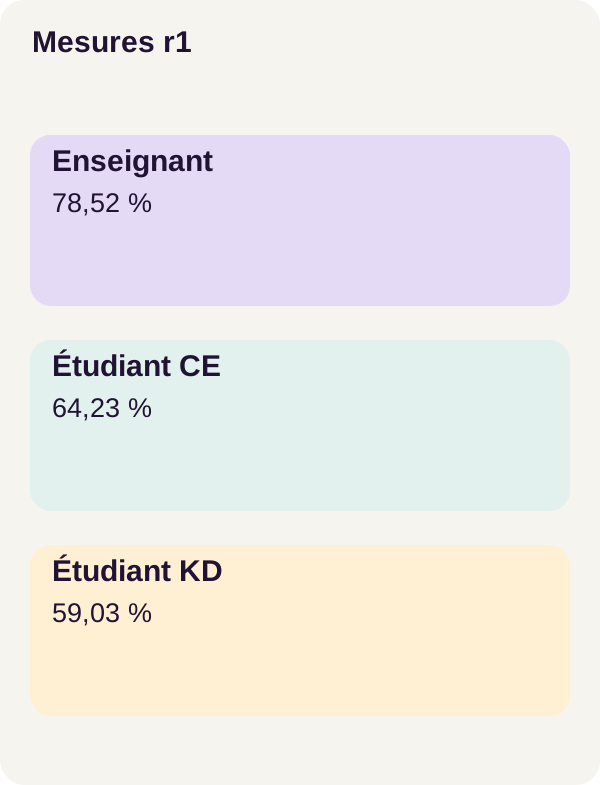
Here are the values from r1 on the 10,000 test images, with the reported decimal values for macro-F1:
| Model | Overall accuracy | Macro-F1 |
|---|---|---|
| Teacher | 78.52% | 0.7756504071911894 |
| Label-trained student, CE | 64.23% | 0.6256681401207919 |
| Distilled student | 59.03% | 0.5716481462359492 |
The reported storage and architecture costs are as follows. A MiB corresponds to 1,048,576 bytes.
| Model | Parameters | Weight size, in MiB |
|---|---|---|
| Teacher | 93,962 | 0.3612794876098633 |
| Label-trained student, CE | 5,130 | 0.02199268341064453 |
| Distilled student | 5,130 | 0.02199268341064453 |
The two students have approximately 18.32 times fewer parameters than the teacher, a reduction of about 94.54%. The weight-size ratio is approximately 16.43. These ratios are calculations based on the table values, not speed measurements.
The decisive comparison is between the two students: 59.03 − 64.23 = −5.20 percentage points. Across 10,000 images, the rates correspond to 5,903 and 6,423 correct classifications respectively, a net difference of 520. This does not mean that we have identified exactly 520 images that were exclusively degraded: comparing predictions image by image would be necessary to know that.
Macro-F1 also falls. With these settings and these data, distillation therefore does not improve the student. The size advantage already exists for the CE student; it would be incorrect to attribute it to a quality gain delivered by distillation.
Why this result? The quality of the teacher signal, the relative weight of the two losses, temperature, student capacity, and training duration are avenues to examine. The table cannot isolate a cause. Nor does it show that a different temperature or more training would solve the problem.
To investigate further, keep the teacher, the CE baseline, and a stable data protocol. Choose new settings with validation, then use the same test for the final comparison of the selected variants. Continually adjusting parameters while looking at the test would eventually turn it into a tuning tool rather than an independent evaluation.
Exercise: predict, then run
Predict the change before touching the calculation
Keep T=3 and mentally remove the T² factor. Images, logits, and distributions are fixed: only the weighting of the KL term changes.
With alpha=0.5, we go from:
0.5 × CE + 4.5 × KL
to:
0.5 × CE + 0.5 × KL.
The weighted KL term is therefore divided by 9. On this same batch, its gradient is also divided by 9. But the total gradient is not necessarily divided by 9: the CE contribution remains unchanged.
To see why, take a one-parameter teaching example. The already weighted CE contribution is +1, and the already weighted KL contribution is −0.9. Their sum is +0.1. After dividing the second by 9, the sum becomes +1 − 0.1 = +0.9. Reducing one contribution has increased the total gradient norm here because the two contributions previously offset each other.
This counterexample does not describe the gradients of the r1 model. It explains why we must distinguish the KL gradient norm from the full-loss gradient norm.
Another pitfall: the total loss value can fall simply because you reduced a coefficient. For fictional values CE=1.2 and KL=0.1, it would go from 1.05 to 0.65, without any improvement in predictions. These two numbers correspond to two differently weighted objectives.
Run and interpret
Now run the provided exercise:
docker compose run --rm gpu python -m vision_distill.cli exercise --config configs/exercise.yaml
Compare the gradient diagnostic with your prediction. Check which term each norm represents, and separate the scale change from the total gradient's response. Do not turn this diagnosis on a fixed batch into proof that future accuracy will rise: it does not replace training followed by evaluate.
Finish with the figures, checkpoints, and project shutdown:
docker compose run --rm gpu python lesson/figures/plot.py
docker compose run --rm gpu python scripts/check_checkpoints.py
docker compose run --rm gpu python scripts/clean.py --scope generated --dry-run
docker compose down --remove-orphans
plot.py generates the figures. The next check examines the checkpoints. Cleanup is a preview: --dry-run deletes nothing. Stopping Compose does not delete project outputs.
Adaptation, production, troubleshooting, and cleanup
Moving from small images to your application
To adapt this experiment, start with the business contract: which classes do you want to distinguish, and which errors would be unacceptable? In our back-office example, a suggestion reviewed by an operator does not have the same consequences as an automatic classification without review.
Build an authorized, versioned dataset. Document the transformations applied to images, and keep distinct train, validation, and test splits. Examine errors by class and choose a quality threshold before trying to reduce weights. The right student is the one that meets this contract, not simply the one with the fewest parameters.
The teacher remains a supervision hypothesis, not an infallible arbiter. Keep the CE student and change only one factor at a time to understand the results of a new experiment. Licenses and the possible presence of personal data must also be checked before using your own images.
Then measure the exported model in the target environment, with its preprocessing and representative load. Reducing parameters does not automatically produce a proportional latency reduction on every type of hardware. The CUDA walkthrough presented here does not validate deployment on CPU, mobile, or browser.
Troubleshoot without silently changing the experiment
If CUDA fails, rerun the container check and follow the NVIDIA Container Toolkit guide. Fix GPU access before modifying the model or loss.
If acquisition fails, restore network access for the acquire service, then rerun the relevant command. Do not replace locked archives or dependencies with another version merely to bypass the error.
If the two students produce different scores, begin by rereading the definition of their objectives, the training traces, and errors by class. A worse result alone does not prove a calculation defect: distillation is a method to evaluate, not a guarantee of improvement.
Finally, docker compose down --remove-orphans stops services without deleting outputs. The cleanup script remains in dry-run mode. Keep the configurations, measurements, and checkpoints you need before deliberately deleting your experimental files.
Key takeaway: reducing architecture, transferring a distribution, and improving predictions are three different things. This tutorial lets you measure them separately, including when the more elaborate method does not produce the better student.
Official sources
The r1 measurements above are those from the project walkthrough. The following references explain the data, formulas, and APIs; they are not new executions of this experiment.
- PyTorch: cross entropy and the consulted versioned documentation: logits, labels, and CE calculation.
- PyTorch: KL divergence and the consulted versioned documentation: the direction of divergence and the difference between
meanandbatchmean. - Fashion-MNIST: image format, official splits, and labels.
- Docker Compose: GPU support: exposing GPUs to services.
- Hinton, Vinyals, and Dean — Distilling the Knowledge in a Neural Network: the foundational reference for distribution distillation.
- PyTorch — Knowledge Distillation Tutorial: teacher-student learning, temperature, and combining losses.
- PyTorch — Tensor.detach: cutting the link to the gradient graph.
- Scikit-learn — F1 score: precision, recall, and macro averaging.
- NVIDIA Container Toolkit — installation: integration between GPU, driver, and container.