





A scan is not text
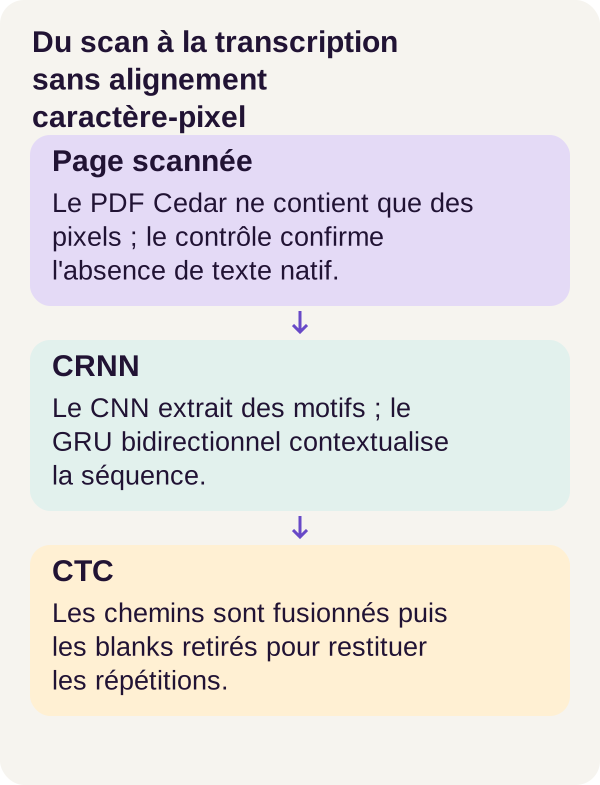
You are developing a document import feature. A user uploads a “Cedar Parts” delivery note as a PDF: on screen, you can easily read BOLT AA11 12.50 and SEAL B00 7.20. You run text extraction… and get nothing.
Why? Because this PDF contains an image of the page, not the characters you see. It is a bit like receiving a screenshot of a form rather than its fields: the information is visible, but no longer available as character strings.
That is the starting point for OCR, or Optical Character Recognition. We must go from pixels to text. And we will build this transition rather than simply call a service that hides how it works.
Our playground will be deliberately limited: printed lines from a fictional corpus, with a restricted alphabet. We will not learn to read every invoice in the world, handwriting or complex page layouts. We will, however, understand how a network learns to transcribe a line without being told the position of each character.
Results will also be part of the learning: this small model improves, but its final quality remains insufficient to automate business data extraction. We will examine precisely what works and what does not.
Download the complete tutorial project
What you will build and learn
The pipeline follows the document: scanned PDF → image → detected lines → CNN-GRU network → character scores → CTC decoding → text.
Do not try to memorize every acronym yet. To begin, think of three responsibilities.
Find lines. We locate page regions containing text and crop a small image for each line. This stage is called segmentation.
Analyze each line image. The CNN transforms pixels into visual patterns. The GRU connects this information by traversing the line in both directions. Together, they produce a sequence of scores for possible characters.
Learn and decode without cutting out each letter. CTC lets us train the network using the entire line's transcription, then interpret a sequence that can contain repetitions and technical symbols.
We will train this network from initialization, check that it can resume after interruption, then measure segmentation and recognition separately. We will finish with an experiment: make scans blurrier without retraining the model, predict what will happen, then compare our intuition with the results.
Our running example will be AA11. This short identifier is particularly interesting: how can we distinguish two actual A characters from the same A proposed several times by the network? That is precisely one of the problems CTC can handle.
Prepare the project and check the GPU
You should know how to program in Python, use a terminal and run Docker. You do not need to have trained a model before. We will explain concepts as we use them.
One term needs defining first: a tensor here is a numerical array with one or more dimensions. An image, a batch of images or character scores will be represented by such arrays. The network also contains numbers, its parameters, which training adjusts to reduce error on known transcriptions.
Use the validated walkthrough's environment
The walkthrough ran with an RTX 3090, Python 3.11.16, PyTorch 2.8.0+cu126 and CUDA 12.6. PyTorch is the library used to build and train the network; CUDA runs the planned computations on the NVIDIA GPU.
These versions describe the validated environment. The ZIP's Dockerfile pins dependencies: do not replace them with the latest versions for your first reproduction. Consult the README for sizing, and allow space for Docker images, generated scans and checkpoints, meaning training saves.
Unzip the archive and open your terminal in its root directory, the one containing README.md. All the following commands run from this folder, in the order shown. The code excerpts explained later belong to the complete project; they do not replace its other files.
Let's begin with the host check, called preflight:
sh scripts/preflight.sh
A GPU visible under Linux does not guarantee Docker can use it. NVIDIA Container Toolkit integrates Docker with host drivers; its official documentation details installation for each system. We will check the container's CUDA access after building it.
Build the services and understand their roles
Let's prepare directories, check the Compose configuration, then build services:
sh scripts/setup.sh
docker compose config --quiet
docker compose build acquisition tutorial inference
acquisition checks project assets. tutorial prepares data and trains the network. inference transcribes scans using saved weights. Files are split among data/generated/ for scans, assets/checkpoints/ for model states and outputs/ for results.
No pretrained OCR weights need downloading. Here, the network learns from its initialization; we are not specializing an already trained engine. The acquisition stage is retained in the walkthrough and therefore reports zero bytes of external weights. This does not mean building Docker images requires no downloads.
docker compose run --rm acquisition python scripts/acquire.py --config configs/minimum.yaml
Now let's check CUDA inside the container, then run the project's tests:
docker compose run --rm tutorial python scripts/check_environment.py
docker compose run --rm tutorial python -m pytest -q
The environment check must confirm GPU access. The 26 passing tests in the reference walkthrough cover segmentation, lengths and decoding, among other things.
Think of your application tests: checking that a function meets its contract is not the same as checking the relevance of every piece of data it will produce. Here too, passing tests do not mean every transcription will be correct.
Training and inference services subsequently have no network access. The complete Compose file describes read-only volumes, the unprivileged user, removed capabilities and resource limits. These restrictions reduce program access; they are not complete protection against every native-library vulnerability.
A delivery note that is actually rasterized
Create scans whose answers we know
To train OCR, we need images and their expected transcriptions. The project creates these examples itself: we can thus know the answer without asking someone to copy every line.
The prepare generator in src/pdfctc/corpus.py composes 600 pages of ten lines. It renders them as images, reinserts each image into a PDF, then converts that PDF back into an image. This conversion into pixels is called rasterization.
Why these steps? To ensure the document sent through our pipeline really is a scanned PDF, not one whose characters the program could simply reread behind the display. The generator checks that native text is empty.
Every page exists in three views: clean, degraded or heavily blurred. These are different versions of the same page, not three independent document families. The corpus is fictional, printed with ASCII characters and a standard PDF font. It does not represent the diversity of a company's invoices, languages or handwriting.
Split documents before learning
The 60 document families are divided into 42 for training, 9 for validation and 9 for testing. This corresponds to 4,200, 900 and 900 lines, respectively.
Training adjusts parameters. Validation observes behavior during development without being the set used to learn those parameters. Testing measures results on examples reserved for final evaluation.
Splitting is done by layout family, not simply by randomly distributing every line. The same family therefore does not appear on both sides of the training/evaluation boundary. This limits overly easy comparison between related documents without covering the full diversity of real documents.
Here, an annotation contains the expected transcription and the box surrounding the line. We therefore know a line's text and overall position, but do not supply a box for each letter. CTC will spare us character-by-character annotation; it does not remove the need for transcriptions to train the model.
Find lines before recognizing them
The line_boxes function in src/pdfctc/segment.py finds rows of dark pixels, groups neighboring rows and builds one box per line. To visualize it, imagine scanning the page from top to bottom and measuring where the ink is.
This is an explicit method, not a second network to train. It locates lines; it does not yet know what they contain. The image fragment extracted from a box is called a crop.
Let's generate scans, then inspect these crops:
docker compose run --rm tutorial python -m pdfctc.cli prepare --config configs/minimum.yaml
docker compose run --rm tutorial python -m pdfctc.cli inspect-lines --config configs/minimum.yaml
You should find the 600 pages and their three views. In inspection files, look at boxes around lines and widths after resizing. The generated PDF must remain without a native text layer; otherwise, we would no longer be testing recognition from pixels.
Take one line and ask two separate questions: “did I recover the whole line?” and “will the network be able to read it?” The first concerns segmentation, the second recognition.
Put images into a common format
normalize, also in src/pdfctc/segment.py, resizes each crop to 32 pixels high, preserving its proportions. Width above 512 pixels triggers an error: the end of the text is never silently cut off to make the image fit.
Here is the project's function:
def normalize(image, height=32, max_width=512):
    width = max(4, round(image.width * height / image.height))
    if width > max_width:
        raise ValueError(
            f"Line width {width} exceeds {max_width}; no text truncation allowed"
        )
    array = (
        1.0
        - np.asarray(
            image.convert("L").resize((width, height), Image.Resampling.BILINEAR),
            dtype=np.float32,
        )
        / 255.0
    )
    return array
The first statement calculates the new width from the height ratio, with a minimum of 4 pixels. As a calculation example, an image 400 pixels wide and 64 pixels high becomes a 200 × 32 image. These dimensions illustrate the code; they do not describe an additional corpus measurement.
image.convert("L") converts the image to grayscale. resize resizes it using the bilinear interpolation specified in the code. These operations are documented in Pillow's Image module.
np.asarray(..., dtype=np.float32) then converts the image into an array of numbers. Division by 255 scales intensities to between 0 and 1; 1.0 - ... reverses that scale. A black pixel, initially 0, becomes 1. A white pixel, initially 255, becomes 0. Dark ink therefore corresponds to high values.
We now have a numerical image of known height, without requiring all lines to contain the same number of characters.
CNN then GRU: build the sequence
The CNN: learn patterns, not a rule for each letter
A CNN, or Convolutional Neural Network, applies filters to different image regions. The values of these filters are learned during training: we do not write a sequence of conditions such as “if this shape looks like an A…”
These filters can represent edges, letter fragments or spaces. This is a way to understand their role, not an inspection of the filters actually learned in this experiment.
In our network, three convolutions build these visual representations. Two max-pooling operations reduce resolution by retaining the maximum over small regions. The code uses 2 × 2 regions, progressively reducing height and width. The contracts for these operations appear in the Conv2d and MaxPool2d documentation.
The GRU: place each position in its neighborhood
A GRU, or Gated Recurrent Unit, is a recurrent network: it retains a state as it traverses a sequence. Here, that sequence corresponds to the line's width after passing through the CNN.
The bidirectional version traverses this representation left to right and right to left. A position can thus be interpreted with context on both sides. This neighborhood can help distinguish 0 from O, without guaranteeing correctness. The PyTorch GRU documentation describes this combination of directions.
The combination of a convolutional and recurrent network is called a CRNN here. A final projection produces, for each position, one score per alphabet character and one score for the technical CTC blank symbol.
Follow the numbers through the code
Here is the complete class from src/pdfctc/model.py. Note its three parts: cnn, gru and projection.
class CRNN(nn.Module):
    def __init__(self, classes):
        super().__init__()
        self.cnn = nn.Sequential(
            nn.Conv2d(1, 32, 3, padding=1),
            nn.ReLU(),
            nn.MaxPool2d(2),
            nn.Conv2d(32, 64, 3, padding=1),
            nn.ReLU(),
            nn.MaxPool2d(2),
            nn.Conv2d(64, 128, 3, padding=1),
            nn.ReLU(),
        )
        self.gru = nn.GRU(128, 128, num_layers=2, bidirectional=True, batch_first=True)
        self.projection = nn.Linear(256, classes)

    def forward(self, images, lengths):
        features = self.cnn(images).mean(dim=2).transpose(1, 2)
        # The backward GRU must not read the right-hand padding as real context.
        packed = pack_padded_sequence(
            features, lengths.cpu(), batch_first=True, enforce_sorted=False
        )
        encoded, _ = self.gru(packed)
        encoded, _ = pad_packed_sequence(
            encoded, batch_first=True, total_length=features.shape[1]
        )
        return self.projection(encoded).transpose(0, 1)
__init__ defines layers and their dimensions. forward describes the path data takes through those layers: this method turns a batch of images into scores.
Convolutions move from one input channel, grayscale, to 32, then 64, then 128 feature channels. ReLU operations introduce nonlinear transformations between convolutions. Once these patterns are extracted, mean(dim=2) averages the remaining height; transpose(1, 2) places horizontal positions in the order expected by the GRU.
To make these manipulations concrete, let's follow a normalized 200 × 32 image, solely as an example of dimensions derived from the code. It is not a published execution output.
| Stage | Representation of this line |
|---|---|
| Input | 1 channel, height 32, width 200. |
| After three convolutions and two max-pooling operations | 128 channels, height 8, width 50. |
| After averaging over height and transposing | 50 successive positions, each described by 128 values. |
| After the bidirectional GRU | 50 positions, each described by 256 values: 128 per direction. |
| After projection | 50 positions, with one score for every possible symbol. |
These positions are called time steps. The term may be surprising: we are not processing video or audio here. “Time” simply means progression through the horizontal sequence.
50 steps do not mean 50 characters. Several steps can contribute to the same character, and some can produce a blank. That is why an alignment and decoding mechanism is needed.
The final transpose returns scores in the dimension order expected by CTC: time steps, batch elements, symbol classes. A raw score is called a logit. It is not yet a probability or a definitively recognized letter.
Do not confuse padding with content
To process lines of different widths together, we place them in a batch with a common width. Shorter lines therefore have an artificial right margin: padding.
lengths retains actual lengths after the CNN's reduction. pack_padded_sequence lets the GRU work on these lengths rather than the entire padded width. This is particularly important in the right-to-left direction: otherwise it would begin by reading artificial margin as if it were part of the line.
pad_packed_sequence then restores the results to an array of common dimensions. You can find this packing contract in the pack_padded_sequence documentation.
CTC: blank, repetitions and lengths
The problem: a transcription, but no position for each letter
We know our line should contain BOLT AA11 12.50. But we have not told the network which steps correspond to the first A, the second A, then the two 1 characters.
CTC, or Connectionist Temporal Classification, handles this lack of precise alignment. Instead of imposing an expected character at each step, it sums the probabilities of paths compatible with the entire transcription. A path is a sequence of symbols, one per step, before they are collapsed into text.
The principle is presented in the foundational CTC paper by Graves, Fernández, Gomez and Schmidhuber (2006). It enables learning from the expected sequence without requiring character-by-character segmentation. In our project, locating lines nevertheless remains a separate stage.
Blank: a technical separator, not a space
Take the path in the supplied example: A, A, blank, A, 1, 1, blank, 1.
To turn it into text, merge consecutive repetitions, then remove blanks, in that order:
Chemin initial       : A, A, blank, A, 1, 1, blank, 1
Après fusion         : A, blank, A, 1, blank, 1
Après retrait        : A, A, 1, 1
Texte obtenu         : AA11
The first two A characters are adjacent: they become one A. The next is separated by a blank: it remains a distinct character. The same mechanism applies to the two 1 characters we want to keep.
Now try the reverse order, deliberately incorrect:
Chemin initial       : A, A, blank, A, 1, 1, blank, 1
Retrait prématuré     : A, A, A, 1, 1, 1
Fusion ensuite       : A, 1
Texte obtenu         : A1
We have lost repetitions that belonged to the identifier. This is not a cosmetic detail: AA11 and A1 are not the same reference.
The blank is not the space character. In BOLT AA11 12.50, visible spaces belong to the alphabet and must be recognized. Blank serves the alignment mechanism; it must not appear in the final transcription.
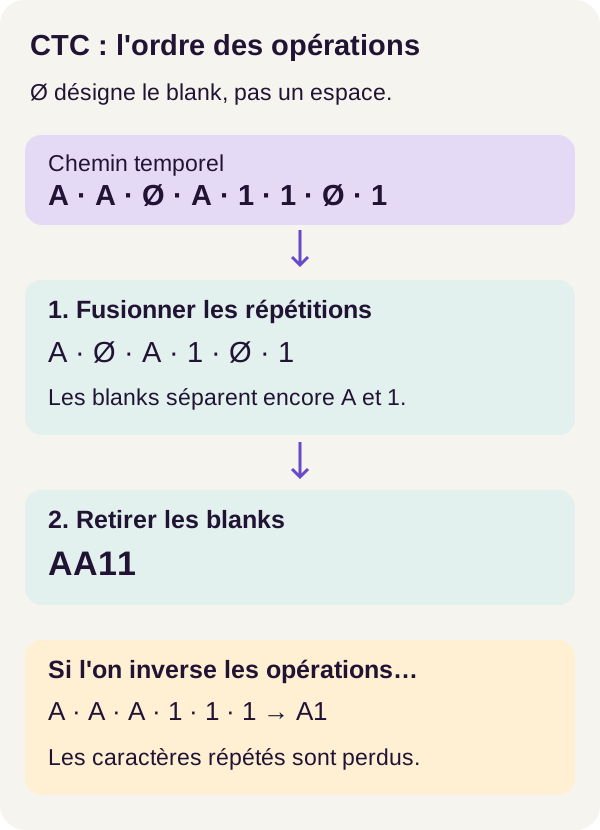
Blank preserves separation between two identical characters until decoding finishes.
A short decoder, but an essential operation order
The decoder handles numeric symbol identifiers. In src/pdfctc/decode.py, collapse performs the correct collapse, while wrong_collapse makes the earlier error testable.
Here is the central function. The blank identifier is 0:
def collapse(path, blank=0):
    """Merge runs first; a blank separates identical visible symbols."""
    result = []
    previous = None
    for symbol in path:
        symbol = int(symbol)
        if symbol != previous and symbol != blank:
            result.append(symbol)
        previous = symbol
    return result
previous remembers the preceding symbol. We add the current symbol only if it differs from the previous one and is not blank.
The decisive point is at the end of the loop: previous is updated even for a blank. An A encountered after that blank is therefore compared with blank, not with the last visible A. It can be retained.
The code thus performs in one pass the two operations we separated for explanation. Also avoid confusing the technical identifier 0 with the printed digit 0: the blank class and a visible character's class have different roles.
Let's check this mechanism with the project's command:
docker compose run --rm tutorial python -m pdfctc.cli explain-ctc --text AA11
Observe the paths and resulting texts. The decoding examples above explain this mechanism; they are not predictions obtained from scans.
Why four characters can require six steps
Producing AA11 requires at least one step for each character, plus a separation step between the two A characters and between the two 1 characters. A minimal path is therefore A, blank, A, 1, blank, 1: six steps for four characters.
More generally, the minimum is the character count plus the number of adjacent identical-character pairs. This is the kind of constraint checked by minimum_steps before computing the loss. If the visual sequence is too short, the problem is impossible in this framework, even with good parameters.
Keep both lengths in mind: the network's time-sequence output length and the expected transcription length. They have neither the same value nor the same role.
CTC loss: the signal that enables learning
A loss function measures the difference between what the model produces and what is expected. It supplies the signal used to adjust parameters. Here, CTC works with probabilities of compatible paths, not an expected box for each letter.
The call follows the torch.nn.CTCLoss contract: log probabilities, targets, input lengths and target lengths. The PyTorch 2.8 documentation lets you consult this contract for the walkthrough's version.
The project's function first checks that the data allows this computation:
def ctc_loss(logits, lengths, targets, target_lengths):
    offset = 0
    for time, size in zip(lengths.tolist(), target_lengths.tolist()):
        target = targets[offset : offset + size].tolist()
        offset += size
        if not target or 0 in target or time < minimum_steps(target):
            raise ValueError(
                f"CTC impossible: T={time}, L={size}, minimum={minimum_steps(target)}"
            )
    if offset != len(targets):
        raise ValueError("Target lengths do not sum correctly")
    # Transfer is differentiable: all network parameters and their gradients remain on CUDA.
    log_probs = logits.log_softmax(-1).cpu()
    loss = torch.nn.functional.ctc_loss(
        log_probs,
        targets.cpu(),
        lengths.cpu(),
        target_lengths.cpu(),
        blank=0,
        reduction="mean",
        zero_infinity=False,
    )
    if not torch.isfinite(loss):
        raise ValueError("Non-finite CTC loss")
    return loss
targets contains transcriptions encoded as identifiers and concatenated. target_lengths indicates how many identifiers belong to each transcription. offset therefore advances through this large array to recover each line's target.
The first check rejects an empty target, a blank in the target or a sequence that is too short. The second checks that declared lengths match the total identifier count. These rejections are project safeguards: they make errors explicit before learning.
log_softmax(-1) converts logits to log probabilities along the symbol dimension. This is the representation CTC expects; the log_softmax documentation explains the combined computation and its numerical stability.
reduction="mean" produces an aggregate loss: PyTorch divides example losses by their target lengths, then averages them over the batch. zero_infinity=False avoids automatically replacing infinite losses with zero, and torch.isfinite(loss) rejects an infinite or nonnumeric loss. Hiding an impossibility would not solve it.
One final detail: CTC loss is computed on CPU in this project, while network parameters and their gradients remain on CUDA. The transfer remains differentiable: it does not break the operation tracking that propagates the learning signal backward. A gradient indicates how a small parameter change affects the loss; the Autograd documentation introduces this automatic tracking.
This is a choice in the demonstrated code, not a general performance recommendation. CTC loss trains the network; character error rate will later evaluate the texts actually produced. Do not confuse these two measures.
Train and check resumption
Compare two ways of learning
An epoch is one pass over training examples. During these passes, the network produces scores, CTC loss is computed, then the optimizer adjusts parameters using gradients.
The project compares a model trained with degradations and a model trained only on clean images, with the same budget and initialization. Adding degradations is a form of data augmentation: we expose the network to visual variations to try to make it more robust.
The idea sounds reasonable, but it is not a guarantee. We must check whether the augmented model actually performs better on the same test images.
Interrupt, resume, then compare
We will also check training resumption. Run interrupted training, the clean variant, the continuous reference, then resumption:
docker compose run --rm tutorial python -m pdfctc.cli train --config configs/minimum.yaml
docker compose run --rm tutorial python -m pdfctc.cli train-clean --config configs/minimum.yaml
docker compose run --rm tutorial python -m pdfctc.cli train-continuous --config configs/minimum.yaml
docker compose run --rm tutorial python -m pdfctc.cli train-resume --config configs/minimum.yaml
train stops after 7 epochs. The train-continuous reference performs 15 without that interruption. train-resume reloads the interrupted state and performs the remaining 8 epochs. The train-clean command supplies the comparison model trained on clean images.
These commands therefore do not all extend the same model in one long sequence: they construct the variants needed for comparison.
A checkpoint is more than network weights. To continue the same experiment, optimizer state and other useful resumption states must also be recovered. The optimizer is the mechanism that updates parameters; its memory can affect subsequent steps.
Now let's check that interruption did not change the result:
docker compose run --rm tutorial python -m pdfctc.cli verify-resume --config configs/minimum.yaml
The validated walkthrough reports exact resumption. The comparison covers parameters, the optimizer, random states, history and data. We therefore do not merely observe that two curves look similar.
This exactness applies to the validated environment. Changing dependencies or hardware requires rechecking behavior; the result does not promise automatic identity across every machine.
Transcribe without reading the expected answers
Inference is when we use learned parameters to produce a transcription. It no longer involves adjusting the network from a known answer.
The inference service mounts pixels and checkpoints read-only. Annotations are unavailable in this service: it must recover lines, compute time-step scores and decode characters from images.
docker compose run --rm inference python -m pdfctc.cli predict --config configs/minimum.yaml
Predictions are written to outputs/. Look at a few lines before examining overall averages. A string can look plausible while containing an error in an identifier or amount.
Evaluation later retrieves annotations to compare texts. It associates predictions with references using boxes, not by retrospectively choosing the text producing the best score. The program must compare the correct line with the correct reference even when recognition is wrong.
Understand metrics before values
Count character errors
CER, or Character Error Rate, equals (S + I + D) / N.
S counts substitutions, where one character replaces another. I counts insertions, where an extra character appears. D counts deletions, where an expected character is missing. N is the reference character count.
For example, one substitution and one deletion among ten expected characters gives (1 + 0 + 1) / 10 = 0.2. This is a calculation example, not an additional model measurement.
A CER of 0.34 does not mean 34% of lines are wrong. It relates character errors to the expected character count. It can even exceed 1 if errors, especially insertions, are numerous enough. It is therefore not a simple proportion of successful or failed lines.
Also check what the application actually needs to use
Line accuracy requires the entire line to be correct. A single wrong letter is enough to fail this check, even if the rest is readable.
Identifier accuracy checks the second field separately. In our BOLT AA11 12.50 example, that field is AA11. This measure keeps sight of what matters in an import: recognizing much of the text does not compensate for a wrong product reference.
Finally, segmentation coverage is the number of geometrically matched lines divided by the number of reference lines. Coverage of 1 means all lines were matched. It does not mean the text is correct or every crop is identical to its annotation.
Distinguish the full pipeline from the “gold crop” diagnostic
Measurements cover 900 test lines and 19,358 characters.
The end-to-end measurement uses the entire pipeline, including projection-based segmentation, which finds lines from rows of dark pixels. This is the closest match to the document's real journey in this project.
The gold crop diagnostic supplies the reference crops directly to recognition. It therefore removes the choice of boxes made by segmentation in order to examine reading in the annotated areas.
The term gold refers to the reference, not to a promise of a better score. This diagnostic does not replace the full-pipeline measurement and does not represent an autonomous prediction from the whole page.
Let's calculate the metrics on the predictions:
docker compose run --rm tutorial python -m pdfctc.cli evaluate --config configs/minimum.yaml
What the r001 run results show
The initial model, before training, achieves a CER of 0.9950, on both clean and degraded views. The following results let us compare the effect of training with that of the images used for evaluation. A lower CER is better.
| Model | Evaluated view | CER |
|---|---|---|
| Initial, untrained | Clean and degraded | 0.9950 |
| Trained on clean images, full pipeline | Clean | 0.3387 |
| Trained on clean images, full pipeline | Degraded | 0.3694 |
| Trained with degradations, full pipeline | Clean | 0.4103 |
| Trained with degradations, full pipeline | Degraded | 0.4131 |
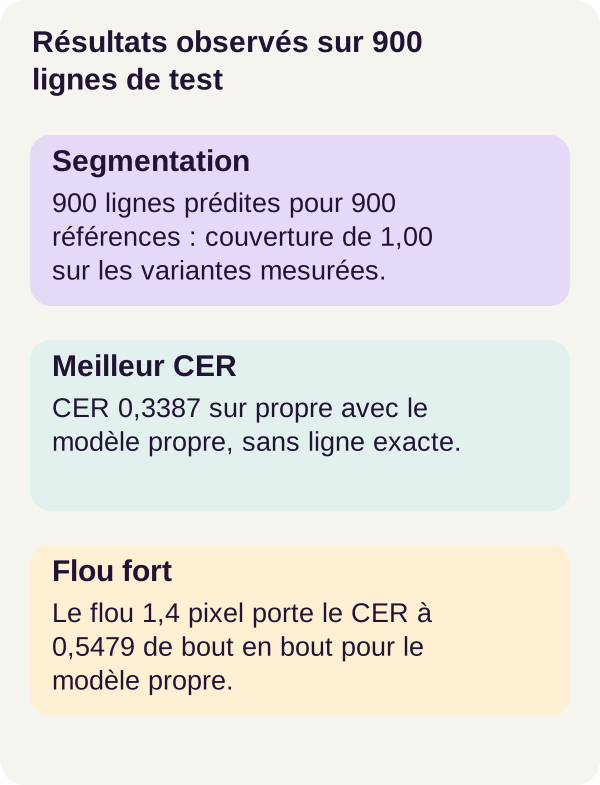
The best result is therefore the model trained on clean scans, evaluated end to end on the clean view: CER 0.3387, with 900 predicted lines for 900 references and coverage of 1.00.
But it also achieves 0 exact lines and 0 exact identifiers out of 900. The pipeline finds the lines, and the model has improved compared with its initialization, but the result is not a usable business-data extractor.
On the degraded view, this same model achieves 0.3694 in the full pipeline and 0.3803 with gold crops. Here, the diagnostic using reference crops therefore does not produce a lower CER. These two averages alone are not enough to identify the cause of this gap: inspect the examples before offering an explanation.
Finally, the model trained with degradations remains at 0.4103 on the clean view, then 0.4131 end to end on the degraded view. The chosen augmentation does not outperform clean training on this corpus and with this budget. This is a negative result to retain, not an anomaly to remove from the story.
This does not show that all data augmentation is useless. It shows that this augmentation, in this experiment, did not deliver the expected gain. Changing the transformations or the budget would require new measurements.
What we learned
OCR brings together several problems: locating text, representing its pixels, putting a sequence into context, then decoding it. A good answer to one of these problems does not automatically solve the next ones.
The CNN learns local patterns; the GRU connects horizontal positions; CTC makes it possible to learn from transcriptions without requiring a box for every character. Its blank handles alignment and repetitions: it does not represent a space.
The metrics give us two concrete lessons. Finding every line does not mean knowing how to read it. And adding degradations does not guarantee a more robust model. The useful question remains: which errors remain, on which documents, and with what consequences?
Exercise: predict before measuring
Write a hypothesis before running the command
We are going to change just one variable: blur strength, without retraining the network.
Before running the experiment, write down what you expect. Will CER increase? Will segmentation necessarily lose lines? Must the model trained with degradations always resist better than the one trained on clean images? Distinguish a reasonable hypothesis from a result you already know.
To check your understanding of the blank, also decode the path A, blank, A, A, 1, blank, 1, 1 by hand. Try the correct order of operations, then the reverse order. Write down the two resulting texts before reading the answer.
Run the supplied variant
configs/exercise.yaml sets blur to 1.4 pixels and keeps the checkpoints. We therefore use the same models to observe the effect of more difficult images, not to teach them to adapt.
docker compose run --rm tutorial python -m pdfctc.cli exercise --config configs/exercise.yaml
Open the exercise results and compare them with your prediction. For the proposed path, the correct decoding gives AA11; removing blanks first leads to A1. The produced files and lesson/SOLUTIONS.md let you study the correction included with the learning path.
The heavily blurred variant, without retraining, confirms the gap. The model trained on clean images reaches an end-to-end CER of 0.5479 and 0.5660 with gold crops. The augmented model reaches 0.5617 and 0.5918, respectively.
Coverage remains 1.00, while line and identifier accuracy remain zero. The program still finds the lines, but their content is harder to transcribe. Segmentation and recognition therefore do not necessarily degrade in the same way.
Extend the experiment without changing everything at once
You can then vary only the intensity of one degradation in the generator. Keep the model, pages and annotations, then predict and measure again.
This personal modification is distinct from the supplied variant: its result is not known in advance. Do not change the data and training at the same time, otherwise you will no longer know what caused the observed difference.
Progress is not necessarily monotonic for every page: increasing degradation does not guarantee that every individual transcription will get worse with each attempt. Also inspect the examples that contradict your intuition and explain them rather than dismissing them.
Generate figures and check files
Generate the figures from your results, then check the checkpoints:
docker compose run --rm tutorial python lesson/figures/plot.py
docker compose run --rm tutorial python scripts/check_checkpoints.py
The six checkpoints in the reference learning path pass their structural and identity check. This check concerns the expected files; it does not turn an imprecise model into a reliable one.
Then look at the curves and line examples in outputs/. An aggregated CER shows the overall scale of the errors, but the examples let you see what is happening: are characters confused, added or lost? Compare the transcription with the image rather than relying on plausibility alone.
Test errors and troubleshoot
A negative case checks that the program rejects an inconsistent situation. Passing this test therefore means getting the expected refusal, not still managing to produce output.
The tests cover, in particular, an empty CTC target, a blank forbidden in the target transcription, too few time steps and a line that is too wide. Do not work around these errors by silently cutting the text or hiding an impossible loss: you would change the problem instead of solving it.
On mobile, scroll the table horizontally.
| Symptom | Check and fix |
|---|---|
| The GPU appears on the host but CUDA fails in Docker | Compare preflight and check_environment.py, then fix NVIDIA integration before training. |
| A line exceeds the expected width | Inspect its box and resizing. Your own corpus may require different segmentation, to be evaluated as a project modification. |
| CTC rejects a target | Check lengths, repetitions and the absence of the blank among expected characters. |
| A checkpoint is missing | Find the corresponding training step and its error; an absent file must not be replaced with arbitrary weights. |
| Disk is full | Check the space used by scans, checkpoints and results. Keep useful files before the targeted cleanup below. |
Stop and clean up
First copy the results and figures you want to keep. The first command stops the project. The script displays and then deletes only outputs/. The final stop ends the learning path after the cleanup has run.
The contents of outputs/ will be deleted. Scans remain in data/generated/ and checkpoints in assets/checkpoints/.
docker compose down
docker compose run --rm tutorial python scripts/clean.py --outputs-only
docker compose down
No global Docker volume is deleted. To repeat the learning path, use the same instructions and the ZIP's locked dependencies. Targeted cleanup lets you know what is being deleted without touching your other projects.
From the tutorial to a real application
The first task would not be to add an HTTP route, but to have representative documents and quality measured on those documents.
Replace the fictional corpus with authorized documents and their annotations. Split the data to avoid leaks between training and testing by supplier, template or batch. Measure CER and the criteria that are genuinely useful to your application on separate sources. Languages, rotations, tables, complex pages and handwriting require additional data and evaluations.
Web integration brings other responsibilities: authentication, document permissions, file limits, asynchronous processing, monitoring and load testing, depending on the context. An asynchronous API could, for example, separate document submission from retrieving its result; that is not a feature provided by this tutorial.
Protect the data, version the models and plan human review of critical identifiers and amounts. Isolating the PDF parser, meaning the library that opens and interprets the file, as well as maintaining native libraries, are part of operating the system.
The network in this tutorial does not provide sufficient quality to automate business-data extraction without review. Its value is to make the mechanism and its limits observable, so you know what will need to be improved and checked next.
Going further
Start by building an annotated corpus representative of your own scans. Study segmentation errors and recognition errors separately: a poorly cropped line image and a misread letter do not call for the same investigation.
You can then compare another training budget while keeping a fixed test set, or test decoding that explores several paths. In both cases, measure the real contribution rather than inferring it from the technical choice alone. These are extensions to experiment with, not improvements already validated in the r001 run.
The documentation links embedded throughout the text explore the mechanisms in greater depth: image operations in Pillow, layers and sequence lengths in PyTorch, then the CTC principle in the founding paper. The PyTorch 2.8 references match the version used here; other documentation may change. To reproduce the experiment, the ZIP's configurations and locked dependencies remain your starting point.