





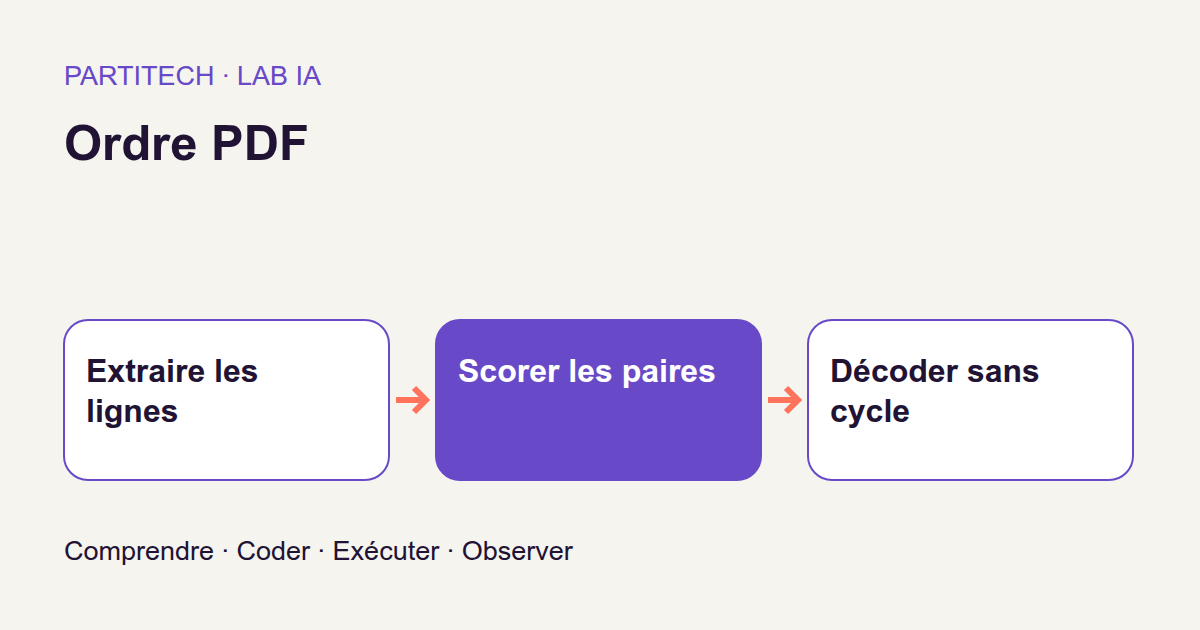
You may already have copied text from a PDF into an editor: all the words are there, but the sentences no longer follow each other. A line from the left column appears between lines from the right. A sidebar lands in the middle of a paragraph. The footer appears before the end of the text.
The problem is not necessarily character recognition. Recovering words and recovering their reading order are two different tasks.
In this tutorial, we will train a small neural network to answer a very specific question: “Which of these two lines should be read first?” We will then use these comparisons to reconstruct the order of an entire page.
There is no large language model to query or text for it to summarize. Our model receives only positions and font sizes. This is an opportunity to understand, with Python and a visual example, how we move from observable data to learning, then to a result we can check.
Download the complete tutorial project
The commands and measurements presented follow the project's r004 reference walkthrough. The small examples added to explain calculations are teaching illustrations, not additional results from that walkthrough.
The result we are aiming for
Our running example is a fictional bulletin, “Boreal Maintenance Bulletin.” It contains a full-width title, two columns of “Check valve …: stable” lines, a notices box and two footer lines.
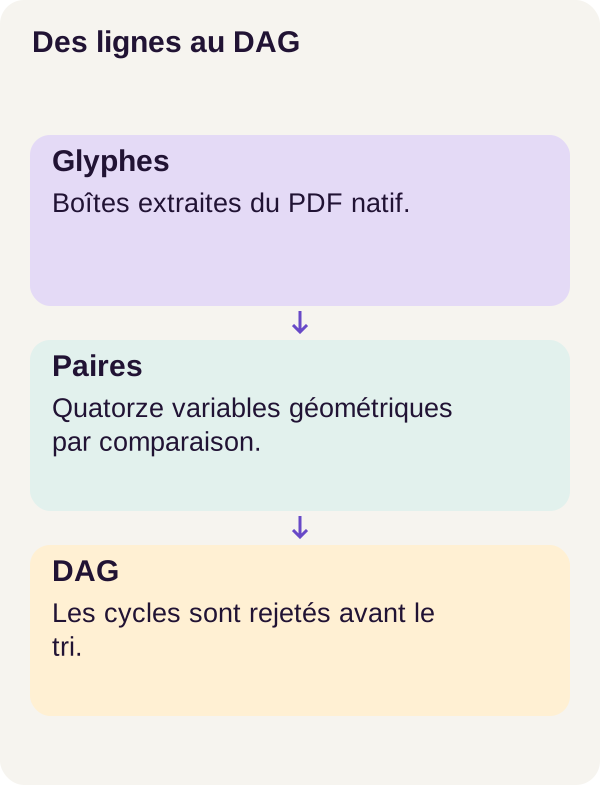
Your eye recognizes blocks. A program, however, must reconstruct this reading path from what it extracts. It first recovers glyphs, the shapes of characters, then groups them into lines. It then assigns a rank to each line and produces two complementary outputs: Markdown for reading the text in the proposed order, and an SVG overlay numbering lines on the page.
The SVG therefore helps explain a decision, not just illustrate the tutorial. If a notice is inserted too early, you can find its position and number on the page.
One detail makes the experiment interesting: the generator deliberately shuffles the drawing order of objects in the PDF. The program cannot simply follow that stream to recover the answer. For a web developer, imagine blocks whose visual order differs from their DOM order: traversing the elements is no longer enough to infer the intended path.
The model receives neither text, line identifiers nor reference order. Text remains available for exports but does not enter its computation. Annotations, meaning expected answers, are used separately for training and evaluation. The prediction service operates without them.
The scope remains precise: native PDFs, whose characters can be extracted. The project does not perform OCR, recognizing text in an image, and does not validate any real business document.
What you need to know before the code
Recover lines in the same coordinate system
Let's start with a concept familiar in interface development: a box surrounding an element. Here, each extracted character has a box, written x0, y0, x1, y1. In the final coordinate system used by the project, these values denote the left, top, right and bottom edges.
We must first prepare that coordinate system. In the conventional PDF coordinate system, the origin is at the bottom left. The project applies CropBox cropping and rotation, then transforms each box exactly once into a common coordinate system with a top-left origin. CropBox defines the page area retained for display; rotations of 90° and 270° swap width and height.
Why address this before the model? Because a coordinate error can make a right-hand column look like a left-hand one. The network would then learn from positions that do not correctly describe what you see.
Nearby characters on the same row are then grouped. The glyphs of “Check valve 0020: stable” become a line with text, a box and an average font size. A very large gap between two groups of characters separates them: we do not want to merge two columns into one line.
This extraction can already make mistakes. Ranking will not bring back a lost line. We will therefore measure line presence and ordering quality separately.
Turn two lines into 14 numbers
The network does not directly handle boxes or paragraphs. We pass it a feature vector: a list of numbers describing what interests us.
For each line, we take its four box coordinates and font size. Horizontal coordinates are divided by page width; vertical coordinates and font size by page height. This is normalization.
A small example suffices: a horizontal position of 60 on a page 600 units wide becomes 60 / 600 = 0.10. A position of 120 on a page 1,200 units wide also gives 0.10. In both cases, the line starts at 10% of the width. We thus compare relative positions rather than raw distances.
A pair receives the first line's five values, then the second line's five. We add horizontal separation, vertical separation and overlap along both axes. That makes 5 + 5 + 4 = 14 features.
Horizontal overlap means boxes partly occupy the same left-to-right positions; it does not imply that their rectangles touch. Two lines stacked in a column can overlap horizontally without overlapping vertically.
Learn a preference, not yet a ranking
For each pair, the model produces a logit, a raw score that can be negative or positive. A function called the sigmoid turns it into a value between 0 and 1, interpreted here as the probability that the first line precedes the second.
With a score converted to 0.90, the model favors the first line; with 0.10, it favors the second. At 0.50, it favors neither. These values express its prediction, not certainty about the page.
During training, we have the correct answer, called the target or label. It is 1 if the first line should precede the second, 0 otherwise. A loss function measures error: here, BCE, or binary cross-entropy. If the target is 1, predicting 0.01 is penalized more than predicting 0.90.
Loss computation uses logits directly. A useful documentation reference is PyTorch's BCEWithLogitsLoss: combining sigmoid and BCE enables more stable computation than applying them separately. Do not confuse the probability we use to explain the result with the raw value passed to the loss function.
From preferences to a readable page
Now suppose the model prefers A before B, B before C, but C before A. It is impossible to satisfy all three decisions at once: we return to the starting point. This is a cycle.
The decoder is the piece of code turning these preferences into a list. The project's decoder examines the strongest relationships first and keeps an arrow only if it does not create a cycle. The resulting structure is a DAG, a directed acyclic graph. Each line is a vertex; each arrow means “must precede.”
A topological sort can then produce an order respecting the retained arrows. Think of deployment tasks: a task becomes available when its prerequisites have been handled. The Python graph documentation explains this principle; the tutorial uses its own decoder, presented below.
Remember the separation: the network estimates preferences; the decoder constructs the final order. Removing cycles makes that order consistent with the retained relationships, but guarantees neither the globally optimal order nor the correct reading order.
Controlled data to learn the mechanism
The corpus is synthetic: the program generates pages and knows their reference order. It contains 60 geometry families, with 10 pages per family, totaling 600 pages. A family groups pages sharing a layout geometry.
Splitting is done by family before any training. 42 families, or 420 pages, are used for learning; 9 families, or 90 pages, for validation; the remaining 9 families, or 90 pages, are reserved for testing.
Training adjusts parameters. Validation tracks model quality without learning directly from those pages. Testing measures the final result. Splitting families, rather than randomly mixing their pages, prevents the same family from appearing in both training and testing. It does not, however, turn a synthetic corpus into a representative sample of all PDFs.
Return to Boreal. On a first page, “Check valve 0000: stable” is in the left column, “Check valve 0020: stable” in the right and “Notice 00-00-0” in the box. You can read these texts to follow the example; the model must decide where to place lines without reading those strings.
The observed walkthrough contains 232,570 line pairs. Input checks confirm 14-dimensional vectors, without text or identifiers. Labels create training targets and compare predictions with expected answers, but are not added to those vectors.
During inference, meaning use of the trained model to predict, the labels folder is absent from the container. The code explicitly fails if it is mounted. This concretely separates “having the answer key to learn” from “accessing the answer key while claiming to predict.”
Core code: construct model inputs
We will read three pieces: pair preparation, the network and the decoder. The excerpts come from the ZIP's modules; read them in their project environment, not as a standalone script to copy into an empty file.
pair_features(): prepare what the network can see
Here are the functions from src/pdforder/features.py. first and second describe two lines. For every pair, we prepare both orientations: first followed by second, then the reverse.
def pair_features(first, second, width, height):
    a = [
        first["bbox"][0] / width,
        first["bbox"][1] / height,
        first["bbox"][2] / width,
        first["bbox"][3] / height,
        first["font_size"] / height,
    ]
    b = [
        second["bbox"][0] / width,
        second["bbox"][1] / height,
        second["bbox"][2] / width,
        second["bbox"][3] / height,
        second["font_size"] / height,
    ]
    overlap_x = max(0, min(a[2], b[2]) - max(a[0], b[0]))
    overlap_y = max(0, min(a[3], b[3]) - max(a[1], b[1]))
    return a + b + [b[0] - a[0], b[1] - a[1], overlap_x, overlap_y]


def page_pairs(page, device="cpu"):
    lines = page["lines"]
    pairs = [(i, j) for i in range(len(lines)) for j in range(i + 1, len(lines))]
    forward = torch.tensor(
        [
            pair_features(lines[i], lines[j], page["width"], page["height"])
            for i, j in pairs
        ],
        dtype=torch.float32,
        device=device,
    ).reshape(-1, 14)
    reverse = torch.tensor(
        [
            pair_features(lines[j], lines[i], page["width"], page["height"])
            for i, j in pairs
        ],
        dtype=torch.float32,
        device=device,
    ).reshape(-1, 14)
    return pairs, forward, reverse
In pair_features(), a and b are lists of five numbers. + concatenates them: it does not perform elementwise addition. The returned value contains exactly 14 numbers in a fixed order.
overlap_x and overlap_y measure the shared interval length along each axis in normalized coordinates. If the intervals do not overlap, max(0, ...) returns zero. These are not percentages of shared area.
The final part adds differences between the top-left corners. Two lines at the same height have near-zero vertical separation; two distant columns produce substantial horizontal separation. The network can combine these clues with box dimensions and font sizes.
page_pairs() then enumerates index pairs with i < j. It does not pair a line with itself and lists each pair only once while constructing both orientations. With four lines, for example, we obtain six pairs: (0, 1), (0, 2), (0, 3), (1, 2), (1, 3) and (2, 3).
forward and reverse become tensors, here two-dimensional numerical arrays. Each row describes a pair with 14 columns. In reshape(-1, 14), -1 lets PyTorch infer the row count. float32 indicates the numeric format; device determines where data is placed for computation. The default "cpu" value in this function does not validate the complete walkthrough on CPU.
Looking at these inputs shows what the model can learn: relationships among width, height, position and font. It cannot rely on the meaning of “Notice” or the number written in a line, since these are not passed to it.
PairOrderNet: compare both orientations
The model in src/pdforder/model.py is an MLP, or multilayer perceptron. It is a small network of successive numerical transformations. Its parameters are initialized locally, then adjusted during training: we download no pretrained model for this task.
import torch
from torch import nn


class PairOrderNet(nn.Module):
    def __init__(self, hidden=64):
        super().__init__()
        self.network = nn.Sequential(
            nn.Linear(14, hidden),
            nn.ReLU(),
            nn.Linear(hidden, hidden),
            nn.ReLU(),
            nn.Linear(hidden, 1),
        )

    def forward(self, forward_features, reverse_features):
        return (
            self.network(forward_features) - self.network(reverse_features)
        ).squeeze(-1)
With hidden=64, the path is 14 values → 64 → 64 → 1 score. The two groups of 64 values are hidden layers: intermediate computations, neither inputs nor the final answer.
An nn.Linear layer combines received values with learned weights and a bias. nn.ReLU keeps positive values and replaces negative ones with zero. These activations insert a nonlinear transformation between layers. nn.Sequential executes them in their declared order.
The forward() method applies the same network, with the same parameters, to both orientations, then subtracts the scores. These are not two separately trained models.
To see the benefit, imagine a forward score of 2.4 and a reverse score of 0.9. The logit is 2.4 − 0.9 = 1.5. Swap the lines: it becomes 0.9 − 2.4 = −1.5. The preference indeed reverses direction. .squeeze(-1) simply removes the final dimension of size 1, retaining one score per pair.
This property is not enough to prevent cycles among three lines. It guarantees consistency when reversing the same pair, not across all pairs on a page.
But where does learning happen? In the training loop, not merely in the class declaration. The model computes scores; the loss compares them with targets; PyTorch computes how parameters affect the error, then the optimizer adjusts them. These indications of change are gradients. The official optimization tutorial details this general mechanism.
In this project, the loss first averages pairs within each page, then pages. A dense page therefore does not gain more weight in the average simply because it supplies more pairs.
decode_dag(): keep contradictions from blocking ranking
The network now supplies preferences. They still need to be assembled. Here is the decoder from src/pdforder/decode.py:
def has_path(adjacency, start, target):
    pending = [start]
    visited = set()
    while pending:
        current = pending.pop()
        if current == target:
            return True
        if current not in visited:
            visited.add(current)
            pending.extend(adjacency[current])
    return False


def decode_dag(lines, pairs, probabilities):
    adjacency = [set() for _ in lines]
    candidates = []
    for (first, second), probability in zip(pairs, probabilities):
        source, target = (first, second) if probability >= 0.5 else (second, first)
        candidates.append((abs(probability - 0.5), source, target))
    candidates.sort(
        key=lambda edge: (
            -edge[0],
            stable_key(lines[edge[1]]),
            stable_key(lines[edge[2]]),
        )
    )
    rejected = []
    for confidence, source, target in candidates:
        if has_path(adjacency, target, source):
            rejected.append([source, target, confidence])
        else:
            adjacency[source].add(target)
    degree = [0] * len(lines)
    for targets in adjacency:
        for target in targets:
            degree[target] += 1
    available = [i for i, d in enumerate(degree) if d == 0]
    order = []
    while available:
        current = min(available, key=lambda i: stable_key(lines[i]))
        available.remove(current)
        order.append(current)
        for target in adjacency[current]:
            degree[target] -= 1
            if degree[target] == 0:
                available.append(target)
    if len(order) != len(lines):
        raise ValueError("Internal cycle escaped detection")
    return order, rejected
First, orient the arrows. If the probability is greater than or equal to 0.5, the first line becomes the source and the second the destination. Otherwise, the orientation reverses. For each line, adjacency stores the lines it points to.
Next, process the strongest preferences. abs(probability - 0.5) measures distance from the point of uncertainty. A probability of 0.95 gives 0.45; a probability of 0.10 gives 0.40, but in the opposite direction. The greater this distance, the earlier the relationship is processed. This does not guarantee that the relationship is true.
Before each addition, check for a return path. has_path(adjacency, target, source) searches for a path from destination to source. If one already exists, adding the arrow in the other direction would close a cycle. It is then stored in rejected rather than added to the graph.
Finally, produce the list. degree counts remaining predecessors for each line. available contains those with none left. The program chooses one, adds it to order, then gradually releases its successors. stable_key, the project's helper function, breaks ties reproducibly.
The final check requires every line to appear in the resulting order. It reports an internal inconsistency otherwise. The result includes the ordered list and rejected relationships: we can therefore inspect the tradeoffs, instead of receiving only final text.
Prerequisites and checks before training
You should be able to read Python functions, manipulate lists and use a terminal. The necessary learning concepts were introduced above; no prior experience with large language models is required.
The validated walkthrough uses Linux, Docker Engine, Compose, an NVIDIA driver and NVIDIA Container Toolkit. The observed profile is an RTX 3090 with PyTorch in float32. The CPU profile remains NOT_TESTED: we do not present it as a validated alternative.
The README specifies 16 GiB of available memory and approximately 12 GiB of disk space for the image and data. These are preparation estimates, not guaranteed consumption on your machine. No external pretrained model is required: the MLP is initialized locally.
Unzip the archive and open a terminal at the project root. All the following commands run from this directory, in order.
The tutorial service prepares, trains and evaluates; inference predicts without labels. Their computations run without networking. The separate acquisition service checks external assets needed by the project; here it downloads no model.
Step 1 — prepare and check the environment
The preflight check verifies Docker and GPU visibility under Linux. The environment check then actually runs a CUDA computation inside Docker. Seeing the card with nvidia-smi on the host does not prove a container can use it.
Docker Compose configures this GPU access using the integration supplied by NVIDIA Container Toolkit. The project's commands check the path we need.
sh scripts/preflight.sh
sh scripts/setup.sh
docker compose config --quiet
docker compose build acquisition tutorial inference
docker compose run --rm acquisition python scripts/acquire.py --config configs/minimum.yaml
docker compose run --rm tutorial python scripts/check_environment.py --config configs/minimum.yaml
docker compose run --rm tutorial python -m pytest -q
Every command must finish with a zero exit code, meaning no reported error. The reference reproduction passed 27 public tests, covering coordinates, character grouping, cycles, rejected PDF inputs and safeguards.
These tests check program behavior. They do not demonstrate that the model will correctly read your future documents.
Step 2 — generate, inspect and compare a baseline
Before training anything, we prepare the pages and examine what a simple method can already do. This is a baseline, a reference result against which to compare learning.
docker compose run --rm tutorial python -m pdforder.cli prepare --config configs/minimum.yaml
docker compose run --rm tutorial python -m pdforder.cli inspect-pairs --config configs/minimum.yaml
docker compose run --rm tutorial python -m pdforder.cli baseline --config configs/minimum.yaml
prepare must produce 600 pages, split 420/90/90 among training, validation and testing.
inspect-pairs exposes the number of pairs, the 14 features and the absence of text or identifiers from network inputs. This is the point to check that the model receives only the intended information.
baseline computes two orders without learning. Vertical sorting follows line height: it is deliberately fragile when several columns occupy the same rows. The columns method applies an explicit geometric rule.
Keep these outputs. The question is not just “does the model work?” but also “does it perform better than a simpler rule on the same data?”
Step 3 — train and check resumption
An epoch is one pass over training data. Here the walkthrough compares continuous training with interrupted and resumed training.
docker compose run --rm tutorial python -m pdforder.cli train --config configs/minimum.yaml
docker compose run --rm tutorial python -m pdforder.cli train --config configs/minimum.yaml --mode continuous
docker compose run --rm tutorial python -m pdforder.cli train --config configs/minimum.yaml --mode resume
docker compose run --rm tutorial python -m pdforder.cli verify-resume --config configs/minimum.yaml
The first command stops after epoch 6. The second launches the continuous control run: it starts from the same initial state and reaches 12 epochs. The third resumes the interrupted state and performs the remaining six epochs. The last compares both paths.
The save used for resumption is called a checkpoint. To resume training faithfully, retaining model weights is not enough: you must also restore the state governing subsequent updates. The PyTorch training-checkpoint documentation explains, in particular, the role of optimizer state.
In this project, verify-resume compares parameters, the optimizer, sampling order, random generators and the best checkpoint. In the reference reproduction, the maximum difference between continuous and resumed runs is 0.0 after 12 epochs.
This check answers a reproducibility question: does resumption follow the same path under the tested conditions? It does not yet measure reading-order quality.
Step 4 — predict and measure
The model is ready. Let's now move to prediction, then comparison against the references.
docker compose run --rm inference python -m pdforder.predict --config configs/minimum.yaml
docker compose run --rm tutorial python -m pdforder.cli evaluate --config configs/minimum.yaml
Prediction produces four orders over the same lines: vertical, columns, DAG and Borda. Borda is another way to combine preferences: it adds them to obtain a ranking score per line, instead of building a graph while rejecting cycles.
Evaluation joins reference annotations only on the test split. It writes, among other things, example exports, per-page metrics and aggregate metrics, meaning measurements summarizing the evaluated set.
Open the generated Markdown and SVG files. Follow the title, left column, right column, box and footer. Where does each method go? An average helps comparison, but an annotated page reveals what was actually reordered.
Understand the measurements before reading the numbers
The trap would be to ask for one “reading score.” We have several stages, so we must distinguish several types of error.
Coverage: did we recover the lines?
Coverage measures the proportion of reference lines recovered during extraction. A value of 1.0 means they are all present. By itself, it says nothing about their order.
Imagine five expected lines, A, B, C, D and E. If extraction finds only A, B, D and E, coverage is four out of five, or 80%. This example illustrates the measure; it is not another corpus page.
Conditional inversions: are recovered lines in the right order?
The conditional inversion rate looks at pairs of extracted lines that could be matched with reference lines. A pair is inverted if prediction puts B before A while the reference requires A before B. Here, lower is better.
Why “conditional”? Because the measure concerns matched lines. In our example, A, B, D and E can be perfectly ordered: the rate is then zero, although C is still missing. A good value therefore does not certify extraction.
End-to-end pair success: do missing lines remain visible?
End-to-end pair success retains extraction losses in its denominator. In other words, it does not remove from the calculation pairs we can no longer reconstruct because a line is missing.
It thus complements the conditional rate. A method must not appear perfect merely because it orders the subset it managed to extract well. For this measure, a value close to 1 is desirable.
Adjacency F1: do the right neighbors still follow each other?
Adjacency F1 compares relationships between immediately consecutive lines. If the reference is A, B, C, D, its adjacencies are A→B, B→C and C→D. In A, C, B, D, none of these three adjacencies is preserved, even though every line is present.
The F1 score combines precision, the proportion of predicted adjacencies that are correct, and recall, the proportion of expected adjacencies recovered. The F1 score documentation specifies this general definition; the link is further reading, not an added project dependency.
We can now read results without confusing present lines, correctly oriented pairs and preserved neighbors.
Results of the reference walkthrough
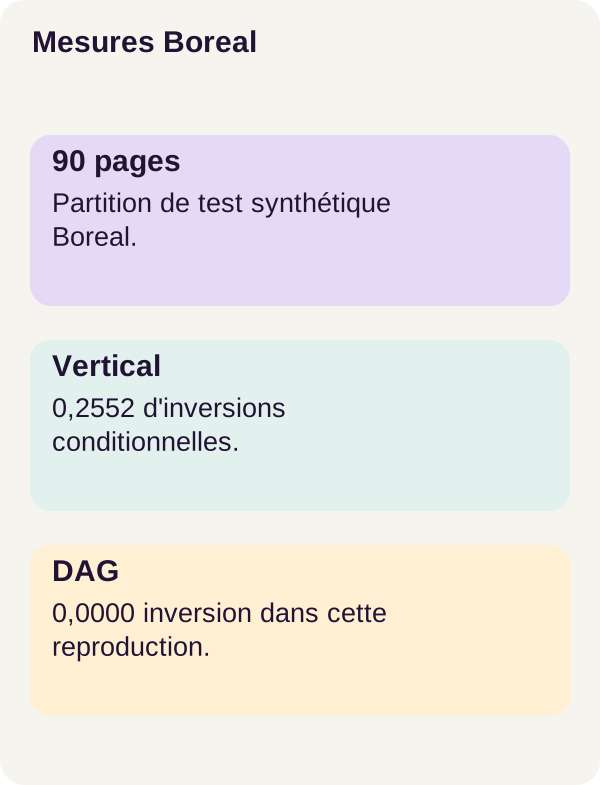
The table covers 90 test pages and rounds values to four decimal places. The best value is 0 for inversions and 1 for the other three measures.
On mobile, scroll the table horizontally.
| Method | Coverage | Conditional inversions | End-to-end success | Adjacency F1 |
|---|---|---|---|---|
| Vertical sorting | 1.0000 | 0.2552 | 0.7448 | 0.1039 |
| Columns | 1.0000 | 0.0000 | 1.0000 | 1.0000 |
| Learned DAG | 1.0000 | 0.0000 | 1.0000 | 1.0000 |
| Borda | 1.0000 | 0.0000 | 1.0000 | 1.0000 |
Vertical sorting retains every line, but its inversion rate is 0.2552, or approximately 25.52%. Its Adjacency F1 remains low at 0.1039. This is exactly the starting problem: words and lines are present, but the reading path is disrupted.
The columns, learned DAG and Borda methods achieve the same perfect results on this test. Learning therefore demonstrates no gain over the geometric column rule in this experiment.
This is not a result to hide. On this distribution, an explicit rule is already sufficient. The tutorial's value is understanding and comparing mechanisms, not attributing an advantage to AI on principle.
The corpus remains synthetic, English-language and constructed with known geometries. These figures prove no general MLP superiority on invoices, contracts, scans, tables or customer PDFs. They describe what the protocol measured on its own test pages.
Exercise: predict, then observe the correction
Take a sheet of paper and draw three lines, A, B and C. Add preferences A→B at 0.95, C→A at 0.90 and B→C at 0.85.
Before running the command, find the cycle. Which arrow will the DAG examine first? Which must it reject? What order will remain possible? For Borda, try adding the probabilities favoring each line and look for a possible tie.
docker compose run --rm tutorial python -m pdforder.cli exercise --config configs/exercise.yaml
docker compose run --rm tutorial python lesson/figures/plot.py
docker compose run --rm tutorial python scripts/check_checkpoints.py
The exercise does not train a new model. Its output gives C, A, B for the DAG and A, C, B for Borda. Let's take time to explain these results.
For the DAG, distances from 0.5 are respectively 0.45, 0.40 and 0.35. The decoder first retains A→B, then C→A. We therefore have a C→A→B path. Adding B→C would return us to C: B→C is rejected, and the resulting order is C, A, B.
Borda seeks another compromise by adding preferences. With the problem's decimal probabilities, hand calculation gives 0.95 + 0.10 = 1.05 for A, 0.05 + 0.85 = 0.90 for B and 0.90 + 0.15 = 1.05 for C. Reverse values come from 1 − p.
One detail deserves attention: A and C have the same theoretical total here. These sums alone cannot break the tie. A, C, B is the order reported by the supplied exercise; do not infer that A has a strictly greater total than C. Consult the output for the ranking actually produced.
The exercise also writes the fingerprint, or hash, of the checkpoint used for the actual comparisons. Figures are produced after this observation. Compare your prediction with the output file: the point is to follow the decoder's decisions, not guess a ranking without examining its computation.
What we learned
The correct reading order is not necessarily the order in which objects were drawn in the PDF. We separated character recovery, grouping into lines, estimating pairwise preferences and constructing a ranking.
The model learns from geometry without reading text. The DAG turns its preferences into acyclic relationships; Borda adds them and may reach a different compromise. The decoder choice is therefore as much a part of the system as the network itself.
Finally, we distinguished missing lines, inverted pairs and preserved adjacencies. Results show no gain over the geometric columns baseline: they provide a reproducible experiment for understanding the data, inputs, model, decoder and measurements.
Matching a simple rule's result remains useful information: it shows what learning has not yet demonstrated.
Adapt, troubleshoot and clean up
Move to other documents without losing your bearings
To extend the project, start with PDFs you are authorized to process and annotations suited to their boxes, notes, tables, images and mixed pages. Defining the expected order is part of the work: you cannot correctly evaluate a box without deciding where it belongs in the reading sequence.
Separate training, validation and testing by document source. Add human readability evaluation and inspect errors by family. A satisfactory average can hide a category of poorly handled pages.
The walkthrough's limits remain: extraction can lose lines; the graph can retain an incorrect preference; rotation tests do not demonstrate learned reading of vertical text.
A production service also needs access permissions, file validation, stronger PDF-parser isolation, monitoring, latency and error measurements, load tests, backups and a retention policy. Extracted strings remain data: never execute them as commands. The project's teaching safeguards are not universal protection against PDF-library vulnerabilities.
Diagnose the stage that is going wrong
CUDA fails? Rerun the environment check in Docker and verify NVIDIA integration before changing the neural network.
Columns appear reversed? Check CropBox, rotation and coordinate systems. If coordinates are incorrect, changing training does not fix the cause.
Lines are already mixed up before ranking? Inspect row grouping and separation at large gaps. Do not replace observations with labels to obtain better output: that would bypass precisely the problem being measured.
Keep useful results, then clean up
Copy the figures and metrics you want to retain before cleanup. The script below targets only outputs/; checkpoints remain in assets/checkpoints/ and generated data in data/generated/.
docker compose down
docker compose run --rm tutorial python scripts/clean.py --outputs-only
docker compose down
The first command stops the Compose environment. The second runs the project's cleanup; the last closes the environment again. You thus retain data and training checkpoints without confusing their deletion with removal of exported results alone.
Official sources consulted
Walkthrough references
- Docker Compose: GPU access: configuring GPU access for services.
- NVIDIA Container Toolkit: installation and Docker configuration: integrating the NVIDIA driver into the container environment.
- PyTorch: BCEWithLogitsLoss: stable computation of binary loss from logits.
Further reading
The references linked throughout explain Linear and ReLU layers, optimization, checkpoints, topological sorting and F1. They clarify concepts; they do not constitute new project validations.
To reproduce the measurements, retain the files, dependencies and configurations in the r004 ZIP. Current documentation may evolve independently of that version.