





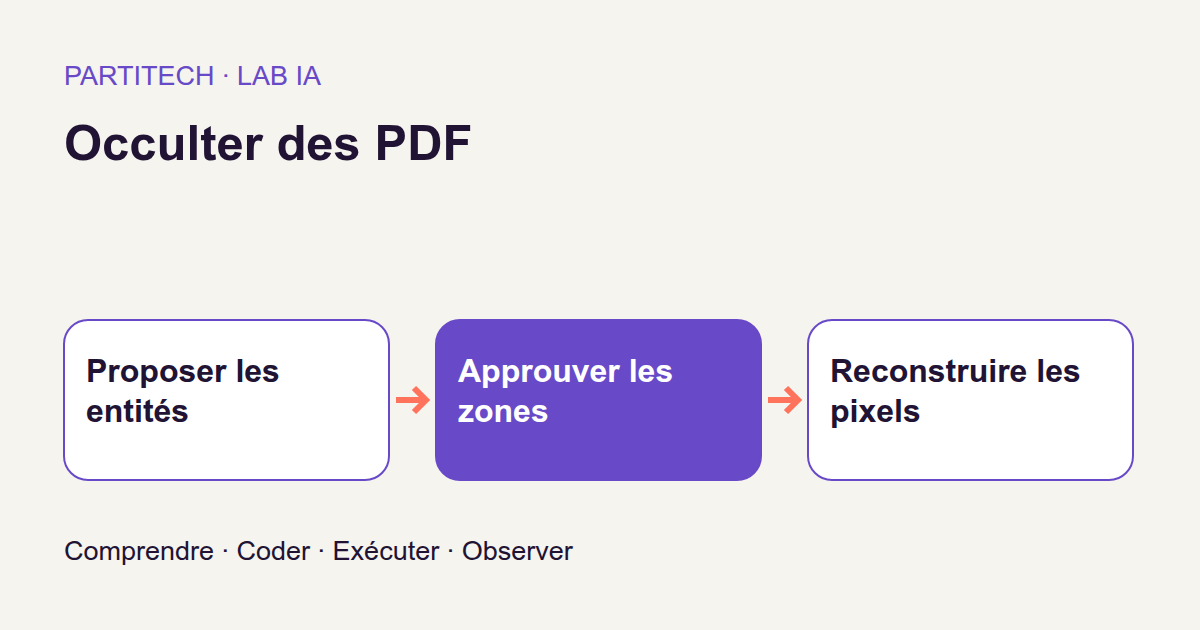
You are developing a back office for sharing letters after hiding their sensitive information. In the preview, names and addresses are covered in black. The file looks ready to send. But what happens if the recipient selects the text and copies it into an editor?
For a web developer, the trap resembles an element hidden on screen while its value remains in the HTML. A PDF is not a web page, but the distinction is the same: no longer seeing information does not mean it has disappeared from the file. A black bar added to a PDF can leave the original text and objects underneath.
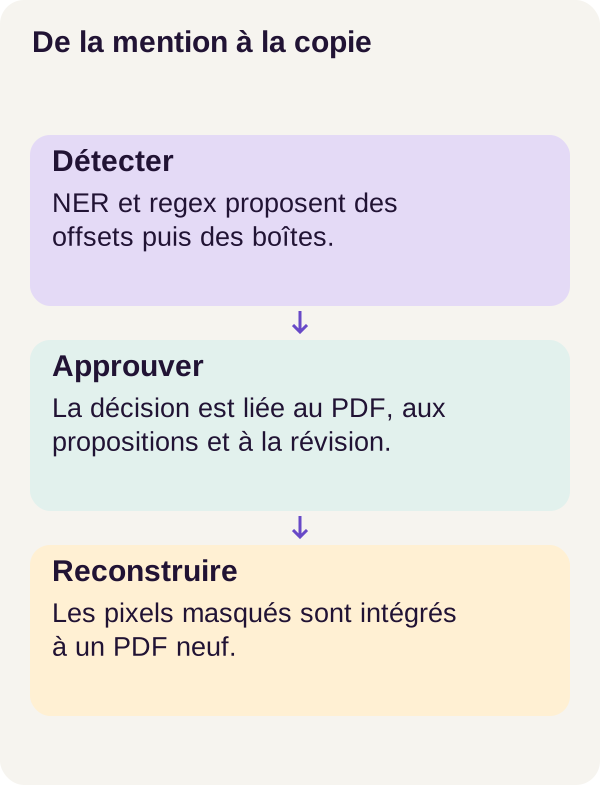
We will build a pipeline that handles these problems separately: propose sensitive areas, select those to approve, modify the relevant pixels, then create a new PDF from the resulting image. We will then check what has actually been masked instead of trusting its appearance.
Download the r001 tutorial ZIP
Our running example is a fictional “Solstice Support” letter. It contains a name, an @example.org address, and a ticket reference. The program must find candidate mentions without reading the expected answers, mask only approved areas, and avoid carrying the source PDF structure into the rebuilt copy.
This tutorial is a demonstration, not a ready-to-use anonymization system. It provides neither legal advice nor guarantees for real documents. Its most important result is precisely an observable failure: some mentions in the test will not be fully masked.
What the example actually measures
Text, pixels, and a file: three different things
We will work with several representations of the same letter. Extracted text lets us search for an address or name. Pixels provide the appearance of the rendered page. The PDF structure contains the elements used to represent the document: it is not simply a screenshot.
This last distinction is not limited to visible text. The Adobe documentation on hidden information in PDFs mentions metadata, comments, and layers among other things. We will not assume they have disappeared just because an area looks black: the project inspects the copy it produces.
Rasterizing a page means computing an image made of pixels. It does not mean recognizing its text. OCR, by contrast, tries to recover characters from an image. Here, detection receives text; rasterization is used to produce and inspect the visual copy. This workflow does not demonstrate name recognition directly on scans.
What AI contributes, and what rules already do
A named entity is a span of text to which we assign a type. In this project, the target types are people (PERSON), emails (EMAIL), and references (REFERENCE). The word mention refers to an occurrence in the document: finding a name in one place does not remove the need to look for its other occurrences.
NER, short for Named Entity Recognition, identifies named entities. spaCy proposes person mentions using an already trained model. Two regular expressions, or regexes, separately look for the email and reference formats used in the course.
Why combine them? Because an address with a recognizable format presents a different problem from a name within a sentence. Regexes express patterns written by the developer; NER uses a statistical model. Neither automatically discovers every possible piece of sensitive information. The spaCy documentation explains this behavior and notes that its predictions can be wrong.
The program then forms their union: it brings together candidates from both mechanisms. It does not require agreement between them to propose an area. We will see in the code what is actually merged and what remains separate.
The workflow uses spaCy 3.7.2 with en_core_web_sm 3.7.1, loaded locally. It does not retrain this model on the letters: we perform inference, meaning that we use the existing model to obtain predictions. The release page for this exact version of en_core_web_sm describes an English pipeline optimized for the CPU. The fact that the original tutorial is written in French therefore does not make the model a French detector.
Keep expected answers out of the detector
The dataset contains 120 synthetic letters: 30 for development and 90 for testing. The test split contains 360 expected mentions.
These mentions are described by reference annotations, often called gold. They play the role of an exercise's answer key. They are used to measure what the program found, not to tell it where to look.
The inference container does not mount their directory. For a developer familiar with Docker, this is a concrete boundary: the process is not simply instructed not to open the answers; it must not have access to the folder containing them. This separation lets us evaluate proposals rather than a program quietly copying its answer key.
The 30 development letters are used to prepare the workflow; the 90 test letters measure the final result. These numbers do not describe new spaCy training. Nor do they represent the diversity of names, languages, and layouts found in a real collection.
Ask the right questions before calculating a score
For detection, we count true positives, meaning correctly proposed mentions, and all predictions emitted. Precision answers “How many of my proposals are correct?”; recall answers “How many of the expected mentions did I find?”
The calculations are precision = true positives / predictions and recall = true positives / gold mentions. As a teaching example, correctly finding 8 of 10 expected mentions, with 2 extra unnecessary proposals, gives precision of 8/10 and recall of 8/10. The values are equal, but the questions remain different.
Masking adds another metric: coverage = covered gold pixels / gold pixels. A mention is fully masked only if all its reference pixels are covered. Good detection does not guarantee that the applied rectangle is positioned correctly; good average coverage does not guarantee that every mention is complete.
We will therefore track detection, pixels, complete mentions, and file structure. Zero extractable characters is not a score measuring the disappearance of visible information. The final exercise will demonstrate this very directly.
Prepare a reproducible CPU run
You need to be able to read Python, use a terminal, and run Docker Compose. We will explain coordinates and image operations as we work through the code. No previous OCR or GPU computing experience is needed.
The r001 workflow was validated on CPU: no NVIDIA GPU is required. Allow approximately 16 GiB of RAM and 15 GiB of free disk space for images, containers, and outputs. These are course preparation guidelines, not guaranteed measurements for every machine.
Unzip the archive and open your terminal at its root. All commands in the article run from this same directory. We retain their configurations and order to reproduce the reference conditions.
Check the environment and build the services
sh scripts/preflight.sh
sh scripts/setup.sh
docker compose config --quiet
docker compose build acquisition tutorial inference
The preflight is the preliminary check: it verifies Docker, memory, and disk space among other things. setup.sh prepares the workflow. Compose then checks its configuration and builds the acquisition, tutorial, and inference services.
Do not be surprised if docker compose config --quiet produces no text when it succeeds: the --quiet option validates without displaying the configuration. What matters is the absence of errors and a zero exit code.
Check resources, then run tests
docker compose run --rm acquisition python scripts/acquire.py --config configs/minimum.yaml
docker compose run --rm tutorial python scripts/check_environment.py
docker compose run --rm tutorial python -m pytest -q
In this revision, acquisition checks the versions and fingerprints of pinned resources; the course states that no resource is downloaded while running the tutorial. This is not an invitation to let inference automatically fetch another model. Building Docker images remains a separate step from this execution.
check_environment.py confirms that resources are present. Tests then check the course's functions before PDFs are produced. A passing test means the tested behavior holds; it does not mean every mention in a letter will be recognized.
If a memory or disk check fails, free the required resources and start again from the preflight. Removing the check does not reduce the program's requirements.
Prepare letters and propose areas
Create the experiment's inputs
docker compose run --rm tutorial python -m pdfredactai.cli prepare --config configs/minimum.yaml
prepare creates the synthetic letters, their rendering, and measurement annotations. These annotations remain outside the volume used by inference. The project's safeguard makes this constraint explicit: the detector must not see data/generated/labels.
At this point, we have the documents to process and, separately, their answer key. We can now ask the program to propose areas using only observable inputs.
Connect a text span to a location on the page
docker compose run --rm inference python -m pdfredactai.cli propose --config configs/minimum.yaml
propose loads the local model and writes candidates to outputs/proposals.json. A proposal must retain more than a word: we need its type, location in the text, and rectangles in the document.
These text positions are character offsets. They indicate where a span of a string starts and ends. In the Span documentation, spaCy exposes them as start_char and end_char. Do not confuse them with token positions, the text units produced by its pipeline.
Consider a string invented solely to explain indexing: Contact: Alice Rowan.. The span Alice Rowan starts at index 9 and ends just before index 20. The Python expression text[9:20] therefore contains the name's 11 characters. The end boundary is excluded. This example is neither model output nor an additional corpus letter.
These indices are not image coordinates. Character number 9 is not necessarily at horizontal pixel 9. We need to find the rectangles associated with that span in the document, then convert them into the rendering's coordinate system. The project preserves this link through span_boxes, followed by the mask's geometric processing.
Read the NER + regex combination
Here is the exact core of propose:
regex = regex_candidates(text)
ner = [
    {
        "start": e.start_char,
        "end": e.end_char,
        "kind": e.label_,
        "source": "ner",
    }
    for e in result.ents
    if e.label_ in config["entity_labels"]
]
candidates = {}
for candidate in regex + ner:
    key = (candidate["start"], candidate["end"])
    row = candidates.setdefault(key, {**candidate, "sources": []})
    row["sources"].append(candidate["source"])
union = []
for index, ((a, b), candidate) in enumerate(sorted(candidates.items())):
    union.append(
        {
            **candidate,
            "id": f"z{index:03d}",
            "text": text[a:b],
            "boxes": span_boxes(document, a, b),
        }
    )
The first part builds NER candidates. For each entity in result.ents, the code retains its character boundaries, label_ type, and ner origin. The config["entity_labels"] filter selects types permitted by the configuration. Regex candidates were computed separately by regex_candidates(text).
The second part brings together occurrences at the same location. regex + ner concatenates the two lists. The dictionary key is the (start, end) pair, not the recognized text. Two identical occurrences in different locations are therefore not conflated simply because they contain the same name.
setdefault inserts a row if the key does not exist; otherwise, it returns the existing row. This is the behavior described in the Python dictionary documentation. The **candidate notation copies the candidate's fields, to which the program adds a sources list.
If regex and NER propose exactly the same boundaries, a single row is retained and both origins are recorded. These are not two independent votes, nor does this produce a probability of correctness. The snippet preserves provenance; it does not calculate a combined confidence score.
There is also a limitation to read in these few lines. If two candidates share the same boundaries but not the same kind, the first one's fields remain: setdefault does not arbitrate between them. Since the regex list precedes the NER list, its candidate is encountered first. Conversely, two candidates that overlap without having exactly the same boundaries remain distinct. This union is not a general rectangle-merging operation.
The final part prepares the output. Pairs are sorted by start, then by end. enumerate gives them identifiers such as z000, z001, and z002. text[a:b] retrieves each occurrence's text, and span_boxes(document, a, b) finds the corresponding boxes.
An identifier such as z003 is thus a position in this version's proposal list, not a universal identity for the detected name. If proposals change, the number may refer to another area. This is a good reason to bind approval to the exact document and proposal version.
Traceable approval, but not yet human review
docker compose run --rm inference python -m pdfredactai.cli review --config configs/minimum.yaml
The word review may suggest an operator has read the letter. That is not what this command demonstrates. In the POC, or proof of concept, review applies the configured policy to proposals from the synthetic corpus.
The decision is bound to the PDF's SHA-256, the proposal digest, and the revision. A digest is a fingerprint computed from content. The Python hashlib documentation describes SHA-256 among other algorithms. Here, these fingerprints check that we are working with the files to which the decision refers.
Think of a form approval that must remain attached to the correct version of a record. Approval of letter A must not be silently reused after it is replaced by letter B. Hashing still proves neither that a person read the letter nor that they chose the right areas.
A review interface, operator identity, permissions, and an escalation policy for uncertain cases still need to be designed for a product. For now, inspect proposals and decisions as experimental outputs, not as established human validation.
Mask pixels and rebuild the copy
Replace pixels instead of adding an object on top
We now have approved areas. The program does not turn them into rectangles added to the original PDF. It works on a copy of the page image, replaces the relevant pixels with black, then the rebuild module creates a new PDF from this modified image.
The following function produces three objects: the blackened image, a control mask, and the list of applied rectangles. It does not create the PDF itself; that step comes later.
def mask_pixels(image, boxes, scale, margin):
    image = image.convert("RGB").copy()
    mask = Image.new("L", image.size, 0)
    paint = ImageDraw.Draw(image)
    mark = ImageDraw.Draw(mask)
    rectangles = []
    for box in boxes:
        x0, y0, x1, y1 = pixel_box(box, scale, image.size, margin)
        rectangle = (x0, y0, x1 - 1, y1 - 1)
        paint.rectangle(rectangle, fill=(0, 0, 0))
        mark.rectangle(rectangle, fill=255)
        rectangles.append([x0, y0, x1, y1])
    return image, mask, rectangles
Why two images?
image.convert("RGB").copy() prepares a three-channel copy: red, green, and blue. Black is represented by (0, 0, 0). The second object, created with Image.new("L", image.size, 0), contains a single grayscale channel, initially filled with zeros. These modes are described in the Pillow concepts.
The two images have different roles. The RGB image is the modified visual document. The mask indicates where the program acted. In the mask, the white value 255 marks processed areas; black zero means no rectangle was applied there. White in the mask therefore does not mean the published page will be white at that location: it is blackened there.
paint draws in the document copy; mark draws in the mask. Each rectangle receives the same location in both. This correspondence later allows the areas actually processed to be compared with the reference areas.
The copy leaves the input image intact. This is useful for checking the transformation, but also reminds us that creating a redacted copy does not delete the original. The function erases neither the source PDF nor other intermediate files.
Convert document coordinates to rendering coordinates
pixel_box receives the source box, scale, image size, and margin. Rounding and page-boundary calculations are in that project function, not in the snippet above. Its conventions must be preserved rather than guessed from those of another library.
To understand scale alone, consider a geometric example independent of the corpus. With origins already aligned and no margin, a box (10, 20, 30, 25) enlarged by a factor of two becomes (20, 40, 60, 50). Its dimensions change from 20 × 5 to 40 × 10; its area quadruples. This example does not describe the rounding or margin configured in r001.
A margin can cover the edge of a character extending slightly beyond the selected box, but it also blackens more neighboring pixels. It does not replace looking for a missed mention elsewhere on the page. We will need to examine coverage of sensitive areas and masking of non-sensitive areas.
What are the two “minus ones” for?
The line rectangle = (x0, y0, x1 - 1, y1 - 1) deserves a pause. The Pillow rectangle function includes both boundaries. The code therefore converts a box with excluded right and bottom boundaries into this inclusive drawing convention.
Suppose pixel_box returns (10, 20, 30, 25). We want to cover columns 10 through 29 and rows 20 through 24: 20 × 5 = 100 pixels. The rectangle passed to Pillow therefore ends at (29, 24).
Without subtracting one, the drawing would extend to column 30 and row 25, giving 21 × 6 = 126 pixels. The rectangle would look almost identical on screen, but its area and measurements would differ. This small example explains a coordinate convention; it is not a new corpus result.
Finally, rectangles.append([x0, y0, x1, y1]) retains the original boundaries for the trace. The stored list and drawn rectangle thus use two consistent representations of the same area.
Run the transformation and evaluation
docker compose run --rm inference python -m pdfredactai.cli redact --config configs/minimum.yaml
docker compose run --rm tutorial python -m pdfredactai.cli evaluate --config configs/minimum.yaml
redact checks approval and the source SHA fingerprint before and after reconstruction. It also refuses the presence of gold annotations. evaluate can then access the answer key to measure what was covered.
Each row of outputs/transformation.json carries the status FIXTURE_COPY_NOT_A_SAFETY_CERTIFICATE. A fixture is a known test case prepared to check a behavior. Read this status as “test-case copy, not a safety certificate.”
Evaluation examines pixels, the absence of the targeted synthetic marker, and the copy's structure: one page, one /Im0 image, no text or expected source objects. /Im0 is the image resource name in this file. Its presence does not mean the image no longer contains sensitive information: the pixels are precisely what still needs checking.
These checks therefore answer two distinct questions: did we rebuild the intended file type, and did we actually mask every expected area? The first can succeed while the second fails.
Read results before generalizing them
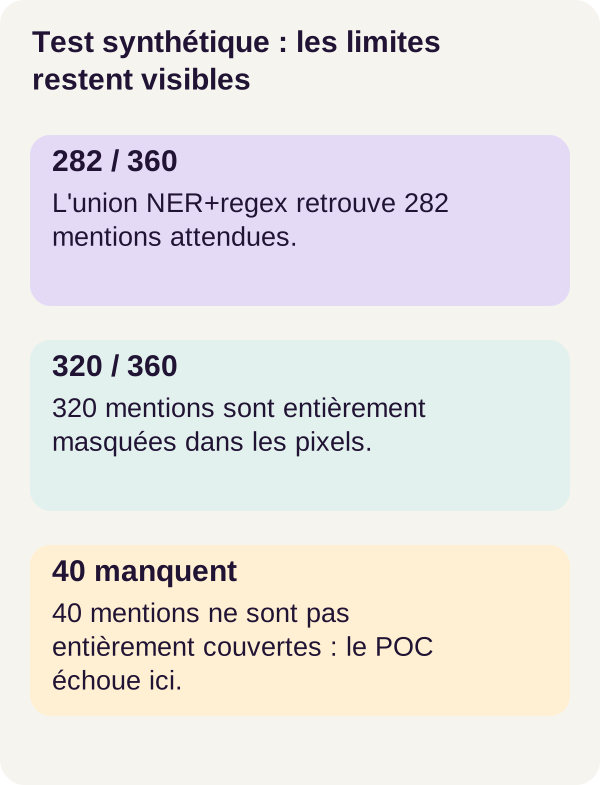
The figure separates mention detection from mask application. Keep this separation when reading the reference workflow's figures.
Regexes are precise, but they do not look for everything
Of the 360 test mentions, regexes alone find 180 correct mentions: the 90 emails and 90 references. They find none of the 180 person mentions. Their precision is therefore 1.00, but recall is only 0.50.
Perfect precision does not mean the task is finished. Here, it means the emitted proposals are correct; half the expected mentions are still missing.
The NER + regex union finds 282 true positives from 411 proposals, giving precision of 0.686 and recall of 0.783. These counts help explain the difference:
| Method | Correct mentions | Proposals | Precision | Recall |
|---|---|---|---|---|
| Regexes alone | 180 | 180 | 1.00 | 0.50 |
| NER + regex union | 282 | 411 | 0.686 | 0.783 |
Adding NER therefore finds more mentions, but also adds unexpected areas. By subtraction, the union has 129 proposals not recognized as correct (411 - 282) and 78 expected mentions not recovered as true positives (360 - 282). These numbers are calculated from published counts, not from a new run.
The PERSON category accounts for most of this difficulty: it has 102 true positives from 231 proposals and 180 gold mentions. We therefore have a detector that helps find people, not one that finds them all or always proposes the right areas.
Pixel coverage is not the proportion of fully masked mentions
The transformation covers 1,717,175 of the 1,881,925 gold pixels, or 0.91246, approximately 91.25%. It fully masks 320 of 360 mentions.
This leaves 40 incompletely masked mentions. That does not mean all 40 are fully visible, nor that they are necessarily unreadable: the check says their coverage is incomplete. This finding does not become a success because the rectangle “looks large enough.”
Why can pixel and mention percentages differ? In a fictional example, suppose two mentions have reference areas of 100 and 10 pixels. If the first is fully covered and the second not at all, overall coverage is 100/110, approximately 90.91%, but only one of two mentions is fully masked. Large areas carry more weight in the first calculation; each mention counts as one unit in the second.
The same reasoning explains why we must not conflate 282 correct detections with 320 fully masked mentions. The metrics count different objects. For example, an overly broad area can cover sensitive pixels without being recognized as a correct detection proposal; several masks can also overlap.
These are possible explanations of the mechanism, not a diagnosis of the mentions in this test. The published totals cannot explain every difference: that would require examining proposals, rectangles, and evaluation matches mention by mention. We retain both results without substituting one for the other.
An absent marker does not prove everything has disappeared
In the 12 documents containing the synthetic marker, the report counts zero remaining marker strings. This targeted check is useful: the searched-for signal was not found by this test. But it does not compensate for the 40 coverage failures.
At document level, outputs show 55 PASS_FIXTURE statuses and 35 fixture-content failures across the 90 test letters. A letter can therefore fail even if several of its areas were handled correctly.
Keep the status names in your outputs. PASS_FIXTURE means the case meets this experiment's checks; it does not turn the general status FIXTURE_COPY_NOT_A_SAFETY_CERTIFICATE into permission to distribute a real document.
The workflow also reports a mean time of approximately 0.096 seconds per document and a mean size of 54,116 bytes per PDF. These values describe this corpus and CPU machine. They do not measure a human operator's time or promise the same performance on another collection.
The cost of excess masking
The fraction of masked non-sensitive pixels is 0.00871, or approximately 0.87% of the non-sensitive area. This is the visual cost of the margin and false positives: some content we wanted to preserve is blackened.
This rate is not the proportion of false proposals. Its denominator is a pixel area, not an entity count. A single large unnecessary rectangle can weigh heavily in this metric; several small proposals may weigh little.
Finally, rebuilding a PDF from pixels has a functional cost: selectable text, active links, forms, and original digital signatures are not carried over as such into this copy. Still seeing the shape of a link or the drawing of a signature does not mean its original function survives. Accessibility requires a separate design, beyond this demonstration.
Summary before the exercise
We have connected four steps that cannot replace one another: detect a mention, approve an area, modify its pixels, and check the resulting copy.
The model and regexes can miss a mention. A policy can approve an insufficient area. Coordinate conversion can leave an edge uncovered. Finally, a simplified PDF structure can contain an image in which sensitive information remains visible.
The workflow lets us locate these questions instead of reducing them to “the PDF is blackened.” The exercise will now isolate two mistaken assumptions: that a graphical cover is enough, and that the absence of extractable text is enough.
Exercise: predict before checking
Before running the command, formulate your response to this first assumption: “A black cover added to the PDF is enough because the reader sees a black area.” What do you think text extraction will return?
Then reverse the reasoning. If we turn the page into an image and create a new PDF without masking the pixels, will the extractor still find text? And what will a person see when opening the file?
Write down your predictions, then run the supplied scenario:
docker compose run --rm tutorial python -m pdfredactai.cli exercise --config configs/exercise.yaml
Compare your prediction with the two counterexamples
The command creates two fictional cases. The results below are those reported for the reference workflow:
| Case | Text extraction | What the experiment shows |
|---|---|---|
| Black cover added to the PDF | cover_text_characters: 361 |
Source text remains extractable despite the visible cover. |
| Raster reconstruction without a mask | Zero extractable characters | The original sensitive pixels are preserved exactly. |
In the first case, appearance is not enough: the black layer has not removed the underlying text. In the second, extraction is not enough: it returns zero because it finds no native text, not because information has disappeared from the image.
The two negative tests refute two imagined guarantees. They do not fix each other. You need to check areas pixel by pixel and inspect the new PDF's structure, then treat every detection omission as a failure requiring review.
Now return to the 40 incompletely masked mentions in the main workflow. The second counterexample explains why empty extraction cannot turn them into passes. This connection between observation and measurement is what makes the tutorial useful.
Generate figures, check milestones, and clean up
Produce the final outputs before removing them
Figures must be built from existing measurements. Run these two commands from the project root:
docker compose run --rm tutorial python lesson/figures/plot.py
docker compose run --rm tutorial python scripts/check_checkpoints.py
plot.py uses the evaluation already produced. check_checkpoints.py checks milestones and flags inconsistencies between the course and code. The word checkpoint in its name does not mean we have just trained spaCy: this workflow still uses the intended local model.
Before cleanup, save the results you want to study. To follow a case, compare outputs/proposals.json, the review decision, applied rectangles, masked image, and outputs/transformation.json. An overall average does not explain why a particular letter fails.
Troubleshoot in the right place
A resource is missing or its fingerprint differs? Repeat acquisition and the environment check using the course's pinned files. Substituting another model would change the experiment before the first proposal.
A name remains visible? First check whether a proposal exists for that occurrence, then whether its area is approved. If it is, inspect the mapping from text to boxes, the scale, and the rectangles actually applied. Enlarging every area without diagnosis may hide more useful content without solving the cause.
An approval no longer matches the file? Compare the source, proposal, and their revision. Do not bypass the fingerprint check to reuse a decision that has become inconsistent.
Extraction is empty but the letter remains readable? This is compatible with an image PDF. Return to pixel checks: you have encountered precisely the distinction studied in the exercise.
Clean up only the intended outputs
docker compose down
docker compose run --rm tutorial python scripts/clean.py --outputs-only
docker compose down
The first down stops the project. The cleanup script then runs in a temporary container; the second down leaves the environment stopped. The --outputs-only option preserves sources and configurations but removes the relevant generated artifacts. Do not run this sequence before reading or archiving useful outputs.
This cleanup is not presented as secure erasure of every copy of a document. It must not be confused with a retention policy, backup deletion, or permission management.
What would need to be designed before real use
Do not connect this pipeline directly to real PDFs intended for distribution. The 40 incompletely masked test mentions are a measured limitation, not a purely theoretical caution.
For an adaptation, start with a separate, authorized, annotated evaluation representative of the relevant documents. Define categories to redact and cases to escalate. Keep labels out of the proposal service, version the area policy, and make decisions revisable. This work constitutes new validation; it does not automatically extend the Solstice corpus validation.
A genuine review must also allow searching for false negatives, the missed information. Showing only proposed areas cannot verify that the rest of the page contains nothing to mask. Plan for document inspection, human sampling of omissions, and independent rendering checks.
Traceability must also remain protected. The propose snippet explicitly retains "text": text[a:b]: the proposal file can therefore contain the strings you are trying to hide in the final copy. Do not automatically distribute the entire output folder with the rebuilt PDF. A correctly transformed copy does not make its logs or intermediate previews shareable.
Finally, define an accessibility strategy and check every additional representation of the document. An image alone does not replace accessible text content, but adding the original text back into the copy without checks would defeat the purpose of redaction.
The lesson is not “rasterization makes a PDF safe.” It is rather: a transformation must be examined at every level where information can survive, using measurements that also make failures visible.
Further references
Links throughout the article point to official documentation: spaCy for entities and their positions, Python for dictionaries and fingerprints, Pillow for image modes and rectangles, Docker for configuration checks, and Adobe for the distinction between visible and hidden information.
These resources explain mechanisms; they are not new project experiments. To reproduce r001, keep the versions, pinned resources, and commands from its archive rather than replacing a dependency with the version in current documentation.
Download the full course archive: r001 ZIP.