





You need to add PDF table importing to a web application. You start by extracting text: the words are there, and so are the numbers. Yet once the data goes into a spreadsheet, an amount ends up in the wrong column, a header appears twice and an empty cell has disappeared. Extraction successfully read the text, but failed to recover its organization.
This is the problem we will explore using the fictional Helix Quarterly Ledger report. Its table contains a ‘Quarter 1’ header merged across two columns, decimal numbers and an intentionally empty cell. To reconstruct it, we must answer two different questions: where are the cells, and which words belong to each one?
We will adapt Table Transformer for structure recognition, or TATR, then use Python to reconstruct the grid and attach the PDF’s words to it. The model detects visual objects; the code turns them into a usable table, with HTML, CSV and provenance JSON exports.
Download the complete r003 tutorial project
The reference workflow and results are those of the r003 project. The small numerical examples added to explain calculations are explicitly educational: they are not new model measurements. Likewise, the figures illustrate the mechanism and observed results, not validation on your own documents.
What we will build
A table region as input, not a page to search
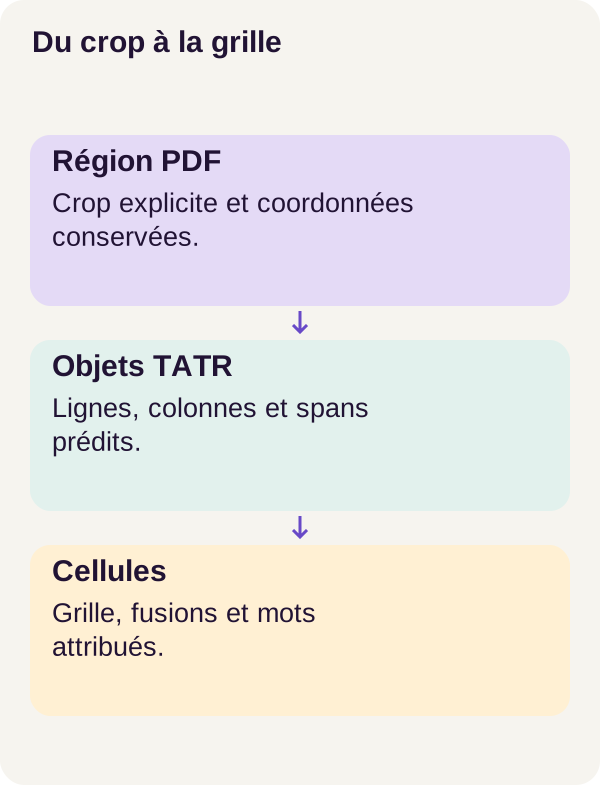
The input is a native PDF, meaning a document whose text can be extracted directly, accompanied by a rectangle declared in data/regions.json. This rectangle specifies the region to process. An image of this region, called a crop, is supplied to the model.
The project does not automatically search an entire page for tables. We tell it where to look, then evaluate its ability to understand the structure within that area. Locating the table on the page would be an additional stage, with its own errors to measure.
From the crop, TATR predicts six object types: table, column, row, column header, projected header and spanning cell. Each object has a box and a score. The code presented below uses rows, columns and spanning cells to build the grid; not all predicted categories therefore play the same role in this excerpt.
The name ‘Transformer’ does not mean we will ask a chatbot to write a table. Here, this is a visual detection model. The Table Transformer documentation clearly distinguishes table detection from table structure recognition.
Two paths that converge
On one side, the region image allows rows, columns and merges to be predicted. On the other, native text supplies words with coordinates. The program brings these two sources together: it creates cells, then assigns each word to a cell or flags it as unassigned.
For a web developer, think of a join. We have a collection of cells and a collection of words. But the words do not yet have a cell_id foreign key: we must determine that relationship from geometry.
The result retains this association. HTML can represent merges with rowspan and colspan. CSV, by contrast, aligns values in a flattened grid; it does not describe merges as HTML does. Therefore, keep the provenance JSON too: it retains the structure and coordinates needed to trace back to the source.
The corpus contains 480 fictional Helix PDFs from 60 families: 336 training documents, 72 validation documents and 72 test documents. Families are separated across these groups. The text is English, native and synthetic. No OCR, scans or customer PDFs are evaluated in this workflow.
Essential concepts before the code
Boxes in the same coordinate system
A bounding box is a rectangle described here as [left, top, right, bottom]. This is similar to what you work with when positioning an interface element: a width, height and position expressed in a given coordinate system.
The trap is mixing coordinate systems. Words come from the PDF; predictions come from the crop image. We must account for this region’s origin, its rendering scale and its padding, the margin added around the image.
Take a teaching example in which all PDF coordinates have already been expressed in a system with its origin at the top left. The region starts at (100, 200). A point on the word is at (120, 230). Within the region, it is therefore at (20, 30). With a scale of two pixels per unit and a 10-pixel margin, it becomes (50, 70): subtract the origin, multiply by two, then add the margin.
Directly comparing (120, 230) with a box expressed in crop pixels would be inconsistent. The word could be declared outside a cell even though it is visually inside it. This simplified calculation explains the need; to reproduce the exact transformations, retain those in the project.
Rows and columns, but not yet cells
A row defines a horizontal band. A column defines a vertical band. Their intersection forms a candidate cell. With three rows and two columns, we initially obtain six cells, even if some contain no text.
A merge changes this organization. The ‘Quarter 1’ header must occupy a single cell covering two columns, not two cells repeating the same text. We will also call this area a span: a cell extending over several grid positions.
The code describes each cell with four indices: row_start, row_end, col_start, col_end. Starts are inclusive and ends exclusive, as in a Python slice. Thus, (0, 1, 0, 2) denotes row index 0 and column indices 0 and 1. We can derive rowspan = 1 - 0 = 1 and colspan = 2 - 0 = 2.
What TATR learns to predict
TATR is based on DETR, short for DEtection TRansformer. The model represents the image through numerical features, then uses learned queries to produce object proposals. These queries are vectors adjusted during training, not natural-language questions or SQL queries. Components called prediction heads produce, among other things, each proposal’s category and coordinates. The official DETR repository presents this architecture.
During training, we have annotations: expected objects, with their categories and boxes. Proposals must be compared with these references. But the first proposal is not necessarily the table’s first row; output order alone therefore cannot determine the matches.
This is where Hungarian matching comes in: finding an assignment between predictions and targets that minimizes the total cost without assigning the same prediction to two targets.
In this invented example, a lower cost means a better match:
| Proposal | Expected row A | Expected row B |
|---|---|---|
| P1 | 9 | 1 |
| P2 | 2 | 8 |
Matching elements in their order of appearance would cost 9 + 8 = 17. Matching P1 to B and P2 to A costs 1 + 2 = 3. We choose the second combination. The principle is not to select each proposal’s best target separately: the choices must remain mutually compatible.
The DETR matching code combines class and geometry costs. This matching to annotations is used during training; inference cannot use it to consult the expected answers.
One loss for learning, several measurements for understanding
A loss function assigns a numerical value to the model’s error. Training adjusts its parameters to reduce that value. In this workflow, it combines classification, L1 distance on coordinates and GIoU.
Classification checks the object type: row, column or another category. L1 distance sums absolute differences between corresponding coordinates. For example, between fictional vectors (0.10 ; 0.20 ; 0.30 ; 0.40) and (0.12 ; 0.20 ; 0.28 ; 0.45), it is 0.02 + 0 + 0.02 + 0.05 = 0.09. This example explains the operation, not values observed during training.
IoU, short for Intersection over Union, measures the overlap between two boxes: their common area divided by their union area. Two identical boxes have an IoU of 1; two disjoint boxes have an IoU of 0.
But a box just beside the correct position and one far away can both have zero IoU. GIoU adds information about the region enclosing both boxes, providing a signal even without overlap. The authors’ GIoU presentation lets you explore this mechanism visually.
Do not confuse these calculations with word assignment. For a word, we will divide its common area with a cell by the word’s area, not by the two rectangles’ union. A small word box can lie entirely inside a large cell: its coverage is then 1, even if their IoU is low.
Controlled data, genuine separation
The generator varies borders, internal margins, sizes and row and column counts. It adds an empty body row and sometimes an empty column. This forces the program to distinguish a cell without text from a cell it failed to reconstruct.
In your application, an empty cell may carry meaning. It does not automatically mean zero, and it must not shift the next value to the left. The tutorial therefore retains geometry before considering whether there are words to place inside it.
The 336 training documents are used to adjust parameters. The 72 validation documents allow behavior to be examined during development; the 72 test documents serve for the final measurement. Separation by family prevents the same template from appearing in multiple groups. However, it does not turn synthetic documents into a representative sample of all PDFs.
Annotations are used for training and evaluation. The inference service cannot open their files. The region rectangle, meanwhile, is a user input fixed before generation and prediction: it specifies where to look without supplying the expected grid.
This distinction is essential when reading the scores. We measure reconstruction given that the region is supplied. Adding a table detector later would not allow us to retain this score as though its localization were always perfect. We would need to measure the new stage, then the entire workflow.
A worked example: the Helix header
Return to ‘Quarter 1’ in a simplified version, with coordinates chosen for calculation. The row occupies vertical interval [20, 50]. The two columns occupy [10, 110] and [110, 210] horizontally.
Before merging, we have two cells: [10, 20, 110, 50] and [110, 20, 210, 50]. A span fully covering both lets us replace them with one: [10, 20, 210, 50], with indices (0, 1, 0, 2).
We now attach the words ‘Quarter’ and ‘1’ to this single cell. Here is a teaching representation of the cell after assignment, using fictional identifiers:
{
  "row_start": 0,
  "row_end": 1,
  "col_start": 0,
  "col_end": 2,
  "box": [10, 20, 210, 50],
  "word_ids": [101, 102],
  "text": "Quarter 1"
}
This is not an actual corpus export, but an example of the structure handled by the functions below. The important point is that there is still one cell and two words, not two copies of the header.
What should we do with a word straddling a boundary? With the coverage threshold of 0.5, a cell must cover at least half its box. In another fictional example, 60 square pixels of overlap over a 100-square-pixel word box gives 0.6: this cell qualifies. If no cell reaches 0.5, the word stays in unassigned_word_ids.
Spans can also conflict. The code processes the most confident first and remembers positions already merged. A conflict reaching this check increments rejected_spans. We will read this counter carefully, because it does not represent every discarded candidate.
The central code: build the grid, then join the words
Reconstruct a grid from predicted objects
The following functions receive objects already represented by label, score and box. label is the category, score the proposal’s associated score, and box its coordinates. The imported utility functions calculate areas, intersections and IoU.
The identifiers useful here are 1 for a column, 2 for a row and 5 for a spanning cell. Categories 0, 3 and 4 denote the table and the two header types, respectively. You can find this naming scheme in the TATR model configuration. Header classes distinguish roles within the table; they are not used directly by this reconstruction function.
First read the two functions as a pipeline: axis_intervals() builds ordered bands; reconstruct() intersects them, then applies merges.
from .boxes import area, intersection, iou


def axis_intervals(objects, label, axis, threshold):
    candidates = sorted(
        [o for o in objects if o["label"] == label], key=lambda o: -o["score"]
    )
    kept = []
    for item in candidates:
        if all(iou(item["box"], other["box"]) < threshold for other in kept):
            kept.append(item)
    kept.sort(key=lambda o: (o["box"][axis] + o["box"][axis + 2]) / 2)
    unique = []
    for item in kept:
        center = (item["box"][axis] + item["box"][axis + 2]) / 2
        if not unique or center - unique[-1][0] > 0.5:
            unique.append((center, item))
    if not unique:
        return []
    # Turn noisy overlapping intervals into a partition. This can be wrong geometrically; IoU and word scores expose it.
    bounds = (
        [min(o["box"][axis] for _, o in unique)]
        + [(a[0] + b[0]) / 2 for a, b in zip(unique, unique[1:])]
        + [max(o["box"][axis + 2] for _, o in unique)]
    )
    return [[a, b] for a, b in zip(bounds, bounds[1:]) if b > a]


def reconstruct(objects, config):
    objects = [
        o
        for o in objects
        if o["score"] >= config["score_threshold"] and area(o["box"]) > 0
    ]
    rows = axis_intervals(objects, 2, 1, config["nms_iou"])
    cols = axis_intervals(objects, 1, 0, config["nms_iou"])
    cells = []
    for r, (top, bottom) in enumerate(rows):
        for c, (left, right) in enumerate(cols):
            cells.append(
                {
                    "row_start": r,
                    "row_end": r + 1,
                    "col_start": c,
                    "col_end": c + 1,
                    "box": [left, top, right, bottom],
                }
            )
    rejected = 0
    occupied = set()
    for span in sorted(
        [o for o in objects if o["label"] == 5], key=lambda o: -o["score"]
    ):
        covered = [
            cell
            for cell in cells
            if area(intersection(cell["box"], span["box"])) / area(cell["box"])
            >= config["span_coverage"]
        ]
        if len(covered) < 2:
            continue
        r0 = min(c["row_start"] for c in covered)
        r1 = max(c["row_end"] for c in covered)
        c0 = min(c["col_start"] for c in covered)
        c1 = max(c["col_end"] for c in covered)
        positions = {(r, c) for r in range(r0, r1) for c in range(c0, c1)}
        if positions & occupied:
            rejected += 1
            continue
        occupied |= positions
        cells = [
            cell
            for cell in cells
            if not (r0 <= cell["row_start"] < r1 and c0 <= cell["col_start"] < c1)
        ]
        cells.append(
            {
                "row_start": r0,
                "row_end": r1,
                "col_start": c0,
                "col_end": c1,
                "box": [cols[c0][0], rows[r0][0], cols[c1 - 1][1], rows[r1 - 1][1]],
            }
        )
    cells.sort(key=lambda cell: (cell["row_start"], cell["col_start"]))
    return {
        "rows": len(rows),
        "columns": len(cols),
        "cells": cells,
        "rejected_spans": rejected,
    }
axis_intervals(): turn noisy rectangles into bands
The function first selects objects of the requested category and sorts them by descending score. It keeps a candidate only if its IoU with every previously retained object stays below threshold. This is overlap filtering, controlled here by nms_iou: the idea is to avoid counting several almost identical proposals as multiple rows or columns.
Retained objects are then sorted by their centers. With axis=0, we examine horizontal coordinates; with axis=1, vertical ones. The unique list also discards centers no more than 0.5 units apart in the coordinate system used. This 0.5 is a distance, not a confidence threshold.
Finally, the function turns the intervals into a partition: contiguous bands meeting at a shared boundary. Internal boundaries are placed halfway between neighboring centers.
For example, if fictional intervals [0, 40] and [30, 70] survive the filters, their centers are 20 and 50. The shared boundary becomes (20 + 50) / 2 = 35. The reconstructed bands are therefore [0, 35] and [35, 70].
We have removed their overlap, but have not proved that 35 is the document’s true dividing line. This is a post-processing rule, meaning code run after the model’s predictions. The function’s comment reminds us: a regular grid can still be geometrically wrong.
reconstruct(): create intersections, then merge
The first filter removes objects with insufficient scores or zero-area boxes. The remaining rows and columns then produce every intersection through the two for loops. This is the stage where an empty cell continues to exist: the grid is created without consulting text.
Next come spans, sorted from highest to lowest score. For each one, covered contains cells whose boxes are sufficiently covered according to span_coverage. The denominator here is the cell’s area, not the word’s or the span’s.
If fewer than two cells are covered, the candidate is ignored: there are not multiple cells to merge. Otherwise, the code retrieves their extreme indices and constructs positions, the set of grid positions within the resulting rectangle.
occupied remembers positions already taken by accepted merges. The expression positions & occupied looks for an intersection between these sets. If it is nonempty, the new merge conflicts with a previous one: it is rejected and rejected_spans increases.
Otherwise, the affected individual cells are removed, then a merged cell is added. Its box is reconstructed from row and column boundaries; it does not blindly reuse the predicted span’s raw coordinates. The final sort orders cells by row, then column.
One clarification when reading the code: rejected_spans counts conflicts reaching the occupied test, not every ignored span. A candidate may be eliminated by the score threshold or no longer cover two cells after a previous merge. A zero counter therefore does not mean every merge proposal was accepted.
assign_words(): assign each word without duplicating it
We have the cells; now we must fill them. This function does not invent their text: it uses words extracted from the PDF and their boxes.
from .boxes import area, intersection


def assign_words(grid, words, coverage=0.5):
    cells = [{**cell, "word_ids": [], "text": ""} for cell in grid["cells"]]
    unassigned = []
    for word in words:
        scores = [
            area(intersection(cell["box"], word["box"])) / area(word["box"])
            for cell in cells
        ]
        if scores and max(scores) >= coverage:
            cells[max(range(len(cells)), key=lambda i: scores[i])]["word_ids"].append(
                word["id"]
            )
        else:
            unassigned.append(word["id"])
    byid = {word["id"]: word for word in words}
    for cell in cells:
        cell["text"] = " ".join(byid[index]["text"] for index in cell["word_ids"])
    assigned = [index for cell in cells for index in cell["word_ids"]]
    assert len(set(assigned)) == len(assigned) and set(assigned + unassigned) == set(
        byid
    )
    return {**grid, "cells": cells, "unassigned_word_ids": unassigned}
The first line creates a copy of the cells with an empty word_ids list and empty text. For each word, scores contains its coverage fraction for each cell.
The code selects the cell with the best coverage, provided that coverage reaches coverage. It does not retain every cell exceeding the threshold: a word is added to only one list. If two cells have exactly the same maximum score, max() keeps the first encountered here. This is deterministic tie-breaking, not proof that the assignment is correct.
If no cell qualifies, the identifier is added to unassigned. The word therefore does not silently disappear from the accounting of inputs.
byid then builds a dictionary to quickly retrieve a word by its identifier. The " ".join(...) statement combines a cell’s associated texts, separating them with spaces. It preserves the order in which words were supplied: this function does not itself reconstruct their reading order.
Finally, the assertion checks two properties: no assigned identifier is repeated across cells, and the set of assigned or unassigned identifiers matches the input identifiers. With unique input identifiers, the loop thus makes every word’s fate visible.
This protects against silent duplication, but does not validate the correct column. Incoming words also need positive-area boxes, since that area serves as a divisor; the check for this condition is not shown in the excerpt. When adapting ingestion, therefore check input preparation rather than assuming this function handles every possible anomaly.
Remember the three distinct questions: is the word preserved, is it assigned only once, and is it assigned to the right place? Only comparison against references can answer the last one.
Prerequisites, then exact commands
You need to be able to read Python, use a terminal and run Docker. Learning concepts are introduced throughout the workflow; you do not need to have trained a detector before to follow the grid calculations.
The reference workflow uses Linux, Docker Engine, Compose, an NVIDIA driver and NVIDIA Container Toolkit. It was observed on a 24 GiB RTX 3090, in float32, meaning 32-bit floating-point numbers. Allow approximately 24 GiB of RAM and 18 GiB of disk space: these are preparation estimates, not measured minimums for every machine. The CPU profile is NOT_TESTED.
The driver makes the GPU usable by Linux; the Toolkit gives the Docker container access to it and does not replace driver installation. nvidia-smi checks visibility on the host; check_environment.py then checks a real computation inside Docker.
Extract the ZIP into a working directory and open a terminal at its root. All commands below are run from this directory. Keep the project’s locked dependencies and model revision rather than replacing them with the documentation’s current versions.
Step 1 — prepare and check
We start by checking the environment, preparing folders, validating Compose and building the three services. acquisition retrieves model files; tutorial supports preparation, training and evaluation; inference produces predictions without access to annotations.
sh scripts/preflight.sh
sh scripts/setup.sh
docker compose config --quiet
docker compose build acquisition tutorial inference
docker compose run --rm acquisition python scripts/acquire.py --config configs/minimum.yaml
docker compose run --rm tutorial python scripts/check_environment.py
docker compose run --rm tutorial python -m pytest -q
Each command must finish with a zero exit code. Acquisition retrieves the 115 MB of TATR files at the locked revision. Tests check coordinates, merged cells, cleanup and acquisition, among other things.
These tests check program operation. They do not mean the model will correctly reconstruct every table. Also verify actual GPU access inside Docker before moving on to training.
Step 2 — prepare the crop and baseline
A baseline is a reference method against which we compare the adapted model. It prevents us from concluding that a solution is useful simply because it uses a neural network.
docker compose run --rm tutorial python -m pdftables.cli prepare --config configs/minimum.yaml
docker compose run --rm tutorial python -m pdftables.cli inspect-labels --config configs/minimum.yaml
docker compose run --rm inference python -m pdftables.cli baseline --config configs/minimum.yaml
prepare should report 480 pages, split 336/72/72. Inspect crops and training annotations before training: are empty rows present? Is the header fully visible? Are its columns correctly represented? Reserve test references for evaluation, without using them to adjust cropping or settings.
The final comparison will cover pdfplumber, pretrained TATR and adapted TATR, all applied to the same known regions. The pdfplumber documentation describes extraction based on graphical lines or word alignments, their intersections and the resulting cells. This is a concrete comparison point, not an opponent to deliberately weaken.
Step 3 — adapt and verify resumption
We start from the pretrained Table Transformer structure recognition model. Adapting, or fine-tuning, means continuing training on our corpus rather than initializing the entire model randomly.
In this project, only the decoder, learned queries and heads are adapted. The decoder turns queries and visual information into representations used for predictions; the heads derive classes and boxes from them. The other weights are frozen: they remain in use during computation but are not modified by training. The project retains an inventory of them.
This is therefore partial adaptation, not full retraining. The workflow does not compare every possible freezing strategy here; we should not attribute a result to it that it does not measure.
docker compose run --rm tutorial python -m pdftables.cli train --config configs/minimum.yaml
docker compose run --rm tutorial python -m pdftables.cli train-continuous --config configs/minimum.yaml
docker compose run --rm tutorial python -m pdftables.cli train-resume --config configs/minimum.yaml
docker compose run --rm tutorial python -m pdftables.cli verify-resume --config configs/minimum.yaml
An epoch is one pass through the training examples. The first run stops after four epochs. The continuous reference restarts from the same pretrained model and completes eight. Resumption reloads the interrupted run and performs the remaining four.
Why repeat this? To check that interruption does not change the experiment. A checkpoint is a saved state. Reloading weights alone is not enough to continue exactly the same calculation: we must also restore the optimizer, which controls their updates, and the pseudo-random number generator states, known as RNG. The PyTorch checkpoint documentation explains the difference between saving for prediction and saving to resume training.
In the validated workflow, verify-resume concludes EXACT. This result concerns the checks and environment of that reproduction; it must not be assumed after changing hardware or dependencies.
Step 4 — predict and measure
Inference uses the saved weights to produce objects, reconstruct the grid and assign words. Evaluation follows separately, using reference annotations.
docker compose run --rm inference python -m pdftables.cli predict --config configs/minimum.yaml
docker compose run --rm tutorial python -m pdftables.cli evaluate --config configs/minimum.yaml
Connect each defect to a decision
After predict, open regions-and-grid.png, the predicted boxes and export/table.json. Start with one table, not the overall average. Follow a value from the PDF through its word identifier, cell and exported text.
A missing row reduces the number of available intersections. A poorly bounded column can send a word to the wrong cell. An incorrect merge can combine two actually distinct cells. An unassigned word can reveal a coverage or coordinate-system problem. Training the network longer does not fix every one of these defects.
HTML helps you inspect merges; CSV makes tabular reading easier; JSON retains the coordinates and identifiers needed for diagnosis. Even if the display looks correct, check amounts and associations.
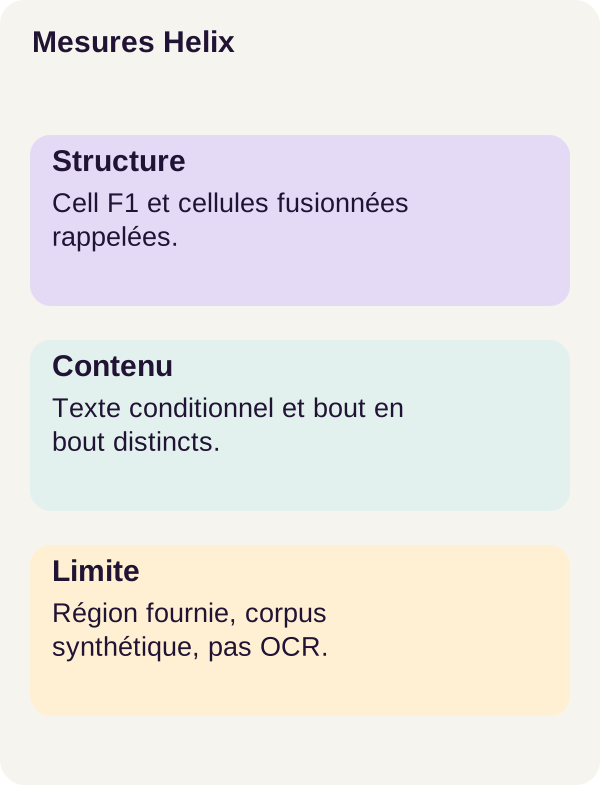
The evaluator examines three layers: cell positions, word-cell pairs and normalized text. If structure deteriorates, start with bands and spans. If it is correct but associations decline, inspect words near boundaries and the coverage threshold. If only text differs, check character extraction and normalization, meaning the transformations applied before comparison.
An empty cell deserves the same attention: do not remove it merely to make the export more compact. Its absence could hide a structural error.
Understand the metrics before the numbers
Precision, recall and F1: three simple questions
Precision asks: among the predicted elements, how many are correct? Recall asks: among the expected elements, how many did we find? F1 combines both using 2 × precision × recall / (precision + recall) when the denominator is nonzero.
Suppose four cells are expected and we predict three, all correct. Precision is 3/3 = 1, recall is 3/4 = 0.75 and F1 is approximately 0.857. We invented nothing, but one cell is still missing: precision alone would hide that.
Structure and association: two different levels
Cell F1 compares cell positions, described as (row start, row end, column start, column end). A cell spanning two columns is not equivalent to two separate cells. This concerns grid structure, not simply visual similarity between two rectangles.
Association F1 compares pairs formed by a word and its cell. Even if every word is present, sending them to the wrong columns produces incorrect associations. And two identical amounts remain distinct words thanks to their identifiers.
This distinction explains why the absence of duplicates in assign_words() is not enough: a unique assignment can be a wrong assignment.
Why ‘perfect content’ can be misleading
Conditional content accuracy examines only cells shared by the prediction and reference. It answers: ‘for cells whose positions were recovered, is the text correct?’
End-to-end content accuracy uses every reference cell in its denominator. It therefore also penalizes missing cells. Here, ‘end-to-end’ remains relative to the tutorial workflow, with a supplied region and native text: it does not include full-page detection or OCR.
Take a teaching example with ten expected cells. The program recovers only two, but their text is exact. Its conditional content score is 2/2 = 1. Its end-to-end content score is 2/10 = 0.2. Both measurements are correct; they simply answer different questions.
In the actual pdfplumber baseline results, the 371 shared cells contain the correct words: conditional content is therefore 1. Yet only 16 of 72 tables are entirely exact and end-to-end content is 0.1593. This is precisely the trap we must learn to recognize.
An entirely exact table is a stricter criterion
table_accuracy requires both exact structure and exact text for a document. A table with many correct cells and just one error does not count as an exact table.
These are the project’s metrics: they are not GriTS metrics. The official Table Transformer repository describes GriTS, a different grid comparison protocol. The names and definitions are not interchangeable; numbers calculated differently cannot be placed side by side as if they measured the same thing.
Results from the r003 workflow
On the 72 test documents, values are rounded to four decimal places:
On mobile, scroll the table horizontally.
| Variant | Cell F1 | Association F1 | Conditional content | End-to-end content | Exact tables |
|---|---|---|---|---|---|
| pdfplumber | 0.2748 | 0.3140 | 1.0000 | 0.1593 | 16/72 |
| Pretrained TATR | 0.8897 | 0.6532 | 0.7473 | 0.6909 | 0/72 |
| Adapted TATR | 0.9974 | 0.9858 | 0.9871 | 0.9820 | 67/72 |
Here, adaptation improves structure, association and content measurements compared with the pretrained model. It achieves 67/72 exact tables, versus 0/72 for pretrained TATR and 16/72 for pdfplumber.
The pretrained model’s zero does not mean it finds nothing: its cell F1 is 0.8897. It means none of the 72 tables satisfies every exactness criterion simultaneously. Each document may contain only a few errors, yet that is enough to fail this strict criterion.
The adapted result preserves 80/80 spanning cells, but five tables are not exact. Recovering merges correctly therefore does not guarantee that all structure and content are right. For an amount, a localized error matters more than the overall impression of a neatly drawn table.
These results concern the synthetic Helix crops in this workflow. They do not demonstrate the same quality on scans, real tables, invoices or full-page detection.
What we have learned
Extracting a table requires reconstructing its organization, then recovering links between cells and words. TATR proposes visual objects; post-processing turns these proposals into bands, intersections and merges; geometric assignment places native text inside them.
Provenance keeps these decisions inspectable. It lets us trace an exported value back to its words and coordinates, but does not by itself guarantee that the decision is correct.
Finally, structure and content are checked separately. An empty cell must remain visible, a merge must not duplicate its text, and a good conditional score must not hide missing cells. On the reference corpus, adaptation delivers a measured gain without making all 72 tables exact.
Exercise — distinguish structure from content
Before running the scenario, take a moment to predict the results. First imagine two columns are merged without changing the words. Is preserving all text enough to maintain good structure and association measurements?
Now imagine a digit is replaced, but cells and word identifiers stay in place. Which measurements can remain good? Should the table still count as exact? Write down your reasoning before running the commands.
docker compose run --rm tutorial python -m pdftables.cli exercise --config configs/exercise.yaml
docker compose run --rm tutorial python lesson/figures/plot.py
docker compose run --rm tutorial python scripts/check_checkpoints.py
The first command runs the supplied exercise. The next generates figures from outputs, then the last checks the checkpoints, the model’s saved files.
In the first scenario, spans change and words are no longer associated with the same cells: structure and associations deteriorate, even without losing words.
In the second, the grid can remain correct while the text becomes wrong. If identifiers and assignments are preserved, association measurements alone do not detect the digit substitution; content must be examined. A table can therefore be perfectly structured and contain an incorrect value.
Compare the tables and measurements with your recorded hypotheses. Do not correct words or annotations to obtain a better score: the exercise is designed to expose this separation.
You can also manually repeat the coverage calculation for the 100-square-pixel word. With 60 square pixels inside a cell, it is accepted at threshold 0.5. With only 40 and no other cell offering sufficient coverage, it remains unassigned. This teaching calculation requires no new training.
Adapt, troubleshoot and clean up
Diagnose before changing the model
The GPU is visible in Linux, but CUDA fails inside Docker? First check integration using the NVIDIA Container Toolkit documentation. CUDA is the environment used for GPU computations; a card visible on the host does not prove the containerized program can use it.
The header is cut off? Examine the supplied region and crop margin. A model cannot faithfully reconstruct what was removed from its input. For your own documents, correct the framing before making another prediction. When measuring the test protocol, do not readjust framing based on expected answers.
A word seems to have disappeared? Consult unassigned_word_ids, then check the word box, crop and coverage threshold. Do not arbitrarily add it to a cell to improve the display. Also check word order before assembly: assign_words() preserves the order received.
HTML looks good, but numbers are wrong? Return to the provenance JSON and compare source words. A shifted column or changed character calls for a different diagnosis from a missing row.
Move to your documents: an extension to evaluate
In a real application, separate table detection, OCR if needed, structure reconstruction and content checks. These additional stages are not validated by the tutorial’s scores.
Add checks suited to the data: expected types, units, numerical formats and human validation of ambiguous cases. A string such as 12.50 must first be extracted and located correctly; interpreting it as an amount is a separate application decision.
Log the region, scale, scores, unassigned words and model version. Retain reliable annotations representative of your documents to measure errors. A review interface could, for example, let users click an exported cell to locate its words on the page: this is an integration idea, not a feature claimed to be present in the ZIP.
The official references linked in the article provide deeper explanations of the mechanisms: Table Transformer and DETR for predictions, GIoU for geometry, pdfplumber for extraction, PyTorch for saving and NVIDIA for GPU access. They do not replace the r003 workflow’s files and commands.
Keep exports, then clean up
Copy the results and figures you want to retain before running the following commands. Cleanup deletes only outputs/; it preserves data/generated/ and assets/checkpoints/.
docker compose down
docker compose run --rm tutorial python scripts/clean.py --outputs-only
docker compose down
The first command stops the project. The tutorial service then performs targeted cleanup, and the final shutdown ends the workflow. There is no need to delete Docker data globally to study this tutorial.