





You are adding a search engine to a document application. A user wants to find the page where a valve appears above a pump. Your full-text search finds the word ‘pump’ in several manuals. But that word alone does not tell it which diagram matches the requested arrangement.
The fictional Lumen Equipment manual will be our playground. It contains a curve, a circuit diagram and a bill of materials, meaning a parts list. Our question is: ‘Which page shows the bypass valve above the pump?’ The workflow’s queries remain in English.
We will build an engine that indexes page images, not just their words. ColQwen2 transforms these images and questions into numerical representations; our code then calculates their similarity using a method called MaxSim. We will compare this method with BM25, a text search method, and a representation obtained by averaging vectors.
The objective is precise: return pages to inspect, not fabricate an answer about how the machine works. The model is already trained and remains unchanged throughout the tutorial. We will learn to control indexing, ranking and their evaluation.

The concrete problem
Our collection, also called a corpus, contains 24 four-page manuals, totaling 96 pages. The program receives their images and questions. It must order pages from closest to least close to the query, then allow users to return to the original document.
A relevance annotation, or label, specifies the expected pages for a question. It measures the ranking rather than producing it: the inference service accesses images and queries, while labels remain outside its Docker mount.
What exactly is an embedding?
A vector here is a list of numbers. An embedding is a representation computed by a model, designed to enable useful comparisons between inputs. Instead of directly comparing a question’s characters with a diagram’s pixels, we compare their numerical representations.
The program creating these representations is called an encoder. In our case, it can receive text for a query and an image for a page. The official ColQwen2 model card presents this document retrieval approach combining text and images with multi-vector representations.
Why multiple vectors? A page may contain a title, caption, curve and small diagram. We do not necessarily want to summarize all of this in a single vector. ColQwen2 retains a sequence of vectors, which we call multi-vectors. The query also has its own sequence.
To picture the idea, imagine several numerical clues rather than one summary card. But do not take that image too literally: there is no column named ‘pump’, another ‘valve’ and a third ‘above’. The representations are learned and contextualized. Names given to them in examples explain the calculation, not automatically translate their dimensions.
Why is it called late interaction?
Late interaction means that the page and query are encoded separately first. They are compared only at search time. This is the principle presented by the ColBERT project, which inspires this multi-vector retrieval strategy.
For a web developer, the separation is familiar. When importing documents, you prepare reusable data: the index. When a new search arrives, you encode the question, then consult that index. Comparisons still need to be computed, but there is no need to run every image through the model again for each query.
Indexing is not training. Here, the model’s parameters, also called weights, are frozen: we do not adjust them on the Lumen manuals. We use a pretrained model to compute new representations. The index’s content changes when we add a page; the model’s weights do not change in this workflow.
The guiding thread: explain a result, not merely see it
Return to our conceptual example: a page shows a pump, an arrow and a valve. The question contains several clues, including bypass valve, above and pump. The engine must find a page compatible with these clues, then let us open it to verify the arrangement.
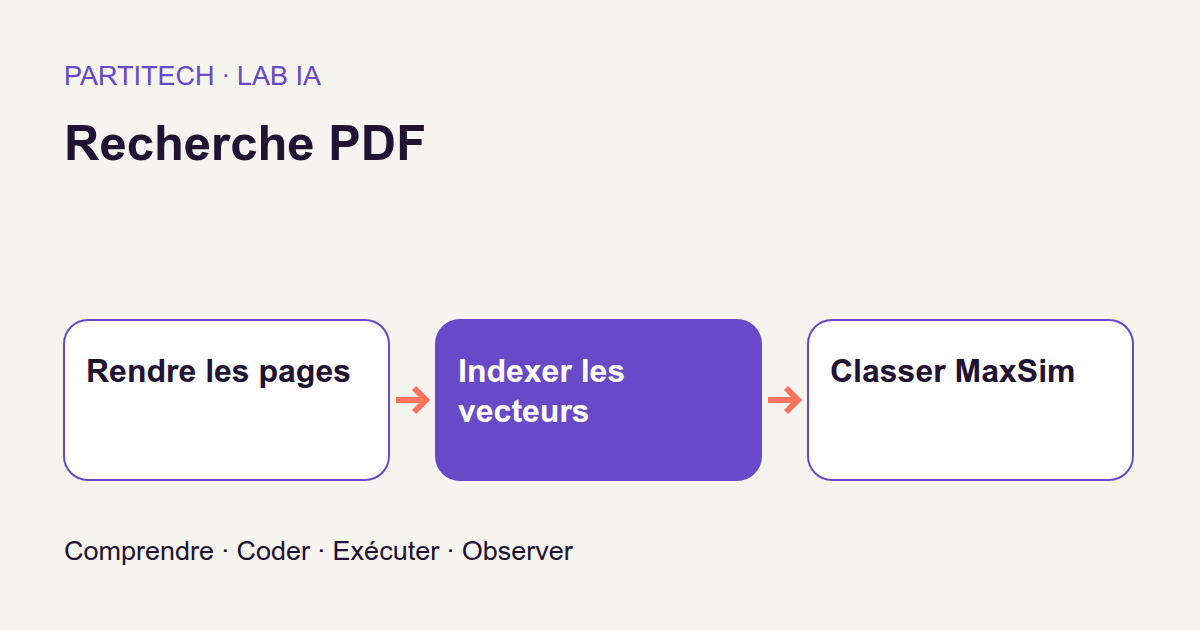
The path is PDF → page image → multi-vectors → comparison with the query → ranking → page inspection. Rendering a PDF as an image means producing the page’s pixels, like those displayed by a PDF reader. The index retains the page, manual identifier, vectors and a mask indicating which vectors to use.
The output contains a rank and score contributions. The rank answers ‘where does the engine place this page?’ Contributions let us inspect the numerical matches involved in the score.
Neither output permits the claim ‘the valve is open’. Ranking neither asks for nor establishes that information. A written answer in your application would be an additional stage, to link to sources and evaluate separately. The search engine tells us where to look; it does not replace reading what it found.
Why an average loses useful detail
A vector average combines several representations into one by averaging their components. This simplification retains global information, but not every difference between the original representations.
For intuition, imagine one query vector seeks a clue related to the pump and another seeks a clue about its arrangement. Each might find strong similarity with a different part of the page. By mixing diagram, text and background representations, an average can weaken a rare detail.
MaxSim makes another choice: for each query vector, retain its best similarity with the page. These best results are then summed. Different clues need not find their best neighbor in the same place.
This choice does not guarantee relevance. A maximum can also retain accidental similarity, and several query vectors can select the same page vector. Nothing in this operation alone enforces a geometric check of the ‘above’ relation. The model supplies representations; MaxSim compares them. We must still measure whether this combination retrieves the correct pages.
Understand MaxSim before the code
From arrays of numbers to a score
In the code, query contains the query vectors and document those of a page. For the operations that concern us, a tensor is simply a numerical array. Each row in these two arrays is a vector.
Lq is the number of query positions, Ld the number of page positions and D the number of components in a vector. Inputs therefore have shapes [Lq, D] and [Ld, D]. They must share the same dimension D for their vectors to be comparable.
You will also encounter the word token. On the text side, it is a unit handled by the model, not necessarily a whole word. On the image side, processing uses visual representations. In the functions below, the calculation mainly handles sequence positions and their vectors: it does not need to give them natural-language names.
Similarity is calculated using a dot product: multiply corresponding components of the two vectors, then add them. A purely numerical example: vectors [1, 0] and [0.6, 0.8], written in Python decimal notation, give 1 × 0.6 + 0 × 0.8 = 0.6. We multiply the two first components, then the two second components, and add the results.
The code’s contract states that the encoder supplies normalized vectors. When their norm is 1, this dot product equals cosine similarity, which compares their directions. This normalization belongs to input preparation: check() neither computes nor verifies it itself.
A MaxSim example you can calculate by hand
Take an invented teaching example, with two query vectors and three page vectors. Here are the resulting dot products; these are not measurements from the Lumen corpus.
| Query vector | Page: vector 0 | Page: vector 1 | Page: vector 2 |
|---|---|---|---|
| Query: vector 0 | 0.8 | 0.1 | 0.2 |
| Query: vector 1 | 0.1 | 0.9 | 0.2 |
For the first row, the maximum is 0.8, found in page vector 0. For the second, it is 0.9, found in vector 1. The MaxSim score is therefore 0.8 + 0.9 = 1.7.
We took neither the single maximum across the table, which would be 0.9, nor the sum of all cells. The rule is: find a maximum for each query row, then sum these maxima. Only positions declared valid contribute to the result.
This score of 1.7 is not a probability. It can exceed 1 because it sums several contributions. The number of query vectors also influences this sum: do not turn a threshold chosen for one question into a universal relevance guarantee for all others.
Padding: added positions, not content
To process several sequences of different lengths together, shorter ones can be extended with artificial positions: this is padding. The mask is a list of booleans of the same length as the sequence. True means ‘use this position’ and False means ‘exclude it’.
Why not simply leave zeros? Take another numerical example: a page’s two real vectors give similarities of −0.6 and −0.8 with a query vector. A zero vector added for padding gives 0. Without a mask, zero wins the maximum even though it corresponds to no real information.
The program therefore replaces similarities at invalid document positions with negative infinity, written -torch.inf. The maximum returns to −0.6, the best of the two permitted results. The query mask then excludes its own artificial positions from the sum.
The project implementation
The following block contains input validation, three ways of calculating the same score and an inspection function. We retain the r001 workflow’s code.
"""Exact masked MaxSim; inputs are normalized by the pretrained encoder."""

import torch


def check(query, document, query_mask, document_mask):
    if query.ndim != 2 or document.ndim != 2 or query.shape[1] != document.shape[1]:
        raise ValueError("Expected [Lq,D] and [Ld,D] with the same D")
    if query_mask.shape != query.shape[:1] or document_mask.shape != document.shape[:1]:
        raise ValueError("Mask length does not match embeddings")
    if query_mask.dtype != torch.bool or document_mask.dtype != torch.bool:
        raise ValueError("Masks must be boolean")
    if not query_mask.any() or not document_mask.any():
        raise ValueError("Empty valid query or document sequence")
    if not torch.isfinite(query).all() or not torch.isfinite(document).all():
        raise ValueError("Non-finite embeddings")


def maxsim_dense(query, document, query_mask, document_mask):
    check(query, document, query_mask, document_mask)
    similarities = query.float() @ document.float().T
    similarities = similarities.masked_fill(~document_mask[None, :], -torch.inf)
    best = similarities.max(dim=1).values
    return best[query_mask].sum()


def maxsim_scalar(query, document, query_mask, document_mask):
    check(query, document, query_mask, document_mask)
    return sum(
        max(
            float(torch.dot(query[i].float(), document[j].float()))
            for j in range(len(document))
            if document_mask[j]
        )
        for i in range(len(query))
        if query_mask[i]
    )


def maxsim_blocked(query, document, query_mask, document_mask, block_size=128):
    check(query, document, query_mask, document_mask)
    if not isinstance(block_size, int) or block_size <= 0:
        raise ValueError("Positive integer vector block size required")
    best = torch.full((len(query),), -torch.inf, device=query.device)
    for start in range(0, len(document), block_size):
        scores = query.float() @ document[start : start + block_size].float().T
        scores = scores.masked_fill(
            ~document_mask[None, start : start + block_size], -torch.inf
        )
        best = torch.maximum(best, scores.max(dim=1).values)
    return best[query_mask].sum()


def contributions(query, document, query_mask, document_mask):
    check(query, document, query_mask, document_mask)
    matrix = query.float() @ document.float().T
    values, positions = matrix.masked_fill(~document_mask[None, :], -torch.inf).max(
        dim=1
    )
    return [
        {
            "query_vector": i,
            "document_vector": int(positions[i]),
            "similarity": float(values[i]),
        }
        for i in range(len(query))
        if query_mask[i]
    ]
Read the functions step by step
check() validates the input contract. Arrays must have two dimensions and vectors of the same size. Each mask must match its sequence’s length and have boolean type. At least one position must be valid on each side. Finally, arrays must contain neither NaN, indicating an undefined numerical value, nor infinity. This last check covers every value, including masked positions.
These rejections prevent a seemingly usable score from being returned for inconsistent inputs. They do not, however, check that the representation captured the correct visual information.
maxsim_dense() builds all similarities at once. .float() converts arrays to 32-bit floating-point numbers. .T transposes the page array: its rows become columns. The @ operator then performs matrix multiplication, described in the PyTorch documentation. The result has Lq rows and Ld columns, like our small example table.
document_mask[None, :] gives the mask a row dimension, applicable to every row of the array. The ~ sign inverts its booleans: invalid positions become those to replace with negative infinity. max(dim=1) then finds the maximum across each row’s columns. Finally, best[query_mask].sum() retains permitted query rows and sums their best scores.
maxsim_scalar() implements the same rule with loops. For each valid query position, it computes dot products with valid document positions, takes the maximum, then sums. This is an easy-to-read reference for understanding the calculation, not a strategy intended to exploit GPU parallelism efficiently. This version returns a Python number, whereas the vectorized versions return a scalar tensor.
maxsim_blocked() avoids building the whole array at once. It visits page vectors in slices, with 128 positions by default. The best array retains the best score for each query position. At every slice, torch.maximum compares this best score with the new maxima and keeps the larger value, position by position. Summation occurs only after all slices have been processed.
This is the key point: retain the global maximum for each query vector, not an independent score to sum for each block. Otherwise, the result would change simply because the page was split differently.
What blocks actually save
The dense version materializes Lq × Ld similarities. With blocks of size B, the temporary array holds only about Lq × B at a time, plus the retained maxima. The number of comparisons remains of the same order: we calculate the same score differently, without skipping part of the page.
Take an illustrative sizing example, unrelated to a workflow memory measurement: 32 query vectors and 1,024 page vectors give 32,768 similarities. At 32 bits, their array occupies 128 KiB. With blocks of 128, one block’s similarity array contains 4,096 values, or 16 KiB.
This reduction concerns the temporary score array. It does not compress the saved index, remove input vectors or reduce model weights. Numerical conversions and other calculations also consume memory. An index that is too large on disk and a temporary calculation that is too large on GPU are different problems.
The dense and blocked versions compute the same mathematical MaxSim; project tests check this parity. In addition, the PyTorch numerical accuracy documentation notes that mathematical equivalence does not guarantee bitwise identity after every hardware or floating-point computation change. Keep the project’s checks when adapting the implementation.
Read a concrete contribution
contributions() reuses the similarity matrix but retains the winning position as well as its value. In our teaching example, query vector 0 selects page vector 0 with 0.8; query vector 1 selects page vector 1 with 0.9.
In the returned objects, query_vector is the query index, document_vector the index in the page sequence, and similarity the retained value. Adding them recovers the example’s score. These objects therefore connect the total to its contributions.
An index is nevertheless neither a translated word nor a detection box. Mapping it onto the image requires retaining the correspondence with image preparation. Even when a visualization shows an area near the pump, this does not prove that the model correctly interpreted the entire spatial relationship.
If an unexpected result seems to depend on the page background, inspect the rendering, masks and question. Do not first modify data or a threshold to make the ranking more convincing. Contributions make the calculation inspectable; they do not dress every result in an explanation that is necessarily correct.
Prerequisites and environment
You should be able to read Python, work with lists and arrays, and use Docker from a terminal. You do not need to know how to train a network to follow this workflow: we use a pretrained encoder without changing its weights.
The reference uses Linux, Docker Engine, Compose, an NVIDIA driver and NVIDIA Container Toolkit, with a 24 GiB RTX 3090. No CPU profile is validated. The stated 32 GiB of RAM and 40 GiB of disk space are preparation estimates, not measured minimums for every machine. RAM is the computer’s memory; the card’s 24 GiB is its video memory, or VRAM.
NVIDIA Container Toolkit connects Docker to the host’s NVIDIA devices and driver libraries. A GPU visible under Linux is therefore not necessarily usable by the containerized program. Consult its installation documentation for integration appropriate to your system. The project check then runs the model inside Docker; nvidia-smi on the host does not replace that verification.
Extract the ZIP and enter its root folder. All the following commands are run from this directory. Acquisition is the workflow’s only network-enabled service; it checks the weights’ revision, size and SHA-256 hash. A hash allows the downloaded content’s identity to be checked. Keep the ZIP’s locked dependencies and files rather than substituting an installation found in a newer example.
Step 1 — check the runtime
Here, the runtime is the environment in which the program executes. Let us prepare folders, validate Compose, build services, then acquire the model and run checks.
sh scripts/preflight.sh
sh scripts/setup.sh
docker compose config --quiet
docker compose build acquisition tutorial inference
docker compose run --rm acquisition python scripts/acquire.py --config configs/minimum.yaml
docker compose run --rm tutorial python scripts/check_environment.py
docker compose run --rm tutorial python -m pytest -q
Each command must finish with a zero exit code, indicating successful execution. Tests cover masks, MaxSim, index compatibility and PDF coordinates. They check program behavior; they do not mean every ranking will be relevant.
Step 2 — prepare and index
We can now generate the Lumen pages and their representations, inspect a score, then calculate the text baseline.
docker compose run --rm tutorial python -m pdfmaxsim.cli prepare --config configs/minimum.yaml
docker compose run --rm inference python -m pdfmaxsim.cli index --config configs/minimum.yaml
docker compose run --rm inference python -m pdfmaxsim.cli explain-score --config configs/minimum.yaml
docker compose run --rm inference python -m pdfmaxsim.cli baseline --config configs/minimum.yaml
prepare renders the pages. You should find the catalog’s 96 images. Visually check text and diagrams: a cropped or unreadable image is already a poor input, before any embedding calculation.
index saves multi-vectors and their masks. Images are thus transformed into reusable search data. The link to the page and manual must remain available: finding a vector without being able to open its source would not be enough.
explain-score exposes contributions. Find the running example’s query and relate the score to its best neighbors. Do not replace this inspection with the intuition that ‘the first page looks good’.
baseline calculates the BM25 reference. A baseline is a comparison method. BM25 ranks text by considering, among other things, the terms present, their frequency, their rarity in the collection and document length. The BM25 chapter in the Stanford textbook details these mechanisms.
Here, BM25 uses the available text: it does not receive the diagram’s pixels to interpret its arrangement. It can nevertheless retrieve a good page through its labels. That is precisely the comparison’s purpose: check what visual retrieval adds beyond textual clues, without assuming it will win everywhere.
Step 3 — measure and experiment
Evaluation can then compare rankings with expected pages, in a service separate from the one producing representations and searches.
docker compose run --rm tutorial python -m pdfmaxsim.cli evaluate --config configs/minimum.yaml
We will read its measurements in the next section. Do not change settings after examining test results to retain only the best variant.
What each output lets you check
After index, inspect dimensions, masks and the encoder hash in the output files. After explain-score, return to the running example’s page and contributions. Parity checks must recover the same calculation with the dense and blocked versions.
The 96-page catalog is shared; the queries are what get separated. The workflow has 48 development queries and 144 test queries. It does not train the model on one group of pages and then test it on another.
The development set supports design decisions. The test set measures the decision once fixed. Even without training, choosing a setting because it performs better on the test would strip that test of its role as a final measurement independent of the choice.
The two resolution budgets are fixed in advance: 200704 and 401408. They influence representation size and search cost. Use the supplied configurations to reproduce them. The second budget is twice the first; this does not imply that actual index size or runtime will exactly double. Those effects are measured in the workflow outputs.
The vector-average comparison examines what changes when multiple representations are retained. Its outputs should be consulted alongside those for the budgets: do not infer a numerical result merely from the intuition that averaging loses detail.
Understand the metrics before the numbers
A metric is a measurement chosen to evaluate behavior. For our engine, the question is not ‘is the MaxSim score high?’ but ‘are expected pages ranked well?’ We will distinguish the number of relevant pages retrieved from the position of the first one.
Recall@k: what fraction of the right pages do we retrieve?
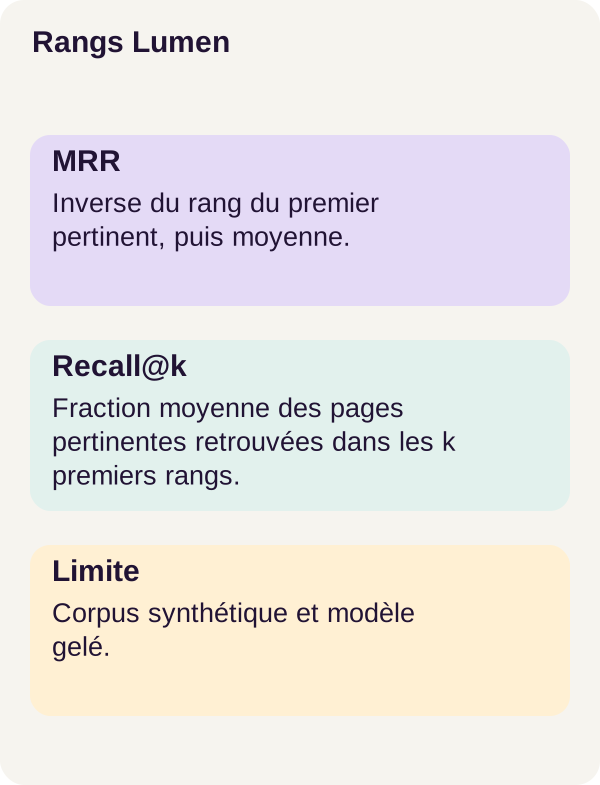
Recall@k, or recall in the top k positions, measures for each query the fraction of its relevant pages appearing in those positions. These fractions are then averaged across evaluated queries.
Take a fictional ranking. Three pages are relevant, named A, B and C. The engine returns A, X, B, C, Y, where X and Y are irrelevant.
At rank 1, we retrieved A, meaning one relevant page out of three: Recall@1 = 1/3. Among the top three results, A and B appear: Recall@3 = 2/3. Among the top five, A, B and C all appear: Recall@5 = 1.
Yet the first page was correct from the start! This is why Recall@1 is not, here, the percentage of queries whose first result is relevant. A question may have several good pages; displaying only one cannot retrieve them all.
MRR: where does the first relevant page appear?
MRR, or Mean Reciprocal Rank, averages the reciprocal of the first relevant page’s rank. At rank 1, the contribution is 1/1 = 1; at rank 2, 1/2 = 0.5; at rank 4, 1/4 = 0.25.
In our fictional ranking A, X, B, C, Y, this contribution is 1. With X, A, B, C, Y, it is 0.5. If these rankings belonged to two queries, their MRR would be (1 + 0.5) / 2 = 0.75.
MRR does not tell us how many other good pages follow the first. Recall and MRR therefore examine different properties: retrieving expected pages and showing a first relevant page quickly. Neither verifies the content of a possible written answer.
Results observed on Lumen
The following measurements concern the 144 test queries, over the synthetic English 96-page catalog. They reproduce the r001 workflow’s values.
| Metric | High-resolution MaxSim | BM25 |
|---|---|---|
| MRR | 0.9549 | 0.9410 |
| Recall@1 | 0.5903 | 0.5972 |
| Recall@5 | 1.0000 | Not reported here |
| Recall@10 | 1.0000 | Not reported here |
‘Not reported here’ means the value is not supplied among the numerical results reproduced in the article; it means neither zero nor failure of the method.
MaxSim’s MRR is better, but its Recall@1 is not. The ranking is therefore more favorable according to mean reciprocal rank, without improving the average fraction of relevant pages retrieved in first place. We cannot infer superiority on every query.
BM25 remains a serious contender on this corpus: some textual labels may already suffice to retrieve a page. MaxSim’s recall at 5 and 10 is reported as 1.0000, but this demonstrates neither perfect understanding of diagrams nor the same quality on real PDFs, other languages or a much larger collection.
When no page is relevant
The workflow also contains 12 out-of-corpus queries. For these, no page in the collection is a relevant answer. They are excluded from the relevance metrics presented above and must be examined separately.
The engine still produces a ranking: it finds the closest page among those it has. That does not mean it found a good page. The best candidate in a bad list remains a bad candidate.
This workflow has no calibrated rejection policy. In other words, the project provides no validated rule for deciding ‘no page answers this request’. A MaxSim score must not be read as a probability of a correct answer. Adding automatic rejection would require designing and measuring that behavior on requests with and without relevant results.
What we have learned
We retained multiple representations per page rather than reducing everything to one vector. Late interaction separates index preparation from encoding new questions. For each valid query vector, MaxSim finds its best neighbor in the page, then sums those contributions.
Masks are part of the calculation: they prevent padding from participating in ranking. Block processing retains the same global maxima while limiting the temporary array’s size; it does not compress the index.
Finally, a relevant ranking is neither an answer nor proof of faithful localization. Contributions help inspect the score. Recall and MRR evaluate ranking. Out-of-corpus requests pose another problem, which this workflow does not solve with a rejection threshold.
Exercise — retain the correct maxima
Before running commands, take another numerical example, chosen for hand calculation. A single query vector compares its similarities with two page blocks. In the first block, values are −0.8 and −0.6. In the second, they are −0.4 and −0.2. Every position is valid.
Which score should remain at the end? What would happen if we added the best result from each block? And if best started at zero instead of negative infinity? Write all three answers before continuing.
Also formulate a hypothesis for comparing resolution budgets: what might happen to index size, search time and recall as the budget increases? Must recall improve on every question? Distinguish a reasonable expectation from an already measured result.
Then run the supplied exercise. It preserves the project algorithm; it asks you to compare your predictions with outputs rather than quietly change the calculation.
docker compose run --rm inference python -m pdfmaxsim.cli exercise-index --config configs/exercise.yaml
docker compose run --rm inference python -m pdfmaxsim.cli exercise-search --config configs/exercise.yaml
docker compose run --rm tutorial python -m pdfmaxsim.cli exercise --config configs/exercise.yaml
docker compose run --rm tutorial python lesson/figures/plot.py
docker compose run --rm tutorial python scripts/check_checkpoints.py
Answer to the small calculation. The first block gives −0.6; the second gives −0.2. The global maximum is −0.2. Adding local maxima would give −0.8, counting two contributions for a single query vector. Initializing at zero would give 0, a value no actual comparison produced.
These numbers illustrate the mechanism; they are not claimed to be an output from a project file. The rule to identify in maxsim_blocked() is indeed: compare maxima, then sum just once at the end.
For the resolution experiment, consult viewer.html, the PNGs and contributions. Compare size, time and recall measurements with your hypotheses. Higher resolution can preserve more detail, but this does not prove the model will use it better for every question. Do not attribute a gain to vision solely because a thumbnail looks sharper.
Troubleshoot without distorting the experiment
Acquisition failing? Reread the expected revision, file sizes and SHA-256 hashes before retrying. Do not copy weights found elsewhere into assets/: the loaded model would no longer necessarily be the workflow’s model.
CUDA failing inside Docker? Check the runtime, driver and NVIDIA Container Toolkit. The diagnosis first concerns actual GPU access; changing a metric or mask does not fix this environment issue.
The index is incompatible? Rebuild it with the same encoder, resolution configuration and mask convention used for search. Vectors of the same dimension are not necessarily comparable if they come from different versions. Keep the representation together with the configuration that gives it meaning.
The calculation runs out of memory? Blocked search can reduce the temporary similarity array. But if the problem is index size itself, splitting the calculation does not shrink it. Reducing the representation budget requires rebuilding the affected data, then measuring size, latency and recall again. Keep these experiments separate from reference results.
The ranking seems absurd? Start by opening the rendered page, then check masks, contributions and query wording. Never replace observations with expected labels to make the output more satisfying.
Production and cleanup
The tutorial handles a small, controlled collection. Turning it into a document service still requires managing access rights, updates, deletion of indexed data, rendering quality, languages, latency and unanswered queries. These are integration tasks to plan, not features demonstrated by Lumen scores.
Retain provenance and versions. Each result must remain linked to its PDF, page and encoder. Contributions and indexing parameters let you trace a ranking back to its calculation. Version indexes instead of silently mixing incompatible representations.
Apply permissions to results and their previews alike. A restricted page must not become accessible through its thumbnail, cache or diagnostic output. Deleting a document must also account for its vectors, previews and caches.
Evaluate requests representative of users. The synthetic English corpus does not validate robustness to typos, other languages or the diversity of real documents. The 12 out-of-corpus queries demonstrate forced ranking; they do not validate abstention. Assemble cases with and without relevant pages, then inspect errors one query at a time as well as through averages.
Any answer generation must consult and cite sources actually retrieved. It must not invent text from a page’s rank alone. Our program stops at an inspectable search result.
Clean up only the intended outputs
Retain indexes, previews, figures and measurements you want to study before cleanup. The following commands stop the project, run targeted cleanup, then stop the project again.
docker compose down
docker compose run --rm tutorial python scripts/clean.py --outputs-only
docker compose down
The script deletes only outputs/. It retains assets/ and data/generated/. Do not confuse this results cleanup with deleting every model and corpus file.
References for further study
The official ColQwen documentation describes the model and its representations. The ColBERT repository explains late interaction; the BM25 chapter in the Stanford textbook explores the text baseline.
To review the code operations, consult matrix multiplication, masked filling and numerical accuracy limits in PyTorch. The NVIDIA Container Toolkit documentation covers GPU access from Docker.
These references supplement the explanations; they do not replace the r001 ZIP’s versions, configurations and commands. The article’s small calculations are teaching examples separate from measurements obtained on Lumen.