





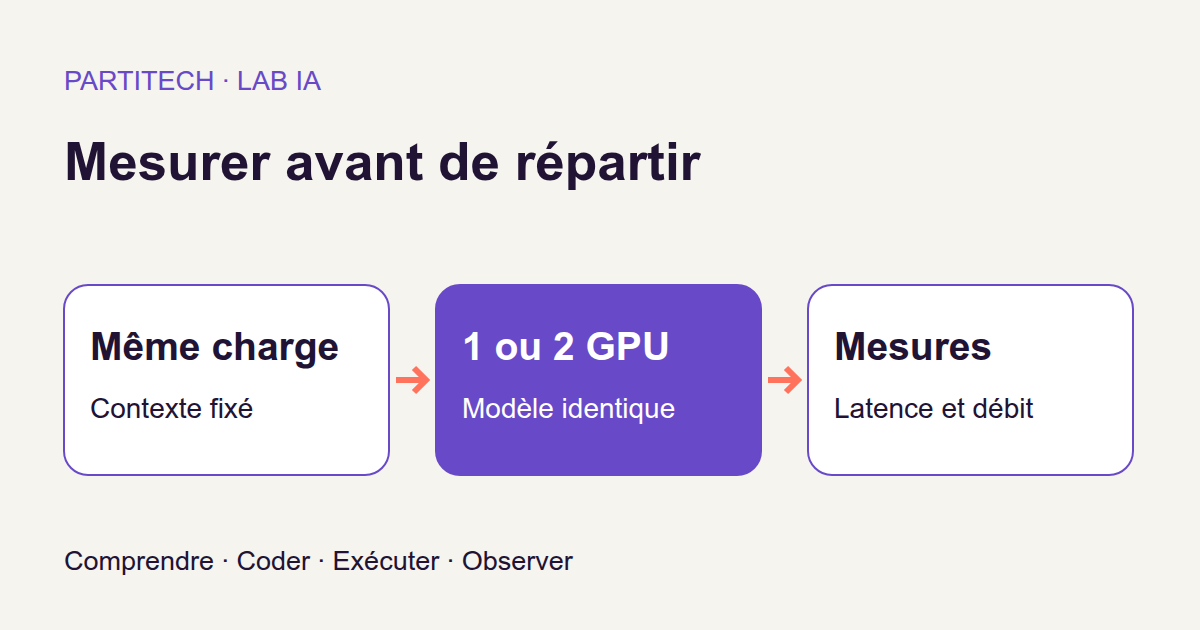
Your application sends text to a local model and waits for its response. Processing works, but the wait feels a little long. One idea naturally comes to mind: add a second graphics card to run twice as fast.
Is that really what will happen? Not necessarily. Two cards can share work, but they must also exchange data. And not every stage of text generation benefits from this distribution in the same way.
We will test this with a small Python and Docker benchmark. The principle resembles an API performance test: send a known workload, time responses, preserve results, and compare two configurations. The new part is understanding what the model does while we wait.
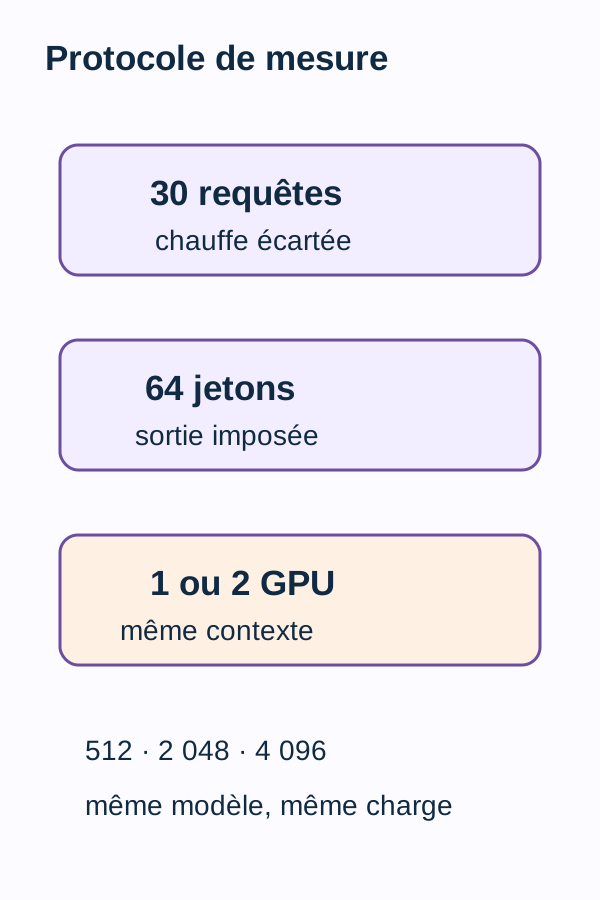
Download the complete tutorial project. The project compares the same Qwen 7B Q8_0 model running through llama.cpp in six modes: one or two GPUs, with context capacities of 512, 2,048, and 4,096 tokens.
The web application scenario is a starting point: the archive provides a measurement tool, not a ready-to-deploy business feature. You will not train a model; you will use an already trained model and observe its execution. Knowing how to read Python functions, JSON, and Docker commands is enough to begin; language-model concepts are introduced below.
The results presented come from the project's r3 reproductions. Small calculation examples are labeled as educational, and supplementary calculations based on measurements are identified as such: they are not new GPU experiments.
Concepts to understand before the commands
The model, engine, and GPU are different things
The language model, or LLM, here is Qwen 7B. Its parameters, also called weights, are numerical values learned during training. The name “7B” describes a size of roughly seven billion parameters, not seven billion words stored in a database.
llama.cpp is the engine that loads this model and performs the computations needed to produce text. In this tutorial, it exposes an HTTP server: our Python program calls it as it would any other service. Using a model to produce output is called inference.
The Q8_0 variant identifies a quantization method: a more compact representation of weights, using 8-bit quantized values and scale factors here. The name does not mean all program memory or computations use 8 bits. The overview of GGUF and its quantization formats expands on this point.
We keep this variant identical across all six modes. Comparing a Q4 model on one card with a Q8 model on two would mix two changes: model representation and hardware distribution. That is not the experiment we want.
A token is not necessarily a word
A token is a unit the model uses to represent text. Depending on tokenization, it may correspond to a word, part of a word, or a symbol. You therefore cannot systematically replace “64 tokens” with “64 words.”
The text sent to the model is the prompt. Here, it includes a filler section called padding, followed by a request's text. This filler is real text to process, not a series of empty slots the model ignores.
We will count input and output tokens separately. This is as important as distinguishing the size of an HTTP request from that of its response.
Context capacity: available space, not occupied space
Context capacity is the configured limit for the sequence the server can handle. In this workflow, both the prompt and requested generation must fit. The six modes use three capacities: 512, 2,048, and 4,096.
A web analogy helps avoid confusion: allowing a 10 MB file in a form does not mean every uploaded file is 10 MB. Likewise, configuring 4,096 tokens does not mean sending a 4,096-token prompt.
The protocol builds fixed padding for each capacity. At a given capacity, it applies the same padding to the same 30 requests in single- and dual-GPU modes. Prompts are therefore comparable between those modes; this does not mean all 30 questions have exactly the same length.
Read the tokens_evaluated field, which retains the server-reported prompt token count. We will see that at the 4,096 setting, measured prompts contain an average of 2,080 tokens, not 4,096.
Two different stages during the wait
Prefill processes the prompt already available. The model computes the representations it needs to begin answering.
Decoding then produces new tokens. In autoregressive generation, each new token is chosen based on what came before. Producing the sequence is therefore not simply launching 64 independent computations in parallel. The Hugging Face documentation on LLM inference explains this mechanism and the intermediate states retained during generation.
For our Python client, these stages belong to the same HTTP wait. The server provides internal timings, but the client times its entire call. As with a web profiler, SQL query time and total route time are not two names for the same measurement.
We will therefore retain HTTP duration, prefill time, and decoding time. The timer does not measure page rendering in a browser: it observes the measurement client provided by the project.
Why request exactly 64 tokens?
Imagine, purely to understand the problem, that a first trial generates 12 tokens and a second 64. Even if the first finishes faster, we have not asked for the same amount of generation.
The project therefore requests n_predict=64 and enables ignore_eos. EOS is the end-of-generation marker; ignoring it prevents a natural stop from shortening the response. The program then verifies that the server actually produced 64 tokens.
We are thus constructing a comparable workload, not evaluating answer quality. Output forced to 64 tokens may be too long for a small question or stop mid-sentence. This behavior is intentional for measurement.
One GPU or two: how is work distributed?
VRAM is graphics-card memory, distinct from machine RAM. In single-GPU mode, the model loads onto one card. In dual-GPU mode, the workflow describes distributing its layers across two cards with tensor-split 1,1.
A layer is a network computation stage. To picture the idea, imagine a processing chain whose first stages run on one machine and later stages on another: intermediate results must pass between them. The second machine does not automatically make every stage simultaneous.
In llama.cpp, --split-mode selects how the model is distributed; --tensor-split provides the proportions. 1,1 means equal shares, not a promise of halved time or perfectly identical memory usage. The project's single-GPU mode uses --split-mode none. The server documentation distinguishes these parameters; keep the ZIP's settings to reproduce the workflow.
The two VRAMs do not become unified 48 GiB memory. NVLink, a hardware interconnect between cards, is not assumed in this experiment. Nor should you confuse sharing one model with two independent servers each receiving their own requests.
Finally, the workload is sequential: our client waits for a response before sending the next request. We are not yet investigating how many simultaneous users the server could serve.
Code that makes the comparison controlled
Six modes, but three useful comparisons
The experiment matrix is simple:
| Context capacity | One-GPU baseline | Two-GPU comparison |
|---|---|---|
| 512 | mono-512 |
dual-512 |
| 2,048 | mono-2048 |
dual-2048 |
| 4,096 | mono-4096 |
dual-4096 |
Each comparison occurs within one row of this table, so at equal capacity. Comparing mono-512 with dual-4096 would not isolate the distribution change: the context setting and workload built for that setting would change too.
In cli.py, each measure-<mode> command builds prompts from the specified padding and 30 requests. The one() function calls /completion with fixed parameters: 64 requested tokens, temperature 0, seed 42, ignore_eos=true, and cache_prompt=false.
Temperature and seed are among the retained settings intended to limit generation-related variation. They do not turn measured duration into a universal constant: machine state and execution engine still matter.
Warm-up and caching answer different questions
Before retained measurements, the program sends a warm-up request. It takes the server through the generation path, but its duration does not enter the average. Initial loading and this first request are therefore not mixed with the following 30 requests.
This does not mean all startup effects or variability disappear. Warm-up is a protocol rule, not a guarantee of perfect hardware state.
The cache_prompt=false setting concerns reusing a prefix processed in an earlier request. We do not want one mode to benefit from a shared prompt already computed while the other rereads it. This setting does not mean “disable every cache on the machine.” Docker layer caching, for example, is a separate issue.
Do not confuse it with intermediate states retained during a single generation, often called the KV cache. These states avoid recomputing some elements of prior text for every new token. The distinction between reuse across requests and computation of one response is detailed in the llama.cpp and Hugging Face documentation.
Keeping observations before producing an average
For each request, the code retains the prompt, raw generated text, HTTP duration, server timings, tokens_predicted, tokens_evaluated, and truncation flag.
Why retain so much detail? Because an average alone cannot reveal that a response was too short or a context overflowed. Individual rows play the same role as request traces in a web application: they let you revisit what actually ran.
summarize() checks certain conditions before aggregating results. compare() then computes the temps_mono / temps_dual ratio at equal capacity: single-GPU time divided by dual-GPU time. A ratio above 1 means dual GPU was faster; below 1 means it was slower. We will work through examples after execution.
Core functions to read before execution
Waiting for the server, then starting the timer
In client.py, ready() polls /health for up to 180 seconds while waiting for a ready server. request() sets an HTTP timeout of 120 seconds. Waiting for process readiness and bounding an HTTP call are different responsibilities.
For a web developer, this is the familiar distinction between “the container started” and “the service actually responds.” A server still loading its model should not be mistaken for an abnormally slow inference request.
one(): one request, one complete observation
Here is the core measurement code. padding, data, mode, capacity, request(), and save() are supplied by the rest of the project: read this snippet in context, not as a standalone script to copy into an empty directory.
def one(query):
    prompt = padding + query["query"]
    start = time.perf_counter()
    result = request(
        "/completion",
        {
            "prompt": prompt,
            "n_predict": 64,
            "temperature": 0,
            "seed": 42,
            "ignore_eos": True,
            "cache_prompt": False,
        },
    )
    return {
        **query,
        "prompt": prompt,
        "raw": result["content"],
        "seconds": time.perf_counter() - start,
        "timings": result["timings"],
        "tokens_predicted": result["tokens_predicted"],
        "tokens_evaluated": result["tokens_evaluated"],
        "truncated": result.get("truncated", False),
    }


one(data["queries"][0])
rows = [one(q) for q in data["queries"]]
summarize(rows)
save(mode, {"mode": mode, "context_capacity": capacity, "rows": rows})
Start with prompt = padding + query["query"]. The program first builds the request text, then starts the timer with time.perf_counter(). Constructing that string therefore precedes the HTTP measurement.
perf_counter() provides a counter suitable for measuring duration. What matters is the difference between calls, not the counter's absolute value. Waiting for the response contributes to elapsed time: we are not measuring only the time during which the Python processor is working. This behavior is described in the official Python documentation.
request() waits for the server response. The seconds value is computed after it returns, while timings retains measurements produced server-side. Writing the file with save() happens later; that time is not added to each HTTP duration.
The **query notation copies request fields into the result dictionary. The code then adds the observations. This links a duration to its input instead of keeping an anonymous list of numbers.
Also notice result.get("truncated", False): if the field is absent, this snippet records False. That choice depends on the contract with the server version used; it is not an independent mechanism capable of detecting every truncation. Keep the supplied server and files together when studying r3 results.
The first request runs twice but appears only once in the measured list
The line one(data["queries"][0]) calls the first question for warm-up and does not retain its result in rows.
The list comprehension [one(q) for q in data["queries"]] then iterates over the 30 requests, including the first. It waits for each result before continuing: no concurrency is introduced here.
Counting this loop gives 31 calls to /completion per mode: 1 warm-up and 30 retained rows. Across six modes, that is 180 measurement rows and 6 additional warm-ups, excluding any other workflow calls. Warm-up is indeed executed, but must not become a thirty-first row in the average.
summarize(): check before calculating
The second snippet is the aggregation function:
def summarize(rows):
    if not rows:
        raise ValueError("Mesures vides")
    if any(
        r["tokens_predicted"] != 64
        or r["truncated"]
        or r["seconds"] <= 0
        for r in rows
    ):
        raise ValueError("Longueur, contexte ou temps invalide")
    return {
        "queries": len(rows),
        "mean_ms": 1000 * sum(r["seconds"] for r in rows) / len(rows),
        "tokens_per_second": 64 * len(rows) / sum(r["seconds"] for r in rows),
        "mean_prompt_tokens": sum(r["tokens_evaluated"] for r in rows) / len(rows),
        "mean_prompt_ms": sum(r["timings"]["prompt_ms"] for r in rows) / len(rows),
        "mean_decode_ms": sum(r["timings"]["predicted_ms"] for r in rows) / len(rows),
    }
The first guard rejects an empty list. The second examines rows with any(...): as soon as a row generates anything other than 64 tokens, reports truncation, or has a duration less than or equal to zero, computation stops with an error.
These rejections have a concrete purpose. A response stopped after 8 tokens must not artificially improve a configuration's throughput. A prompt overflowing context must not be compared as though it had been processed under identical conditions.
The returned dictionary then gathers the row count, mean HTTP time, throughput computed from total time, average prompt length, and the two mean server timings. We detail these formulas in the metrics section.
Note the snippet's exact scope: summarize() returns len(rows) but contains no test enforcing len(rows) == 30. Nor does it alone compare prompts in single- and dual-GPU files. The 30 requests and identical construction come from the workflow; verify them in the outputs. Likewise, this function is not an exhaustive validator of every imaginable numerical value.
Finally, compare() calculates the three ratios from the generated files. Configuration differences remain those in the supplied Compose file: --split-mode none for single GPU and the described tensor-split 1,1 distribution for dual GPU.
Running the six measurements in order
The workstation used and resources to allow
The tested workflow requires Linux x86_64, Docker with Compose, a working NVIDIA driver, NVIDIA Container Toolkit, and two RTX 3090 cards.
The stated allowances are 12 GiB of RAM, 25 GiB of disk space, and 14 GiB of free VRAM on each card. These are resources planned for this workflow, not minimums demonstrated by a threshold study. Having the total memory on one card does not replace the requirement “on each card.”
No CPU inference mode is validated. This does not mean the machine's processor is useless: Python, Docker, and HTTP exchanges still depend on it.
NVIDIA Container Toolkit lets Docker expose GPUs to the container. It does not replace the host's installed driver. If the GPU works under Linux but is inaccessible in Docker, consult the official NVIDIA guide before continuing.
Extract the ZIP into a dedicated folder and open a terminal at the project root. Every command below starts there. Avoid running other work simultaneously on the measured cards: it would introduce a workload absent from the protocol you are trying to reproduce.
1. Validating the host and building the environment
The preflight is the preliminary check. It must show that Docker can access both cards. The setup script prepares project permissions; the build creates the image that will run the measurements.
./scripts/preflight.sh
sh scripts/setup.sh
docker compose build
What to observe: preflight and build must finish without errors. Check that GPU_DEVICE and GPU_DEVICE_2 identify two distinct devices. Two differently named variables pointing to the same card do not create dual-GPU mode.
2. Fetch the model, test the contract, and prepare the workload
Fetching retrieves and validates the model specified by the project. The tests check the expected metrics and rejections. prepare then writes the workload description: 30 requests per mode, six modes, and 64 output tokens.
docker compose --profile acquisition run --rm --no-deps fetch
docker compose run --rm --no-deps app -m unittest discover -s tests -v
docker compose run --rm --no-deps app -m src.cli prepare
What to observe: the public suite must pass. Then open outputs/prepared.json: it must contain queries_per_mode: 30, the six modes, and output_tokens: 64.
This check is like validating fixtures before an API test: you need to know the intended inputs before interpreting the output. This article does not state the exact number of public tests; use the report from the supplied suite instead of replacing it with an assumed number.
In these commands, app runs the Python program. run --rm creates a container for the command and removes it when it ends; --no-deps prevents linked services from starting automatically. That is why the servers are started explicitly in the next step. The docker compose run reference describes these options.
3. Measure one GPU at three context capacities
A Compose profile lets you select services for a scenario. Here, each profile is named after its measurement configuration.
We will repeat the same sequence three times: start the server, measure, stop the profile. Do not leave the previous server running: it could still reserve the port or VRAM.
docker compose --profile mono-512 up -d server-mono-512
docker compose run --rm --no-deps app -m src.cli measure-mono-512
docker compose --profile mono-512 down

docker compose --profile mono-2048 up -d server-mono-2048
docker compose run --rm --no-deps app -m src.cli measure-mono-2048
docker compose --profile mono-2048 down

docker compose --profile mono-4096 up -d server-mono-4096
docker compose run --rm --no-deps app -m src.cli measure-mono-4096
docker compose --profile mono-4096 down
What to observe: three outputs/mono-*.json files must be present. Each must contain 30 rows, with tokens_predicted equal to 64 and no truncation.
These files are the single-GPU references. Keep them: the aim is not merely to remember the shortest duration, but to compare each single-GPU mode with its dual-GPU equivalent.
4. Measure two GPUs at equal context
Keep the same requests, the same padding for each capacity, the same temperature, and the same output length. The variable studied in each pair is how the model is distributed.
docker compose --profile dual-512 up -d server-dual-512
docker compose run --rm --no-deps app -m src.cli measure-dual-512
docker compose --profile dual-512 down

docker compose --profile dual-2048 up -d server-dual-2048
docker compose run --rm --no-deps app -m src.cli measure-dual-2048
docker compose --profile dual-2048 down

docker compose --profile dual-4096 up -d server-dual-4096
docker compose run --rm --no-deps app -m src.cli measure-dual-4096
docker compose --profile dual-4096 down
What to observe: three outputs/dual-*.json files, with the same expectations: 30 requests, 64 tokens produced per request, and no truncated context.
Also compare prompts and their tokens_evaluated values between corresponding files. At this stage, an inconsistent workload matters more than an attractive latency number: first understand what was actually compared.
5. Aggregate the six results
This command rereads the measurement files and calculates aggregates and ratios. It does not add a new series of requests to the table.
docker compose run --rm --no-deps app -m src.cli evaluate
What to observe: outputs/evaluation.json must contain the six aggregates. Keep the per-mode files too: they are still needed to explain an unexpected average.
Leave the exercise command until later. We will first learn to read the results, then make a prediction before running it.
Read the metrics before the numbers
Which number answers which question?
| Field | What it measures in this project |
|---|---|
queries |
The number of rows used for the aggregate: 30 expected per mode. |
mean_ms |
Mean HTTP call duration, in milliseconds. |
tokens_per_second |
Generated tokens divided by the sum of HTTP durations. |
mean_prompt_tokens |
The mean of tokens_evaluated, so the prompt length reported by the server. |
mean_prompt_ms |
Mean prefill time reported by the server. |
mean_decode_ms |
Mean decoding time reported by the server. |
The point is to relate a duration to its scope. mean_ms answers “how long does our client wait?” mean_decode_ms answers a narrower question about the generation stage reported by the engine.
Recalculate a mean and throughput by hand
Take two fictional requests, solely to understand summarize(). Both generated 64 tokens without truncation:
| Teaching request | HTTP duration | Generated tokens |
|---|---|---|
| A | 0.5 seconds | 64 |
| B | 1.5 seconds | 64 |
The mean duration is (0.5 + 1.5) / 2 = 1 second, or 1,000 ms.
The throughput calculated by the project is:
tokens_per_second = 64 × number of requests / sum of HTTP durations
Here, it gives (64 × 2) / (0.5 + 1.5) = 64 tokens/s.
It is not the arithmetic mean of individual throughputs. Request A gives 64 / 0.5 = 128 tokens/s; B gives 64 / 1.5 ≈ 42.67 tokens/s. The mean of those two values would be about 85.33 tokens/s, which is a different calculation from the code's. The project reports the total volume produced over the total measured time.
Since each response contains exactly 64 tokens, we also obtain directly:
tokens_per_second = 64,000 / mean_ms
Mean time and this throughput are therefore not two independent pieces of evidence of a speed-up: they describe the same durations, expressed in two different units.
“Tokens/s” does not measure decoding alone
The numerator of tokens_per_second counts generated tokens, but its denominator includes all measured HTTP time, including prefill.
Take another teaching example: a request takes 300 ms to process its prompt, 680 ms to decode its response, and 1,000 ms total on the client side. For 64 generated tokens, end-to-end throughput is 64 tokens/s. Dividing only by the 680 ms of decoding would give about 94.12 tokens/s. Both calculations are meaningful, but they do not cover the same interval.
The remaining 20 ms in this example are not an isolated network measurement: they are simply the difference between timing scopes. Likewise, the server's internal timings must not be treated as a universal, exhaustive breakdown of HTTP time.
Faster prefill can therefore improve this tutorial's tokens/s without speeding up decoding. We will find exactly this situation in the results.
Read a ratio without reversing the conclusion
The project's ratio is:
ratio = single-GPU time / dual-GPU time
With fictional durations of 1,200 ms single-GPU and 1,000 ms dual-GPU, the ratio is 1.2. Dual GPU takes less time. But the time reduction relative to single GPU is (1,200 - 1,000) / 1,200 ≈ 16.67%, not 20%.
With 800 ms single-GPU and 1,000 ms dual-GPU, the ratio is 0.8. Dual GPU now takes longer: (1,000 - 800) / 800 = 25% additional time.
You can use the following formula to express time reduction relative to single GPU:
relative reduction = 1 - dual-GPU time / single-GPU time = 1 - 1 / ratio
A positive result is a time reduction; a negative result is an increase. The choice of denominator explains why “20% more throughput” and “20% less time” are not synonymous.
The right question is therefore: for this model, these prompts, this capacity, and this sequential workload, which duration changes, and by how much? VRAM capacity alone does not answer that question.
Local results observed
Values from the first reproduction
The following measurements come from the first validated reproduction. The “Context” column refers to configured capacity, not the exact token count of each prompt.
On a small screen, scroll the table horizontally.
| Context | Single-GPU: mean ms | Dual-GPU: mean ms | Single/dual ratio | Interpretation |
|---|---|---|---|---|
| 512 | 711.80 | 709.49 | 1.003 | nearly identical, dual GPU slightly faster |
| 2,048 | 886.90 | 843.31 | 1.052 | dual GPU faster for this workload |
| 4,096 | 1,124.56 | 1,025.49 | 1.097 | dual GPU faster for this workload |
The corresponding throughputs are 89.91, 72.16, and 56.91 tokens/s single-GPU, versus 90.21, 75.89, and 62.41 tokens/s dual-GPU. They use the end-to-end formula explained above, with 64 output tokens per request.
At 512, the difference between 711.80 ms and 709.49 ms is 2.31 ms, or about 0.32% of single-GPU duration. These last two values are calculated from the displayed means. This table can describe dual GPU as slightly faster, but an advantage cannot be called stable from such a small gap and these means alone.
At 2,048 and 4,096, mean dual-GPU duration is also lower. The table describes what was observed for this workload; it does not demonstrate a general relationship in which increasing context always makes two GPUs more advantageous.
At 4,096: where was time saved?
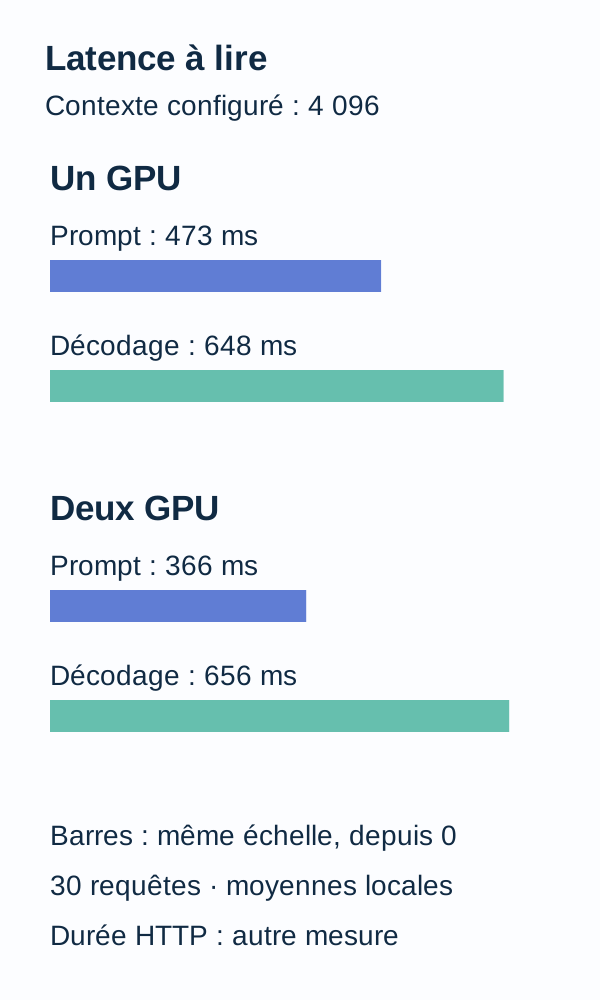
The prompts actually evaluated then contain 2,080 tokens on average. Mean prefill changes from 473.17 ms single-GPU to 365.70 ms dual-GPU; decoding changes from 648.18 ms to 656.43 ms.
Let us restate these figures in a reading table. The final column is a subtraction calculated from published values, not a new measurement:
| Measurement at capacity 4,096 | Single GPU | Dual GPU | Dual − single difference |
|---|---|---|---|
| Mean prefill | 473.17 ms | 365.70 ms | −107.47 ms |
| Mean decoding | 648.18 ms | 656.43 ms | +8.25 ms |
| Mean HTTP duration | 1,124.56 ms | 1,025.49 ms | −99.07 ms |
A negative sign indicates a shorter dual-GPU duration. A positive sign indicates a longer duration.
The gain here is in prefill. Decoding does not improve: it slows slightly. This clarifies how to read the original values. The full response still arrives sooner because lower prefill compensates for the small increase in decoding, and total HTTP time falls.
The 99.07 ms represent about 8.81% less HTTP time than single GPU, calculated from the displayed means. The rounded 1.097 ratio therefore does not mean “9.7% less time.”
And overall throughput does rise from 56.91 to 62.41 tokens/s. That does not contradict slightly slower decoding: its calculation includes prefill. This is why defining the metrics before commenting on the figures mattered.
What these values do not explain on their own
The breakdown locates the change in timings reported by the server. It cannot precisely attribute the gain to a transfer, an interconnect, or a particular internal operation: the table contains no detailed profiling of these mechanisms.
Two complete runs passed validation on the same workstation. The table above is neither an average of the two reproductions nor the result of a comparison across several machines. No independent human review or measurement across a heterogeneous fleet is claimed.
Another model, interconnect, context, concurrent workload, or llama.cpp version may change the balance. The result is useful because it describes an identifiable experiment, not because it provides a universal purchasing rule.
What we learned
We can now return to our web application. Adding a card does not mean halving HTTP wait time: how computation is distributed and the weight of each stage matter.
The protocol makes this question observable with 30 identical requests between the two modes in a pair, one discarded warm-up, 64 required output tokens, and the actual prompt token count retained. Server capacity and request size remain two distinct pieces of information.
At 512, observed durations are almost identical. At 2,048 and 4,096, dual GPU is faster on this machine. At 4,096, detailed reading shows shorter prefill and slightly longer decoding: looking only at tokens/s would have hidden that difference.
The conclusion to retain is neither “two GPUs are better” nor “two GPUs are useless.” It is: to compare two configurations, define an identical workload, verify what ran, then look at which part of the time changes.
Active exercise: predict, modify, run, observe, explain
Predict before looking at the answer
Before running the exercise, write down your answer to these three questions: are two GPUs necessarily faster? What does a single/dual ratio of 0.8 mean? And a ratio of 1.2?
Do not settle for “better” or “worse.” Make up two coherent durations for each ratio, then state which configuration makes the client wait longer.
docker compose run --rm --no-deps app -m src.cli exercise
Observe and explain
The program reminds you that a ratio below 1 means dual GPU is slower for this workload. Relate its explanation to your two durations.
The hypothesis “an additional card mechanically reduces all latency” is too strong. At 512, we have 711.80 ms versus 709.49 ms: a tiny gap in this measurement. At 4,096, total time falls but decoding increases slightly. System behavior is more precise than simply counting cards.
To check your understanding, also ask why 62.41 tokens/s dual-GPU does not prove that decoding became faster. The answer lies in the throughput denominator: it is the complete HTTP duration.
Change one variable in a separate experiment
Keep your reference outputs, then work in a copy of the project. Change one context capacity only, consistently for the single/dual pair you want to compare. Repeat that pair's startup, measurement, and shutdown commands.
You must keep the same constructed prompt in both modes and check that 64 tokens are still produced without truncation. If a change also alters padding construction, record it: you are no longer testing only a configured limit, but a different input length. Do not force tokens_evaluated to the capacity value merely to make the files look consistent.
The article provides no additional command parameter to automate this variation. Locate the corresponding definitions in the ZIP's Compose file and cli.py, and document your change rather than inventing an option. The exercise command and this manual change are two separate steps.
Before running again, write your prediction about prompt length, prefill, and decoding. Afterwards, compare tokens_evaluated, mean_prompt_ms, mean_decode_ms, and mean_ms. Explain what changes, but also what remains stable.
Your new result is an additional local observation, not an r3 value to substitute into the reference table. A result without improvement is just as useful for learning to read the mechanism.
Troubleshooting and cleanup
The two GPUs are not distinct. Check GPU_DEVICE and GPU_DEVICE_2, then run preflight again. Do not start the dual profile until both variables identify the expected cards.
The server does not become ready. Check the relevant service logs and prerequisites. The readiness wait limit is 180 seconds; an HTTP request timeout is set to 120 seconds. A failure at this stage is not a performance measurement to add to the table.
A response is truncated or does not contain 64 tokens. Do not include that row in a comparison presented as compliant with the protocol. Check the context, prompt, and server settings, then repeat the measurement under documented conditions. Do not simply remove an inconvenient row to improve the average.
The port or VRAM is still occupied. A previous server may have remained active. Use the relevant profile's down command as shown above, inspect its logs, and restart only the profile to be measured.
The workflow already stops each server with its profile after measurement. Do not skip those stops: the Compose profiles documentation specifies that shutdown depends on active profiles. A docker compose down without a profile must not be treated as a guarantee that a profiled server left active after an interruption has been cleaned up.
After the planned profile shutdowns, finish the workflow with the project's cleanup command:
docker compose down
Fetched models and output JSON files remain in the extracted folder. Back up useful measurements before deleting only your extraction to recover space. Do not purge volumes or images from other projects to complete this tutorial.
Go further
A mean does not describe every wait
Then rerun the same matrix on your real prompts, in a separate experiment, with more repetitions. The p50, p95, and p99 percentiles help you read the distribution of durations: p50 is the median; p95 and p99 describe thresholds below which about 95% and 99% of observations respectively fall.
The benefit for a web application is immediate: an acceptable mean can hide a few very slow requests. With only 30 measurements per mode, high percentiles depend heavily on the few most extreme values; showing them does not replace a suitable repetition protocol.
To extend the experiment, you can also alternate or vary the order of single- and dual-GPU runs instead of always measuring all single-GPU modes first. This would be a new protocol variant, intended to examine a possible execution-order effect; it is not part of the r3 commands presented here.
Testing multiple clients is another experiment
A concurrent workload submits several requests that can overlap in time. It brings in queuing, server limits, and available memory. This is not the same question as the duration of a series of requests sent one at a time.
Measure this workload separately, with observable queueing and memory limits. Do not translate the table's sequential tokens/s into a number of simultaneous users: those users were not simulated in this workflow.
To keep new measurements interpretable, retain the model, llama.cpp version, server settings, requests, and outputs together. Changing one of these elements without recording it is like comparing two API configurations after losing the details.
Production limitations
This protocol measures neither throughput under concurrency, nor queuing, nor robustness against user prompts, nor energy cost, nor answer quality. It also does not by itself provide a deployment policy or capacity guarantee.
Host resources and disk can be affected by other processes. Public Docker layers may be reused. Discarding a warm-up or disabling prompt reuse between requests therefore does not mean the entire environment is “cold.”
Before choosing infrastructure, revisit your representative prompts and set your criteria: response time, high latencies, throughput at the intended concurrency, acceptable errors, and VRAM budget. Add repetitions, resource observation, and quality assessment if the text must serve a business purpose.
Two cards add hardware possibilities; only a suitable protocol can tell you what those possibilities bring to your application. This tutorial's measurements are an example of that approach, not a conclusion valid for all models or workstations.
References for exploring the concepts further
The official llama.cpp server documentation describes context, distribution, and generation parameters, as well as response fields. The ZIP retains the settings actually used for this comparison.
The explanations of GGUF and quantization, together with the Hugging Face guide to inference cost, help distinguish weight storage, prompt processing, and generation. They are conceptual supplements; this tutorial does not use Transformers instead of llama.cpp.
For execution code, also consult the time.perf_counter() reference, the Docker Compose profiles guide, the docker compose run reference, and the NVIDIA Container Toolkit guide.
These pages explain concepts and tools; they do not replace the project files or outputs from reproductions. Their content may change: to reproduce the workflow presented here, retain the ZIP's versions and settings rather than silently replacing the engine with its current version.