





You are adding invoice import to a web application. Uploading works, the PDF opens and your extractor finds the numbers on the page. All that remains is filling in the form fields… but which of those numbers is the total?
A regular expression can recognize 250.16. By itself, it does not tell you whether this is the amount due, tax or a subtotal. To determine that, we read labels around the number and look at its position. Our program will also use text and location.
We will build a field extractor with Python, Docker and LayoutLM. We will follow fictional invoice AL-01-03: its subtotal is 250.00, tax 0.16, and total 250.16. These values are our running example, not an accounting rule to teach the model. We want to recover amounts written in the document, not recalculate or invent a missing field.
The desired result fits in one sentence: recover a value, determine its role and show where it came from. We will also compare the network with simple rules. The aim is to understand each method's contribution, not assume the one using AI must be better.
Download the complete tutorial project
What you will build and learn
Our program takes PDFs containing native text and returns six fields: invoice number, date, supplier, subtotal, tax and total. Every value retains its page, words and their rectangles. An absent or ambiguous field can remain empty.
Here, a native PDF contains characters the program can extract. This differs from a scan containing only an image: that would first require optical character recognition, or OCR. That stage is not part of this walkthrough.
The processing pipeline is:
PDF → words and rectangles → subtokens → LayoutLM → per-word labels → fields with provenance.
Imagine highlighting: the program must associate some words with “total,” others with “date,” and leave aside words with no role in our six fields. A label describes the chosen role; the rectangle lets you find the word on the page.
LayoutLM combines learned representations of text and positions. In this tutorial, it classifies tokens; it neither writes an answer nor directly reads pixels from a scan. Python code extracts data, prepares inputs, gathers predictions and checks results.
We will learn to put coordinates on a common scale, retain the link between words and their fragments, train the classifier and handle a page too long for one window. We will then see how to measure extraction quality without confusing a correct value with a correct location.
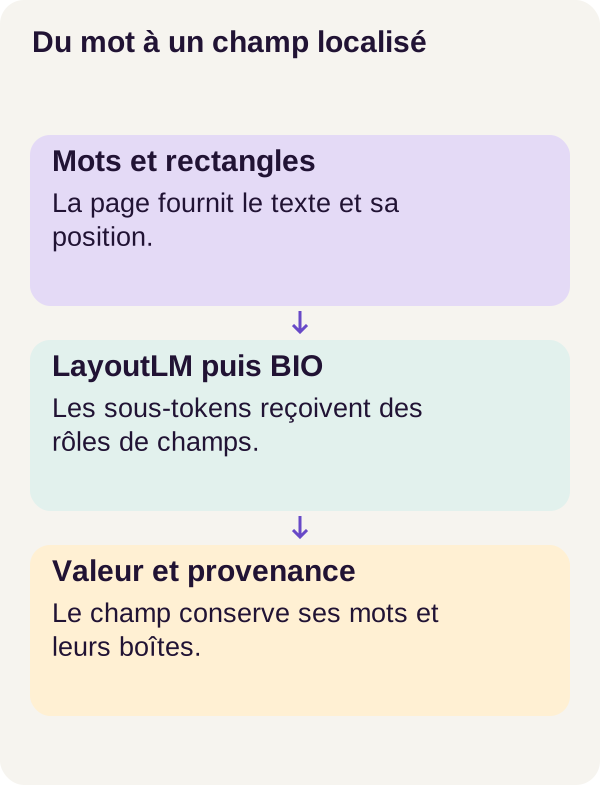
A box locates a word; a label describes its role. Provenance lets you return to the page.
Prepare the environment
You should know how to use Python, a terminal and Docker. You do not need prior knowledge of LayoutLM. We will explain neural concepts as they appear: a tensor here is an array of numbers, and training adjusts model parameters from annotated examples.
The walkthrough was validated under Linux with a 24 GiB RTX 3090. The README specifies 32 GiB of RAM and 24 GiB of disk space: these are sizing guidelines, not minimums measured on every machine. RAM is computer memory; the graphics card's 24 GiB is its own memory, VRAM.
Have Docker Engine, Compose and an NVIDIA GPU usable by containers available. Retain the ZIP's dependencies and configurations to reproduce the r002 walkthrough.
Check that Docker sees your GPU
A GPU visible on the host does not guarantee that a Docker program can use it. The following script checks the host and Docker; we will then check CUDA inside the container. CUDA is the computing environment used here to run network operations on the GPU.
NVIDIA Container Toolkit integrates the Docker engine with the host's NVIDIA drivers. Installation depends on your system: use the official NVIDIA documentation.
Unzip the archive, then open a terminal in its root folder, the one containing README.md and compose.yaml. All the following commands run from this folder. Start with preflight checks.
sh scripts/preflight.sh
Fix any blocking check before proceeding. The setup script then creates required directories, Compose validates its configuration and builds the three services.
sh scripts/setup.sh
docker compose config --quiet
docker compose build acquisition tutorial inference
Each service has a role: acquisition downloads assets, tutorial prepares data and trains the model, and inference predicts from PDFs and saved weights. Weights are the numerical parameters learned by the network.
To navigate the files, assets/ stores the model and checkpoints, data/generated/ contains the corpus and outputs/ receives results. A checkpoint saves a training state; we will also use it to check resumption after interruption.
Inference has read-only inputs and weights, without reference annotations or network access. The ZIP's complete Compose file details mounts and restrictions. In this walkthrough, this separation prevents giving expected answers to the service responsible for predicting them. It does not replace a real application's access controls.
Acquire the model once
We use microsoft/layoutlm-base-uncased. Its revision 30e3cdd39c11f09757b0fcf7598533d05052acef is pinned to recover the same files. scripts/acquire.py checks their sizes and the fingerprints defined in locks/models.lock.json, then stores them in assets/model/.
You can compare this locking with web-project dependencies: retaining a name is not enough; you must also know which version and files were used. Internet access is used for this acquisition; subsequent model loading uses local files.
docker compose run --rm acquisition python scripts/acquire.py --config configs/minimum.yaml
Now let's check the environment inside Docker, then run tests. The first check complements the host check: what matters is the containerized program's actual GPU access.
docker compose run --rm tutorial python scripts/check_environment.py
docker compose run --rm tutorial python -m pytest -q
What to observe: the validated walkthrough records 26 passing tests. These check coordinates, alignment, windows and invalid cases, among other things. They verify program behavior; they do not guarantee the model can handle your own invoices.
Understand the data before predicting
Three document groups, three roles
The synthetic corpus contains 600 pages and 50 layout families. “Synthetic” means invoices are generated for the experiment rather than collected from actual customers. A family groups documents sharing a layout template.
The split is by family: 420 training pages, 84 validation pages and 96 test pages. Training adjusts parameters. Validation selects the checkpoint. Testing then measures the final result on documents not used for those decisions.
Why not randomly mix all pages? Because a method could succeed by recognizing a previously encountered template without performing well on a new layout. Separating families reduces this risk without reproducing the full diversity of the real world.
Read an invoice before reading tensors
Fictional Alder invoices contain native English text. pdfplumber extracts words and their rectangles; its text-extraction documentation describes these objects. Annotations associate words with expected fields: these are reference answers used for learning and measurement, never prediction.
Let's create the data and inspect a batch: a set of inputs prepared for the model.
docker compose run --rm tutorial python -m pdflayout.cli prepare --config configs/minimum.yaml
docker compose run --rm tutorial python -m pdflayout.cli inspect-batch --config configs/minimum.yaml
Observe token identifiers, rectangles and labels. For AL-01-03, three words are particularly relevant:
| Word identifier | Extracted text | Expected role |
|---|---|---|
55 |
250.00 |
Subtotal |
58 |
0.16 |
Tax |
62 |
250.16 |
Total |
These mappings come from the reference case. The model receives text and position; during training, the annotation tells it which role it should recognize.
Identifiers remain stable to distinguish two occurrences with the same text. This resembles two database rows with the same value but different keys: finding 250.16 somewhere does not mean finding the right word.
Eight test pages have no total. An absent value is neither zero nor an invitation to recalculate it. The program must be able to abstain. Later we will check what this abstention measures.
Build a simple reference
Before training the network, let's start with a method you could write without machine learning: regular expressions combined with proximity to labels. This baseline reveals whether the corpus clues are already sufficient for simple rules.
The idea is not just recognizing the shape of an amount. It must also be associated with the right label, such as “TOTAL” or “SUBTOTAL.” The ZIP's code defines the rules actually compared.
docker compose run --rm tutorial python -m pdflayout.cli baseline --config configs/minimum.yaml
Keep this result for final evaluation. It answers a practical question: does the network outperform a simpler solution on the documents we care about? An isolated good score cannot tell us.
Give the model words and positions
We now have words, rectangles and annotations. They still need converting to arrays the network can use without losing the link to the document.
Put every rectangle on the same scale
A box contains x0, top, x1, bottom: the word's left, top, right and bottom boundaries. If you have handled element dimensions on a web page, the bounding-rectangle principle is familiar. You simply need to work in the prepared PDF page's coordinate system, not a browser window's.
We transform coordinates on this canonical page, meaning one brought into a common coordinate system, into integers between 0 and 1000. Rotation and cropping must be handled before this step. Scaling a wrongly oriented box would not fix its orientation.
In src/pdflayout/align.py, this function checks and then normalizes each rectangle.
def normalize_bbox(box, width, height):
    if (
        width <= 0
        or height <= 0
        or not (0 <= box[0] <= box[2] <= width and 0 <= box[1] <= box[3] <= height)
    ):
        raise ValueError("Invalid canonical box")
    return [
        round(1000 * box[0] / width),
        round(1000 * box[1] / height),
        round(1000 * box[2] / width),
        round(1000 * box[3] / height),
    ]
Both horizontal coordinates are divided by width; both vertical coordinates by height. Multiplication by 1000 supplies the expected scale, and round() rounds values. The initial check rejects nonpositive page dimensions, an inverted box or a box outside the page.
Take a teaching numerical example, independent of AL-01-03's actual coordinates. On a page 600 units wide and 800 high, box [300, 560, 360, 576] becomes [500, 700, 600, 720]. Its left edge is at 50% of width and its top edge at 70% of height.
Doubling the page and all box coordinates produces the same normalized rectangle. That is the benefit: representing relative position, not merely a distance dependent on format. These numbers describe geometry, not probability. The LayoutLM documentation details the expected box format.
From words to subtokens
The model does not directly handle Python strings. A tokenizer converts text into vocabulary units, then numeric identifiers. This walkthrough's tokenizer uses WordPiece, which can split a word into several subtokens. The Hugging Face WordPiece course explains this splitting.
A token identifier and a word identifier therefore have different roles. The first identifies an entry in the model's vocabulary. The second lets us return to a particular occurrence in the PDF.
For each subtoken, we repeat the original word's box. We are not claiming to know each fragment's exact position inside the word: all fragments remain attached to the same source rectangle.
Annotations must also be converted. We use the BIO convention:
| Label | Meaning |
|---|---|
B-TOTAL |
Beginning of an entity of type TOTAL. |
I-TOTAL |
Continuation of that same entity. |
O |
Word outside the fields to extract. |
Here, an entity is a group of words with the same role, such as the total's value. A single-word value needs only a B label. With two labels per field type, plus O, our six fields give thirteen labels: 6 × 2 + 1.
The project supervises only the first subtoken of each word: that is where prediction is compared with the expected label. Other subtokens, special tokens and padding receive -100, the value ignored by the loss function.
The following function converts word annotations into this representation.
def align_word_labels(word_ids, first_flags, word_labels, label_to_id):
    return [
        label_to_id[word_labels[word]] if word is not None and first else -100
        for word, first in zip(word_ids, first_flags)
    ]
word_ids identifies the source word, and first_flags identifies its first subtoken. word_labels contains per-word annotations; label_to_id converts label names into numbers. The list comprehension traverses these mappings and returns either the label identifier or -100.
To illustrate the rule, suppose a word labeled B-TOTAL is split into three fragments. The first receives the B-TOTAL identifier; the other two receive -100. This is not a trace of AL-01-03 tokenization, but an example of the alignment mechanism.
O and -100 are not interchangeable. O is an actual answer to learn: “this word does not belong to a field.” -100 means “do not compute classification loss at this position.” Other word fragments remain textual network inputs even without their own supervised label. The token-classification documentation presents this alignment principle.
This rule avoids multiplying a word's supervision weight simply because the tokenizer split it into several pieces.
Load and train LayoutLM
We will not teach the entire network from scratch. We load a pretrained encoder, then adapt it to our annotations: this is fine-tuning, adjusting an already trained model. The LayoutLM model card presents the starting model.
An encoder transforms inputs into numerical representations. LayoutLM uses a Transformer architecture to combine text and positions with context from other tokens. The idea is to classify an amount not just from its digits but also from surrounding clues.
A classification layer, also called a classification head, then transforms each token's representation into thirteen scores, one per BIO label. These raw scores are logits. They are neither final JSON nor invoice values: code must still group and decode them.
The project's function loads the encoder and initializes the layer suited to our labels.
def create_model(config):
    names = label_names(config["fields"])
    model, info = LayoutLMForTokenClassification.from_pretrained(
        "assets/model",
        num_labels=len(names),
        id2label=dict(enumerate(names)),
        label2id={name: i for i, name in enumerate(names)},
        local_files_only=True,
        use_safetensors=True,
        output_loading_info=True,
    )
    assert all(key.startswith("classifier.") for key in info["missing_keys"]), info
    assert not info["mismatched_keys"] and not info["error_msgs"], info
    assert all(p.requires_grad for p in model.parameters())
    return model.cuda(), info
num_labels sets the class count. id2label and label2id preserve mappings in both directions between names and identifiers. local_files_only=True requires the locally acquired model, while use_safetensors=True requests weights in Safetensors format.
Loading information supports the following checks: missing parameters are accepted only in the new classifier layer, while dimension mismatches and loading errors are rejected. The program therefore does not silently proceed with inconsistent loading.
Finally, requires_grad indicates that parameters can participate in gradient computation; model.cuda() places the model on the GPU. All parameters are trainable: we also adjust the encoder, not just the new classification layer. The training loop performs this adjustment.
To read the arrays, imagine a batch of two windows with 128 positions. Identifiers have shape [2, 128], boxes [2, 128, 4] and logits [2, 128, 13]. These are example dimensions: two windows, 128 positions per window, thirteen scores per position. This is not an additional configuration to apply to the project.
A loss for learning, not just a score for observation
How does the model improve? We compare its logits with expected labels using a loss function, cross-entropy here. It penalizes, among other things, favoring an incorrect label. Training then computes gradients, indicating how parameter changes affect this loss, and the optimizer adjusts parameters. The PyTorch optimization tutorial describes this cycle.
The following code sums errors at supervised positions and counts those positions.
def supervised_sum(logits, labels):
    count = int((labels != -100).sum())
    if not count:
        raise ValueError("No supervised tokens")
    loss = torch.nn.functional.cross_entropy(
        logits.reshape(-1, logits.shape[-1]),
        labels.reshape(-1),
        ignore_index=-100,
        reduction="sum",
    )
    return loss, count
labels != -100 identifies positions to include. If none is supervised, the function rejects the batch rather than continuing with an empty learning signal.
logits.reshape(-1, logits.shape[-1]) groups positions into rows while keeping thirteen classes as columns. labels.reshape(-1) aligns expected answers. ignore_index=-100 excludes ignored targets, and reduction="sum" sums losses. The cross_entropy documentation specifies these parameters; in this excerpt, the function directly receives logits, without prior conversion to probabilities.
The loop then divides this sum by the number of supervised tokens in the accumulation group: several batches whose contributions are accumulated before one update. This computes a mean per supervised position, rather than an average arbitrarily giving each batch equal weight.
A small calculation illustrates the difference. Suppose a batch of 10 positions has total loss 20, then a batch of 30 positions has total loss 30. The overall mean is (20 + 30) / (10 + 30) = 1.25. Averaging the two means would give (2 + 1) / 2 = 1.5. This numerical example explains normalization; it does not describe losses measured during the walkthrough.
Handle long pages without losing words
What happens if an invoice contains too much text? The model accepts windows of 512 tokens, including special tokens. The project uses at most 510 text subtokens per window, with 128 overlap. Some text therefore appears in two neighboring windows.
This limit concerns tokens, not words: a word split into three fragments occupies three positions. Simply cutting text at the limit could remove the end of the invoice, exactly where a total might appear.
Windowing solves the length problem but raises a new question: which prediction should we keep when the same word appears in several windows?
We merge logits at word level, giving more weight to positions farther from edges. This favors positions surrounded by more context in a window; it does not prove their prediction is always better. Here is the complete function.
def merge_logits(windows, logits, word_count):
    classes = logits[0].shape[-1]
    total = torch.zeros(word_count, classes, dtype=torch.float64)
    weights = torch.zeros(word_count, dtype=torch.float64)
    contributions = torch.zeros(word_count, dtype=torch.long)
    for window, values in zip(windows, logits):
        length = len(window["input_ids"])
        for token, (word, first) in enumerate(
            zip(window["word_ids"], window["first_flags"])
        ):
            if not first:
                continue
            weight = min(16, token, length - 1 - token)
            assert weight > 0
            total[word] += weight * values[token].double().cpu()
            weights[word] += weight
            contributions[word] += 1
    if not bool((weights > 0).all()):
        raise ValueError("A word was dropped by windowing")
    return total / weights[:, None], contributions.tolist()
total contains a score vector per word; weights stores the weight sum, and contributions counts received contributions. The loop retains only first subtokens, as with supervision.
The weight variable, computed by min(16, token, length - 1 - token), measures proximity to both edges and caps the weight at 16. A position near an edge weighs less than one sufficiently far inside. assert weight > 0 checks that a retained contribution has positive weight.
We add weighted scores, then divide each vector by its weight sum. In weights[:, None], the extra dimension applies the same divisor to all classes for a word. Values accumulate on CPU in float64, as indicated by .double().cpu() and array initialization.
Here is a calculation example, not an observed output: for one class, a word receives logit 2 with weight 4, then logit 6 with weight 12. The merged score is (4 × 2 + 12 × 6) / (4 + 12) = 5. This operation repeats for every class. The result is still a logit, not a probability.
Finally, the weights > 0 check requires a contribution for every word. If a word disappears during splitting, the function raises an error rather than quietly producing incomplete extraction. contributions shows how many windows contributed to each word's prediction.
Train, compare and resume
We will train two variants: layout, with actual rectangles, and neutral, with zero rectangles during both training and inference. “Zero” here means coordinates set to zero, not deleted words.
The neutral variant asks a precise question: can the model learn this task without positional differences between boxes? Text remains present. It does not erase token order in the sequence either. We remove a variable geometric signal, not all document information.
We also check training resumption. The following commands train the interrupted main model, the neutral variant and a continuous reference, then resume the interrupted model in another process.
docker compose run --rm tutorial python -m pdflayout.cli train --config configs/minimum.yaml
docker compose run --rm tutorial python -m pdflayout.cli train-neutral --config configs/minimum.yaml
docker compose run --rm tutorial python -m pdflayout.cli train-continuous --config configs/minimum.yaml
docker compose run --rm tutorial python -m pdflayout.cli train-resume --config configs/minimum.yaml
An epoch is one pass over training examples. The main walkthrough specifies five epochs, with an interruption after two to test resumption. The continuous reference completes the walkthrough without this break; the resumed run reloads the interrupted state to perform the remaining three epochs.
Why not just check that the final score is close? Because different models can obtain the same score on a small corpus. Resuming the same experiment requires recovering computational state, not merely achieving similar performance.
The following comparison checks parameters, the optimizer and random states, among other things.
docker compose run --rm tutorial python -m pdflayout.cli verify-resume --config configs/minimum.yaml
Validated walkthrough result: exact resumption, with zero maximum difference between compared parameters. This checks this procedure and environment. Do not assume the same numerical identity after changing hardware or a dependency.
Predict without consulting annotations
We now reach inference: using the trained model to produce predictions without adjusting its parameters with expected answers.
The inference service does not mount the annotations directory. It loads words, boxes and weights, merges windows, then decodes labels. This should resemble a document received by your application: its text is available, its answer key is not.
docker compose run --rm inference python -m pdflayout.cli predict --config configs/minimum.yaml
Open outputs/example.json. For AL-01-03, the layout variant recovers TOTAL = 250.16 at word 62, with its box on the page. It also recovers the expected subtotal and tax. Follow these links back to words: this file does not merely announce numbers; it identifies which occurrences were selected.
From labels to fields
The decoder groups BIO sequences into entities. If an I is inconsistent, it repairs it into an entity beginning and counts that repair. For example, an illustrative O, I-TOTAL sequence can become O, B-TOTAL: a continuation with no beginning becomes a new beginning. Repairing sequence structure does not prove the selected word is correct.
For each field, the program returns a value when there is exactly one candidate. No candidate or several candidates lead to an empty value, while ambiguities are retained. It therefore does not arbitrarily choose between two possible totals; the application can request human verification.
Be careful about the meaning of empty output: it can indicate an absent field, but also a detection failure or ambiguity. Provenance and candidates help analyze the result; they provide neither a correctness guarantee nor an accounting guarantee.
Understand metrics before results
A metric measures program behavior. We use several because they do not all answer the same question.
Did we recover the right entities?
An entity is correct if its type and word identifiers exactly match the reference. On a page where the same amount appears twice, selecting the wrong occurrence is therefore still an error, even if the character string is identical.
Precision measures the proportion of predicted entities that are correct. Recall measures the proportion of expected entities recovered.
Take a calculation example: we predict four entities, three are correct, and five were expected. Precision is 3 / 4 = 0.75, recall 3 / 5 = 0.60. F1 combines both: 2 × precision × recall / (precision + recall). Here it is approximately 0.667. This is not a tutorial score but an illustration of the formula.
Micro-F1 pools counts from all entities before calculation. Macro-F1 computes F1 for each field type, then averages them. This second perspective better prevents a difficult field from being hidden by the others.
Is the invoice entirely correct?
Document accuracy requires every field on an invoice to be correct. In an example of ten invoices, nine entirely correct ones give 0.9. Many individual fields can be correct while few documents are completely successful: a single incorrect field is enough for a document to fail.
The amount error rate compares numerical values. Lower is better. This check does not replace entity checking: finding the correct number at the wrong word can preserve the numerical value while losing the right provenance.
Are provenance and abstention meaningful?
Valid provenance means references correctly point to words and boxes on the page. It does not guarantee that those words have the right role. A technically valid reference can point to the subtotal when we wanted the total.
Abstention on invoices without a total checks that the program does not assign them an invented total. But a system returning nothing ever could pass this criterion alone while missing every present field. Keep this limitation in mind before reading results.
Let's run evaluation, which can access annotations separately from inference.
docker compose run --rm tutorial python -m pdflayout.cli evaluate --config configs/minimum.yaml
Results of the r002 walkthrough
The following results cover 96 test pages, with 568 expected entities. They come from outputs/evaluation.json. This count is consistent with six fields per page and eight absent totals: 96 × 6 − 8 = 568.
On mobile, scroll the table horizontally.
| Method | Micro-F1 | Field macro-F1 | Document accuracy | Amount error |
|---|---|---|---|---|
| Simple rules | 1.00 | 1.00 | 1.00 | 0.00 |
| LayoutLM, actual rectangles | 1.00 | 1.00 | 1.00 | 0.00 |
| LayoutLM, neutral training | 1.00 | 1.00 | 1.00 | 0.00 |
| Rectangles masked only at inference | 0.00 | 0.00 | 0.00 | 1.00 |
Two very different ways to “remove positions”
The first three methods achieve the same scores. The last row, however, is the model trained with actual rectangles, replaced with zeros only at prediction time.
This is not the neutral variant. neutral learned from the start with this constant representation. The masked model, by contrast, suddenly receives positions different from those it learned to work with.
A web-application analogy may help: designing from the outset for a field to remain constant differs from replacing its value with zero after building processing that relies on it. For the network, the difference lies in the training examples that guided its parameters.
Late masking measures sensitivity to an input change; it does not demonstrate that the task would be impossible to learn without geometry. The success of neutral shows precisely the opposite on this corpus.
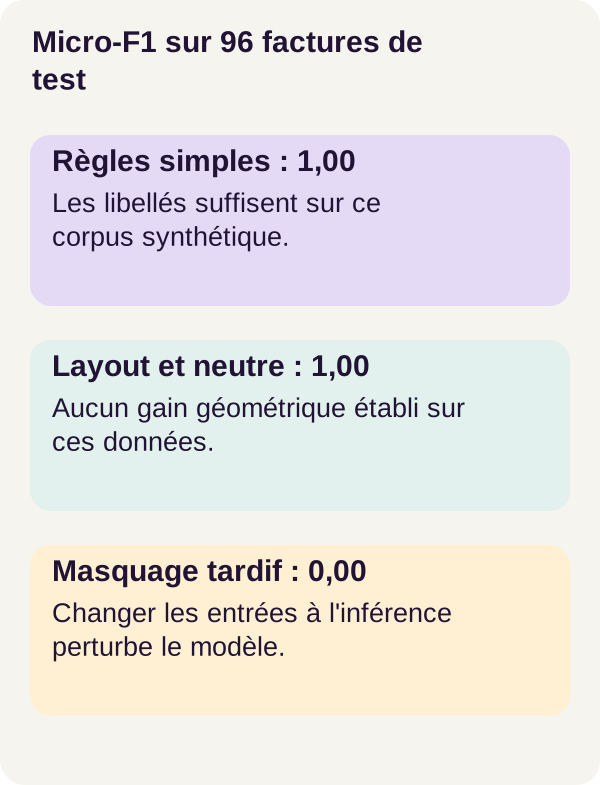
These scores describe the tutorial's synthetic corpus. They establish no advantage for the geometric model over simple rules.
The first three methods also succeed on the subgroups of eight long pages, eight pages with repeated amounts and eight pages without a total.
The masked variant predicts no entities. Its abstention on absent totals is therefore 1, but this isolated value hides its failure on present fields. Similarly, a valid-provenance rate of 1 can accompany empty output: no invalid reference was produced, but no useful extraction was obtained either.
The conclusion is therefore not “geometry is never useful.” It is more precise: on this corpus, simple rules and the neutral model already suffice to achieve the same scores as LayoutLM with actual rectangles. We have understood and measured the mechanism, not established its superiority on all invoices.
Test what should fail
A negative test gives the program a situation it must reject. The tests run at the start check, among other things, invalid boxes, words lost during windowing, and inconsistent inputs.
The benefit is concrete: an apparently plausible result is hard to diagnose when part of the document disappeared before prediction. It is better to report the invalid input than to hide the problem behind reassuring output.
Look at the tests to see the exact cases before adapting your documents. Passing the covered cases does not mean that every possible situation has been explored.
What we learned
We started with an amount on a page and arrived at a field linked to its source. The text provides lexical clues; the rectangles provide a location. LayoutLM combines their representations, then the classification layer proposes roles for the tokens.
Alignment lets us return from sub-tokens to words. Windowing handles a long page, and merging avoids making several independent decisions for the same occurrence. The decoder then assembles the entities and preserves ambiguities.
Finally, traceability, accuracy, and the value of learning are three distinct questions. A valid box does not ensure a correct field; a perfect score on a synthetic corpus does not guarantee a reliable service; a complex network does not necessarily improve on simple rules. The tutorial results illustrate these differences.
Exercise: predict before moving
Let us return to our total and subtotal problem. We will swap the positions of the TOTAL and SUBTOTAL blocks without changing their values. Before running it, write down your hypothesis: which clues will remain available to the rules, the geometric model, and the neutral model? Must the move necessarily change their predictions? Why?
The project provides this change in configs/exercise.yaml. Compare the two pages of the experiment and note the fields that you think should change. Then run the prepared variant.
docker compose run --rm tutorial python -m pdflayout.cli exercise --config configs/exercise.yaml
Compare your prediction with the exercise results. The validated reference finds all twelve entities with the rules, layout, and neutral; the masked variant finds none. The detailed answer is in lesson/SOLUTIONS.md.
Why is moving the blocks not enough to make these methods struggle? The labels remain sufficiently discriminating here. Moving a block does not remove all the other clues. This experiment therefore does not, on its own, demonstrate the value of geometry.
For your own experiment, then choose one change only in the generator, for example making a label ambiguous. Predict the effect on each method before regenerating the data and rerunning the tutorial. Keep your results separate from the reference results.
This new experiment has no stated result. Its value is precisely to measure what changes, then explain the errors or successes, including when they contradict your intuition.
Inspect the figures and check the checkpoints
Generate the figures from your own results, then check the expected model files.
docker compose run --rm tutorial python lesson/figures/plot.py
docker compose run --rm tutorial python scripts/check_checkpoints.py
The figures in the outputs/ directory let you inspect the invoice, the sub-tokens, and the results. Check the match between a field, its word, and its box before relying on the aggregated table.
For AL-01-03, the visual check includes finding word 62, which contains 250.16, then verifying that the TOTAL field does point to that occurrence. An average does not replace reading one example.
If something goes wrong
Start by identifying the failing step: GPU access, acquisition, word preparation, splitting, or prediction. Changing the model would not solve a box that is incorrectly oriented before it even enters the network.
On mobile, scroll the table horizontally.
| Symptom | Check and fix |
|---|---|
| GPU unavailable in Docker | Compare the host preflight with the container check. Fix the NVIDIA Container Toolkit integration before training. |
| Model unavailable or acquisition interrupted | Review the errors from scripts/acquire.py, check free space, and restart the planned acquisition; keep the model and locked revision. |
| Box rejected | Check the dimensions, framing, and rotation of the canonical page. A box outside the page must not be made valid by hiding the error. |
| Word lost during splitting | Inspect the identifiers and the first sub-tokens in the windows. The check must remain active. |
| Input with no usable text | Check that the PDF contains native text. Scans require an additional OCR step, outside the validated tutorial here. |
Stop and clean up
Before cleaning up, keep the results and figures you want to study. The first command stops the project, the script removes only the results in outputs/, then the final stop ends the tutorial.
docker compose down
docker compose run --rm tutorial python scripts/clean.py --outputs-only
docker compose down
The model assets, the checkpoints in assets/, and the generated data are kept. No global Docker purge is necessary. Cleaning up therefore does not mean that the weights or corpus must be downloaded or generated again.
From the tutorial to a real application
The first task is not to add an endpoint to this script: it is to check that it works on your application's documents. Business invoices require controlled ingestion, a range of languages and formats, an OCR strategy for scans, and multi-page handling.
Build a representative annotated corpus, separating suppliers or templates, then analyse errors by field and document type. A global score can hide a difficulty with one supplier's dates or the totals in a particular format. These examples describe analyses to plan, not errors already measured here.
Add authentication, document permissions, data protection, size limits, a processing queue, logging, and monitoring as needed. Define abstention cases and human validation for ambiguous values. The preserved provenance can help with this review, but the interface and business process still need to be built.
Version models, configurations, and evaluation data to detect regressions. This educational engine establishes no accounting compliance and is not, by itself, a production service.
Going further
Start by testing invoices with genuinely different templates and verified annotations. Compare rule and model errors on deliberately ambiguous labels: this is one way to look for situations where learning could help, then measure that benefit.
Another extension is to add an OCR pipeline to obtain words and boxes from scans. It introduces its own errors; you will need to evaluate that new pipeline, rather than assign it the tutorial's scores on native text.
Finally, you can build an interface that shows each value with its source area and allows human correction. This extension directly connects the tutorial's mechanics to a web-application need: letting the user check a proposal instead of showing a number with no origin.
Sources for further study
The README, the code, and the lessons in the ZIP make up the reproducible tutorial used here. The published scores are those of tutorial r002; the numerical examples noted in the article only explain the calculations.
The Transformers LayoutLM documentation, version 4.56.2 describes the textual and geometric inputs as well as token classification. The LayoutLM model card presents the pretrained model.
For more detail on the intermediate steps, see the pdfplumber documentation, the WordPiece course, and the token classification guide. The explanations of learning also draw on the PyTorch cross-entropy documentation and its parameter-optimization tutorial.
These supplementary documents do not replace the locked files in the ZIP. Online documentation can change independently of the validated environment; keep the project's versions and commands to reproduce it.