





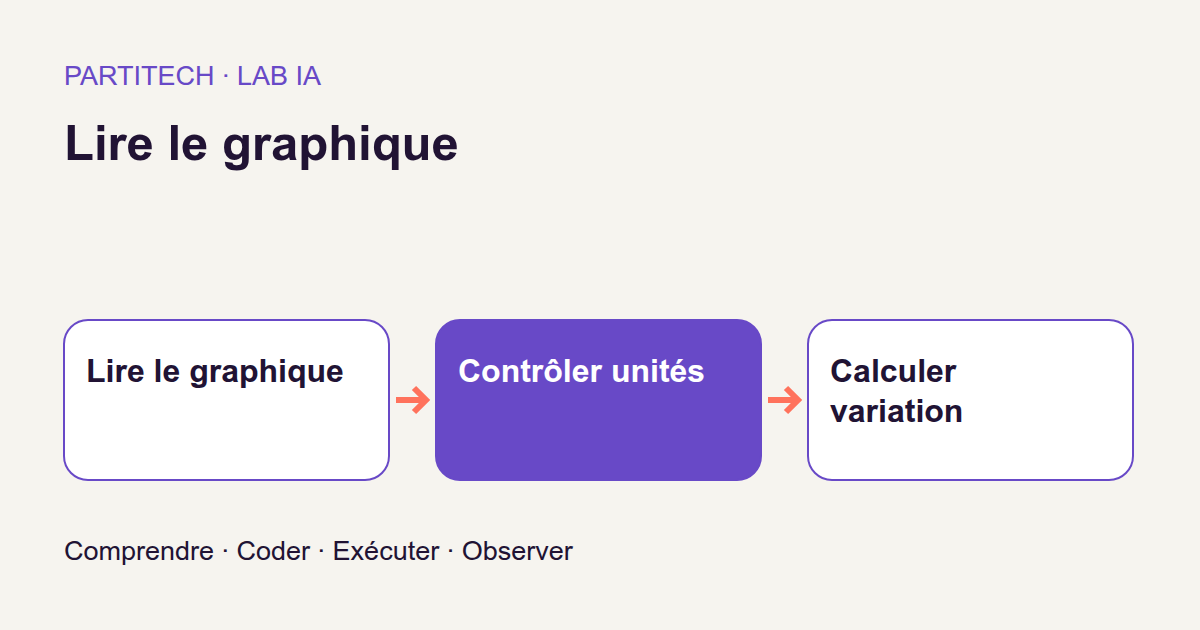
You are developing a dashboard. To populate it, you receive a PDF containing a chart, but not the data file used to draw it. On screen, two curves, years and a legend are clearly visible. Your application, however, needs something else: values you can store, compare and use in calculations.
Take the fictional Vega Energy Summary page. It presents two series and an ‘Energy (MWh)’ axis. How can we recover the values and calculate their change without confusing the series or converting MWh into kWh at the wrong stage?
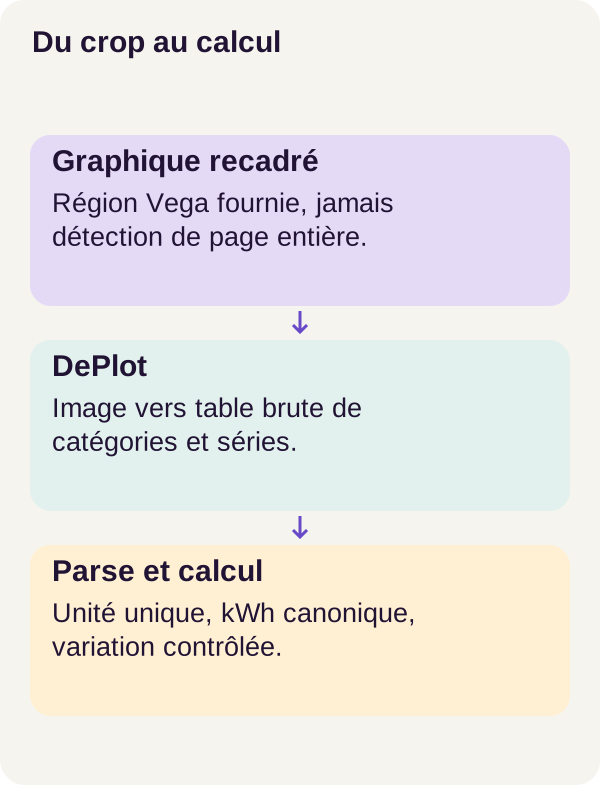
We will use DePlot to propose a table from the image. Python code will then validate numbers and units before calculating. The model extracts; the program checks and calculates. This separation will guide us throughout.
The concrete problem
An answer such as ‘consumption increased by 50%’ can sound convincing. Yet it does not tell us whether the model read the right years, retained both series or understood the unit. Even a correct percentage can accompany incorrect quantities, as we will see in an example.
For a web developer, this resembles an import problem: receiving text does not yet mean having valid data. Structure must be recognized, fields checked and errors retained rather than converted into default values.
Our workflow therefore follows page image → proposed table → validation → conversion to kWh → calculation → evaluation. A rejected output remains a result to examine, not a chart whose values are all zero.
The corpus is synthetic: Vega pages were created for this experiment. This lets us know expected values and compare predictions against a reference. These reference answers, sometimes called labels or gold in code, are used for evaluation. They are not used to repair extraction afterward.
Concepts before the code
How DePlot moves from pixels to a table
DePlot is an image-to-text model based on the Pix2Struct architecture. Its input is an image; its output is a table written as text. We are not retrieving the original data file hidden behind the curve: the model must propose a transcription from what it sees.
The processor prepares the input. It divides the image into small pieces called patches and retains information about their positions. A patch is not necessarily a letter or a curve point: it is an image region transformed into numbers.
The encoder turns these numbers into representations the model can use. The decoder then produces output piece by piece. These text pieces are tokens: they do not necessarily correspond to whole words. The prompt is the instruction specifying the task, here converting a chart into a table. The Transformers DePlot documentation presents this task; the Pix2Struct documentation details architecture and image preparation.
The model remains frozen throughout this tutorial: its parameters, or weights, are not retrained on Vega. We perform inference, meaning we use an already trained model to produce output. There is therefore neither learning on workflow pages nor fine-tuning hidden behind preparation.
Producing a number’s tokens does not guarantee that the number is correct. DePlot may omit a series or write a value close to the expected one. We retain its raw table to trace an error’s origin before any Python transformation.
From a plotted line to usable data
In Vega, a category is a year, for example 2020. A series is a sequence of values associated with a curve. To avoid mixing curves passing through the same year, a value must stay linked to its series and category.
Parsing the output means moving from DePlot’s text to a structure the program can manipulate. Think of reading CSV: recognizing rows and columns does not remove the need to validate their content.
The unit is a field in its own right. 2 MWh and 2 kWh contain the same number but represent different quantities. The prefixes mega and kilo mean one million and one thousand, respectively; 1 MWh therefore equals 1000 kWh. The NIST prefix table provides these factors.
The project chooses kWh as its canonical unit: every accepted quantity is expressed in this common unit before operations. ‘Canonical’ does not mean ‘more true’; it simply means ‘the chosen internal representation to avoid mixing units’.
Three functions share this work. recognized_unit requires a single recognized unit in the received text. number converts a compliant string into a number. canonical applies the conversion factor. None may choose its factor by consulting the expected annotation value.
Calculation follows acceptance
Once the table is accepted, calculate works with numerical values and annual categories. It sorts years, then calculates the first value, last value, sum, minimum, maximum and change.
The calculation is deterministic: for the same accepted data and numerical context, formulas follow the same rules. We do not ask the model to improvise an addition or explain why a result seems plausible.
The program uses Decimal, a Python type designed for decimal arithmetic. We will examine its role in the code. For now, remember the boundary: controlling calculation does not automatically control chart reading.
An example of units and change
Return to a simplified example intended to explain the mechanism, not present a new corpus measurement. A series is 2 MWh in 2020, then 3 MWh in 2022.
After conversion, we obtain 2000 and 3000 kWh. The difference is 1000 kWh. Relative change is (3000 - 2000) / 2000 = 0.5, or 50%. The code returns ratio 0.5; percentage display multiplies it by 100. This is not annual growth: the formula compares the period’s endpoints.
Here is the trap: calculating (3 - 2) / 2 also gives 0.5. An identical factor applied to both values cancels out in the ratio. A correct percentage therefore does not prove absolute quantities have the right unit.
If the legend says only ‘Energy’, the project contract rejects calculation for lack of a recognized unit. This does not mean a ratio would be mathematically impossible without a displayed unit: it means our program lacks the information required to accept the table and its conversions. Interpreting a quantity actually expressed in MWh as kWh would divide it by a thousand; the reverse would multiply it by a thousand.
Another case: the first value is zero. Its difference from the last remains calculable, but the percentage formula would divide by zero. The result then becomes None, with status UNDEFINED_ZERO_BASELINE. Displaying 0% instead would mean ‘no change’, which is different information.
Finally, we must decide which image to give the model. Full mode uses the entire page. Crop mode uses a supplied cropped region, focusing input on the chart rather than neighboring titles, logos or tables. Retain this rectangle with results: reading an already located chart is not automatically detecting every chart in a report.
The central code
Recognize the unit, read the number, convert
The following excerpt comes from src/pdfcharts/units.py. It contains four small functions. Read them as import stages with a deliberately limited format.
"""Recognize units in the extracted text; never infer a factor from gold."""

from decimal import Decimal, InvalidOperation
import re

UNIT = re.compile(r"(?<![A-Za-z])(kWh|MWh)(?![A-Za-z])", re.I)
FACTORS = {"kwh": Decimal(1), "mwh": Decimal(1000)}


def recognized_unit(raw):
    found = {m.group(1).lower() for m in UNIT.finditer(raw)}
    if len(found) != 1:
        raise ValueError("missing_unit" if not found else "conflicting_units")
    unit = next(iter(found))
    return {"unit": "kWh" if unit == "kwh" else "MWh", "factor": str(FACTORS[unit])}


def without_unit(text):
    return UNIT.sub("", text).strip().strip("()[]").strip()


def number(text):
    text = without_unit(text).replace("−", "-").strip()
    if re.fullmatch(r"[+-]?[0-9]{1,3}(,[0-9]{3})+(\.[0-9]+)?", text):
        text = text.replace(",", "")
    elif re.fullmatch(r"[+-]?[0-9]{1,3}( [0-9]{3})+(\.[0-9]+)?", text):
        text = text.replace(" ", "")
    if not re.fullmatch(
        r"[+-]?(?:[0-9]+(?:\.[0-9]*)?|\.[0-9]+)(?:[eE][+-]?[0-9]+)?", text
    ):
        raise ValueError("unsupported_numeric_format")
    try:
        value = Decimal(text)
    except InvalidOperation as exc:
        raise ValueError("invalid_number") from exc
    if not value.is_finite() or abs(value) > Decimal("1e12"):
        raise ValueError("numeric_range")
    return value


def canonical(value, unit):
    return value * Decimal(unit["factor"])
recognized_unit: one distinct unit, not a single occurrence
UNIT is a regular expression searching for kWh or MWh. The re.I flag ignores case. Checks around the group prevent recognition when directly adjoining a letter covered by [A-Za-z]. The re module operations document these mechanisms and whole-string checks.
finditer() traverses matches. The brace construction creates a set, retaining only one instance of each unit after lowercasing. The important point is therefore the number of distinct units: two mentions of MWh do not constitute a conflict.
On illustrative strings, the function behaves as follows:
| Received text | recognized_unit decision |
|---|---|
Energy (MWh) |
Unit MWh, factor "1000". |
MWh MWh |
Same unit repeated: accepted. |
Energy |
Rejected: missing_unit. |
Energy MWh / kWh |
Rejected: conflicting_units. |
The contract covers only two units here. For example, GWh is not recognized: it does not automatically receive a factor just because a human knows the conversion.
An essential limit remains: this function examines the text it receives, not the chart directly. If the model omits a unit present in the image, the regular expression cannot recover it. Ambiguity rejection must therefore also be evaluated on pages, not just test strings.
without_unit and number: accept a defined format
without_unit removes recognized unit mentions and cleans the string’s edges. number then standardizes the typographic minus sign − to -.
The first two checks recognize certain thousands groupings: 1,234.5 and 1 234.5, for example. Separators are removed only if the entire group matches the expected form. The final fullmatch validates the whole remaining string, not just the first number found inside it.
Here are examples of this function independent of model predictions:
String passed to number |
Value or rejection |
|---|---|
2 MWh |
Number 2, without conversion at this stage. |
1,234.5 kWh |
Number 1234.5. |
1 234.5 |
Number 1234.5, with an ordinary space. |
1.25e3 |
Number equivalent to 1250; e3 means ‘times one thousand’. |
−2.5 MWh |
Number -2.5. |
1,5 |
Rejected: unsupported_numeric_format. |
1,234 |
Number 1234, not the French decimal 1,234. |
Watch local conventions. The code expects a decimal point and certain thousands formats. It does not automatically recognize every language’s conventions. Replacing every comma with a point would not be a neutral improvement: it would notably change the interpretation of 1,234.
Conversion to Decimal follows format validation. NaN, meaning ‘not a number’, and Infinity are already rejected by the numerical pattern. The is_finite() check adds validation, and an absolute value above 1e12, one trillion, triggers numeric_range. This function does not prohibit negative numbers: their relevance depends on the subsequent business contract.
Crucially, number does not replace recognized_unit. For example, removing units from 2 MWh kWh can leave number 2. The separate unit check must reject this conflicting text. Successful numerical conversion is not enough to accept the data.
Why Decimal and separate conversion?
Building Decimal from text preserves its decimal representation without first passing through a binary float. For example, Decimal("0.1") + Decimal("0.2") gives exactly Decimal("0.3"). However, this type does not offer infinite precision for every operation: division such as one third depends on the precision and rounding context. The Python Decimal documentation explains this distinction.
canonical then performs multiplication. For 2 MWh, number returns 2 and the factor is 1000: we obtain 2000 kWh. For 2 kWh, the factor is 1: we obtain 2 kWh. Conversion uses the supplied factor; it does not rediscover the unit.
The 1e12 bound is checked before multiplication. It must therefore not be presented as a 1e12 kWh cap on every converted value. Likewise, this small function does not verify that the source text was true. Each check has a specific role, not a general guarantee.
Calculate only from accepted values
Move to src/pdfcharts/calculate.py. At this stage, numbers are expressed in kWh. The function no longer receives the image or raw DePlot table: it receives an upstream-prepared structure.
def calculate(table):
    result = {}
    for series in table["series"]:
        values = {
            row["category"]: Decimal(row["canonical_kwh"])
            for row in table["values"]
            if row["series"] == series
        }
        if not all(re.fullmatch(r"[0-9]{4}", year) for year in values):
            raise ValueError("unsupported_category_order")
        years = sorted(values, key=int)
        first, last = values[years[0]], values[years[-1]]
        result[series] = {
            "first_category": years[0],
            "last_category": years[-1],
            "first_kwh": str(first),
            "last_kwh": str(last),
            "sum_kwh": str(sum(values.values())),
            "minimum_kwh": str(min(values.values())),
            "maximum_kwh": str(max(values.values())),
            "variation": str((last - first) / first) if first != 0 else None,
            "variation_status": "DEFINED" if first != 0 else "UNDEFINED_ZERO_BASELINE",
        }
    return result
The loop handles each series separately. The values dictionary associates a category with its canonical value and retains only rows from the current series. Numerical strings become Decimal values again for operations.
The [0-9]{4} check then requires four digits per category. 2020 qualifies; Q1 2020 does not. This is an annual-category contract, not universal date sorting. The check does not define a business year range either: it validates form.
sorted(values, key=int) sorts these categories numerically. First and last values therefore denote chronological endpoints, not minimum and maximum. A curve that rises and then falls would make this difference particularly visible.
To follow the calculation, here is a minimal illustrative object built with the fields the function reads. It is neither a real corpus export nor the parser’s full schema. It contains only one series for readability; Vega’s two series are handled separately by the same loop.
{
  "series": ["A"],
  "values": [
    {"category": "2022", "series": "A", "canonical_kwh": "3000"},
    {"category": "2020", "series": "A", "canonical_kwh": "2000"}
  ]
}
Input order is reversed, but calculation correctly starts in 2020. It produces first_kwh = "2000", last_kwh = "3000", sum_kwh = "5000", minimum_kwh = "2000", maximum_kwh = "3000" and variation = "0.5", with status DEFINED.
The sum covers only present values. It invents no value for 2021 and does not calculate area under the curve. For a series starting at zero, variation would be None without removing other results.
Calls to str() retain numerical results as strings in the output. The frontend must therefore distinguish a string such as "0.5", a displayed percentage and an absent value. The associated status specifically prevents undefined change from being displayed as zero.
This excerpt is not a standalone validator for every possible table. It notably assumes nonempty series and unique categories per series. In a fabricated input with two rows of the same category, dictionary construction would keep the last one; it would not raise a duplicate error here. These guarantees must be examined in the project’s preparation and parser before reusing the function elsewhere. Calculation must not be called directly on an arbitrary model-generated structure.
Prerequisites and commands
You need to be able to read Python, work with dictionaries and use a terminal with Docker. You do not need to know how to train a network for this experiment: DePlot remains frozen.
The reference profile uses Linux, Docker Engine, Compose, an NVIDIA driver and NVIDIA Container Toolkit, on a 24 GiB RTX 3090. Recommendations are 32 GiB of RAM and 25 GiB of disk space. RAM is machine memory; the card’s 24 GiB is video memory, or VRAM. These guidelines prepare the environment; they are not guaranteed minimums for every configuration. The CPU profile is not validated.
The driver makes the GPU usable by Linux. NVIDIA Container Toolkit provides container access integration; it does not replace host driver installation. That is why seeing the card with nvidia-smi is insufficient: check_environment.py runs the model inside Docker to verify this second level.
Extract the ZIP and open a terminal at its root. All following commands run from this directory, in order. The acquisition service retrieves intended assets; inference performs predictions and associated processing; tutorial prepares the corpus and evaluations. Acquisition is separate, and inference services do not consult reference labels.
Step 1 — prepare
Start with preflight checks, preparation, service builds and model acquisition. We will finish with computation in the containerized environment and project tests.
sh scripts/preflight.sh
sh scripts/setup.sh
docker compose config --quiet
docker compose build acquisition tutorial inference
docker compose run --rm acquisition python scripts/acquire.py --config configs/minimum.yaml
docker compose run --rm tutorial python scripts/check_environment.py
docker compose run --rm tutorial python -m pytest -q
Each command must finish with a zero exit code, indicating success. Checks complement one another: a valid Compose configuration does not prove model acquisition; successful acquisition does not prove GPU usability; passing tests do not prove every extracted value will be correct.
Retain the ZIP’s locked acquisition versions and files. The linked documentation explains mechanisms, but its installation examples do not replace r001 workflow dependencies.
Step 2 — build the prediction
We will now create Vega pages, request tables from DePlot, then parse outputs.
docker compose run --rm tutorial python -m pdfcharts.cli prepare --config configs/minimum.yaml
docker compose run --rm inference python -m pdfcharts.cli infer --config configs/minimum.yaml
docker compose run --rm inference python -m pdfcharts.cli parse --config configs/minimum.yaml
prepare renders the corpus’s 120 pages and sets regions. Rendering transforms a PDF page into an image. infer produces the tabular representation; parse checks its structure, series and units.
Before evaluation, open an image and its textual output. Locate years, series names and the unit. Then examine the parsed table or rejection reason. You must be able to follow a value’s path without consulting its expected answer to ‘correct’ it.
This inspection answers a useful question: was the error already present in DePlot’s output, or did it appear during interpretation? Changing the parser to hide a model misreading would prevent us from knowing.
Step 3 — measure and check
The first two commands below calculate statistics on accepted tables, then evaluate results. The third already launches the unit exercise using configs/exercise.yaml.
Before running this block, record your exercise prediction: what happens if 2 MWh is correctly rewritten as 2000 kWh? And if the unit disappears? We will explain the answer in the exercise section after the measurements.
docker compose run --rm inference python -m pdfcharts.cli calculate --config configs/minimum.yaml
docker compose run --rm tutorial python -m pdfcharts.cli evaluate --config configs/minimum.yaml
docker compose run --rm tutorial python -m pdfcharts.cli exercise --config configs/exercise.yaml
docker compose run --rm tutorial python lesson/figures/plot.py
docker compose run --rm tutorial python scripts/check_checkpoints.py
docker compose down
calculate uses only accepted values; evaluate can compare them with separate references. exercise runs the supplied scenario. The next two commands generate figures and perform the project’s file check. The name check_checkpoints.py does not imply training occurred: this workflow’s model remains frozen.
The final docker compose down stops project services. It is not the export cleanup command: retain outputs for inspection, then use targeted cleanup at the article’s end.
Measurements before numbers
Measure extraction without confusing populations
A metric measures program behavior. Before comparing two numbers, we must know what was counted and on which examples.
The acceptance rate is the proportion of charts for which checks permit a table and calculation. Accepting more is not always better: accepting an ambiguous unit would be an error, whereas explicit rejection is the desired behavior in that case.
MAE, or Mean Absolute Error, is the average absolute error. In a fictional example, expected values of 1000 and 2000 kWh predicted as 990 and 2030 kWh give errors of 10 and 30 kWh. MAE is therefore (10 + 30) / 2 = 20 kWh. Signs disappear: underestimation does not compensate for overestimation.
Here, MAE is conditional: it covers only accepted, comparable values. It does not directly penalize those unavailable for comparison. A method rejecting difficult cases could therefore display low MAE while providing few values. Read error together with acceptance and coverage, never alone. Coverage here means the elements actually available for comparison; do not assume it is perfect because a table was accepted.
Series recall indicates whether expected series were recovered. In a fictional example with four expected series and three recovered, recall is 3/4 = 0.75. Exact values on one curve do not automatically compensate for omitting another.
Unit precision measures the correctness of recognized units among unambiguous outputs. A perfect score here means neither that every page was accepted nor that every number is correct.
Finally, the arithmetic check compares sums, extrema and changes with accepted values after conversion. It verifies the calculator’s work, not those values’ fidelity to the image. In the preceding example, adding 990 and 2030 correctly gives 3020, although expected values sum to 3000. Calculation can be exact on inexact inputs.
See what the commands produce
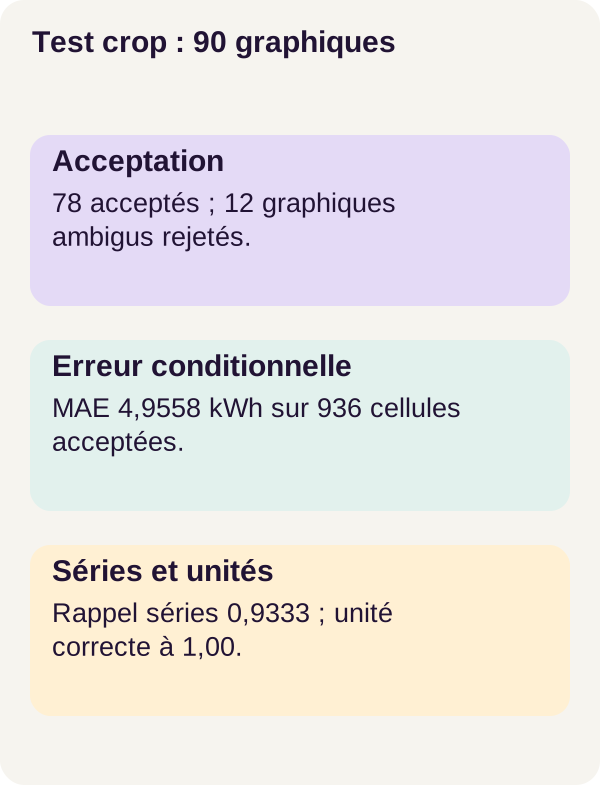
The main workflow has 90 test pages, including 12 ambiguous charts. The following table reproduces r001 results reported for this set without mixing them with the exercise’s three pages.
| Test metric | Supplied region: crop mode | Entire page: full mode |
|---|---|---|
| Accepted charts | 78/90 | 45/90 |
| Conditional MAE, kWh | 4.9558 | 26.4075 |
| Series recall | 0.9333 | Not quantified here |
| Unit precision | 1.0000 | Not quantified here |
A measurement not quantified in this table is not zero. Populations compared for MAE depend on the outputs each mode accepts.
Crop mode accepts the 78 unambiguous charts and rejects the 12 ambiguous ones, with no unsafe acceptance observed among these cases. Its acceptance rate is therefore approximately 86.7%, versus 50% for the entire page. These percentages are simply calculated from the displayed fractions.
Crop mode’s lower conditional error is useful, but two limits matter. First, the modes do not accept exactly the same population: comparing MAEs does not replace value-by-value comparison on a shared set. Second, the crop already supplies the relevant region to the model; this score does not measure its ability to find a chart independently on a page.
Series recall of 0.9333 highlights another limit. A table usable for the series it contains is not necessarily an exhaustive reconstruction of expected series. An entirely omitted series may become visible only through reference comparison, since inference cannot access answers.
The takeaway is therefore not ‘every chart is read correctly’. On this synthetic corpus, supplied cropping enables more accepted tables and lower conditional error. Series remain missing, and the numbers establish no performance on your own PDFs.
Troubleshoot and operate
A value is rejected? First return to the text export: is the unit present? Does the format respect the numerical convention? Are series and categories usable? Do not start by adding a factor of 1000 ‘because it looks like MWh’.
If the crop cuts off the legend, the model no longer receives all required information. A corrected region is a new input to evaluate: retain both old and new versions rather than retrospectively rewriting the reference workflow’s result.
In service, version the model, PDF rendering, supplied region, raw table, conversions and rejection reasons. This traceability lets you work back from a displayed number to what was actually processed. Data used in an energy decision or invoice must also undergo human review appropriate to the stakes.
What we have learned
DePlot proposes a table from an image without retraining in this workflow. The parser gives it a usable form, then explicit checks accept or reject numbers and units. Canonical conversion finally allows the same formulas to be applied to accepted values.
These stages answer different questions: did I extract the right data? Can it be interpreted unambiguously? Did I calculate correctly from it? One metric cannot answer all three.
We also saw that relative change can remain correct despite a scale error, that an absent series can escape conditional mean error, and that a correctly recognized unit does not guarantee a correctly read number. These concrete distinctions must remain visible in the interface.
Exercise — change the unit or make it ambiguous
Return to the hypotheses recorded before step 3. The experiment runs through the exercise subcommand with configs/exercise.yaml, already included in that sequence. It requires no changes to the validated code. Cleanup commands appear later, after result inspection.
The question is simple: does changing how a quantity is written necessarily change the quantity itself? In our simplified example, 2 MWh becomes 2000 kWh. Representation changes, but the canonical value must remain 2000 kWh. For the second year, 3 MWh becomes 3000 kWh: change remains 0.5.
Compare that with another, purely illustrative operation: replacing only text MWh with kWh while retaining number 2. That is not a conversion of the same quantity. You have described a quantity one thousand times smaller. The program must not guess that you intended to preserve the old value.
The supplied scenario contains three pages, one ambiguous. In reference results, crop mode accepts two tables and rejects the ambiguous page. Compare source units, canonical values and rejection reasons with your prediction. Explicit conversion preserves magnitude; a missing unit must not be inferred from whatever would make the result satisfying.
This small experiment checks specific cases. It does not demonstrate that the model can handle every axis format, legend or unit in a real corpus.
Decide what to show a user
In an interface, an accepted table should show the series, categories, source unit, canonical unit and calculation results. The PDF and processed region must remain viewable so the user can check the reading. This is an integration requirement, not a claim that the tutorial already supplies a back office.
For a rejected output, display the reason: missing unit, conflicting units, unsupported numerical format or unusable series structure. Hiding these cases would suggest ignored charts contain zeros or do not exist.
Finally, distinguish zero value, absent value and undefined change. A series starting at zero retains a known first value; only its relative change from that baseline is undefined. Status UNDEFINED_ZERO_BASELINE explains this situation without removing the entire series.
Outputs and common failures
After infer, keep the raw DePlot table. After parse, examine recognized units and categories, plus rejected series or tables. After calculate, check initial and final categories and change status.
When multiple units are present, the workflow does not provide general handling of multi-axis charts. Reject the case according to the contract; splitting it into subtables would be an adaptation to design and evaluate separately, not behavior to implicitly attribute to it.
If the image is poorly rendered or the legend unreadable, inspect the PDF, crop and resolution before blaming the parser. It cannot recover a detail that was not transmitted or correctly extracted.
Production, limitations and cleanup
Moving from this experiment to an application requires measuring extraction on authorized documents representative of your use. Vega pages provide a controlled environment, not the diversity of customer reports, degraded scans or real charts.
For each result, retain the document version, page, input region, model version, units, transformations and acceptance or rejection decision. This provenance helps verification; it does not by itself prove every value correct. The crop rectangle locates the input; it does not automatically provide precise evidence for each produced number.
Add document access rights, service monitoring, tests on your own formats and human review for consequential decisions. Absence, an ambiguous unit or an invalid region must never silently become certainty.
Clean up after saving results
Copy useful exports and figures before running the next two commands. The first deletes outputs; it does not run the exercise. Cleanup targets only outputs/, then the final shutdown ends the Docker workflow.
docker compose run --rm tutorial python scripts/clean.py --outputs-only
docker compose down
References for further study
The primary DePlot repository documents conversion of a figure into its underlying table. The official NVIDIA Container Toolkit documentation explains GPU integration with containers.
Supplementary links to Transformers, Python and unit prefixes explain the mechanisms presented. The article’s numerical examples are educational; corpus and exercise measurements remain those of r001. To reproduce it, use the ZIP’s files and configurations rather than replacing versions with those from a recent documentation example.
A value becomes usable when you can trace where it came from, how it was interpreted and why its calculation was permitted. That is the path we built, without confusing a readable prediction with evidence.