





The problem: a moved clause and a changed deadline
Imagine a back-office feature: a user uploads two versions of a guide and wants to know what changed. You could extract text, run a diff and display added or removed lines. The principle resembles comparing files in Git.
But consider two versions of the fictional ‘Nova Service Policy’ guide. The second uses a different font and pagination. One paragraph now takes four lines instead of three; the next moves to another page. Text has not necessarily changed, but lines and coordinates no longer match.
A genuine change hides within this new presentation: ‘Payment is due within 30 days’ becomes ‘Payment is due within 45 days’. The deadline changes from 30 to 45 days. A line-by-line diff can bury this change among line breaks. Conversely, a similarity model can find the sentences very close: they still concern the same topic, with almost identical words.
We therefore have two separate questions: which passages should be compared, and what differs between them? Finding a similar passage does not suffice to declare it unchanged.
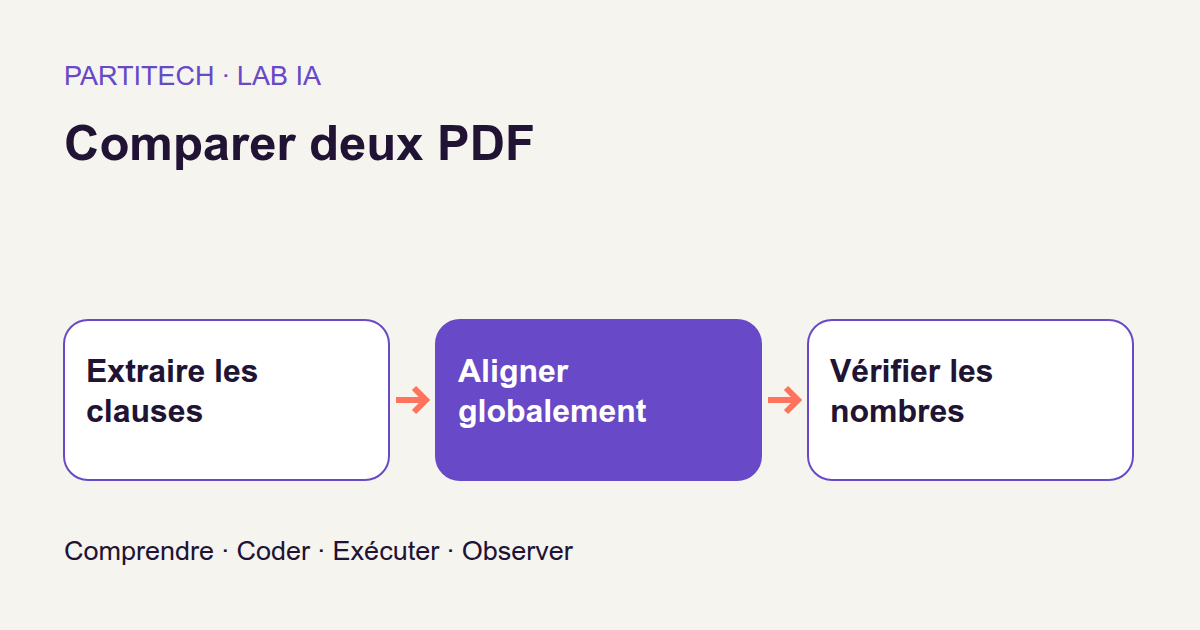
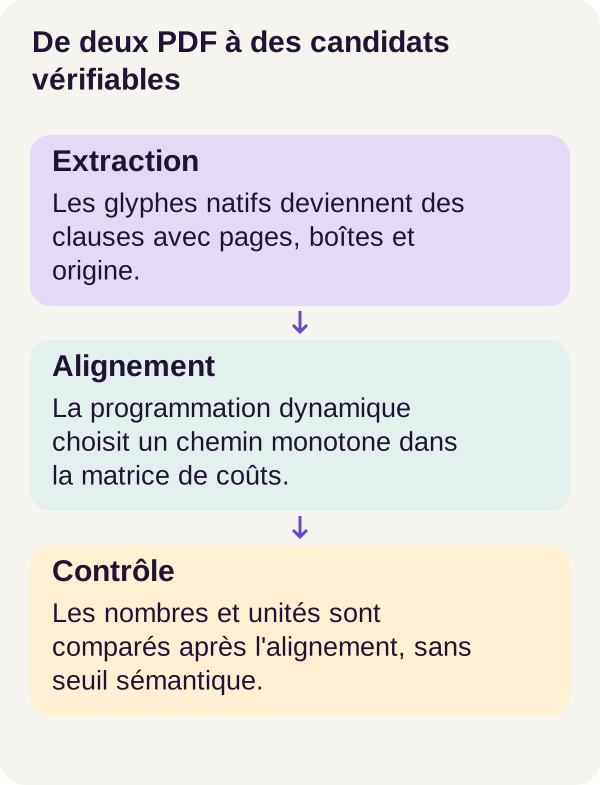
This tutorial builds a local comparator for native PDFs, meaning those containing usable text, not just scan images. Its workflow is glyphs → clauses → similarity vectors → global alignment → explicit checks → passages to review. Terms are explained progressively; you can approach the project with Python, array and Docker basics without having trained a model before.
The result is a list of review candidates with provenance from both PDFs. It is neither legal advice nor a guarantee that rewording preserves meaning. Above all, we will learn to make a model and rules cooperate rather than ask the model to decide everything.
Download the complete project.
What the data actually provides
Three ways the same guide changes
The Nova corpus contains 40 families and three pairs per family, totaling 120 pairs of actual native PDFs. Files are generated for the experiment: ‘actual PDFs’ means we truly process this format, not that documents come from customers.
Within each family, one pair changes presentation only. Another changes the deadline and punctuation. The third inserts one clause, deletes another and rewords a contact. This construction establishes expected differences before running the comparator.
Families 0–9 form development, totaling 30 pairs; the remaining 30 form testing, totaling 90 pairs. No family crosses these sets. Development is for working on the method; testing measures retained behavior without correcting it after seeing answers.
We do not separate neural training and testing here: the pretrained model stays frozen. Separation still prevents designing rules on the examples used to report results. The generative grammar remains shared across families; this protocol therefore does not automatically represent your documents’ diversity.
Reconstruct clauses, not merely retrieve a string
A glyph is a character shape drawn in the PDF, with a position. The program starts from these visible elements. Its segmenter, the code dividing the document into passages, groups lines by position and identifies bold headings to reconstruct clauses.
Here, a clause is the passage unit we compare. It is not a legal category recognized by the program. Extraction must first have correctly grouped document elements.
Each clause retains a list of source regions: document, SHA-256 hash, page index, box and glyph identifiers. A box is simply a rectangle locating the passage on a page. If a clause begins on one page and ends on the next, it keeps several boxes: one rectangle cannot faithfully summarize that provenance.
For a web developer, this provenance resembles the link between a displayed result and the records producing it. It allows return to the correct document and regions. The SHA-256 hash computed from the file helps identify the version used; it does not certify the proposed match’s correctness.
Normalize without losing the path to the original
To compare text, the project applies NFKC, lowercases and collapses whitespace. NFKC is a Unicode normalization form: it notably brings certain different character representations together. The Python unicodedata.normalize documentation describes this operation.
Take a teaching example independent of Nova measurements. The string office may contain a single Unicode character for the ffi ligature. After NFKC, it becomes office: the letters f, f and i are separate. The Unicode specification details this transformation and distinctions compatibility normalization can erase.
If the ligature glyph in our example had identifier G17, all three normalized characters must be able to refer back to that glyph. The project retains precisely a map from normalized characters to original glyphs. It does not assume every normalized character always corresponds to one distinct source character.
Likewise, harmonizing Payment, PAYMENT and whitespace eases comparison but removes some formatting differences. Normalized text alone cannot reconstruct the original. That is why both the working representation and provenance are retained. This normalization choice belongs to the protocol; its suitability must be reconsidered before comparing other document types.
What extraction does not repair
Headers and footers are excluded by declared region: their location is supplied, not discovered automatically by the model. Hyphenation is not automatically repaired. A word split at a line ending may therefore require additional handling in another corpus.
Bad extraction does not become correct because the vector model is good. If a passage is missing or two clauses were mistakenly merged, inspect this stage first. The comparator works on received clauses, not an ideal document version.
Embeddings: similar is not identical
Turn a clause into numbers
An embedding is a vector, a list of numbers representing text in a learned space. The POC, or proof of concept, uses all-MiniLM-L6-v2. Its official model card describes 384-dimensional vectors and their construction through pooling.
The model serves as an encoder: it transforms input into a numerical representation. It does not write change analysis. Its parameters stay frozen, unchanged throughout the workflow. We perform inference, using an already trained model, not fine-tuning on Nova.
Computation uses FP32 on CPU: 32-bit floating-point numbers processed by the processor. No GPU is required or used in this tutorial.
The 384 values do not correspond to named business fields. For example, there is no ‘deadline’ slot where the model faithfully stores the day count. That is precisely why we later add an explicit numerical check.
Tokens, windows and weighted averaging
A tokenizer divides text into units the model can process. Here, it uses WordPiece: a token can be a word or word fragment, not necessarily a character or whole word. The Transformers tokenizer documentation explains this segmentation.
Pooling combines token representations into a passage vector. This must be distinguished from the second average the project uses for long clauses.
The tokenizer divides a long clause into windows of 254 content wordpieces. The workflow encodes every window, averages their vectors weighted by token count, then normalizes the resulting vector. A long clause exercises this path in one family out of five. We therefore do not replace a long clause with just its beginning.
To understand weighting, take two fictional windows of 254 and 46 tokens. With vectors v1 and v2, the mean is (254 × v1 + 46 × v2) / 300, not (v1 + v2) / 2. The small final window does not weigh as much as the large one merely because it is another window.
Reducing vectors to two dimensions for hand calculation, suppose v1 = (1 ; 0) and v2 = (0 ; 1). The mean is approximately (0.8467 ; 0.1533). Length normalization gives approximately (0.9840 ; 0.1782). These values only explain the calculation; they are not MiniLM outputs.
Encoding every window avoids ignoring one, but creates no single context where each token interacts with the entire clause. Averaging condenses representations; it does not automatically retain every detail or relationship.
Compare directions, not certify equivalence
Cosine similarity compares two vectors’ directions. For nonzero vectors u and v, it is dot_product(u, v) / (length(u) × length(v)). A value near 1 indicates similar directions. When both vectors are length-normalized, the dot product suffices, as explained in the Sentence Transformers documentation.
A two-dimensional example shows the difference from equality: (1 ; 0) and (2 ; 0) share direction and therefore have cosine 1, without being identical lists of numbers. For texts, a high score is likewise no equivalence certificate.
For n clauses before and m after, the program produces an n × m matrix: one row per old clause and one column per new clause. Cell [i, j] contains those clauses’ similarity.
Return to 30 and 45 days. Even similarity of 0.99 would not mean ‘a 99% chance nothing changed’. It would help recognize that the passages correspond. The deadline difference must remain visible at the next stage. Similar here means ‘good comparison candidates’, not ‘interchangeable’.
Build the global path
Why not take each clause’s best neighbor?
Suppose two old clauses both resemble the same new clause. If each independently selects its best neighbor, the comparator may reuse that passage twice and ignore another.
The align function in src/pdfdiffai/align.py instead chooses a global alignment. Every segment must appear exactly once: either matched or isolated as an insertion or deletion. Matching means associating a clause from the before version with one from the after version; it does not mean declaring them identical.
The path is also monotonic: it advances through both documents in order without going backward. If old clause A precedes B, their matches cannot cross in the new version.
This constraint accommodates a clause pushed onto another page as long as section order remains broadly preserved. It does not permit freely swapping entire sections. We will measure this limitation in the exercise.
Turn similarity into cost
We seek the minimum-cost path. Low cost makes an option attractive; it is not an error probability. Matching cost combines three terms fixed before inference:
0.7 × (1 − cosine) + title penalty + 0.1 × relative position distance.
The title penalty is 0.2 when title tokens differ, otherwise zero. Insertion and deletion each cost 0.45. These are protocol choices, not parameters learned during the workflow.
For example, with fictional cosine 0.98, different title tokens and relative distance 0.10, cost is 0.7 × 0.02 + 0.2 + 0.1 × 0.10 = 0.224. Textual similarity is strong, but other clues still contribute.
Deleting a clause then inserting another costs 0.45 + 0.45 = 0.90. Comparing costs helps explain possible choices. However, this is not an independent decision threshold for each pair: alignment must remain compatible with other clauses.
Dynamic programming: remember the best path beginnings
Dynamic programming avoids recalculating every possible path. It retains the best solution for each pair of document prefixes, then builds on those results to advance.
distance[i, j] represents the minimum cost of processing the first i clauses before and first j clauses after. The matrix therefore has n + 1 rows and m + 1 columns. Zero represents an empty document prefix.
Cell distance[0, 0] is zero. On the first row, only insertion is possible; on the first column, only deletion. With cost 0.45, these boundaries therefore accumulate 0, 0.45, 0.90, and so on.
Here is the project’s central excerpt. It runs within the calculation after matrices and indices are prepared; it is not a standalone program.
value, rank, operation = min(
    (distance[i - 1, j - 1] + cost[i - 1, j - 1], 0, "M"),
    (distance[i - 1, j] + deletion, 1, "D"),
    (distance[i, j - 1] + insertion, 2, "I"),
)
Diagonal move M matches two clauses. It takes the best cost for their preceding prefixes and adds the current match cost. cost[i - 1, j - 1] uses indices reduced by one because that matrix lacks distance’s empty boundaries.
Vertical move D consumes an old clause without a match. It adds deletion cost. Horizontal move I consumes a new clause without a match. It adds insertion cost. ‘Consume’ means including it in the alignment result; no clause is erased from source PDFs.
Each option is a tuple containing cost, priority rank and operation name. Python compares tuples element by element. When costs tie exactly, ranks 0, 1, 2 prioritize matching, then deletion, then insertion. This makes the choice reproducible; it provides no additional proof of correctness.
A small alignment to work out by hand
Take a teaching example: the before version contains A, B, and the after version A′, X, B′. We chose the following costs to represent two attractive matches and an inserted passage. They do not come from Nova encoding.
| Matching cost | A′ | X | B′ |
|---|---|---|---|
| A | 0.10 | 1.20 | 1.20 |
| B | 1.20 | 1.20 | 0.10 |
With insertion and deletion at 0.45, the matrix of best cumulative costs becomes:
| Before / after prefix | Empty | A′ | A′, X | A′, X, B′ |
|---|---|---|---|---|
| Empty | 0.00 | 0.45 | 0.90 | 1.35 |
| A | 0.45 | 0.10 | 0.55 | 1.00 |
| A, B | 0.90 | 0.55 | 1.00 | 0.65 |
Look at the final cell. Matching B to B′ extends cost 0.55 by 0.10, giving 0.65. The other options each cost 1.00 + 0.45 = 1.45. The best path therefore matches A to A′, inserts X, then matches B to B′.
We still need to recover the path, not just its cost. The program retains predecessors, the option selected in each cell. It traces backward from (n, m) to (0, 0), then reverses the list into reading order.
The final check verifies every segment appears exactly once. The result is a deterministic path, though multiple paths could have equal cost before tie-breaking. Most importantly, the minimum is sought among permitted monotonic paths, not every imaginable document reorganization.
Flag a difference without confusing signals
Finding the right clause does not finish the job
After alignment, we know which passages to compare. The classify function in src/pdfdiffai/changes.py then determines which signal to present.
numbers searches for decimal numbers with the following word or unit. For our deadline, the information to compare is conceptually ‘30 with days’ then ‘45 with days’. These descriptions explain the rule; they do not claim to reproduce the function’s internal JSON format.
A difference between these elements triggers numeric, even with high cosine. Examine the condition order in the supplied code.
def classify(left, right, similarity=None):
    # Similarity is explanatory metadata, never a gate on the numeric check.
    if left is None:
        return {"kind": "insertion", "review": True}
    if right is None:
        return {"kind": "deletion", "review": True}
    a = numbers(left)
    b = numbers(right)
    if a != b:
        return {
            "kind": "numeric",
            "review": True,
            "left_numbers": a,
            "right_numbers": b,
        }
    if lexical(left) == lexical(right):
        return {
            "kind": "unchanged" if left == right else "presentation",
            "review": False,
        }
    return {"kind": "rewording_candidate", "review": True}
First, clauses absent on one side. left is None produces insertion; right is None produces deletion. Here, None means an absent partner segment, not an empty string. Both categories require review.
Next, numbers. Results of numbers(left) and numbers(right) are compared. If they differ, the function immediately returns numeric, with observed values on each side. The similarity parameter appears in no condition in the excerpt, so it cannot cancel this alert.
Then, lexical form. If lexical(left) and lexical(right) are identical, the program requests no review. It still distinguishes two cases: unchanged if received strings are already exactly equal; presentation if they differ but become equal after lexical processing.
This matters: the function does not directly compare fonts or coordinates. A font change leaving extracted strings identical can therefore lead to unchanged, not necessarily presentation. Their common point is review: False, under workflow rules.
Finally, other differences. The function returns rewording_candidate with review: True. It concludes neither a definite meaning change nor definite equivalence.
Understand what categories do not say
The function returns one category. If numbers and wording change together, the numerical check comes first and gives numeric. This does not mean the number is the passage’s only difference. Both texts must be kept for review.
Likewise, insertion or deletion is initially an alignment-path conclusion: no partner was selected there. It is not always proof that content is genuinely new or removed. Section movement will demonstrate precisely this case.
Numerical diagnostics cover the POC’s English grammar, not every document date, currency, unit or convention. Do not attribute general unit conversion to it or assume it recognizes every number written as words. Such cases require additional rules and tests.
This preserves a useful distinction: the model finds similar passages, alignment pairs them, rules flag differences, and a person reviews them.
Reproduce the validated workflow
Prepare the CPU environment
Unzip the archive and open a terminal at its root. Run the commands once, in the order shown. The validated profile uses a CPU: Docker Engine and Compose are required; 16 GiB of RAM and 12 GiB of disk space are recommended. These recommendations are not minimum requirements measured on every machine.
Three services have distinct roles. acquisition has network access to retrieve and verify the pinned assets. tutorial prepares the data and runs checks. inference performs the planned calculations without mounting the labels or gold operations, meaning the annotations and expected changes used for evaluation. tutorial and inference run without network access.
This separation lets you check that the calculation does not quietly consult the expected answers. It does not replace access controls in a real application.
Start with the preflight check, setup, and service builds:
sh scripts/preflight.sh
sh scripts/setup.sh
docker compose config --quiet
docker compose build acquisition tutorial inference
The preflight checks prerequisites before the remaining steps run. The Compose check must accept the configuration, and the build must finish without errors. If a step fails, fix it before continuing with an incomplete environment.
Acquire the model, then check the program
docker compose run --rm acquisition python scripts/acquire.py --config configs/minimum.yaml
docker compose run --rm tutorial python scripts/check_environment.py
docker compose run --rm tutorial python -m pytest -q
Acquisition uses the project's pinned assets. The environment check then verifies that they can be used inside the container; pytest runs the program's tests. These three commands serve different purposes: obtaining the files, being able to use them, and checking expected code behavior.
Passing a test does not prove that every match on unfamiliar documents will be correct. Keep the model and dependencies from the ZIP to reproduce the r001 workflow; documentation linked in the article provides background, not upgrade instructions.
Generate the documents and inspect the inputs
docker compose run --rm tutorial python -m pdfdiffai.cli prepare --config configs/minimum.yaml
prepare writes the PDFs, extracted documents, and their provenance. Before looking at scores, examine the recovered passages: is the payment deadline present? Are headings and bodies grouped as expected? Does a clause spanning two pages retain its source regions?
Next, move on to the two educational views of the calculation:
docker compose run --rm inference python -m pdfdiffai.cli inspect-similarity --config configs/minimum.yaml
docker compose run --rm inference python -m pdfdiffai.cli explain-alignment --config configs/minimum.yaml
inspect-similarity provides the encodings and similarity matrix. The aim is to connect a cell to two specific passages, not simply to look for the largest value.
explain-alignment exposes a small teaching matrix, checked against exhaustive enumeration: for this reduced example, the program can examine every permitted path and compare its best cost with the dynamic programming result. This check covers the calculation mechanism; it does not demonstrate that every pairing makes sense in a real document.
Compare alternatives and produce the report
docker compose run --rm inference python -m pdfdiffai.cli baseline --config configs/minimum.yaml
docker compose run --rm tutorial python -m pdfdiffai.cli evaluate --config configs/minimum.yaml
baseline compares the project's two alternatives on the same clauses. A baseline is a reference method: it lets you judge a method's result against something other than an impression. Inspect their outputs without attributing scores to the alternatives that do not appear in the published results below.
evaluate produces the two-sided report, with both versions side by side, row JSON files, and the local viewer. Open outputs/viewer.html, the PNGs, and the JSON files. For the deadline, follow the entire chain: old passage, new passage, selected pairing, extracted numbers, category, and source regions.
Do not clean up yet: it will erase outputs/. First, we will interpret these results and run the exercise.
Define the metrics before looking at the numbers
Is the alignment correct?
Alignment F1 compares predicted pairs with gold pairs, the corpus's expected matches. Precision measures the proportion of proposed pairs that are correct; recall measures the proportion of expected pairs that were found. Their combination is F1 = 2 × precision × recall / (precision + recall) when this calculation is defined.
Consider the counts from the exercise we will examine next: eight proposed pairs, all correct, when ten were expected. Precision is 8/8 = 1, but recall is only 8/10 = 0.8. F1 is approximately 0.8889, not 0.8. A method can therefore be precise in its pairings while still missing some.
How many passages have a partner?
Matched coverage is 2 × number of matched pairs / total number of clauses in both versions. The factor of two comes from each pair containing one clause from each version.
This metric does not tell you whether the pairings are correct. Arbitrarily pairing every passage would produce high coverage without guaranteeing good F1. Conversely, a genuine insertion or deletion must remain unpaired: coverage below 1 is therefore not automatically a defect.
Isolated clauses remain in the denominator. You cannot make difficult cases disappear from the assessment simply by choosing not to pair them.
Was the numerical change found in the right place?
Numerical recall equals 1 only if every expected change occurs in a correctly paired clause and its numerical difference is flagged. Detecting a different number in two incorrectly paired clauses is not a success.
Candidate precision is examined separately for insertions, deletions, numerical changes, and candidate rewordings. This distinguishes a pairing error from a rule that sends too many passages for review.
For pairs where only pagination varies, the false-change rate measures passages unnecessarily sent for review. Finally, the protocol's mean time covers alignment only: it excludes acquisition, PDF rendering, and encoding. It is therefore not the full time between uploading files and displaying the result in a back office.
Nova test results
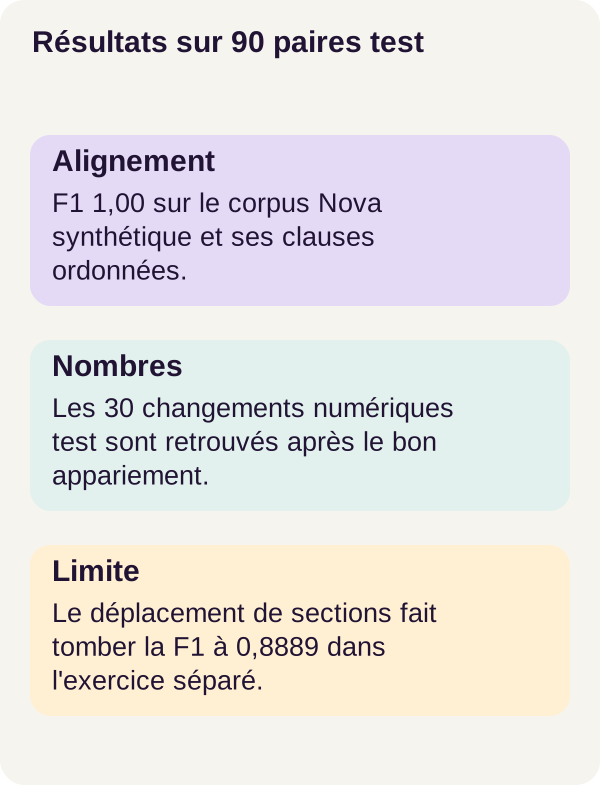
On the 90 test pairs, the dynamic comparator achieves the following results:
| Metric | Reference result |
|---|---|
| Alignment | 870 gold pairs aligned; F1 = 1.00 |
| Matched coverage | 1,740 passages out of 1,800; 0.9667 |
| Numerical recall | 30 expected changes flagged; 1.00 |
| False changes from repagination alone | Rate of 0 on the 30 relevant pairs |
Check the counts: 2 × 870 = 1 740, then 1 740 / 1 800 ≈ 0.9667. The remaining 60 passages are isolated in the alignment. This is consistent with the 30 insertions and 30 deletions expected from the construction of the test pairs; it does not represent 60 overlooked matches.
These figures describe controlled Nova PDFs. They validate neither a legal comparator nor the handling of unfamiliar layouts. Review remains necessary to interpret a difference, and a good score on this distribution does not predict performance on another corpus.
The negative result: swapping two sections
The independent exercise changes the order of two entire sections. The moved content is still present, but the monotone path cannot freely retain crossing pairings.
The result drops to F1 = 0.8889, with eight gold pairings out of ten and 16 matched passages out of 20. The corresponding coverage is therefore 16/20 = 0.8. Two insertions and two deletions are proposed.
These four alerts belong to two categories whose precision as content-change candidates is zero in this exercise: they represent movement, not a demonstrated insertion or deletion of content. An algorithm can perfectly honor its ordering contract and fail when the document no longer satisfies that assumption.
Summary before the exercise
We have separated three objects: the extracted data, the comparator's decision, and the measurement against references. Provenance lets you return to the source; it does not prove that the chosen partner is correct. Cosine helps identify similar passages; it does not cancel out a difference in deadlines. The global path prevents reuse; it also limits possible movements.
The exercise will test these distinctions. The point is to predict which mechanism will be affected, then explain the result rather than settle for a score.
Exercise: predict before checking the answer
Write your hypothesis before running the command
Start with this situation: Payment within 30 days and Payment within 45 days receive an almost perfect similarity score. Should they be classified as unchanged? Find the deciding condition in classify, without inventing a new similarity threshold.
Now imagine two sections completely swapping places without changing their content. Can the global path preserve all pairings? Does a proposed insertion then prove that new text has appeared? Distinguish the passage-ordering problem from the content problem.
Write down your answers, then run the provided scenario:
docker compose run --rm tutorial python -m pdfdiffai.cli exercise --config configs/exercise.yaml
Compare your prediction with the outputs
For 30 versus 45 days, numerical comparison takes priority and must request a review. Changing the illustrative similarity value does not change the conditions visible in classify: no test on that value permits numbers to be ignored.
For the swap, the order assumption is broken. The program may prefer insertions and deletions because it has no operation allowing a section to move freely. These alerts must not be renamed “confirmed rewordings.”
Find the eight correct pairings, two insertions, and two deletions in the outputs, then return to the source passages. The solution is to connect these alerts to the movement, without claiming that the comparator automatically solved this case. Recognizing the limitation is the outcome of the exercise; general movement detection is not a feature added to the POC.
Produce figures and clean up
After the exercise, generate the figures and run the workflow's file checks:
docker compose run --rm tutorial python lesson/figures/plot.py
docker compose run --rm tutorial python scripts/check_checkpoints.py
The presence of a command named check_checkpoints.py does not mean training has just taken place. MiniLM remains frozen; the script is part of the project's file checks.
Open the figures, outputs/viewer.html, and the JSON files before continuing. Save useful results, especially cases where an insertion or deletion signal actually corresponds to movement.
The final three commands stop the project, display and erase only outputs/, then finish the workflow. The corpus and assets are preserved.
docker compose down
docker compose run --rm tutorial python scripts/clean.py --outputs-only
docker compose down
Cleanup does not fix an alignment error or improve a metric: it simply resets the outputs. No global Docker cleanup is requested.
Adapt, troubleshoot, and clean up
Diagnose in processing order
Environment or acquisition failing? Start with the preflight and check_environment.py, then inspect the acquisition checksums, the expected file fingerprints. Do not replace pinned versions with files found elsewhere to make the error disappear.
Passages missing, cut off, or incorrectly grouped? Inspect glyphs, regions, detected headings, and excluded areas. An incorrectly excluded header or unrepaired hyphenation is primarily an extraction issue, not a MiniLM issue.
A matrix or report looks inconsistent? Follow the encoding, alignment, and evaluation JSON files. Examine the selected partner and assigned category separately. Two passages may be similar but incorrectly paired; a pairing may be correct while the wording still calls for review.
Wording changes without an alert? Check which differences lexical processing removed and what numbers actually recognizes. Insertions and deletions appearing around moved sections? Compare clause order before changing costs: different weights do not remove the monotonicity constraint.
Define a new scope before extending the comparator
To process authorized real documents, build separate corpora by source, language, and layout type. Measure movements, but also clause merges and splits, columns, tables, and scans before adjusting a threshold.
An elementary pairing in this workflow links one clause to one clause. Splitting a passage in two or merging several passages therefore presents a different challenge from changing a few words. Likewise, adding OCR for scans would change the inputs and their possible errors: it would be an extension to evaluate, not a capability already validated here.
In a real interface, distinguish the candidate produced by the comparator from the reviewer's conclusion. Add a “rejected / uncertain” state, document permissions, and human review. Users must be able to find both versions, understand the category, and see that an unpaired passage is not necessarily deleted content.
An asynchronous API, meaning processing whose result is retrieved after submission, as well as logging, backup, and restoration still need to be planned. These are product development tasks, not features supplied by the tutorial.
Finally, the POC is neither a complete PDF parser sandbox nor a retention policy. Documents and extracted strings are data, never instructions to execute. Processing isolation and file permissions require a design specific to the deployed service.
Further references
The workflow references are the official MiniLM model card, for the model and pooling, and the NumPy array documentation, for matrix dimensions and indexing.
The additional links throughout the text explain Unicode normalization, WordPiece tokens, cosine, and Python tuple comparisons. The small illustrative calculations are not new measurements on Nova. To reproduce the results, the reference versions, settings, and commands remain those in the r001 ZIP.