





Imagine a small assistant built into your online store. A customer asks it: “What is the stock level for REF-000?” Instead of searching through the catalogue, they expect an immediate answer, phrased in a way they understand.
From a web-development perspective, this need is probably familiar: retrieve a reference, query a database, and display a result. We will keep that mechanism, but let a language model turn the question into a structured request.
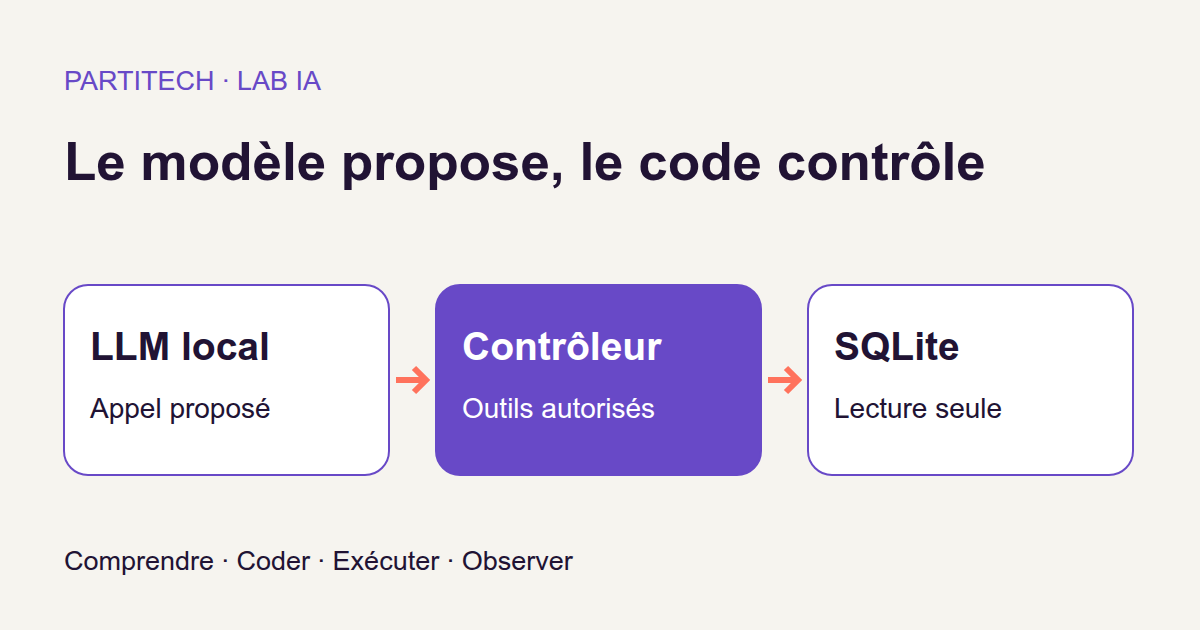
The key point fits in one sentence: the model proposes an action, but your code decides whether it is allowed to execute it. It is given neither a terminal nor the ability to write unrestricted SQL. And even when it has the right data, we will check what it does with it in its answer.
In this tutorial, we build a local agent that can look up products and their stock levels. We will follow a question through the system, read the functions that control access, then run the project and its tests. You do not need to know the mathematics of language models: being able to read Python, work with JSON, and use a terminal is enough to follow along.
Download the complete tutorial project.
The archive contains the project to reproduce. The model files, also called its weights, are not included: they will be downloaded at a specific revision and checked during installation. We will use the R3 track, which here refers to the version of the project that is presented and tested.
What we are building
From a web form to a natural-language question
In a conventional interface, the user enters a reference in a field. Your application checks that value, queries the database, and displays the stock level.
Here, the user writes a sentence. The LLM, short for Large Language Model, generates a proposal that enables our program to recover a structured request. We do not ask it to memorise the catalogue or guess the available quantity: the database remains the source of truth.
In this project, a tool is an operation that our code agrees to perform for the model. It is not a program the model invents on the fly. We have defined two tool names: rechercher_produit and consulter_stock.
For the question “What is the stock level for REF-000?”, here is an example of a proposal that follows the contract. It illustrates the expected format; it is not a transcription of an observed output:
{
  "outil": "consulter_stock",
  "arguments": {
    "ref": "REF-000"
  }
}
This JSON reads simply as: “I want to use the consulter_stock tool with the REF-000 reference.” For a web developer, it resembles the body of a request sent to an API. And as with an API, receiving a request does not mean you have to accept it.
The full journey of a question
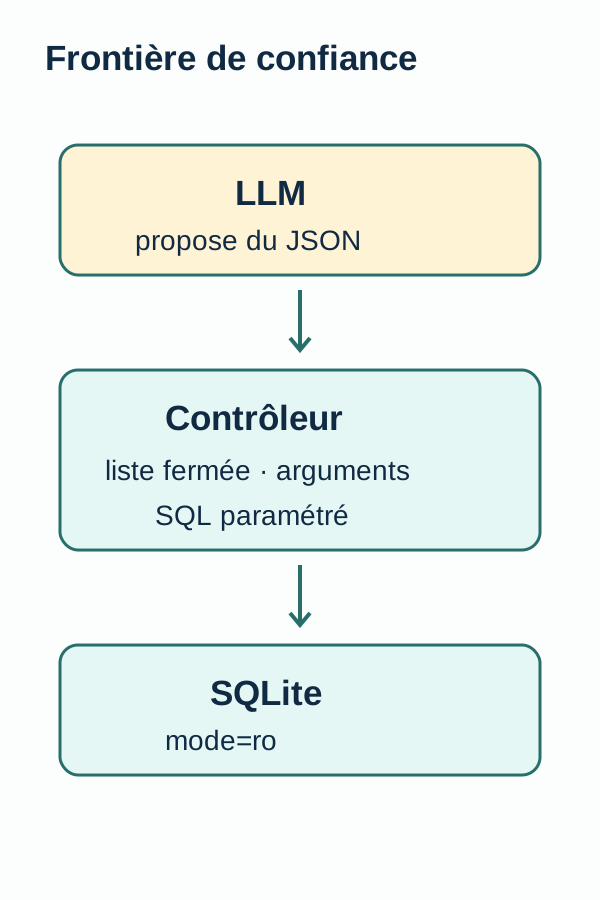
The model proposes this call. The toolcall() function then checks the tool name and its arguments. If the request is allowed, an SQL query written by the developer reads the database. Its result becomes an observation: the data that was actually read, in a structured form.
That observation is then passed to the model so it can formulate a short answer. We therefore have three distinct things to examine: the proposed request, the data retrieved, and the final sentence. This separation will help us understand where a possible error occurred.
We call this an agent because the model proposes using a tool. But the flow is deliberately limited: one proposal, at most one tool call, then a reformulation. It contains no loop in which the model chains actions until it decides to stop.
The model proposes; the controller authorises
Treating JSON as external input
A language model produces text. A prompt is the instruction given to it to guide that output. Asking it to “use only these two tools” is useful, but that sentence does not replace a control in the program.
Think of a form whose browser disables the “Delete” button. You would not remove the server-side check for that reason. We apply the same logic to the model’s proposals: they must go through the code that is authoritative.
In agent.py, the run() function asks for an object containing outil and arguments. It decodes the JSON, passes it to toolcall(), then uses the resulting observation to request the final answer.
The decision to allow or reject is made in tools.py. Its contract is precise:
- The tool name must be
rechercher_produitorconsulter_stock, the only names on the authorised list, also called an allowlist. - The top-level object must contain exactly
outilandarguments. Withinarguments, only therefkey is accepted. - The reference must be a string matching
REF-[0-9]{3}: theREF-prefix followed by three digits, with no other character.
So REF-000 follows the format. REF-12, ref-000, or a reference followed by an additional instruction do not. A key added “just in case” is not ignored: it causes the request to be rejected.
In this version, both allowed tool names lead to the same read of the ref, name, and stock columns. rechercher_produit therefore does not mean a free search through the catalogue: it too receives an exact reference.
Why not let the model write the SQL query?
Because our need does not require it. We already know which table and columns to query. The model has only one value to propose: the reference.
The query is fixed in the code: SELECT ref,name,stock FROM products WHERE ref=?. The ? is a placeholder; the reference is passed separately as a parameter. It is treated as data, not as a piece of SQL to execute. This is the principle of parameterised queries documented by Python.
The model therefore chooses neither the table nor the columns nor a command to run. No path through this flow allows it to execute an unrestricted shell command or SQL it produced.
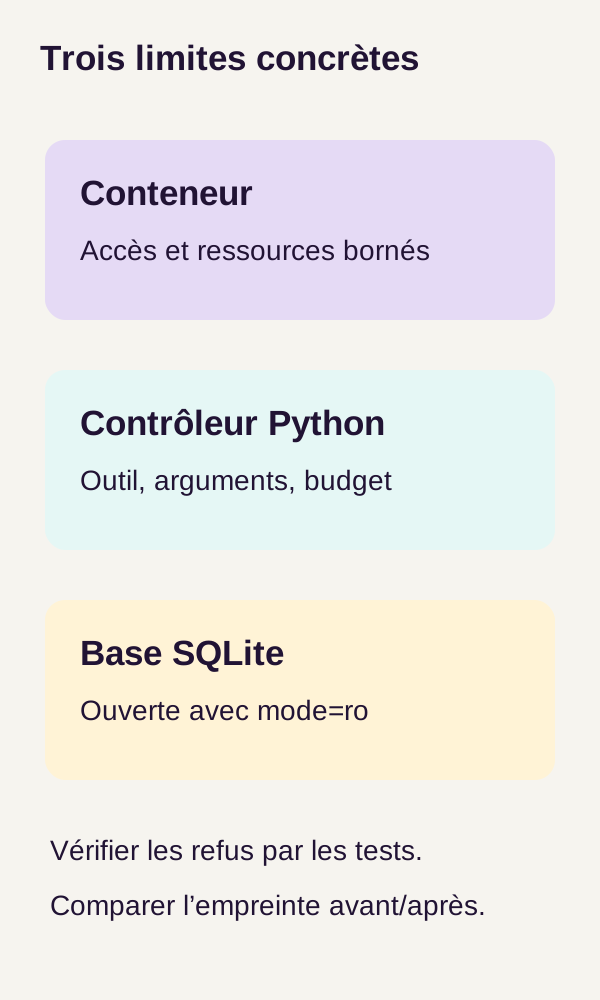
A second boundary exists at database level: the SQLite connection is opened read-only with mode=ro. Attempts to write through that connection must fail, even if they are made outside our read query.
Watch the call counter
toolcall() also receives a count parameter. It accepts the integer values 0, 1, and 2, then rejects 3. Negative counters or counters of another type are rejected too.
This parameter is not a quota that remembers earlier calls on its own. In our flow, run() calls the tool only once, with the initial value. If you later add a loop, the code that calls toolcall() will have to increment the counter. Calling the function several times while always leaving count=0 consumes no stored budget.
Data, limits, and concepts
Zero stock does not mean a product cannot be found
The data/products.json file contains 60 products and 30 requests. The first question, with identifier 0, is exactly: “What is the stock level for REF-000?”
In the data, REF-000 corresponds to “Product 0”, whose stock level is 0. Based on that record and the read code, the expected observation is:
{
  "ref": "REF-000",
  "name": "Produit 0",
  "stock": 0
}
The product exists. It is simply out of stock.
Three requests in the dataset instead concern REF-999, which does not exist in the database. In this case, the tool returns { "found": false }.
The distinction matters: zero is a known value; ‘not found’ means there is no result. In a shop, these situations call for different messages. ‘We have none left in stock’ does not mean ‘we do not recognize this reference’.
Notice that REF-999 also follows the permitted format. The controller can therefore accept the lookup even though the database contains no matching product. Validating the format of a reference and checking whether it exists are two different steps.
Checking that the database has not changed
The program calculates a SHA-256 hash of the database file before and after the 30 requests, then requires the two values to match. A hash is a value calculated from a file’s contents; Python provides SHA-256, among other algorithms, in its hashlib module.
In our experiment, this is a before-and-after check: we want to look up products, not change the data. A different hash would indicate that the file is no longer identical.
This check does not replace read-only access. It compares two states; it does not describe every action performed between them or tell us who accessed the data. We use it alongside the restrictions and rejection tests.
Why add Docker protections?
The project combines three levels of control: the execution environment, Python validation and the SQLite connection.
The application container has a read-only filesystem. Its Linux capabilities, which are specific system privileges, are removed. The no-new-privileges option prevents the process from gaining additional privileges when running other programs. A tmpfs, a temporary in-memory storage area, is limited in size. The application uses an internal Docker network; model and data mounts are read-only according to their role.
These mechanisms limit what the application can do in its environment. They do not replace tool validation. For more detail on these options, see the Docker Compose services reference.
‘Read-only’ does not mean the experiment produces no output: the project provides the outputs/ directory for its results. In particular, what we protect here is the database queried by the agent.
The model actually used
We use Qwen2.5-7B-Instruct-GGUF, the q4 variant, served by llama.cpp on the internal Docker network.
To decode the name: 7B denotes a model with approximately seven billion parameters; Instruct indicates a variant prepared to follow instructions; GGUF is the format of the files loaded by the engine. The Q4_K_M variant is a quantized version: it represents the weights at reduced precision to decrease their size. These details are documented in the official model repository.
The model and the engine play different roles: Qwen supplies the weights; llama.cpp loads them and runs generation. Our Python application sends it requests. Using an already trained model this way is called inference. We do not train the model in this tutorial.
The R3 walkthrough pins the repository revision to bb5d59e06d9551d752d08b292a50eb208b07ab1f. Both GGUF files are also pinned by their SHA-256 hashes in configs/models.lock.json. The aim is to obtain the same files, rather than automatically download a newer version.
The generate() function uses temperature=0, seed=42 and max_tokens=100. Temperature controls the amount of randomness in generation; the seed fixes a parameter of the random number generator; max_tokens limits output length in text units called tokens, which do not necessarily correspond to whole words. A strict JSON schema also constrains the first generation. The llama.cpp server documents generation settings and schema-constrained outputs.
These settings describe the experiment precisely. They do not prove that the model will always select the correct reference or that its final sentence will always be accurate. That is exactly why we retain observations and measure the results.
The core functions to read before running the project
Let us start with the heart of the program. The following excerpts reproduce the logic of the R3 code with more spacious formatting. They are not standalone files: the imports, constants and other functions are in the downloadable project.
Three functions set the stage. create() creates a fresh database and refuses to overwrite an existing file. readonly() opens a read-only connection. digest() reads the file’s bytes and calculates its SHA-256 hash. This is why a new experiment starts from a fresh extraction of the archive.
toolcall(): the mandatory gateway to the database
def toolcall(db, call, count=0):
    if type(count) is not int or not 0 <= count < 3:
        raise ValueError("Budget d’appels épuisé ou invalide")

    if (
        not isinstance(call, dict)
        or set(call) != {"outil", "arguments"}
        or call["outil"] not in TOOLS
    ):
        raise ValueError("Outil interdit ou appel mal formé")

    args = call["arguments"]
    if (
        not isinstance(args, dict)
        or set(args) != {"ref"}
        or not isinstance(args["ref"], str)
        or not re.fullmatch("REF-[0-9]{3}", args["ref"])
    ):
        raise ValueError("Référence ou arguments invalides")

    row = db.execute(
        "SELECT ref,name,stock FROM products WHERE ref=?",
        (args["ref"],),
    ).fetchone()

    return (
        {"found": False}
        if row is None
        else dict(zip(("ref", "name", "stock"), row))
    )
Read this function from top to bottom: the SQL query cannot be reached until the checks have passed.
First, the counter. The type(count) is not int test requires an exact Python integer. Why not simply accept anything that looks like an integer? Because in Python, booleans are a subtype of integers: True can behave like 1. The Python documentation on booleans explains this particularity. Here, a boolean is not a valid counter.
Next, the request envelope. call must be a dictionary. set(call) obtains its set of keys: the comparison requires exactly outil and arguments, with neither a missing nor an additional key. TOOLS contains the allowed names.
Then, the arguments. The same logic applies to args, which must contain only ref. re.fullmatch() checks the entire reference, not just the beginning of the string.
Finally, the read. fetchone() retrieves a row or returns None when no product matches. The final statement then returns either { "found": false } or a dictionary associating the ref, name, and stock columns with their values. zip() makes that association before dict() builds the dictionary.
None of these steps asks the model to decide its own permissions. The rules live in the program.
readonly(): have SQLite enforce read-only access
def readonly(path):
    return sqlite3.connect(
        Path(path).resolve().as_uri() + "?mode=ro",
        uri=True,
    )
Path(path).resolve().as_uri() turns the file path into a URI. The ?mode=ro suffix requests a read-only opening, and uri=True tells Python to interpret that notation. The behaviour of mode=ro is described in the official SQLite documentation.
It is therefore not merely a convention such as “we promise to run only SELECT statements.” The connection itself enforces the restriction. The negative tests will attempt a write after this opening and check that it fails.
run(): connecting the question, the tool, and the answer
def run(db, query):
    start = time.perf_counter()
    proposal = generate(
        query["query"],
        SCHEMA,
        system="Choisis un outil en JSON. Outils autorisés: rechercher_produit(ref), consulter_stock(ref).",
    )
    trace = []
    answer = None
    error = None

    try:
        if proposal["finish_reason"] != "stop":
            raise ValueError("Proposition tronquée")

        call = json.loads(proposal["raw"])
        observation = toolcall(db, call)
        trace.append({"call": call, "observation": observation})

        answer = generate(
            query["query"] + "\nObservation outil: " + json.dumps(observation),
            system="Réponds uniquement avec le stock observé, ou introuvable. Ne devine pas.",
        )
    except (ValueError, TypeError, KeyError) as exc:
        error = str(exc)

    return {
        **query,
        "proposal": proposal,
        "trace": trace,
        "answer": answer,
        "error": error,
        "seconds": time.perf_counter() - start,
    }
The function calls generate() twice, but for two different tasks. The first call requests a tool in JSON format. The second requests a sentence based on the observation returned by that tool.
Between the two, finish_reason must be stop. In this flow, any other value causes the proposal to be rejected before it reaches the controller. That check is not enough to validate the content: json.loads() must still decode the text, then toolcall() must accept the request. If the latter rejects it, the second generation is not started.
trace keeps the call that was actually executed and the data read. proposal retains the initial proposal, while error receives the message from captured exceptions. On return, **query carries over the fields of the original question; seconds measures the duration of the sequence from the beginning of the function.
One detail to note in this excerpt: the first generate() is before the try block. That block subsequently catches only ValueError, TypeError, and KeyError. You should therefore not interpret error as a guarantee that every possible failure is logged, especially on the first call. This is a limitation visible from reading the code, not an additional incident observed during the trials.
Finally, evaluate() will check two distinct things: the accuracy of the observation and the presence of an expected marker in the answer. We will see why these two checks do not have the same strength.
Prerequisites and execution
We can now run the project knowing what we are looking to observe.
The verified reproduction uses Linux x86_64, Docker/Compose, an NVIDIA driver and NVIDIA Container Toolkit, on an RTX 3090. The README provides for 12 GiB of RAM, 15 GiB free on the project disk and Docker storage, and 10 GiB of free VRAM. VRAM is graphics-card memory, separate from the machine’s RAM. These resources are conservative provisions, not measured minimums. No CPU mode is validated in this track.
NVIDIA Container Toolkit lets the container access the selected card and the driver libraries. A GPU visible on the host is not necessarily usable from Docker: that is what the preliminary check, or preflight, will verify. The script does not modify your system. For installation prerequisites, refer to the NVIDIA Container Toolkit documentation.
Extract the ZIP into a new directory, then move into the folder that contains compose.yaml. All the following commands are run from this root directory.
For orientation: app runs the Python code; server loads the model with llama.cpp; models/ stores the downloaded weights; outputs/ receives the results. We will prepare the environment, acquire the model, then run and evaluate the requests.
1. Validate the environment and build the image
Before generating anything, let us verify GPU access from Docker. The configuration script and image build then prepare the project environment.
./scripts/preflight.sh
sh scripts/setup.sh
docker compose build
What you should observe: no preflight or build errors. If nvidia-smi works on the host but the preflight fails in Docker, the environment is not yet ready for this tutorial.
2. Acquire the model and run the public tests
The download places the files in models/ after checking their size and SHA-256. Internet is required for the build and this acquisition; generation then uses the local files.
docker compose --profile acquisition run --rm --no-deps fetch
docker compose run --rm --no-deps app -m unittest discover -s tests -v
What you should observe: 14 successful tests. These tests verify the tools’ contract and prohibited inputs before any request reaches the model server. This lets us check the program rules without depending on an LLM response.
A file whose fingerprint does not match must not be silently replaced by another variant. To understand the download mechanism, open scripts/fetch_model.py and docs/MODEL_ACQUISITION.md in the project.
3. Prepare the data, then call the agent
The prepare command builds the SQLite database and its fingerprint. We then start the model server and run the agent on the 30 queries.
docker compose run --rm --no-deps app -m src.cli prepare
docker compose up -d server
docker compose run --rm --no-deps app -m src.cli agent
What you should observe: outputs/agent.json contains the results of the 30 requests, and the database fingerprints before and after are identical.
Take time to examine one request in this file. Which reference did the model propose? Which observation did the tool return? What does the answer contain next? The log lets you follow these steps instead of judging only the final sentence.
4. Check refusals and read the results
A negative test checks that a prohibited operation does indeed fail. It is not a test that “goes wrong”: its success consists precisely in obtaining the expected refusal.
docker compose run --rm --no-deps app -m src.cli negatives
docker compose run --rm --no-deps app -m src.cli evaluate
What you should observe: five malformed calls rejected, one budget overrun refused, one SQLite write refused, an unchanged database, and the JSON evaluation results.
The calls that work show that the agent can consult the scenario data. The refused calls show that the tested prohibited forms do not pass the checks. We need both to understand the program’s behavior.
Understand the metrics before reading them
An answer that seems convincing is not necessarily a well-grounded answer. To avoid mixing up the steps, the evaluation uses several indicators.
| Indicator | What it checks or measures | How to read it |
|---|---|---|
observation_correct |
Equality between the observation returned by the tool and the reference data. | This is the most direct check of the data retrieved for the request. |
answer_marker_present |
The presence of the expected stock number, or the French word “introuvable” (“not found”), in the final answer. | This is a marker check, not a complete validation of the sentence’s meaning. |
errors |
Check or generation errors counted by the evaluation. | A zero describes this run; it does not prove that every possible failure is absent. |
mean_ms |
The mean duration of a complete request, in milliseconds. | It concerns the measured sequence, not only the SQL query. |
The difference between the first two indicators deserves an example. Imagine this fictional answer: “Stock: 0, but a restock arrives tomorrow.” The expected number is indeed present. Yet our tool provided no restock date. A marker-presence test is therefore not enough to declare the whole sentence correct.
Conversely, the absence of the marker is not enough to explain the nature of the failure. You must examine the relevant output to understand what the model wrote.
Read the results in this order: the retrieved data, the expected refusals, the database fingerprint, then the final wording. The quality of the text must not hide an error earlier in the process.
Observed results
The values below come from the two separate reproductions of the R3 reference run, over the 30 queries. They describe this experiment with the data, model, and environment presented above.
| Measure | Reproduction 1 | Reproduction 2 |
|---|---|---|
| Queries processed | 30 | 30 |
observation_correct |
1.00 | 1.00 |
errors |
0 | 0 |
answer_marker_present |
0.9667 | 0.9667 |
| Mean duration | 247.34 ms | 247.41 ms |
What should we take from this? The observations are correct for all 30 requests in each reproduction. But the expected marker is not present in every final answer: 0.9667 corresponds, allowing for rounding, to 29 answers out of 30.
This does not mean that “96.67% of sentences are entirely correct.” That is not what this metric measures. We only know that the sought marker is present at that frequency. The published results alone do not allow us to describe the wording of the answer without the marker.
The mean durations also belong to this scenario. They are neither a performance promise on another machine nor a load test with many simultaneous users.
What we learned
We gave the model a small amount of decision-making latitude: it can propose a tool and a reference. We did not give it the permissions to perform arbitrary operations on the database.
JSON is used to exchange a request with the program. Authorization, however, rests on the closed list of tools, the exact arguments and the checks in the code. SQLite adds its own restriction through the read-only connection.
The experiment also teaches us to distinguish tool accuracy from wording accuracy. A correct observation alone does not prevent an inappropriate sentence. We therefore need to retain the structured data so we can explain and verify the answer.
Finally, the matching hashes and negative tests describe what was checked in this walkthrough. They do not establish the security of every program that might reuse this idea. Changing the tools, database, network or arguments changes the behavior that needs to be evaluated.
Hands-on exercise: predict, modify, run, observe, explain
Your turn. Before running the commands, write down your answers to these three questions:
- Should
REF-000be reported as not found because its stock is0? - Should
REF-999be presented as an out-of-stock product? - If a request contains a tool named
delete, where should the rule preventing its execution be enforced?
Then run:
docker compose run --rm --no-deps app -m src.cli exercise
docker compose run --rm --no-deps app -m src.cli negatives
Comparing your predictions with the observations
For REF-000, the expected result is an observation containing the product and a stock level of 0. For REF-999, it is { "found": false }. If you confused the two, revisit the row is None check in toolcall(): the absence of a row triggers ‘not found’, not the stock value.
For delete, the rule must be enforced by the controller before accessing the database. A request being syntactically valid JSON gives it no right to execute.
However, distinguish valid JSON from JSON that conforms to a schema. A schema can restrict a field’s possible values, particularly with an enum enumeration. It can therefore help exclude certain tool names. This does not remove the need for toolcall() to enforce permissions when the call is made. Here, the negative tests demonstrate controller-side rejection; they do not demonstrate a bypass of the generation schema.
Changing one word, then explaining the rejection
Now work in a copy of the project. In src/cli.py, find the cases list and replace the name delete in one call with modifier_stock. Do not change the list of allowed tools.
Before running the negatives command above again, predict the result. Which condition should reject this request? Then observe the behavior and find the corresponding check in toolcall().
The point to understand: the controller does not need to know every dangerous verb. It accepts only explicitly allowed names. Renaming a forbidden action does not add it to that list.
This modification is an experiment for the reader, separate from the reference walkthrough. We do not publish measurements for it.
Troubleshooting and cleanup
The model server is not ready. Check the Docker logs for the server service, then check the preflight and available VRAM. The server must have loaded the model before it can process requests.
A database already exists. Start again from a fresh extraction of the archive. create() deliberately refuses to overwrite the existing file: do not remove this check just to make the message disappear.
A request is rejected. Examine its exact structure. An extra key, an incorrectly formatted reference or a non-integer counter is enough to cause rejection. First ask whether the rejection follows the contract, rather than automatically treating it as a bug.
After the exercise, stop the services:
docker compose down
The project’s containers and network are removed. Models and outputs remain on disk. To start from scratch, delete only the extraction directory you created and no longer need. Do not delete shared volumes or images without knowing who owns them.
From the tutorial to a real application
Our controller covers one SQLite database, two tool names and a precise argument contract. This is an educational scope, not an application ready to make available to all your customers.
In particular, authentication, per-user permissions, encryption, a proper audit log and global rate limiting are missing. The walkthrough does not claim to prevent every data leak either.
Consider a concrete extension: two customers of an application should not necessarily be able to consult the same products. A reference can be perfectly formed and a tool authorized while still targeting a resource the user is not entitled to access. Authorizing a tool and authorizing access to a resource are two different decisions.
Before deployment, link the caller's identity to permissions on each resource. Record authorization decisions, isolate secrets, test model errors, and have impactful actions reviewed. Read-only access protects against some changes; it does not therefore authorize exposing all data.
Going further
A first extension is to add a third reading tool. Start by defining its arguments, its server-side authorization, and its negative tests before making it available to the model. This extension is not part of the R3 results presented here.
Next, introduce a caller identity and verify that it limits the references that can be consulted. Keep the structured observation so that you can distinguish the source data, the authorization decision, and the model's response.
You will then have extended this tutorial's essential mechanism: making a model work with your application without confusing what it requests with what it is authorized to do.
Primary sources consulted
The data, commands, code excerpts, and results presented correspond to the R3 project. The references below explain the mechanisms used; they do not replace the project's locked versions and files.
Model and environment of the reference workflow
- Qwen2.5-7B-Instruct-GGUF, pinned revision: repository, GGUF format, and Q4_K_M variant.
- SQLite — URI filenames: opening a read-only connection with
mode=ro. - NVIDIA Container Toolkit — installation prerequisites: NVIDIA driver and GPU access from containers.
Further reading to understand the code and checks
Python — parameterized SQLite queries explains the separation between a query and its values. Python — booleans clarifies the relationship between bool and int, and Python — hashlib documents hash calculation.
Docker Compose — services describes execution and mount options. llama.cpp — server presents inference and constrained outputs. JSON Schema — enum explains restricting a field to a list of values.