





We will see how to create a Token (Smart Contract) on é
the Binance Smart Chain (BSC) and the déployer in order to
allow à everyone to trade it.
We are leaving
from the principle that you know déjà the principles
cryptocurrency, that you have some déjà
buyé, and know how wallets work
(wallets).
Smart Contracts are programs that
control édigital assets directly. These are
these programs which, once
« inséré » in the blockchain,
will définish how these assets will êbe
gérés.
Once the program is
addingé à the blockchain, it n’is more
editable and it is impossible to delete it.
We
here we use the méSmart Contract mechanisms of the
Binance blockchain, BSC (on the ré bucket
BEP20).
We chose BSC because the gas costs are
très weak.
It is possible to make the même
thing on the Ethereum Blockchain (ERC20) but each transaction
can represent several dozen d’euros against
a few fractions of cents on the BSC.
Add réBSC bucket to MetaMask wallet
To validate transactions on the BSC you will need a
wallet (wallet) relié au rébucket BEP20.
For
this we will install MetaMask, add BNB to it (the
currency nénecessary to pay transaction fees), and
connect it to the ré bucket BEP20.
You can install it on your téléphone or
well on your PC (préférable to follow this
item).
https://metamask.io/download
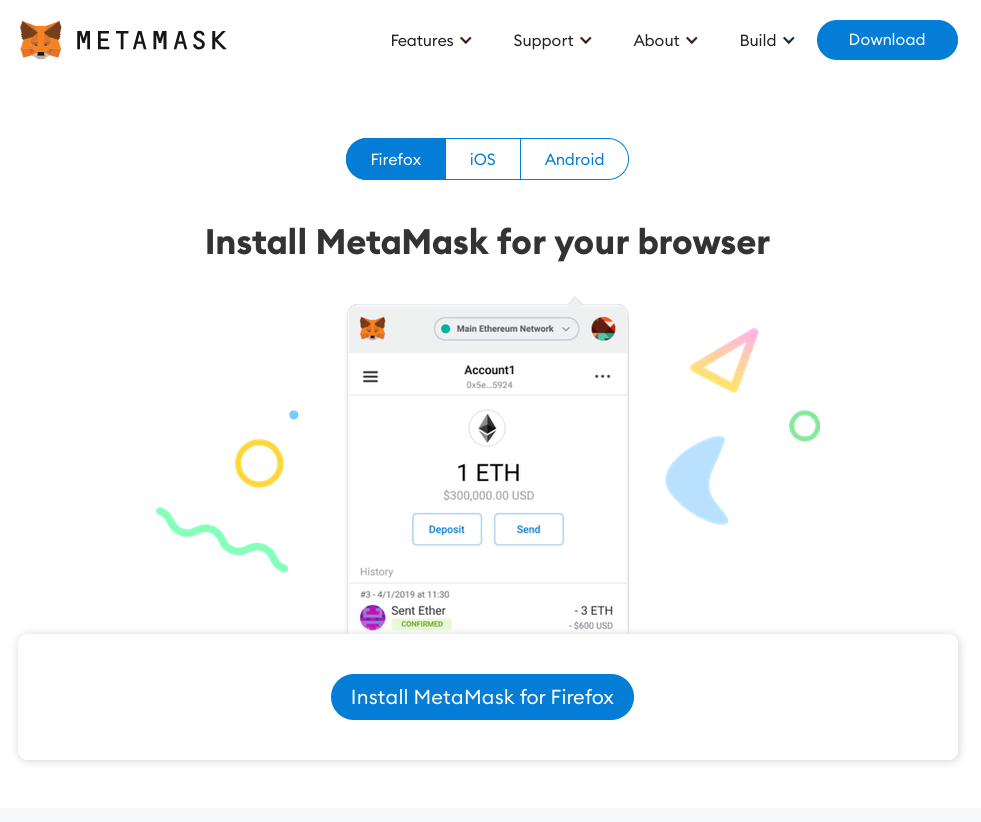
Note your seed phrase carefully (the clé privée) and
keep it in place sûr.
Do not
never transfer à to a third party.
C’is this keyé which will allow you to
réinstall your wallet later.
Once
installée you will need to go to the configuration of
l’extension and add the réBSC bucket.
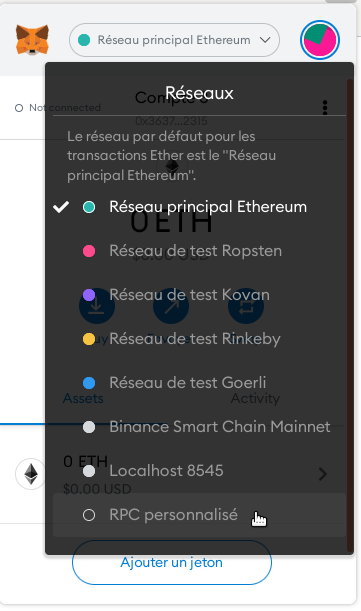
Click
on the middle bar which contains the name of the rébucket then
on « RPC personalizedé ».
Complétez le formulaire suivant :
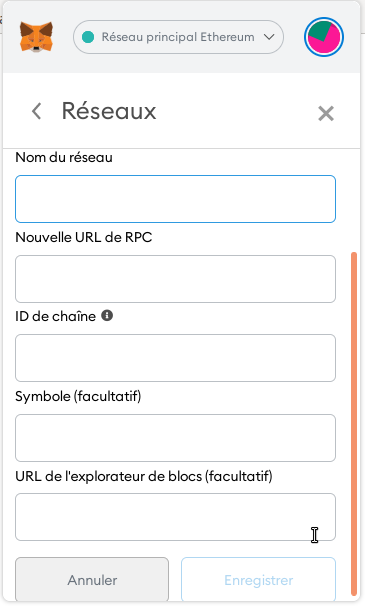
Pour le réseau principal (Main Net) :
Network
Name : Binance Smart Chain
New RPC URL :
https://bsc-dataseed.binance.org/
ChainID
: 56
Symbol :
BNB
Block Explorer URL : https://bscscan.com
Puis le réseau de test (Testnet) :
https://docs.binance.org/smart-chain/developer/rpc.html
Network
Name : Binance Smart Chain Testnet
New RPC
URL :
https://data-seed-prebsc-2-s1.binance.org:8545/
ChainID
: 97
Symbol :
BNB
Block Explorer URL :
https://testnet.bscscan.com
En règle générale, pour tester votre contrat,
vous commencerez par le publier dans le testnet.
Pour cela il
vous faudra alimenter votre wallet avec du BNB de test
(heureusement gratuit).
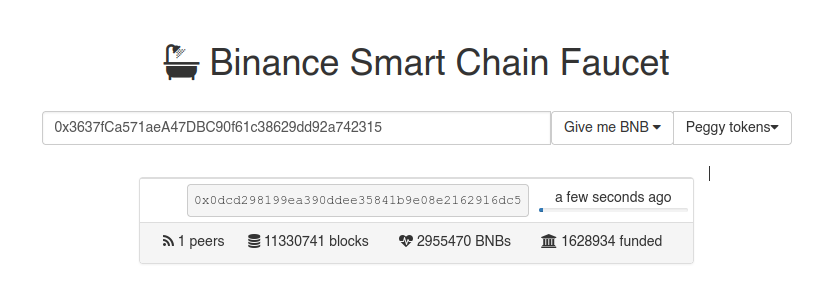
Il vous suffit de vous rendre sur la page suivante : https://testnet.binance.org/faucet-smart
Puis de renseigner l’adresse de votre portefeuille.
Votre adresse se trouve ici :
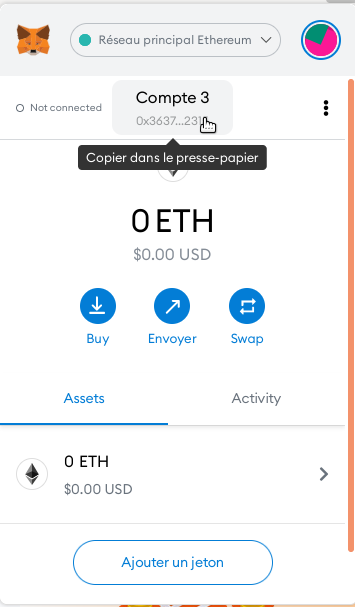
Vous renseignez votre adresse puis sélectionnez 1 BNB dans la liste ‘Give me BNB’.
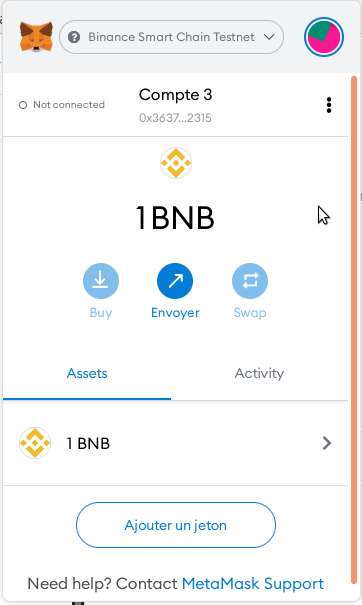
Votre compte sera automatiquement crédité.
Création de votre Smart Contract
On a vu précédemment qu’un Smart Contract
était un programme inséré dans la blockchain.
Pour le réseau BEP20 (BSC), le langage de programmation
utilisé est le Solidity.
Vous trouverez la
documentation complète ici :
https://solidity-fr.readthedocs.io/fr/latest/
Honnêtement, ce n’est pas très compliqué. Il suffit de RTFM, comme un peu tous les langages. Il est aussi accessible que JavaScript.
Pour rédiger notre programme, le compiler et le publier, nous allons le faire directement en ligne sur le site https://remix.ethereum.org/
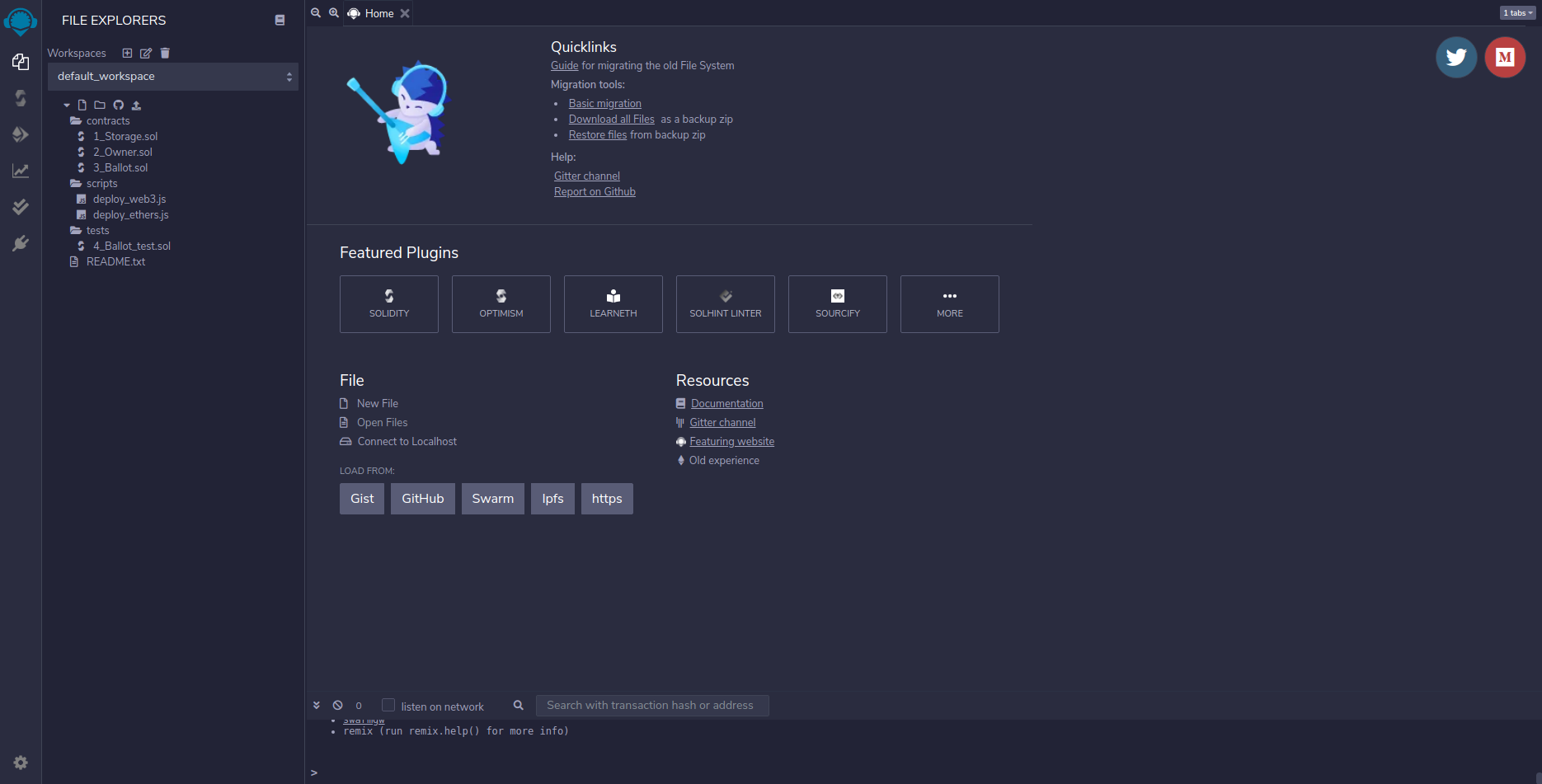
Tout vas se faire directement depuis ce site.
Nous
allons créer un Token appelé le« PartiTech Token » with symbol
« PTECH ».
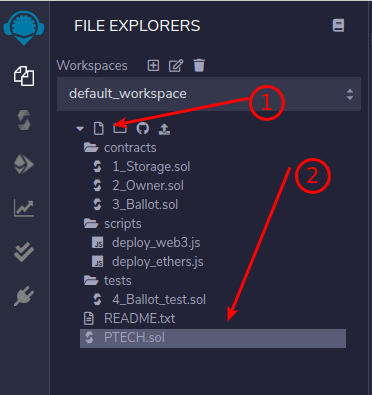
1 – We create our file
We will take care to name our file with the name of our project.
2 – L’entête our file
Très important, c’is she who will définish the
version of the compiler usedé and thereforeé
language version.
In our case, we will use the
latestère version:
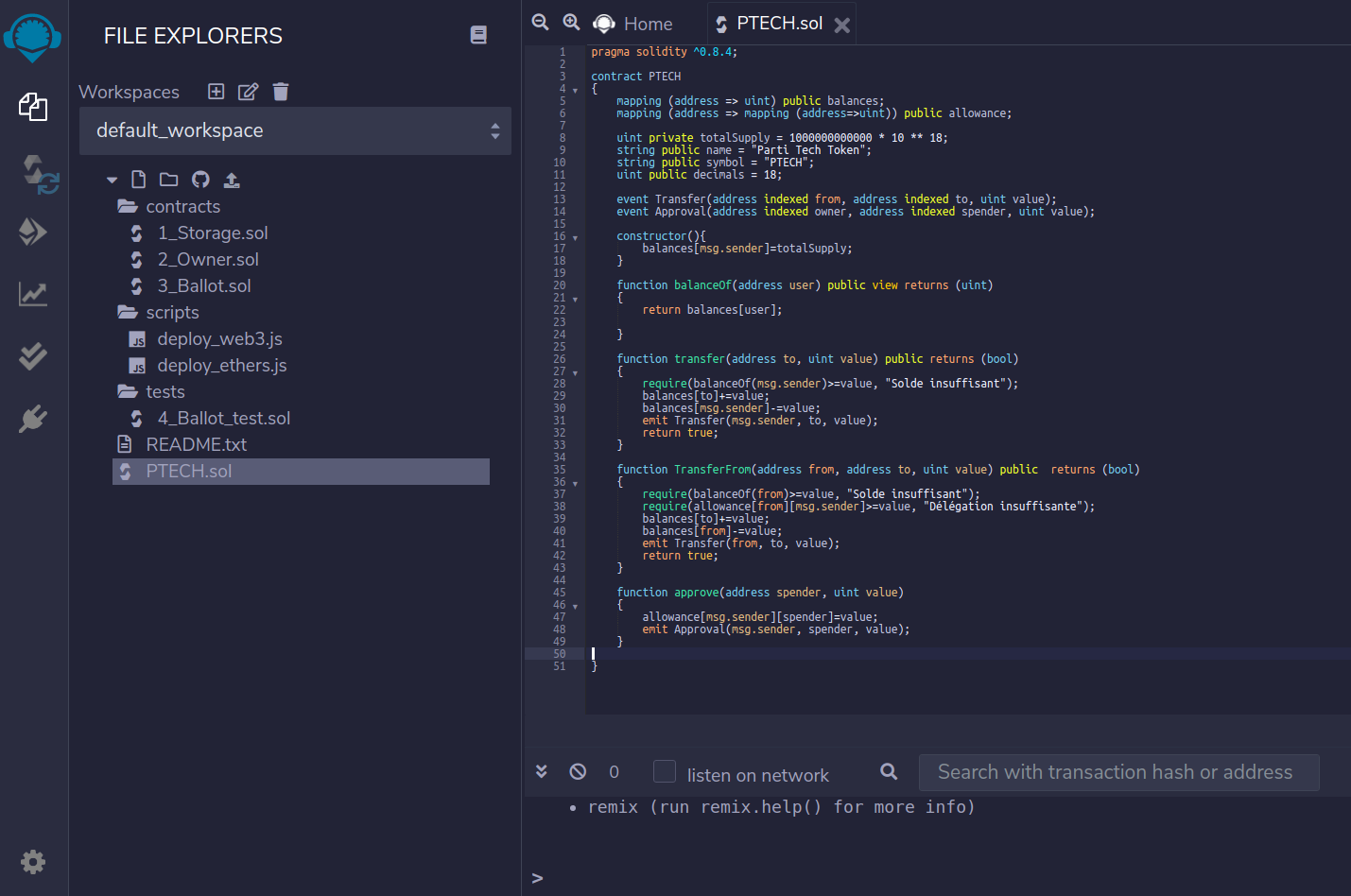
pragma solidity ^0.8.4;
3 – The body of our program
We then create é our contract via the déclaration
« contract » which we will name
même manière than our file (which is a bit
cleaner).
Note that you can déclarer
as many contracts as you want in one même
file.
pragma solidity ^0.8.4;

contract PTECH
{

}
4 – Définishing our contract
We're going to have to définish some very important parameters.
our contract.
Its name, the number of tokens, and its
symbol.
ArrêLet's take a moment to discuss the syntax that
we will use. We need to declare variables.
As in most languages, they are typées
(int, string, bool etc) and have a portée (public or
privée).
In blockchains everything is public. So
do not get confused about the notion of privacy,
c’is a portée d’accès of the value
but it is still possible d’y accéder.
pragma solidity ^0.8.4;

contract PTECH
{
    uint private totalSupply = 1 000 000 000 000;
    string public name = "Parti Tech Token";
    string public symbol = "PTECH";
}
Our contract will have 1k Billion tokens available and
s’will call the « Party Tech Token »
with a symbol « PTECH ».
(Frankly,
we don’t have long hésité between PTECH and
PTT…)
So as you see, déclaring a chainîne is all simple:
Type+Portée+Name = value;
But this n’is not all.
We want to add
décimals à our token so that traders
can buy fractions of it. We will thereforespé specify the number of décimals.
pragma solidity ^0.8.4;

contract PTECH
{
    uint private totalSupply = 1 000 000 000 000 * 10 ** 18;
    string public name = "Parti Tech Token";
    string public symbol = "PTECH";
    uint public decimals = 18;

}
Note our new variable
« decimals » and the modification made on the
variable « totalSupply ».
18
décimal, then a number of tokens of 1,000,000,000,000 * 10
** 18
The double * allows you to give the power of the number,
and we multiply the number of tokens by 10 because d’a point of
wallet view to display a token, it needs 10
unités. So we need to multiply the number réel
of token by 10 to the power of 18 for décimals.
5 – Add token mapping to addresses
At this stage, our contract does not know what ’ it has for logic d’assign user tokens. For at the moment, he just knows that ’he has a total number of tokens whose répartition is completely unknown to him.
For this, we will add a mapping of people's addresses (wallets) à the répartition of the tokens that we let's call balance (like a balance in accountingé).
pragma solidity ^0.8.4;

contract PTECH
{
    mapping (address => uint) public balances;
    uint private totalSupply = 1 000 000 000 000 * 10 ** 18;
    string public name = "Parti Tech Token";
    string public symbol = "PTECH";
    uint public decimals = 18;

}
By doing ça, we assign à to our object
« balances » l’set of addresses
which will interact with our contract. We can later
manipulate « balance » to add or
delete tokens from addresses.
To put it simply, we
will map an index à to a value. L’index will be
l’address d’a user and the value of the token
qu’he will have boughté or woné (yes because
qu’We are not forced to buy the token, we can
make them win too, à l’image of the tokens
déflationists).
6 – The manufacturer
The manufacturer is à l’image d’un « constructor » in other languages. C’ is a function that will be exécutée qu’only once in the life of the program. And as we saw that the program éwas exécuté à life, without the possibility of é updating it, the constructor will really be exécuté qu’une only once.
pragma solidity ^0.8.4;

contract PTECH
{
    mapping (address => uint) public balances;
    uint private totalSupply = 1 000 000 000 000 * 10 ** 18;
    string public name = "Parti Tech Token";
    string public symbol = "PTECH";
    uint public decimals = 18;

    constructor(){
        balances[msg.sender]=totalSupply;
    }


}
Let's take stock of what ’ we just added.
Our manufacturer does not taked’argument. Inside we
let's assign the ’set of tokens à an index
précis. Our index, c’ is an address.
For
fully understand the mé mechanism, à each interaction
between a user and our program, the blockchain will send
messages. A message in ée, a message in return.
When the contract is publishedé, the person who publishes it is
the déholder of the contract, c’is us.
So the
message in ée which is représenté by
l’object « msg » contains
paramètre « sender » our
address.
So we assign à our address
l’set of available tokens.
We could
très well make a répartition on several
addresses. For example, créer a dead wallet
wallet) and assign to it dès the creation of contract one
percentage of our tokens.
We could also create a é
portfolio for marketing, for devs and their
réstarting from the tokens that’they will use later,
when ’there will be liquidityé, to
rémunérer or finance a marketing action.
7 – Function for reading the balance d’a user
We must
now produce a feature sés seriesés
à our program which will allow you to gérer the
basic functions of our contract.
The first is to
récupérefer the balance of the ’user.
En
basically, when you open your wallet, the first thing
What he will do is send a request to the
contract to récupéreturn your balance.
And the
protocol will exécut a function définite by the
protocol that s’ calls
« balanceOf() ». This function will have
always as argument l’address of the messenger.
pragma solidity ^0.8.4;

contract PTECH
{
    mapping (address => uint) public balances;
    uint private totalSupply = 1 000 000 000 000 * 10 ** 18;
    string public name = "Parti Tech Token";
    string public symbol = "PTECH";
    uint public decimals = 18;

    constructor(){
        balances[msg.sender]=totalSupply;
    }

    function balanceOf(address user) public view returns (uint)
    {
        return balances[user];

    }

}
Wait. Take 2 seconds to analyze the syntax of our
function.
function balanceOf(address user) public
view returns (uint)
Basically qu’is this
what l’ we just did? We spéspecifies the type of
return that our function will produce. Quite simply.
With
a public or private ée portée and a return type
integer(uint). And importantly, the propertyété
n’ is thatreadable (view, basically read-only).
Next,
we see that our function takes a variable into ée
user who n’ is other than ’ an address and that l’on
then returns the value affectée for the ’index
corresponding à our address in our table
« balances ».
8 – The transfer of tokens to users
We now need to finish the’interaction between
each transaction.
When ’a user goes to purchase
our token on a marketplace it will send us a request for
transfer. At the réception we will have to assign the number
of tokens à our user.
If we wanted
make a system like the DOGE coin, which creates ée
tokens à each transaction, we could do it here.
From même, if we wanted to do a méBurn mechanism,
we could do it here too.
As you see,
all these terms that circulate around contracts are in
réalité très simple à
implémenter.
A règle mathématically all
bête.
Ça will not be our case here. Let's stay
simple.
So à each transaction the protocol of the
blockchain will send us a message which will call the function
« transfer() » which will contain
l’address of l’user.
pragma solidity ^0.8.4;

contract PTECH
{
    mapping (address => uint) public balances;
    uint private totalSupply = 1 000 000 000 000 * 10 ** 18;
    string public name = "Parti Tech Token";
    string public symbol = "PTECH";
    uint public decimals = 18;

    constructor(){
        balances[msg.sender]=totalSupply;
    }

    function balanceOf(address user) public view returns (uint)
    {
        return balances[user];

    }

    function transfer(address to, uint value) public view returns (uint)
    {
        require(balanceOf(msg.sender)>=value, "Solde est insuffisant");

    }

}
Overall, a transaction c’is a transfer d’a
value d’one address à another. So if the
détentor A want to transfer a token à a
détent B, it is necessary to impératively that A
possèof at least 1 token.
For this we will
use the ’ instruction « requires »,
which allows you to validate a condition. If the condition
éfails, then the process is terminatedêté, and a
error is returnedée to the protocol which is responsible for
transmit à l’user.
So what
l’on done, c’is récupérer
l’address of l’user and call our function
« balanceOf » which returns the balance to us
for the given address ’ée and validate that the number of
tokens à transférer is available in the balance
of the donor d’order.
If the balance isinsufficient, we
arrête the transaction.
Note that the ’msg object
is global and available à at any time in each function
at the time of ’ a transaction.
Depending on the réresult, we add ément the balance of the recipient and we décrémente the balance of the donor d’order.
pragma solidity ^0.8.4;

contract PTECH
{
    mapping (address => uint) public balances;
    uint private totalSupply = 1 000 000 000 000 * 10 ** 18;
    string public name = "Parti Tech Token";
    string public symbol = "PTECH";
    uint public decimals = 18;

    constructor(){
        balances[msg.sender]=totalSupply;
    }

    function balanceOf(address user) public view returns (uint)
    {
        return balances[user];

    }

    function transfer(address to, uint value) public view returns (uint)
    {
        require(balanceOf(msg.sender)>=value, "Solde est insuffisant");
        balances[to]+=value;
        balances[msg.sender]-=value;
    }

}
Once the balance is done, we will éwrite in the
blockchain. For this we will éput a
événement « Transfer ».
Un
a bit like in JS we could do a fire event in the DOM.
To summon a évènement, we use the
keywordé « emit », and for
To clarify, we use the
keywordé « event ».
pragma solidity ^0.8.4;

contract PTECH
{
    mapping (address => uint) public balances;
    uint private totalSupply = 1 000 000 000 000 * 10 ** 18;
    string public name = "Parti Tech Token";
    string public symbol = "PTECH";
    uint public decimals = 18;

    event Transfer(address indexed from, address indexed to, uint value);

    constructor(){
        balances[msg.sender]=totalSupply;
    }

    function balanceOf(address user) public view returns (uint)
    {
        return balances[user];

    }

    function transfer(address to, uint value) public returns (bool)
    {
        require(balanceOf(msg.sender)>=value, "Solde insuffisant");
        balances[to]+=value;
        balances[msg.sender]-=value;
        emit Transfer(msg.sender, to, value);
        return true;
    }

}
So once validée, we send a transfer order of the donor d’order « msg.sender » to the recipient « to » for a value « value ».
8 -The délégation transfer
The transfer délé gives the
possibilityé à a third party to make transfers
à in place of the contract holder. C’est
exactly what finance does décentralisée
(DEFI).
So what’is happening c’is that ’on
authorizes contract à to perform transfers à
our place which then allows the contract to place orders
from l’address of détent to l’address of
recipient.
pragma solidity ^0.8.4;

contract PTECH
{
    mapping (address => uint) public balances;
    mapping (address => mapping (address=>uint)) public allowance;

    uint private totalSupply = 1 000 000 000 000 * 10 ** 18;
    string public name = "Parti Tech Token";
    string public symbol = "PTECH";
    uint public decimals = 18;

    event Transfer(address indexed from, address indexed to, uint value);
    event Approval(address indexed owner, address indexed spender, uint value);

    constructor(){
        balances[msg.sender]=totalSupply;
    }

    function balanceOf(address user) public view returns (uint)
    {
        return balances[user];

    }

    function transfer(address to, uint value) public returns (bool)
    {
        require(balanceOf(msg.sender)>=value, "Solde insuffisant");
        balances[to]+=value;
        balances[msg.sender]-=value;
        emit Transfer(msg.sender, to, value);
        return true;
    }

    function approve(address spender, uint value) public  returns (bool)
    {
        allowance[msg.sender][spender]=value;
        emit Approval(msg.sender, spender, value);
        return true;
    }

}
I'm not going to go over the concepts we've seen anymore
top.
On crée a mapping d’addresses which contains
him même a mapping d’addresses. Basically a table
à 3 dimensions.
On crée a function
« approve » which will affect à our
mapping d’addresses to a value. Which will allow us to say
to the système that this address has the right to déthink
in our name such number of tokens.
We add a function « TransferFrom » which, when the order will be an order délégué, goingvérify the balance and vérify the délégation. If the balance is sufficient, and the délégation is also sufficient, then we calculate the scales in our table « balances » and we émet a transfer évèment for éwrite to the blockchain.
pragma solidity ^0.8.4;

contract PTECH
{
    mapping (address => uint) public balances;
    mapping (address => mapping (address=>uint)) public allowance;

    uint private totalSupply = 1 000 000 000 000 * 10 ** 18;
    string public name = "Parti Tech Token";
    string public symbol = "PTECH";
    uint public decimals = 18;

    event Transfer(address indexed from, address indexed to, uint value);
    event Approval(address indexed owner, address indexed spender, uint value);

    constructor(){
        balances[msg.sender]=totalSupply;
    }

    function balanceOf(address user) public view returns (uint)
    {
        return balances[user];

    }

    function transfer(address to, uint value) public returns (bool)
    {
        require(balanceOf(msg.sender)>=value, "Solde insuffisant");
        balances[to]+=value;
        balances[msg.sender]-=value;
        emit Transfer(msg.sender, to, value);
        return true;
    }

    function TransferFrom(address from, address to, uint value) public  returns (bool)
    {
        require(balanceOf(from)>=value, "Solde insuffisant");
        require(allowance[from][msg.sender]>=value, "Délégation insuffisante");
        balances[to]+=value;
        balances[from]-=value;
        emit Transfer(from, to, value);
        return true;
    }

    function approve(address spender, uint value) public  returns (bool)
    {
        allowance[msg.sender][spender]=value;
        emit Approval(msg.sender, spender, value);
        return true;
    }

}
Dédeployment of the contract in the Blockchain
For deployment, we remain in our ésite editor https://remix.ethereum.org/
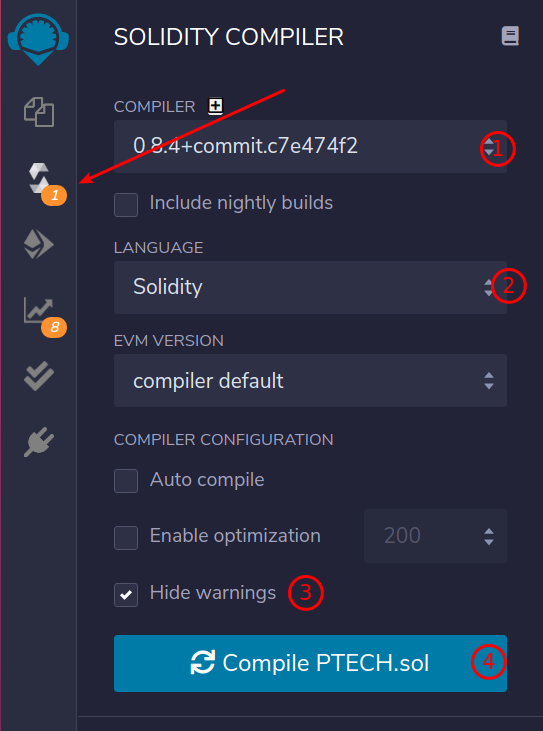
We will now compile our contract in vérifying the
compiler version and language type.
We will check
« Hide warning » so as not to pollute yourself with
non-blocking messages.
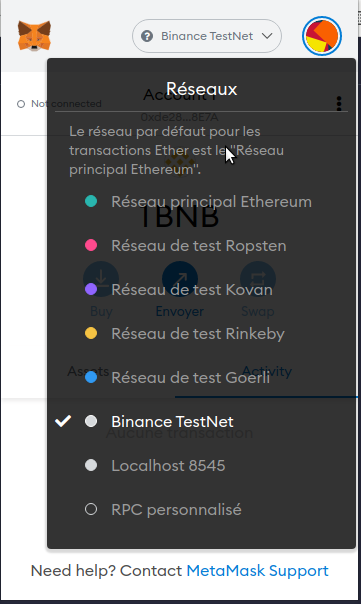
You must then inject web3 into your project. Basically, it goes
link your MetaMask wallet à your contract.
On
will position the préalable MetaMask on the ré bucket
TestNet.
Then we position ourselves in the ’tab déployment, we
injects « Web3 », MetaMask s’opens and
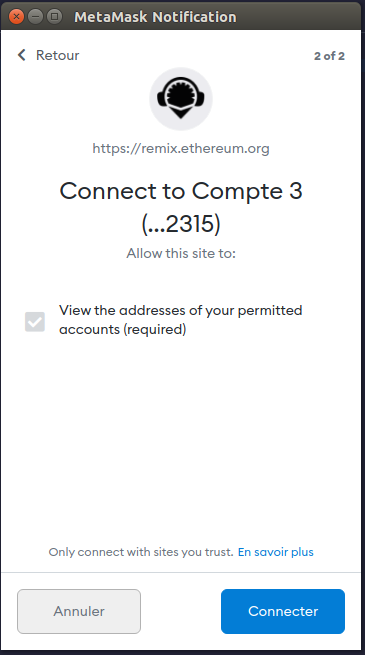
asks us to validate which account we want to use.
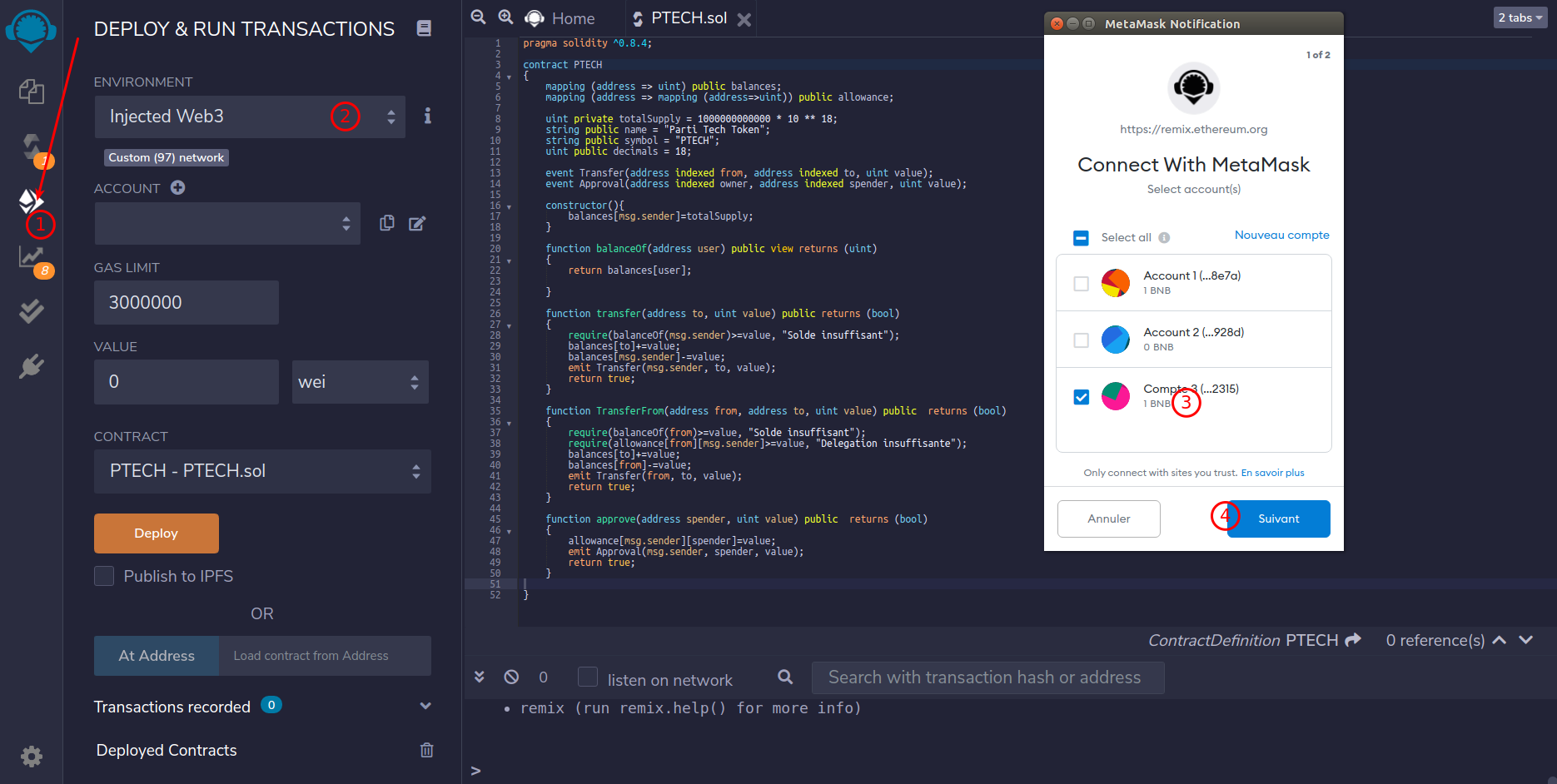
On valid.
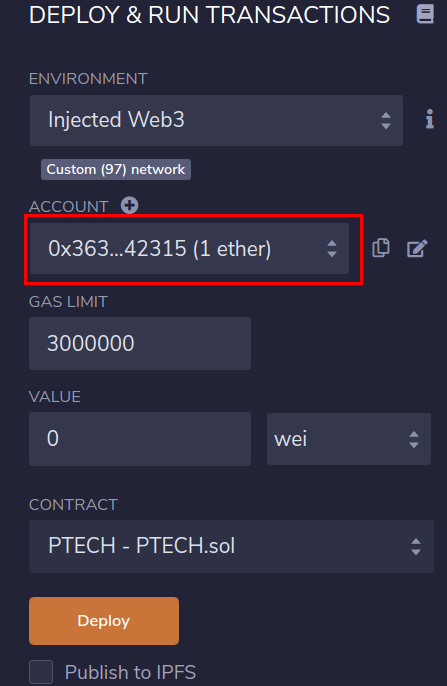
The numberéro of our account is directly filled in
l’interface.
We click on « Déploy » and
MétaMask asks us to validate the transaction.
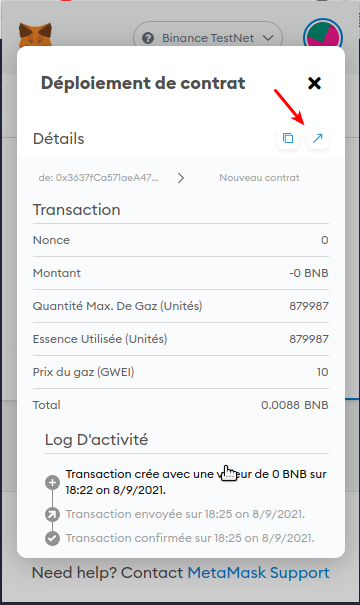
Le
déployment will cost us 0.0088 BNB. A trifle.
Not to mention that on the TestNet, you can create éedit
Test BNB 😉
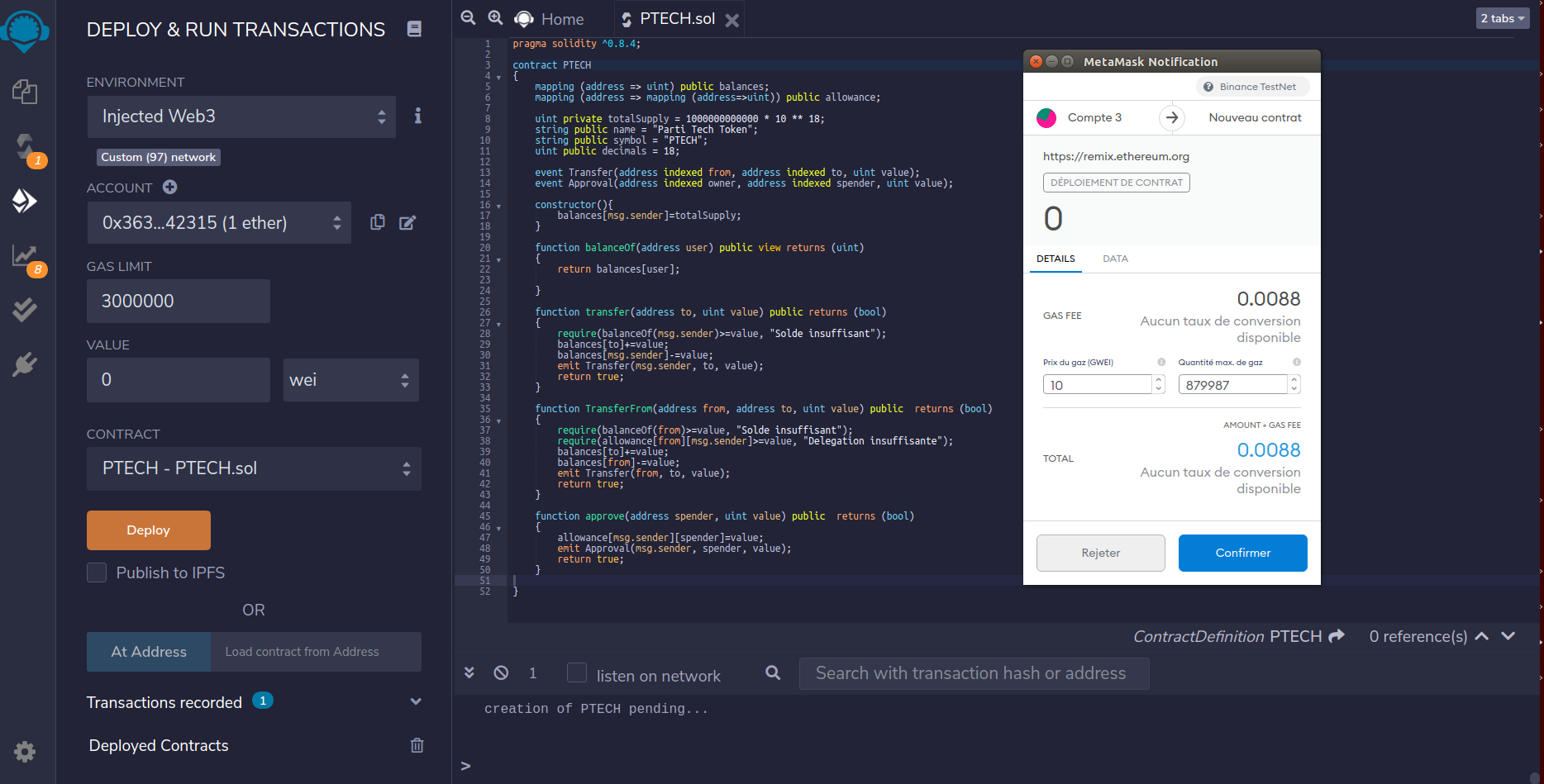
And we confirm.
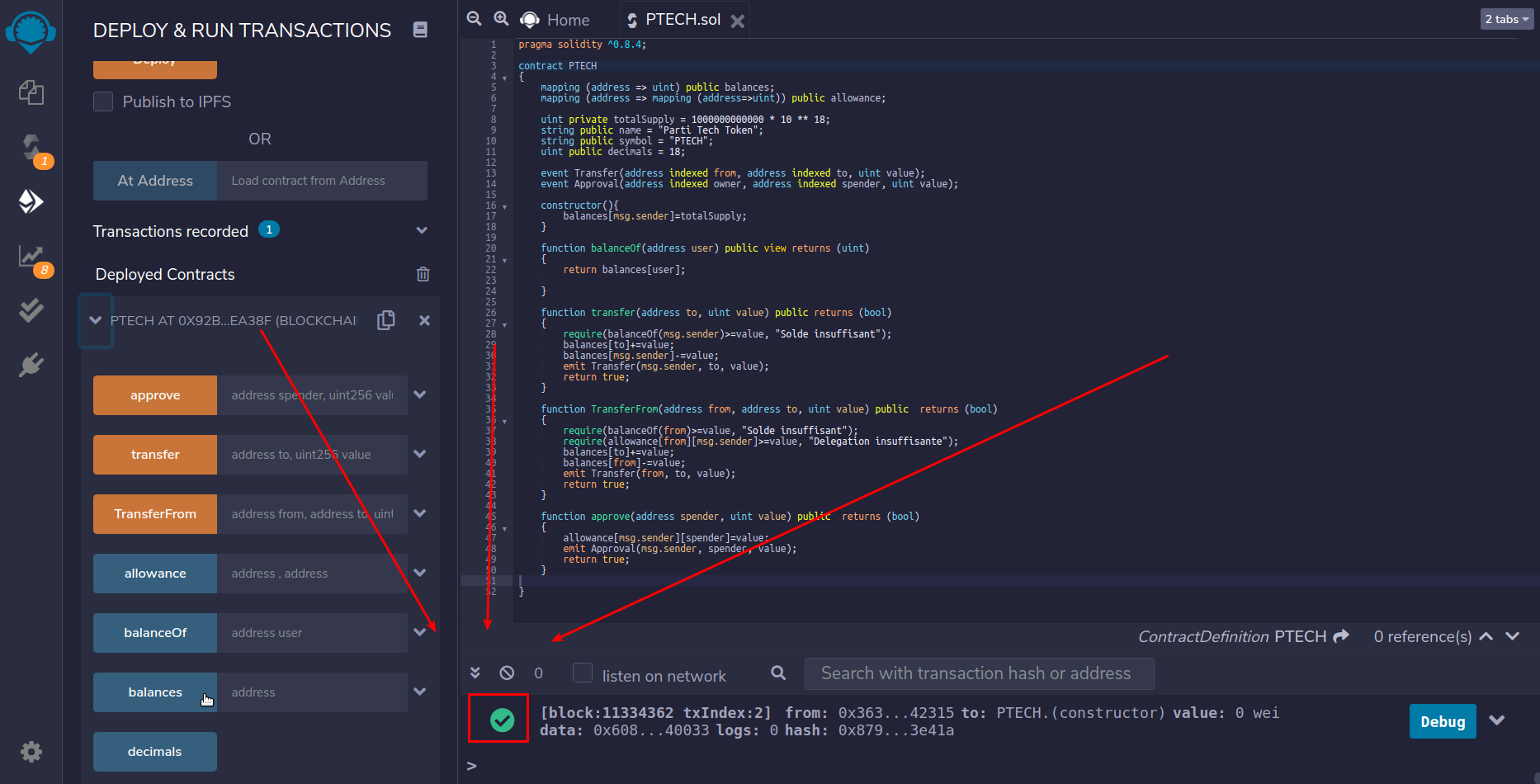
We have the little green checkmark, everything is good!
On vérifies
the transaction in MétaMask.
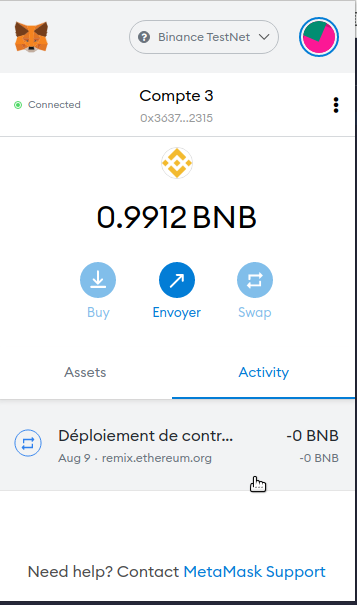
Click on the link to check the deployment on bscscan.com
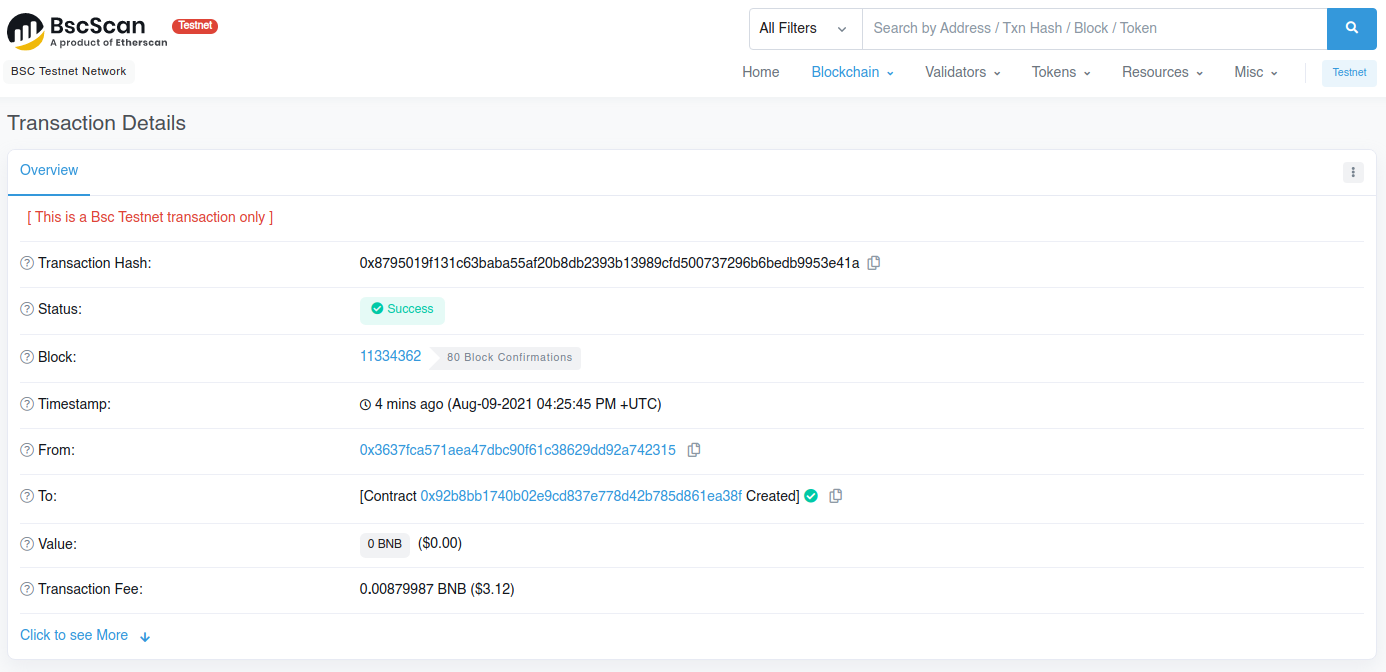
Voilà, our contract is créé.
We
we will see in a future chapter how to add
liquidité in order to enable trading in
différental market placesé.
Création d’one pair and liquidity poolé
So that your contract is ableé d’êto be
traidé, you will need to create a pair with another
token and add liquidity to ité.
For example, make
a PTECH/BNB pair. We create éera a pool of ’une
fraction or totalityé of our available tokens, and we
will assign it a value of départ.
250 000 000 000
token for 33BNB (i.e. à can loan $10,000 over
d’today’today) would be a good value of
départ.
For this we will go to pancakeswap
: https://pancakeswap.finance
On chosen
« Liquidity » in the menu
« Trade »
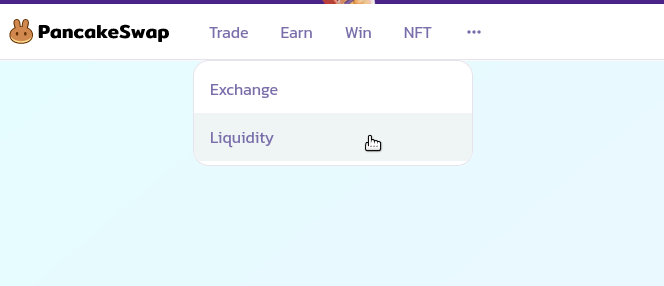
Then we select the ’tab « Liquidity » and we click on « + Add Liquidity »
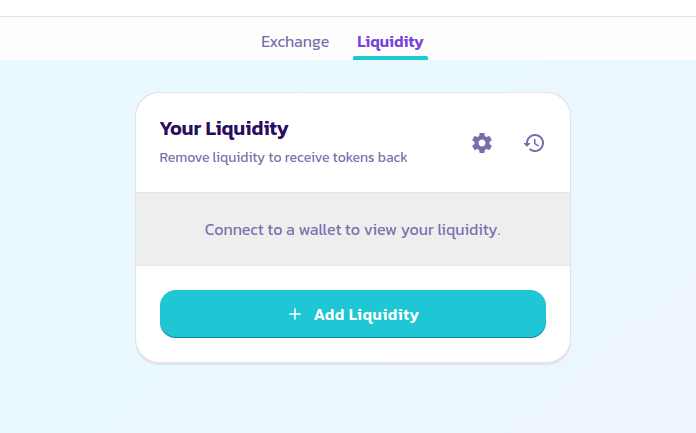
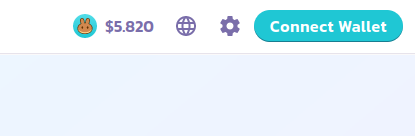
You must necessarily connect your wallet to the site, if we would like the site créé our pool.
Once connectedé, the site shows us our pools. For the
At the moment, we don't have one.
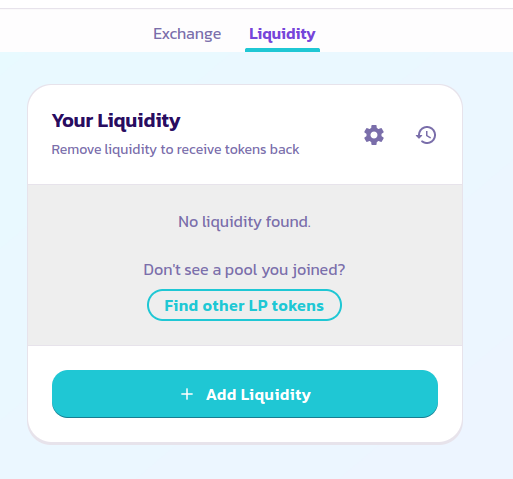
Click on « + Add liquidity »
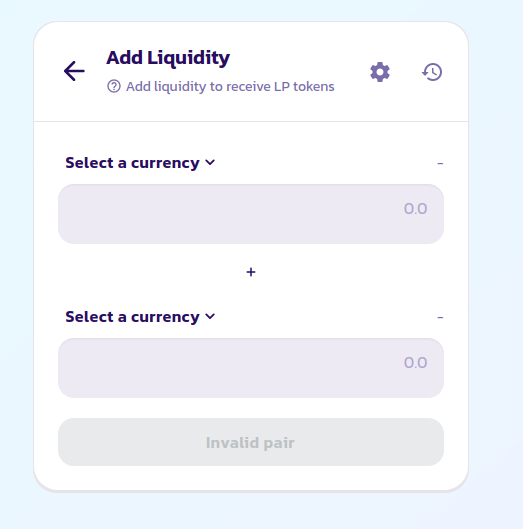
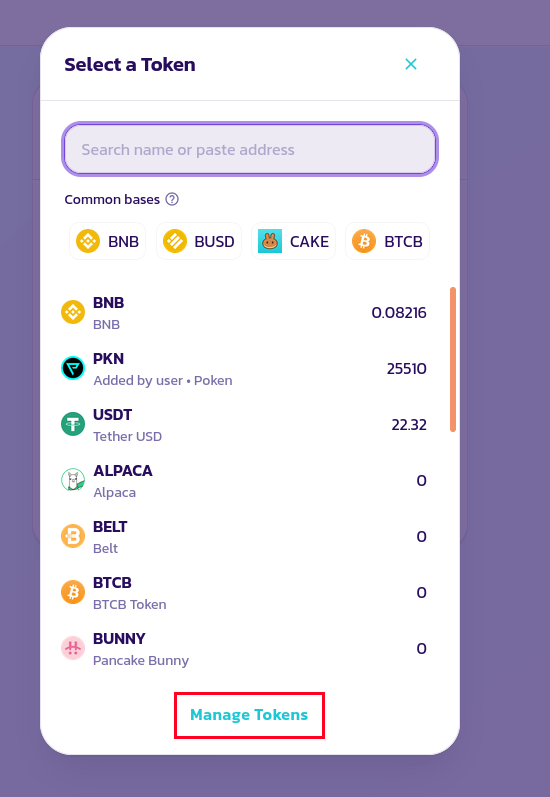
And we add our token. In the list, click on Manage token
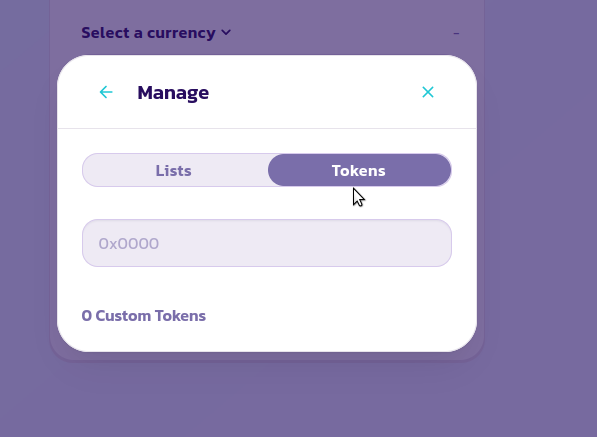
Then in the ’token tab we add the ’address of our contract:
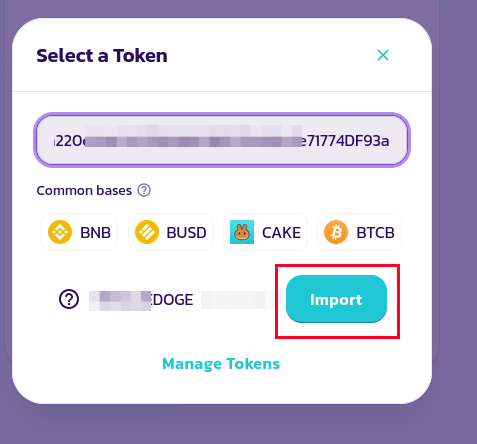
Once the contract is importedé, we select it:
And we choose the second currency
« coupler » with our contract.
Contract/Currency or Currency/Contract, c’is as you
wish.
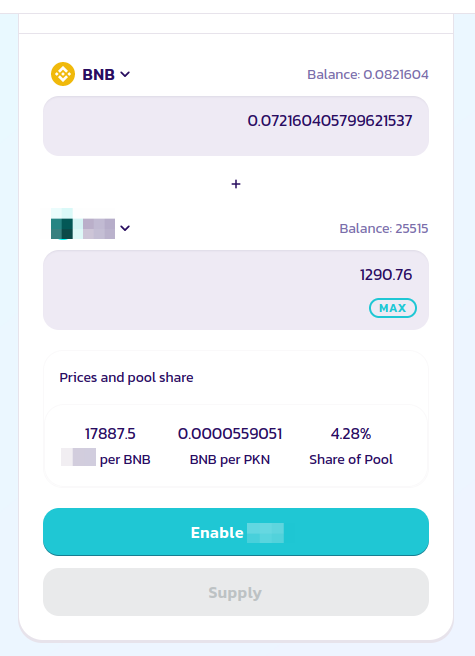
We click on « Enable » and leave work Metamask which will ask you to authorize d’ necessary transactions à the creationéation of the pool.
You should soon see it listedé in the news contracts available. For example on https://poocoin.app/ape
Once your pool is créé
If you found this article useful été,
n’hédon't hesitate to give me a little one including a few
billion 😉
My address:
0x3637fCa571aeA47DBC90f61c38629dd92a742315
I would list below the généworthy donors with l’address of the pool on an exchange to be able to trade it:
| Amount | Token | Exchange address |
Precautions before any deployment
This tutorial is a historical technical example, not a financial recommendation. A published contract is difficult to correct and can involve real funds.
- Never place a private key or recovery phrase in the code, the shared terminal, or the Git repository.
- First deploy on a test network with useless addresses.
- Have the contract, its administrative rights, the total offer, and the creation or destruction functions reviewed before any actual use.