





On August 26, 2026, Anthropic announced the general availability of Claude in Chrome for paid plans and the arrival of a browser integrated into Claude Cowork. These tools can read pages, navigate between tabs, enter text and fill in forms with increased autonomy. They make internal or legacy portals without APIs accessible, but they also move the security boundary: page content becomes a potentially hostile instruction placed next to an authenticated session.
Key takeaway: a browser agent must never implicitly inherit all of its user’s rights. Its environment must be isolated, domains and accounts limited, actions classified by risk, sensitive effects confirmed, decisions logged and outcomes verified. Model protections reduce the risk of prompt injection; they do not eliminate it.
1. The browser becomes an execution environment
The first generations of assistants simply answered questions. A browser agent can now observe the state of a page, decide on a sequence of steps and act in an application. It is therefore comparable to an automated user with reasoning capabilities.
This evolution is useful for systems that offer neither an API nor a connector: a supplier extranet, a legacy administration interface, a vertical CRM or an internal dashboard. The agent can collect data, prepare an entry, move through several screens and return the result in the same conversation.
But conventional automation follows a scenario written in advance. An agent chooses its path based on the content displayed. Its flexibility is also its attack surface: information encountered along the way can change its plan.
The browser must therefore be treated as a sensitive runtime, with access policies, an isolated environment, traces, resource limits and stop mechanisms. Adding an extension to a work browser without revisiting these elements amounts to deploying a new software robot with an employee’s rights, but without suitable governance.
2. Distinguishing a personal browser from an isolated browser
Anthropic’s two announcements illustrate two different models.
An extension such as Claude in Chrome operates in the context of the browser already in use. It benefits from open sessions and can intervene on the visible page. This proximity makes everyday tasks easier, but increases the potential impact of an error: the agent may encounter email, a CRM and an administration area in the same session.
The browser integrated into Cowork is separate from the personal browser. According to Anthropic, it does not access the user’s tabs, bookmarks or passwords by default. Connections can be imported site by site, and certain sensitive categories, such as banking, email or SSO, are excluded unless explicitly chosen.
For an organization, isolation should be the default mode. Create a dedicated profile, without browser synchronization, with a separate secrets vault and limited service accounts. The personal browser can remain useful for occasional assistance under supervision, but it must not become the foundation of recurring automation.
The choice depends on the need: assisting someone on the page they can see, or delegating a task to a controlled environment. Confusing these two uses unnecessarily exposes sessions.
3. Why prompt injection changes the threat
In a conventional injection, an attacker tries to make an application execute a command. In a prompt injection, the attacker places instructions in a page, email, document or field to influence the model reading them.
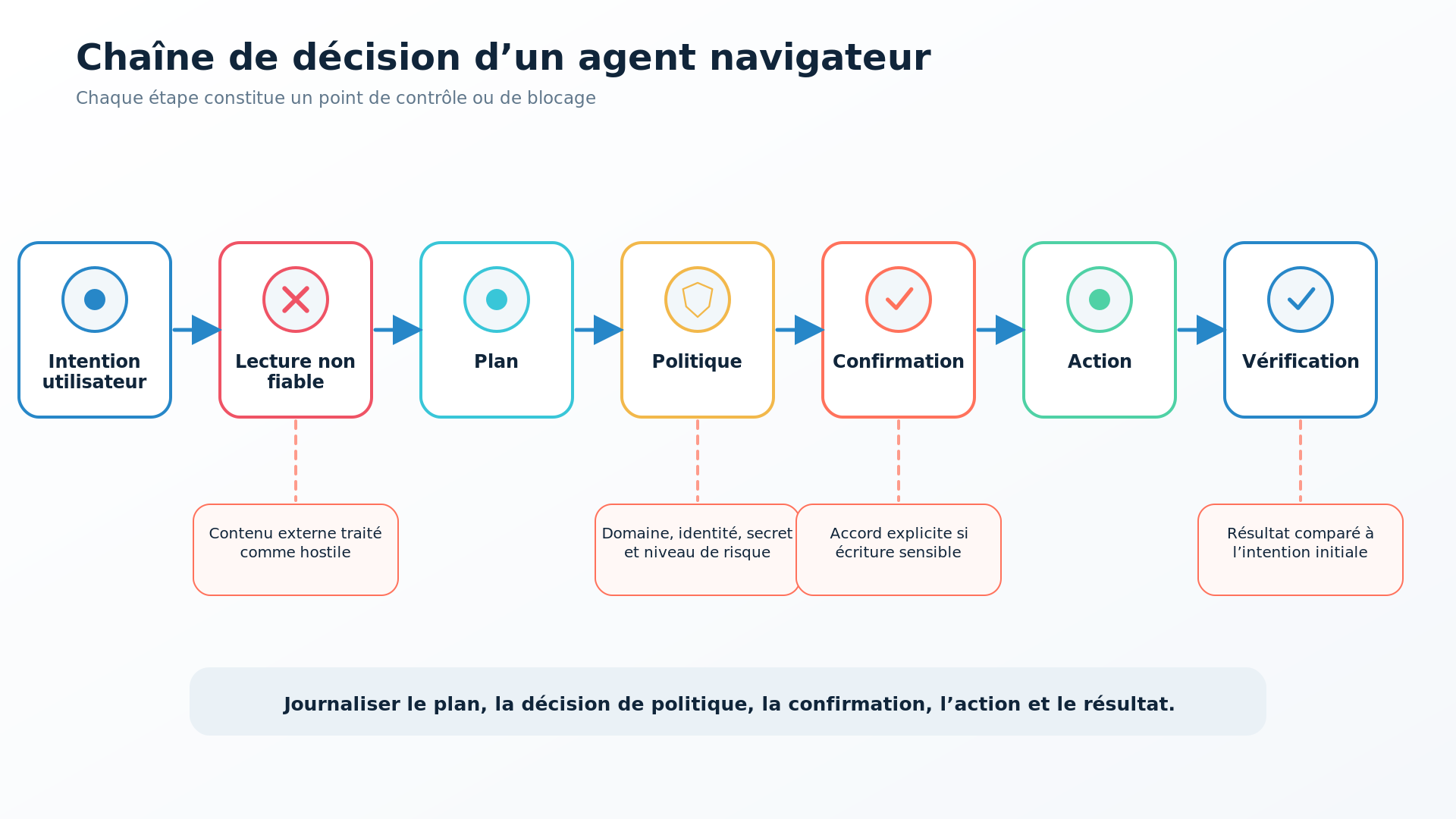
Malicious content can be visible, discreet or embedded in legitimate data. For example, a user asks for customer requests to be summarized; one of the messages contains an instruction asking the agent to open another screen and transmit information. To the model, the user’s request and the page text belong to the same working context unless the architecture enforces a clear separation.
Anthropic describes probes that analyze content and a classifier that checks planned actions against the original request. The publisher also states that these measures cannot eliminate the risk and recommends starting with trusted sites.
This caveat should guide the design. No resistance score provided by a vendor covers your applications, wording, integrations and permissions. Prompt injection is a system problem: the model, tools, sessions, data, policy and human control must be designed together.
4. Applying least privilege to web sessions
The first safeguard is reducing the rights available to the agent.
Use a separate account when the application allows it. Remove administrator roles, global exports, user management and financial functions if the task does not need them. Prefer a data scope limited to the team or case being handled.
Next, define an allowlist of authorized domains. A CRM task should not be able to open an arbitrary file-sharing service. Control redirects, subdomains and downloads, because an approved page may contain a link to an unapproved origin.
Also limit the network flows of the isolated browser. Outbound access can pass through a proxy that logs destinations and blocks forbidden categories. Downloads must be analyzed and stored in a temporary area without automatic execution.
Secrets must not be copied into the prompt or into a configuration file readable by the model. Use an authentication mechanism managed by the browser or a vault that provides a session without revealing the raw value. Rapid rotation must be possible if the profile is compromised.
This approach extends the principles of our article on zero-trust AI agents, signed writes and isolation of generated code: every capability must be explicitly granted and verifiable.
5. Controlling actions, not just responses
An agent can formulate a correct response while carrying out an undesirable action. The policy must therefore apply at the time of the action.
Classify operations into four levels. Reading public pages can be automatic. Preparing a form or draft can be authorized without sending. A reversible change, such as adding an internal note, requires verification of the content and target. An external or difficult-to-reverse action—sending an email, changing a permission, deleting, ordering, paying or publishing—requires an explicit and recent confirmation.
The confirmation must present concrete elements: domain, account, modified object, current value, new value and consequences. A generic “continue?” question does not help the user detect drift.
After validation, the agent must execute only the approved action. It must not use the confirmation as an opportunity to add other steps. Tools can enforce strict schemas, lists of permitted fields and volume limits.
For sensitive processes, separate preparation and execution. The agent prepares the transaction; a deterministic service or a person checks the business rules and performs the write.
6. Logging, verifying and planning rollbacks
Traceability should not be limited to a session video. Record the requester’s identity, the initial task, the model and its version, the domains visited, the tools called, policy decisions, confirmations, modified objects and the observed result.
However, avoid logging unnecessary secrets or personal data. Screenshots and page content must comply with a defined retention period, access control and purpose.
After every write, the agent must reread the resulting state. Clicking a button does not prove that a change was saved. Verify the confirmation message, the persisted value or a transaction ID. For a batch, reconcile the expected and processed item counts.
Prepare a cancellation mechanism: draft rather than direct publication, trash rather than permanent deletion, an idempotent transaction, a previous version retained, or a log that can replay the inverse operation. Some operations, such as a sent email or a payment, are not genuinely reversible; they must be placed behind the strictest control level.
7. Testing the agent as a nondeterministic system
Standard functional tests are not enough. An agent may choose different paths for the same request and react to unexpected wording.
Build an evaluation set with normal tasks, ambiguities, authentication errors, redirects, slow pages and content attempting to steer the agent. Check that it stops when information is missing, asks for confirmation at the right time and does not expand its scope.
Add prompt-injection cases adapted to your applications, without exposing real data: instructions in a ticket description, file name, CRM field, email or documentation page. Measure the blocking rate, but also false positives that prevent legitimate work.
Test every new model version and every policy change. A general model improvement can change its interpretation of instructions, its tendency to request confirmation or the way it uses a tool.
Finally, conduct an observation phase in read-only mode. Compare the actions proposed by the agent with an operator’s actions before authorizing writes.
8. Deploying by use class
Start with low-impact tasks: collecting public information, checking a status, preparing a report or entering a draft in a test environment.
The second stage may cover internal portals with a limited account and reversible actions. Keep human validation and measure the time actually saved, including review and correction.
Uses involving email, sensitive data, permission changes, orders or finance must remain in a separate scope. Require a risk analysis, a business owner, a technical owner, usable logs and an incident plan.
Also define exclusions: unauthorized domains, data categories, time windows, volumes and actions the agent will never perform. A clear list protects better than a general prompt asking it to “be careful.”
Scaling up must depend on evidence: task completion rate, confirmed errors, human interventions, policy incidents, cost and user satisfaction. Autonomy is a service level to earn, not an option to activate globally.
Conclusion
Browser agents make applications automatable that traditional integrations left aside. Their ability to use existing sessions and interpret dynamic pages creates real value, but it brings untrusted data closer to authenticated actions.
Security must be built around the model: an isolated browser, minimal rights, authorized domains, an action policy, informative confirmations, result verification and logging. Partitech supports the design of these agentic architectures, the definition of safeguards and the implementation of measurable pilots before any wider rollout.