






Per usare una tabella différendita di quella daéserve per l’autenticazione
Bisogna d’approcci créper la nostra entità che va géper i nostri utenti.
Questa entità deve poiêtre implémenteé àInterfacciaUtente.
Bisogna quindi aggiungere una référence al componente e l’implémentire :
<?php

namespace App\Entity;

use Doctrine\Common\Collections\ArrayCollection;
use Doctrine\Common\Collections\Collection;
use Doctrine\ORM\Mapping as ORM;
use Doctrine\ORM\Mapping\Entity;
use Doctrine\ORM\Mapping\Table;
use Doctrine\ORM\Mapping\Id;
use Doctrine\ORM\Mapping\Column;
use Doctrine\ORM\Mapping\GeneratedValue;
use Doctrine\ORM\Mapping\Index;
use Symfony\Component\Security\Core\User\UserInterface;

/**
 * @ORM\Entity(repositoryClass="App\Repository\WcoconRepository")
 * @Table(name="wcocon")
 */
class Wcocon implements UserInterface
{
Adesso che l’entity è un implément di userInterface, bisogna aggiungere le mémetodi di l’implémentazione.
    /*Authentication méthods implements interface User*/
    public function getRoles(){
        return ['ROLE_USER'];
    }


    public function getPassword(){
        return $this->getWcoPassword();
    }

    public function getSalt() {
        return false;
    }


    public function getUsername(){
        return $this->getWcoDossier();
    }


    public function eraseCredentials(){

    }
La funzione getRoles dà dédovrà restituire un array di rôlezioni. Qui‘RUOLO_UTENTE’ma potremmo aggiungere una logica più complessa qui.
Poi bisogna créper il controller che va géVerificare la nostra autenticazione.
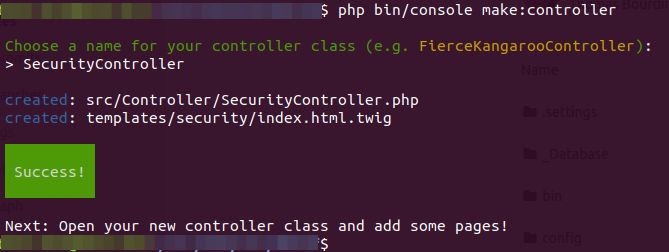
Per le commandi CLI basta eseguire: php bin/console make:controller
E di créer il nostro SecurityController.
Nel nostro base.html.twig (/templates/base.html.twig), noi andremo a créper un blocco login, che ci servirà da segnaposto per il nostro modulo
<!DOCTYPE html>
<html>
    <head>
        <meta charset="UTF-8">
        <title>{% block title %}Welcome!{% endblock %}</title>
        <link href="https://stackpath.bootstrapcdn.com/bootstrap/4.4.1/css/bootstrap.min.css" rel="stylesheet" integrity="sha384-Vkoo8x4CGsO3+Hhxv8T/Q5PaXtkKtu6ug5TOeNV6gBiFeWPGFN9MuhOf23Q9Ifjh" crossorigin="anonymous">
        <script src="https://stackpath.bootstrapcdn.com/bootstrap/4.4.1/js/bootstrap.bundle.min.js" integrity="sha384-6khuMg9gaYr5AxOqhkVIODVIvm9ynTT5J4V1cfthmT+emCG6yVmEZsRHdxlotUnm" crossorigin="anonymous"></script>
        {% block stylesheets %}{% endblock %}
    </head>
    <body>

        <div class="container">
          <div class="row">
            <div class="col-sm-3">
                {% block login %}{% endblock %}
            </div>
            <div class="col-sm-9">
                {% block body %}{% endblock %}
            </div>

          </div>
        </div>
        {% block javascripts %}{% endblock %}
    </body>
</html>
E noi andiamo créper il nostro template di modulo di login in /var/www/cfc/delef/templates/security/login.html.twig.
Questoétanto un'estensione della nostra base HTML e per il nostro blocco login :
{% extends 'base.html.twig' %}

{% block login %}
	<h1>Connexion !</h1>
	<form action="{{ path('security_login') }}" method="post">
    	<div class="form-group">
    		<input placeholder="N° de dosser" 	required name="_username" type="text" 		class="form-control">
    	<div class="form-group">
    	</div>
    		<input placeholder="password" 		required name="_password" type="password" 	class="form-control">
    	</div>
    	<div class="form-group">
    		<button type="submit" class="btn btn-success">Connexion</button>
    	</div>
	</form>
{% endblock %}
A questo punto abbiamo il seguente risultato :
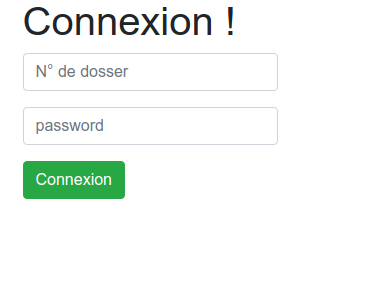
Attenzione, il modulo di login deve contenere i campi _username e _password.
Bisogna poi configurare l’encoder, poi il provider, e il firewall.
Nota che l’codificatore per del testo semplice è« testo normale ». sarebbe necessario per fare bene di piùôusare bcrypt o un altro sha.
security:
    encoders:
        App\Entity\Wcocon:
            algorithm: plaintext
    providers:
        frontend_users:
            entity:
              class: App\Entity\Wcocon
              property: wco_dossier
    firewalls:
        main:
            anonymous: true
            provider: frontend_users
            form_login:
                login_path: security_login
                check_path: security_login
L'intero file dà questo:
security:
    # https://symfony.com/doc/current/security.html#where-do-users-come-from-user-providers
    encoders:
        FOS\UserBundle\Model\UserInterface: bcrypt
        App\Entity\Wcocon:
            algorithm: plaintext
    providers:
        in_memory: { memory: null }
        fos_userbundle:
            id: fos_user.user_provider.username
        frontend_users:
            entity:
              class: App\Entity\Wcocon
              property: wco_dossier


    firewalls:
        # Disabling the security for the web debug toolbar, the profiler and Assetic.
        dev:
            pattern:  ^/(_(profiler|wdt)|css|images|js)/
            security: false

        # -> custom firewall for the admin area of the URL
        admin:
            pattern:            /admin(.*)
            context:            user
            form_login:
                provider:       fos_userbundle
                login_path:     /admin/login
                use_forward:    false
                check_path:     /admin/login_check
                failure_path:   null
            logout:
                path:           /admin/logout
                target:         /admin/login
            anonymous:          true

        # -> end custom configuration

        # default login area for standard users

        # This firewall is used to handle the public login area
        # This part is handled by the FOS User Bundle
        main:
            anonymous: true
            provider: frontend_users
            form_login:
                login_path: security_login
                check_path: security_login

    # Easy way to control access for large sections of your site
    # Note: Only the *first* access control that matches will be used
    access_control:
        # Admin login page needs to be accessed without credential
        - { path: ^/admin/login$, role: IS_AUTHENTICATED_ANONYMOUSLY }
        - { path: ^/admin/logout$, role: IS_AUTHENTICATED_ANONYMOUSLY }
        - { path: ^/admin/login_check$, role: IS_AUTHENTICATED_ANONYMOUSLY }
        - { path: ^/admin/resetting, role: IS_AUTHENTICATED_ANONYMOUSLY }

        # Secured part of the site
        # This config requires being logged for the whole site and having the admin role for the admin part.
        # Change these rules to adapt them to your needs
        - { path: ^/admin/, role: [ROLE_ADMIN, ROLE_SONATA_ADMIN, ROLE_SUPER_ADMIN] }
        - { path: ^/.*, role: IS_AUTHENTICATED_ANONYMOUSLY }
Dobbiamo poi configurare la nostra URL di logout.
Per questo, dobbiamo aggiungere una rotta nel nostro controller, e l’salvare nella configurazione.
Nel controller aggiungere la méthode :
    /**
     * @Route("/deconnexion", name="security_logout")
     */
    public function logout(){}
E nella configurazione:
Path fait référenceàla strada, e target permette di fornire un URL di reindirizzamento una volta che l'’reimpostazione dell'autenticazioneé.
        main:
            anonymous: true
            provider: frontend_users
            form_login:
                login_path: security_login
                check_path: security_login
            logout:
                path: security_logout
                target: /
Adattare l’esempio alla versione installata
Gli esempi Symfony e Sonata rimangono legati alle versioni indicate nell’articolo. Symfony 4.x e Symfony 6.2 non sono più supportati: per un progetto attuale, utilizzate un ramo mantenuto e la documentazione corrispondente esattamente alle vostre dipendenze.
php bin/console about
composer show symfony/framework-bundle sonata-project/admin-bundle
Prima di riprendere il codice, controllate le firme, i servizi, le rotte e i template interessati. Aggiungete poi un test funzionale che copra le autorizzazioni, il codice HTTP e il risultato visibile.
Riferimento : versioni di Symfony supportate.